Note: The Reservation Rebalancer operates exclusively on soft-allocated reservations held against Call-Off Orders. It never touches pegged shipment allocations. Hard-allocated future and backorder shipments are handled by the Allocation Rebalancer.
Prerequisites
Before using the Reservation Rebalancer, ensure the following:- The B2B Wholesale OMS feature is enabled for your tenant. Contact Kibo Support to enable this capability.
- At least one Reservation Rule is configured and enabled. See Reservation Rules.
- At least one Steal-For Rule is configured and enabled if you want the rebalancer to recover supply by taking from lower-priority Call-Off Orders. See Steal-For Rules.
- At least one Steal-From Rule is configured and enabled to define which Call-Off Orders may give up supply. See Steal-From Rules.
- The Reservation Rebalancer is enabled within the B2B tab under General settings.
- You have Admin or Super Admin role permissions.
How the Reservation Rebalancer Works
Where It Fits in the Run Sequence
The Reservation Rebalancer runs as the second stage in Kibo’s B2B supply rebalancing pipeline. This fixed order ensures that pegged supply is secured before soft reservations are re-evaluated, and that new demand only receives what remains after promised commitments have been protected:
The supply pool the Reservation Rebalancer works from is always net of everything the Allocation Rebalancer has already pegged — never the original supply total. This sequencing is enforced by the Inventory Balancing & Reservations under General Settings under B2B Tab and cannot be changed.
Triggers
The Reservation Rebalancer is triggered by supply change events that leave an existing reservation unable to be fully covered:Note: Supply Up events (a PO arriving with more than expected) and Demand events (order cancellations, quantity reductions) do not trigger the Reservation Rebalancer. These events make supply more available — any new capacity is naturally consumed by the next Reservations Job run.
Rebalancing Flow
When the Reservation Rebalancer runs, it processes affected Call-Off Orders through the following sequential steps: Step 1 — Deallocate Stale Supply. Before attempting to refill a short reservation, the stale or disrupted portion of the reservation at the affected location is first removed. This clears the gap so the system recognizes a genuine unfulfilled quantity to recover. Step 2a — Fill from Free Supply. The rebalancer attempts to re-secure the needed quantity from free, available supply across the network using Order Routing. Affected Call-Off Orders are processed in priority order (determined by the existing Reservation Rules), because filling one Call-Off Order reduces the free supply remaining for the next. A Call-Off Order filled successfully in this step does not proceed to Step 2b. Step 2b — Steal from Later-Shipping Call-Off Orders. For Call-Off Orders still short after Step 2a, the rebalancer may take supply from other Call-Off Orders — governed by the Steal-For Rules and Steal-From Rules, and a hard engine-enforced Ship Date Buffer. At this point, the still-short Call-Off Order becomes a Seeker and any Call-Off Order it takes supply from becomes a Giver. Step 3 — Fall Through to Regular Reservation Run. Any Call-Off Order that could not be fully re-secured in Steps 2a and 2b is not left in an error state. It passes into the standard Reservations Job run, competing alongside new Call-Off Orders for whatever free supply remains. Its status remains Partially Reserved or Hold as appropriate.The Ship Date Buffer
The Ship Date Buffer is a hard, engine-enforced guarantee that supply may only be stolen from a Call-Off Order whose ship date is strictly later than the Seeker’s ship date, by at least the configured Ship-Date Buffer (in days). Formally: Giver Ship Date > Seeker Ship Date + Ship-Date Buffer Days This protects the supply-priority order: a more-urgent, earlier-shipping commitment can never have its supply taken by a less-urgent one. Example:Stealing Logic
The steal phase follows a single, deterministic pass:- Seekers and Givers are determined once, at the start of the steal phase, as a fixed partition. A Call-Off Order is either a potential Seeker or a potential Giver in a given run — never both. If a Call-Off Order matches both Steal-For and Steal-From Rules, it is treated as a Seeker only and removed from the Giver pool.
- A Giver may supply multiple Seekers. A Giver is not exhausted from the pool after being partially used — its remaining supply stays available to later Seekers in the same pass.
- A Giver that goes short is not re-promoted. If a Giver loses enough supply through stealing that it becomes short itself, it is not re-evaluated as a Seeker within the same run. It falls through to the regular Reservations Job alongside new demand.
- Cross-product stealing is not permitted. A steal only ever moves the same product between a Giver and Seeker.
EDD Recalculation After a Steal
When a steal transfers supply from a Giver to a Seeker, both Call-Off Order reservations have their Estimated Delivery Date (EDD) immediately recalculated as a consequence of the supply change event. This recalculation happens at the time of the steal — not during the next scheduled reservation batch cycle.- The Seeker’s EDD is recalculated to reflect its newly secured supply source and delivery timeline.
- The Giver’s EDD is recalculated to reflect its reduced or changed supply position after giving up units.
- A PO is delayed — supply is reduced for an existing future inventory record.
- Reservation R1 is impacted and steals supply from Reservation R2.
- Both R1 and R2 have their EDD immediately recalculated — R1 reflects its newly secured supply source and delivery timeline; R2 reflects its reduced or changed supply position.
Blanket Order Ledger Integrity
When supply reserved against a Blanket Order’s uncalled balance is taken from a Giver, that draw must be reversed — the quantity is returned to the Blanket Order’s uncalled balance so the contract ledger stays correct. The identity Called + Uncalled = Contracted is maintained before and after every steal, for every affected Blanket Order.Fill Rate and Status Updates
After every rebalancing action, the fill rate and reservation status on each affected Call-Off Order Line are updated to reflect the true reserved quantity:
The fill rate (
reservedQty ÷ requestedQty) is also recalculated so the Call-Off Release Rules Engine has an accurate basis for evaluating whether a line is eligible to be converted into a Sales Order.
Segmentation
If a Call-Off Order specifies an inventory segment tag, the Reservation Rebalancer respects that segment during both free-supply fill and steal. Inventory is only drawn from within the designated segment.Steal-For Rules
Steal-For Rules define which still-short Call-Off Orders are eligible to attempt a steal and their priority order when competing for the same Giver supply. A Call-Off Order matched by a Steal-For Rule becomes a Seeker — it is permitted to take supply from eligible Givers under the Ship Date Buffer. Seekers with higher priority attempt to recover supply before lower-ranked Seekers, and the sort on each rule determines the order within a priority tier. Configure Steal-For Rules to protect your highest-priority buyers during a supply disruption — ensuring their Call-Off Orders are the first to recover reserved supply before lower-priority accounts. See Steal-For Rules for the full configuration guide.Steal-From Rules
Steal-From Rules define which Call-Off Orders may have their reserved supply taken and the order in which they are drawn from. A Call-Off Order matched by a Steal-From Rule becomes a Giver — it is eligible to lose supply to a higher-priority Seeker, subject to the ship date buffer. Call-Off Orders not matched by any enabled Steal-From Rule are fully protected and cannot be Givers.Note: There is no default Steal-From Rule. If no Steal-From Rules are configured or enabled, no stealing can occur. All short Call-Off Orders fall through to the regular Reservations Job.
Rebalancer Run Audit — Reservation Rebalancer Tab
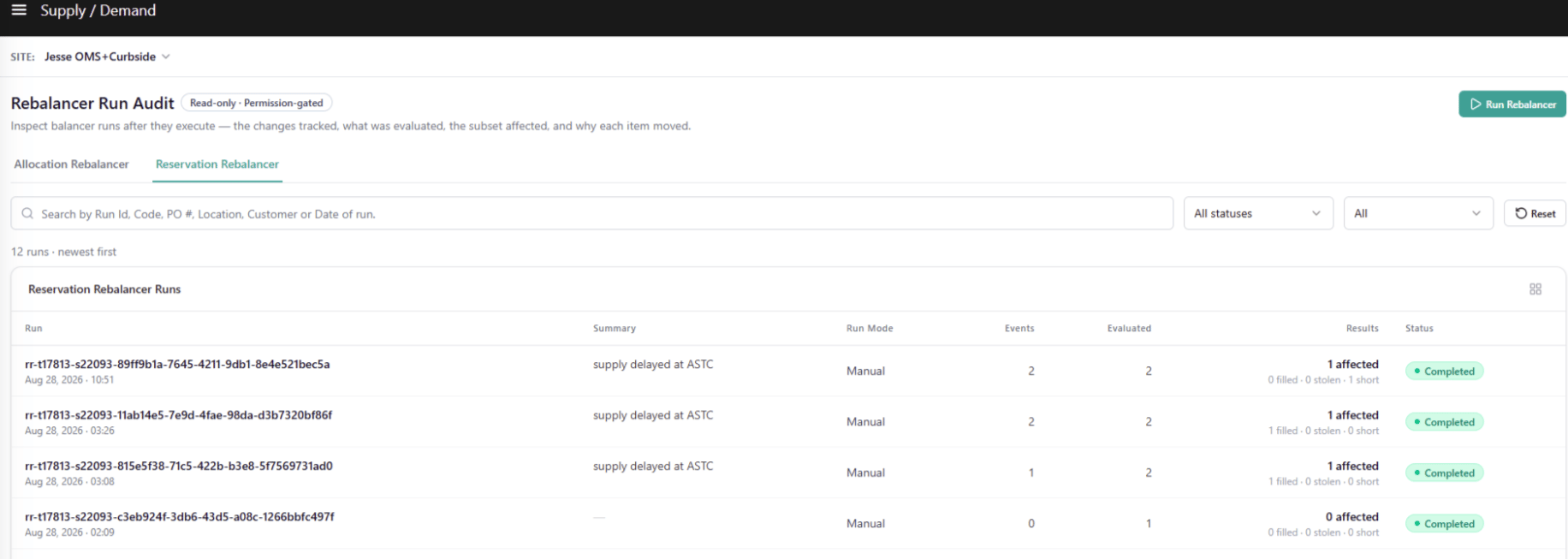
Every Reservation Rebalancer run produces a full audit trail accessible from the Reservation Rebalancer tab of the Rebalancer Run Audit page. Navigate to Main > Supply > Reservation Rebalancer .Note: The Rebalancer Run Audit page contains two top-level tabs: Allocation Rebalancer and Reservation Rebalancer. Each tab has its own Run Rebalancer button, and each button runs only that tab’s rebalancer — there is no combined “run both” option. The Run button is only visible if the site’s Run Mode is set to Manual
Run List
The Run List displays all Reservation Rebalancer runs for the selected site, sorted newest first. A live count is shown above the table — for example, “5 runs · newest first.”Search & Filters
Run List Table Columns
Note: Unlike the Allocation Rebalancer, the Reservation Rebalancer only tracks supply-side events — not demand events. The Events column therefore reflects supply changes only.
Run Detail
Click any row in the Run List to open its detail view. The Run Detail page provides a full breakdown of what the rebalancer evaluated and what outcomes it produced for the selected run.Header
Summary Tiles
Sub-Tabs
Three sub-tabs sit below the summary tiles, each with a count badge:Supply Changes Tab
The Supply Changes tab lists every tracked supply change event that triggered this run. Use it to understand why the run was initiated before switching to the Reservations or Steal From tabs to see what happened as a result.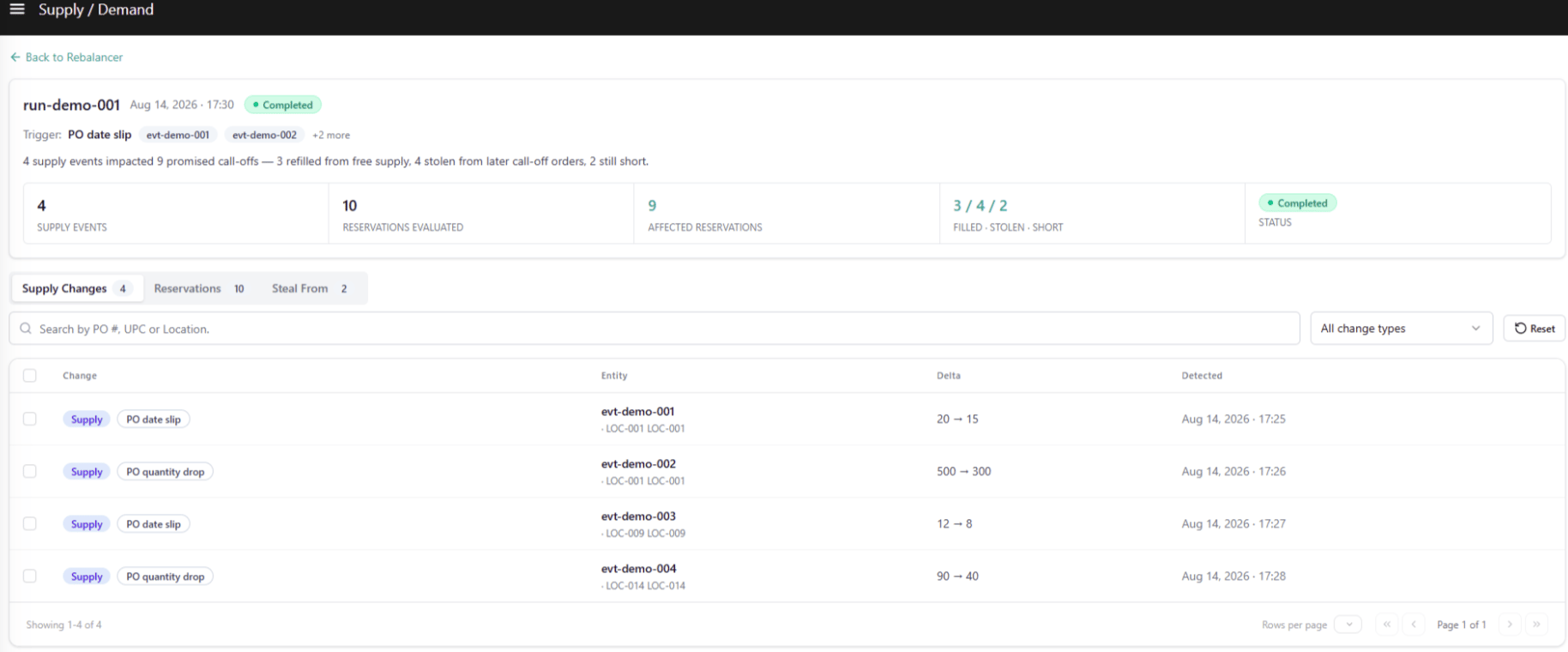
Search & Filters
Table Columns
Selection & Cross-Tab Pre-filter
Selecting one or more rows in the Supply Changes tab updates a banner above the table:“N changes selected · open Reservations or Steal From tab to see impacted reservations.”The selection pre-filters both the Reservations and Steal From tabs to display only the records tied to the selected change events. Unchecking rows or clicking Reset restores both tabs to their unfiltered view.
Reservations Tab
The Reservations tab shows every Call-Off reservation the rebalancer evaluated during this run and the outcome for each.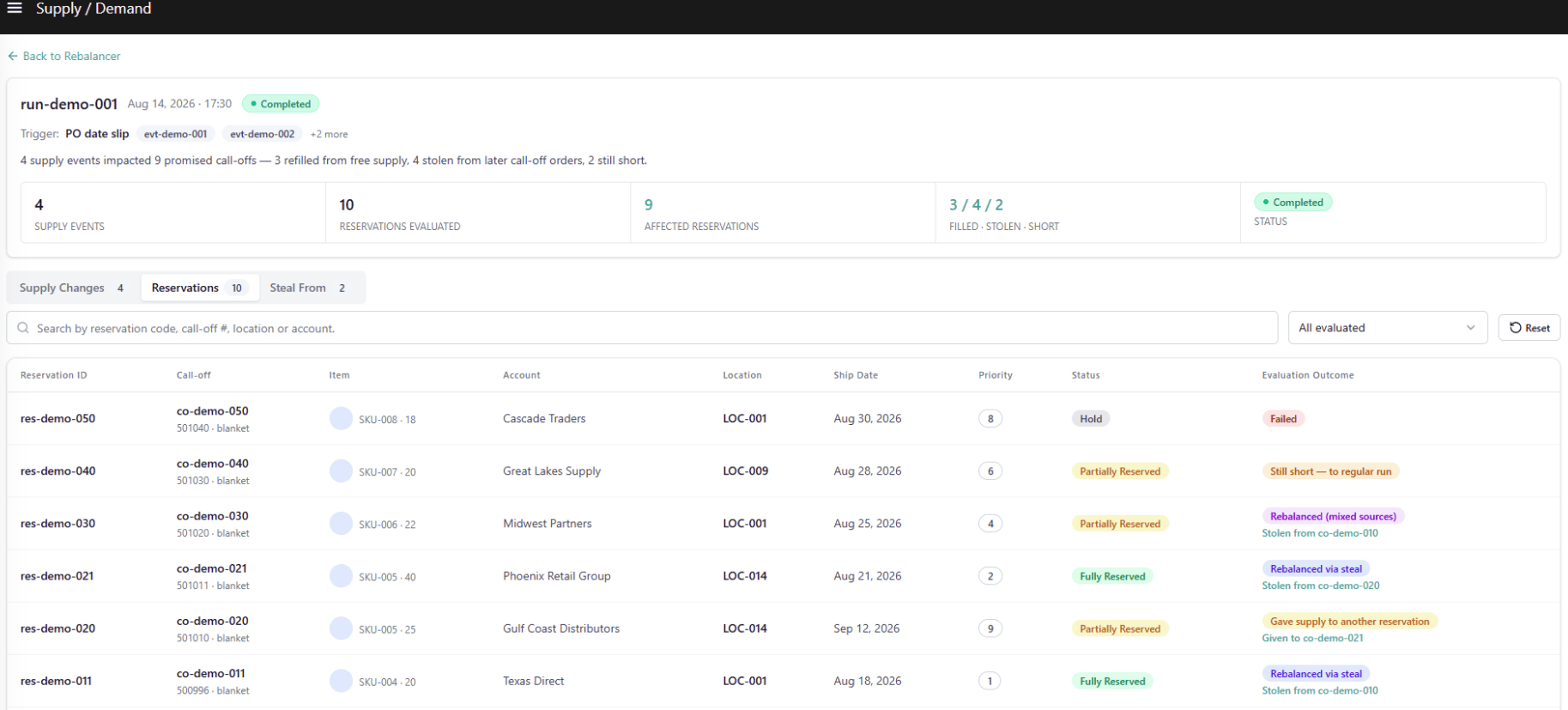
View Filter
Search & Filters
Table Columns
Clicking any row opens the Call-Off Reservation Detail Drawer. See Call-Off Reservation Detail Drawer below.
Steal From Tab
The Steal From tab lists every steal pairing produced by the run — one row per unit transfer from a later-shipping Call-Off Order (Giver) to an earlier, higher-priority Call-Off Order (Seeker) that was short.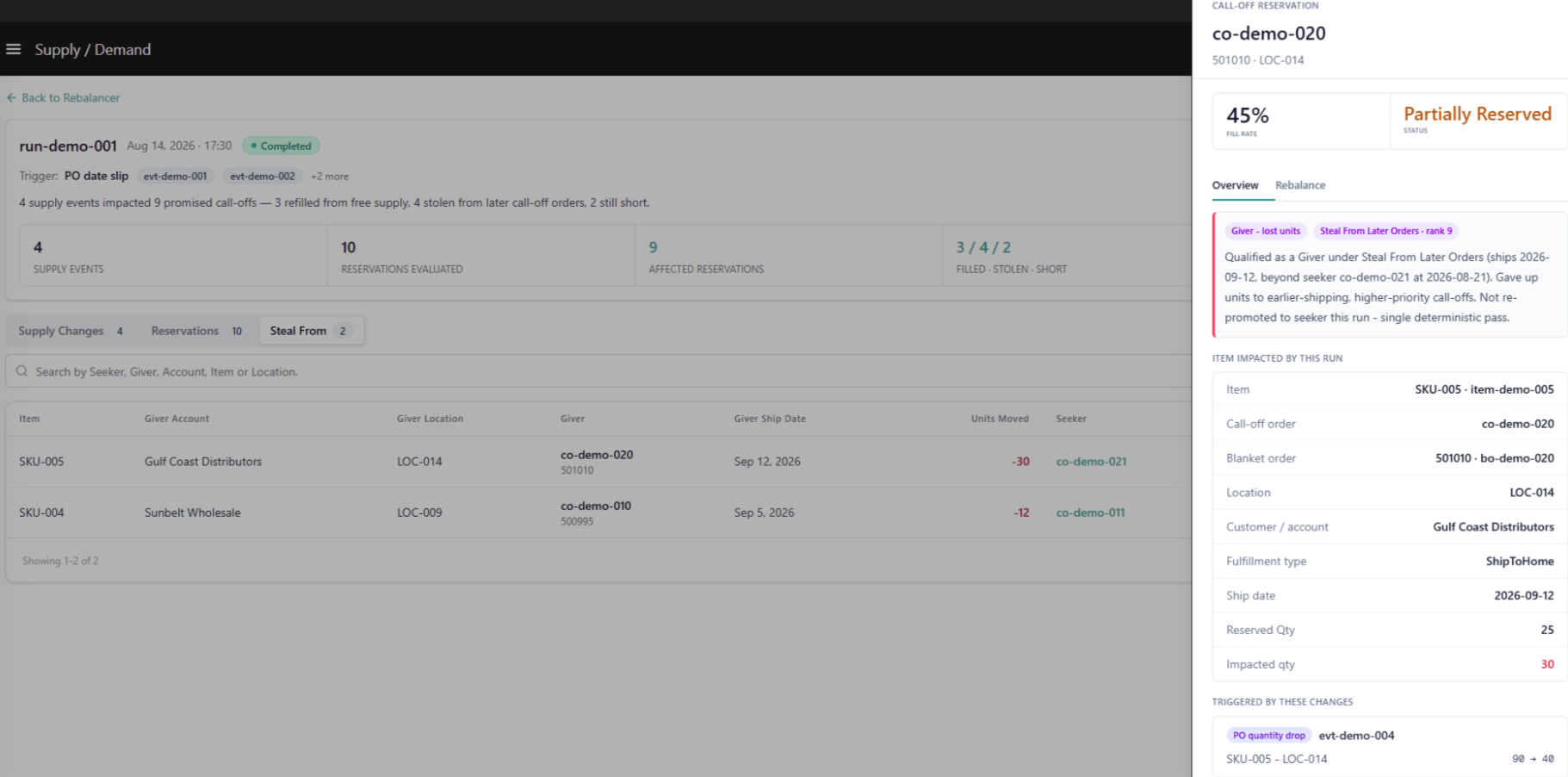
Search & Filters
Table Columns
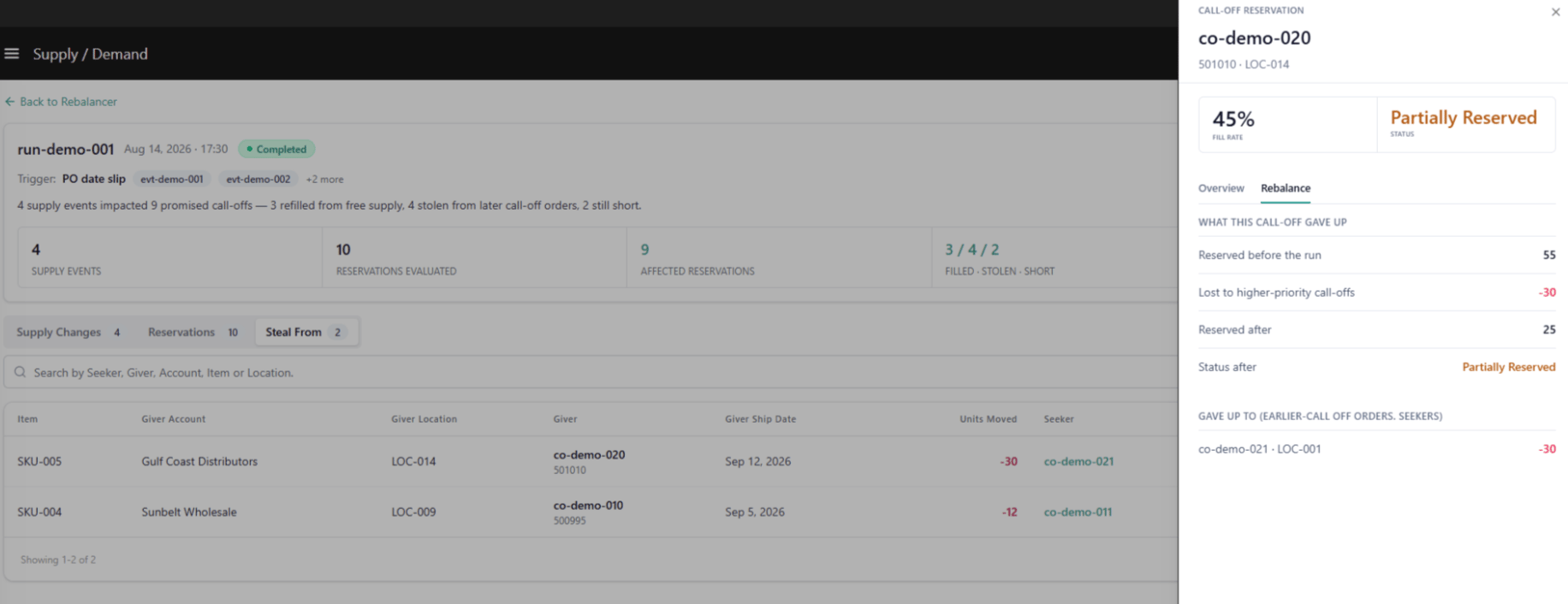
Each row in the Steal From tab corresponds to a “Rebalanced via steal” or “Rebalanced (mixed sources)” outcome in the Reservations tab. Clicking any row opens the Call-Off Reservation Detail Drawer scoped to the Giver’s own record.
Call-Off Reservation Detail Drawer
Clicking any row in either the Reservations tab or the Steal From tab opens the Call-Off Reservation Detail Drawer — a read-only side panel providing a full breakdown of a single reservation’s evaluation context, outcome, and rebalancing detail. The drawer structure is the same whether opened from a Seeker record or a Giver record. What differs is the call-off’s role in this run.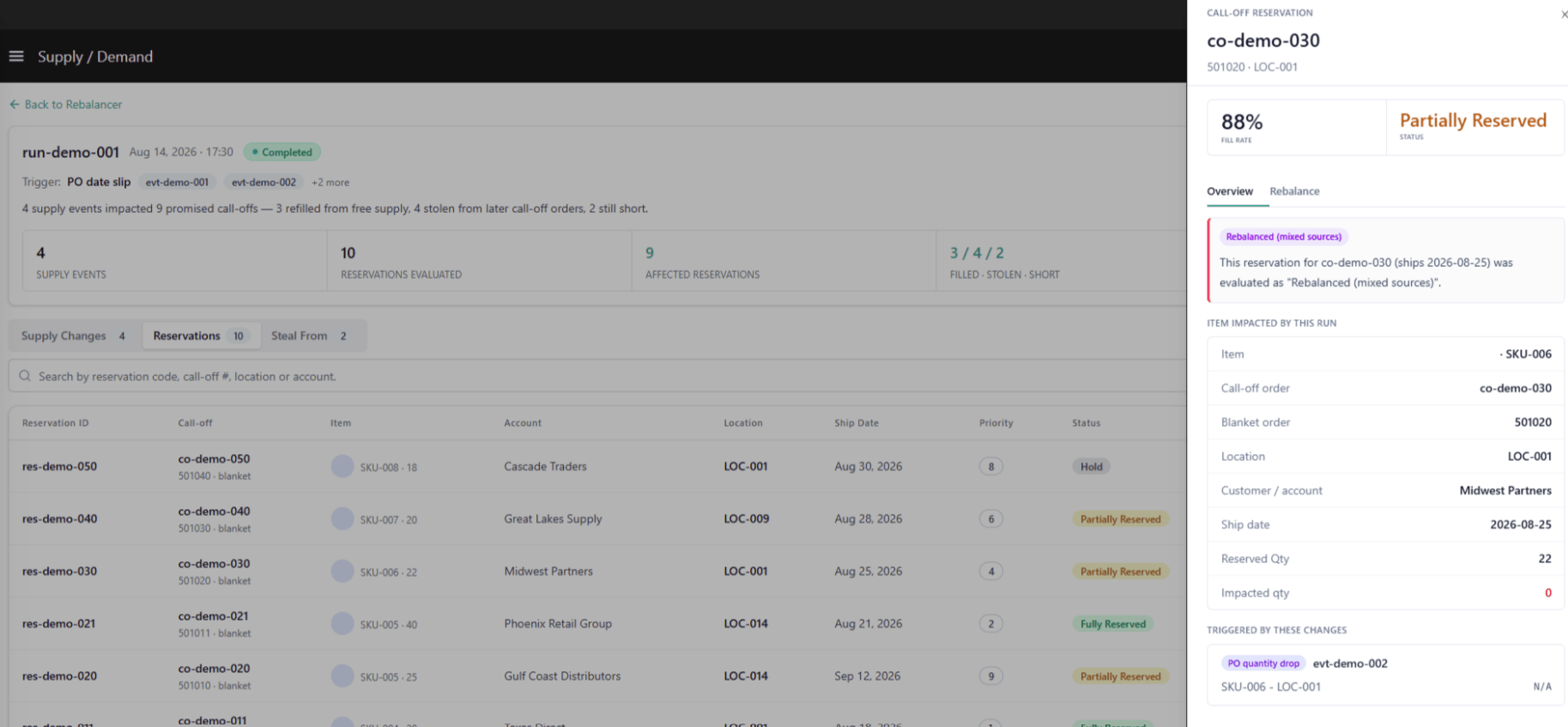
Drawer Header
Overview Tab
The Overview tab provides the narrative context for what happened to this reservation and why.Outcome Callout
Item Impacted by This Run
Triggered by These Changes
Lists every supply change event that caused this reservation to be re-evaluated in this run:Rebalance Tab — Seeker Record
The Rebalance tab on a Seeker record shows exactly how the system attempted to re-secure supply for this call-off.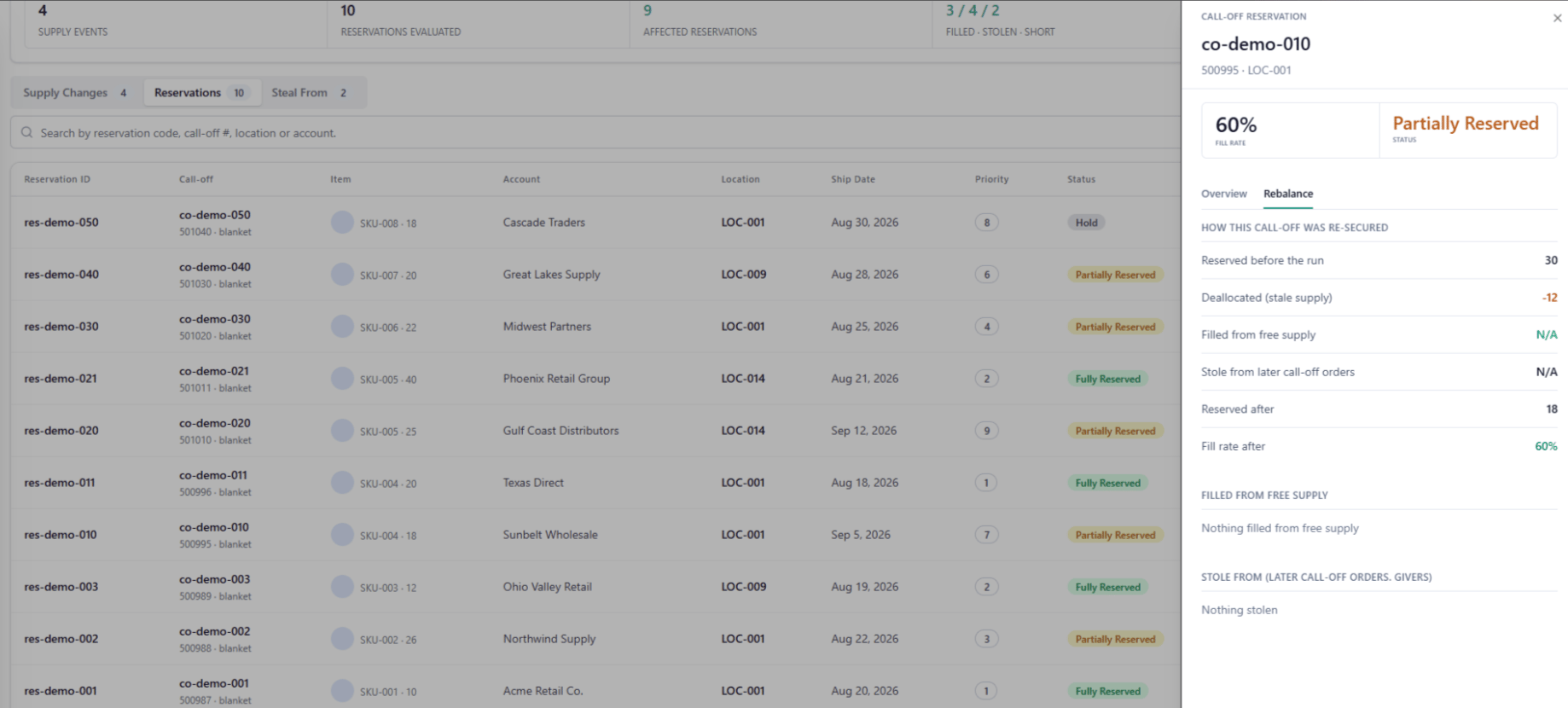
How This Call-Off Was Re-Secured
Filled from Free Supply — Breakdown
Stole From (Later Call-Off Orders — Givers)
Still Short
Rebalance Tab — Giver Record
The Rebalance tab on a Giver record shows what supply the system took from this call-off and who received it.What This Call-Off Gave Up
Gave Up To (Earlier Call-Off Orders — Seekers)