

- Controlled Order Conversion: Automatically schedules order conversion based on configured release timing parameters.
- Inventory-Aware Release: Requires a configurable minimum inventory fill rate threshold before a line converts, preventing premature release of under-allocated orders.
- Demand & Buyer Prioritization: Evaluates account, product, and order criteria to prioritize specific B2B accounts or products during release.
- Automated Processing Pipeline: Evaluates line items across configurable background job cycles, converting eligible items into Sales Orders.
Release Rules List View
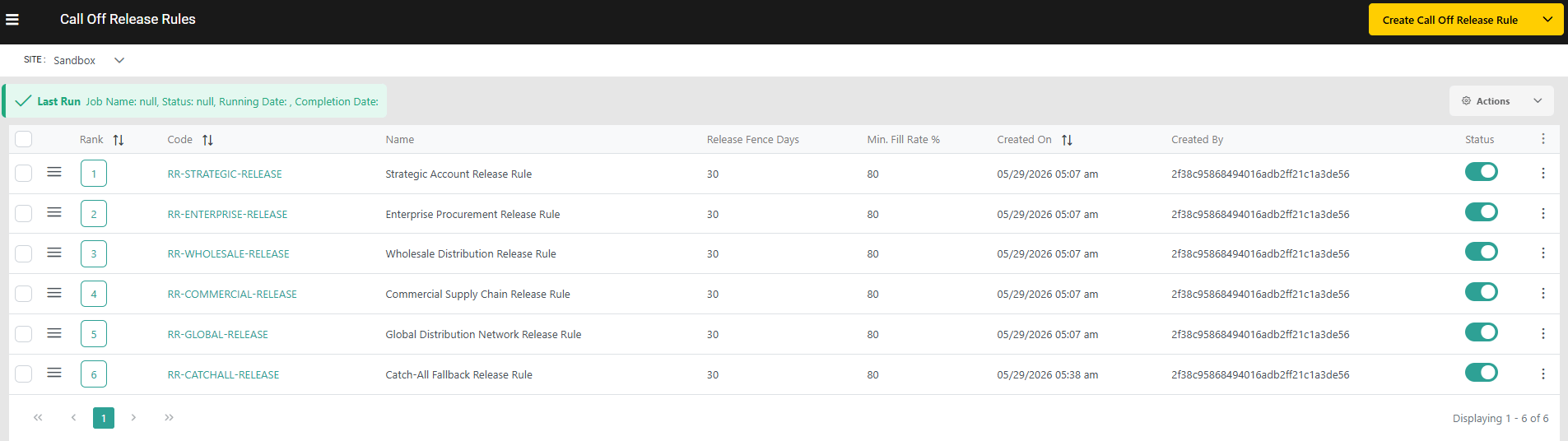
- Navigate to Main > Demand > Rules > Call Off Order Release Rules
- Site-Level Configuration: Select a target site from the site selector to view and manage the order release rules.
- Execution Status Monitoring: Displays real-time execution status for the background release job, providing operational visibility into the most recent run date, job status, and completion time.
- Prioritized Rule Evaluation: Rules are displayed in ascending priority sequence based on their assigned rank. Call-Off Order lines are evaluated against rules in this exact order, and evaluation stops as soon as a rule match is found.
- Rule Status Toggle: Individual rules can be toggled on or off to include or exclude them from evaluation cycles.
Configuring Release Rules
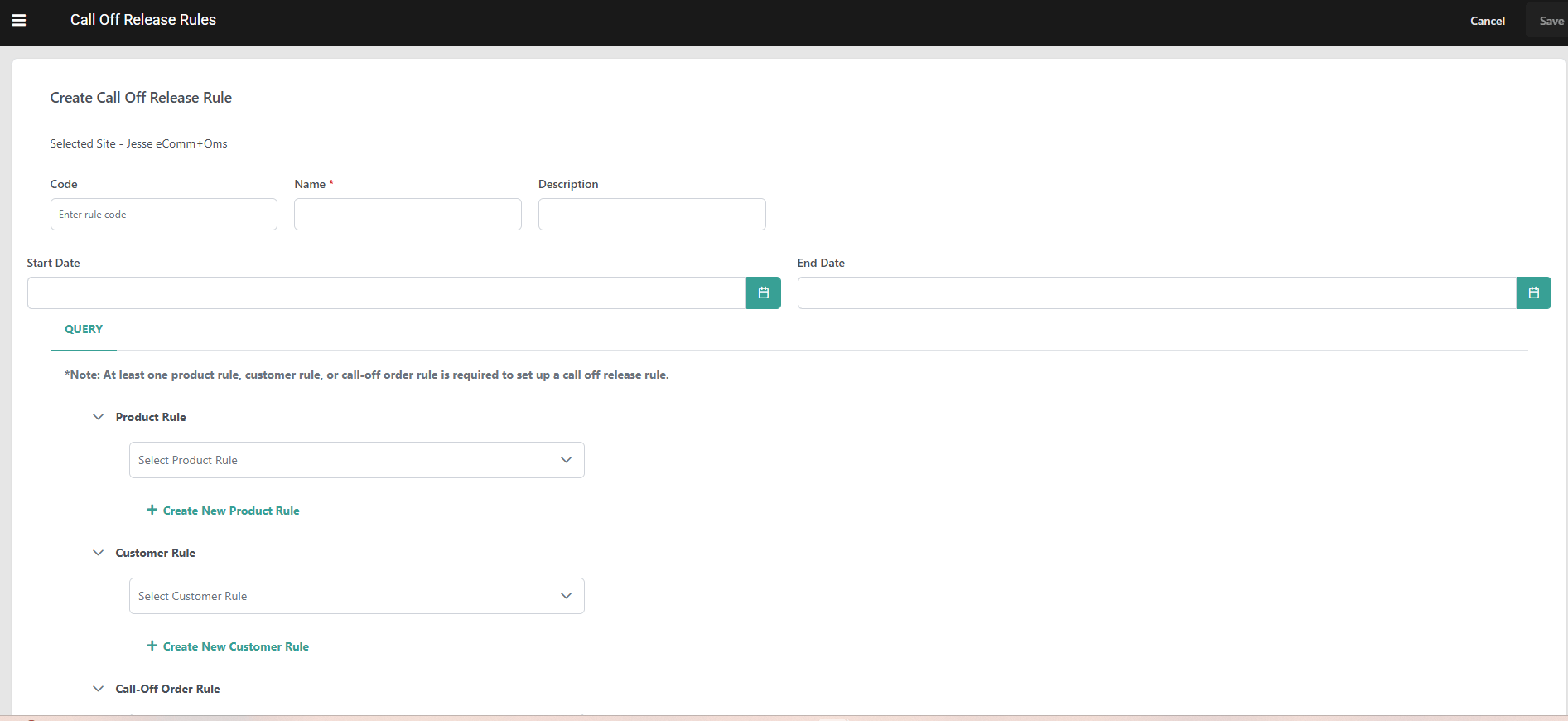
Each Call-Off Release Rule combines targeting criteria with execution parameters to determine when specific order lines qualify for Sales Order conversion:Administrative & Priority Settings
- Rule Code: Unique alphanumeric identifier for the rule.
- Rule Name & Description: Unique descriptive identifier and optional summary capturing the business purpose of the rule.
- Rank: Priority sequence number that determines evaluation order, where lower numerical values represent higher evaluation priority. If left blank during rule creation, the system automatically assigns the next available rank.
- Use the optional Start Date and End Date fields to schedule when the rule is eligible for evaluation.
- Enabled Status: Active toggle controlling whether the rule is included in automated background evaluation runs.
Combining Conditions
Rules filter order lines using condition builders supported by logical operators (AND / OR) to define evaluation criteria.Supported Rule Parameters
Conditions can be configured using attributes across three distinct criteria categories:- Product Rules: Filter order lines by catalog properties, such as Product Code, Variant Product Code, UPC, Product Type, Category Code, Catalog List Price, Fulfillment Types Supported, or custom product attributes.
- Customer Rules: Filter order lines by B2B account properties, limited to:
- Customer (Account ID)
- Customer Segment
- Account Attribute
- Call-Off Order Rules: Filter order lines at the header or line item level using parameters including Call-Off Order Total Amount, Account ID, Channel Code, Item Product Code, and Item Requested Ship Date, as well as custom Order Attributes (header level) and Item Attributes (line level).
Note : Only Extensible/Custom attributes marked Available for Rules on their attribute definition appear in this rule’s criteria builders for Product Rules , Customer Rules & Call off Order Rules (Header as well as line item level )
Release Execution Parameters
Once an order line matches the rule conditions, the platform applies two required execution parameters to determine conversion eligibility:- Release Fence Days: Configures the advance window (in days) prior to the requested ship date when line conversion is permitted. The platform calculates the conversion date using: Release Date = Requested Ship Date - Release Fence Days
- Minimum Fill Rate (%): Configures the minimum percentage of requested inventory that must be successfully soft-reserved before line conversion can occur.
Eligibility Criteria
To qualify for Sales Order conversion under a matched rule, a Call-Off Order line must satisfy two criteria simultaneously:- Release Timing Condition: The current date must reach or pass the computed release date:
Release Date = Requested Ship Date - Release Fence Days - Minimum Fill Rate Condition: The line item’s current fill rate must meet or exceed the rule’s Minimum Fill Rate (%) threshold: (Reserved Quantity\Requested Quantity) * 100
- Note: Lines already in Released or Cancelled status are skipped during evaluation.
Evaluation Outcomes & Scenarios
- Release Date Reached, Fill Rate Not Met: If the release date window is open but the reserved inventory does not meet the minimum fill rate threshold, the line remains unreleased and continues to be evaluated on subsequent background runs.
- Fill Rate Met, Release Date Not Reached: If the fill rate threshold is satisfied prior to the release window opening, the line holds in its current reserved status until the computed release date arrives.
- Partial Reservation Release: When both eligibility conditions are met for a partially reserved line (for example, 80% reserved against an 80% minimum fill rate rule), a Sales Order is created for the reserved quantity, while the unreserved balance remains on the order.
Background Release Job Configuration & Sales Order Conversion
Automated line evaluation is controlled by a site-level background job configured within the platform:- Site Setting Location: Accessible under Site Settings > B2B in the Kibo Admin UI.
- Job Activation & Frequency: Administrators enable the background release job and define its execution frequency to dictate how often unreleased lines are evaluated.

Run Release Rules
While Call-Off Release Rules are processed automatically on a background schedule, administrators can manually trigger an evaluation cycle at any time using the Run Release Rules button on the Call-Off Release Rules dashboard.- On-Demand Execution: Submits an immediate, site-scoped release run that evaluates all Call-Off Order lines within the active site context against all active Call-Off Release Rules. Only lines that satisfy eligibility criteria are released; ineligible lines are skipped and remain available for evaluation on subsequent runs.
- Ranked Rule Evaluation: The system evaluates lines against enabled Call-Off Release Rules in ascending rank order (Rank 1 being highest priority). The first rule whose conditions a line satisfies is applied; no further rules are evaluated for that line. Disabled rules are skipped entirely.
- Eligibility Processing: For each line, the system verifies the line against the two required Eligibility Criteria (Release Timing Fence Days and Minimum Fill Rate %). Lines failing either condition are skipped with a recorded skip reason.
- Sales Order Creation: Lines satisfying all rule criteria are grouped by fulfillment destination and asynchronously converted into downstream Sales Orders. Line statuses update to Released, maintaining explicit links back to the originating Call-Off Order line.
- Real-Time Progress Monitoring: Executing a run activates a “Last Run” status banner on the dashboard that updates in real time—polling from Running until the job reaches Completed. Status polling automatically resumes if you navigate away and return to the page.