

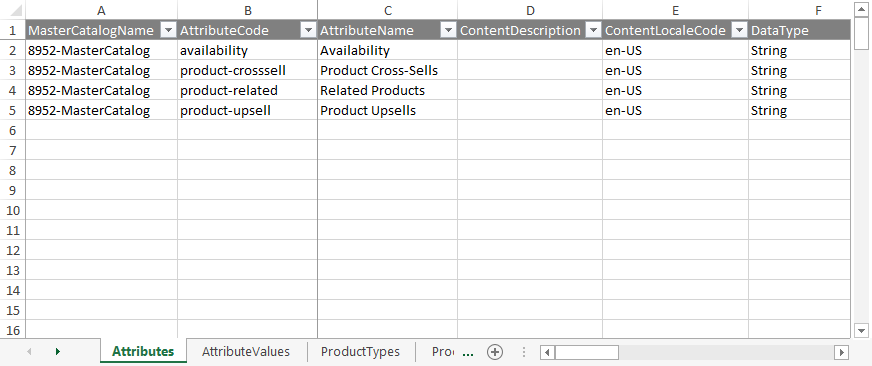
The Catalogs template for the import/export tools is the largest of the import/export template files, and is likely the one you will use the most. Together, the sheets of the Catalogs template represent your entire catalog structure for all the sites on your tenant. You can use this template to add or update master catalogs, sub-catalogs, product types, product attributes and options, images, inventory, and discounts. If you are preparing your initial data import for a new tenant, import contacts before you import products. As you work with this file, you will enter information about a single product across multiple sheets. A a combination of IDs, codes, names, and catalog information are used to make the proper data connections. For example, most sheets require a ProductCode to bind the data the sheet contains to the correct product. Catalogs template file content with example data

Access the Tools

With the Import-Export Application installed and enabled, go to Main > Catalog > Import/Export in the Admin.

Supported File Formats

  • CSV (.csv): Each sheet is a separate CSV file. For both imports and exports, sheets are compressed into a ZIP file. When importing, the ZIP file can have any file name but each individual CSV file name must match the export file name and the sheet. You can remove CSV files for data you do not want to import.
These CSV files should not be opened in Excel, as that may cause errors with their formatting. Instead, use a different CSV editing program to make changes to the data. You should only use the default Windows zipper to zip the files, as using different software may cause errors. You can upload multiple files at once as long as they all are zipped.

Template Key

For each sheet, we define each column and describe valid values for the column. If you have questions or concerns specific to your data, please contact your integration partner or Kibo Support.
Information Provided for Each Sheet of the Template
Corresponding REST API ResourceEvery column in a sheet corresponds to a property in the REST API. For each sheet, we provide a link to any API resources that contain properties in the sheet.
Column NameThe name of the column in the sheet.
DescriptionA description of the data a column contains.
Valid ValuesLists valid values for the column.

Sheets

Attributes

Corresponding REST API Resource: commerce/catalog/admin/attributedefinition/attributes Required With: AttributeValues Product attributes are the variable properties that define a product. Attributes can be options (such as size or color), properties (such as the brand of the product), or extras (such as custom printing or warranties). Because many products share common attributes, you define general attributes before you apply them to specific products.
Column NameDescriptionValid Values
AttributeCodeThe unique code that identifies the attribute. Once an attribute is created, you cannot change its AttributeCode.Any string. The string must be unique to a single attribute in the master catalog.
MasterCatalogNameThe name of the master catalog that includes the attribute. All attributes are defined on the master catalog level, and populate down to sub-catalogs within the master catalog.A string matching the name of the master catalog as it appears at Settings > System Administration > Catalog and Site Structure in Admin.
NamespaceThe namespace to which the attribute belongs. All attributes you create through Admin have a namespace of Tenant. Attributes that custom applications create through the API might have a custom namespace.Any string that is a valid, registered namespace. If empty, the default is Tenant.

Note: To avoid overwriting attributes created by custom applications, the Import/Export Tool only processes attributes with a namespace of Tenant. If you want to edit attributes in another namespace, you must use the API.
SearchableInAdminSpecifies whether the attribute Value (specified on the AttributeValues sheet) is included in product search results in Admin. If an attribute has multiple values, this setting applies to all the values. The default is No.A Boolean value, specified as Yes or No.
SearchableInStorefrontSpecifies whether the attribute (specified on the AttributeValues sheet) is included in product search results on the public storefront. If an attribute has multiple values, this setting applies to all the values. The default is No.A Boolean value, specified as Yes or No.
SearchDisplayValueSpecifies whether the display value or the canonical value of an attribute with a DataType of String is indexed for searching. If Yes, the system indexes the display value. If No, it indexes the canonical value. The default is No.A Boolean value, specified as Yes or No.

This value is ignored if the DataType of the attribute is anything other than String.
AttributeNameThe name of the attribute as it appears to customers. For example: Size

This value corresponds to the Attribute Label in Admin. If you are creating a new attribute, this value is used for the Administration Name that Admin users see.
Any string. The string must be unique to a single attribute in the master catalog.
DataTypeThe type of data the user must select or enter for the attribute.A string matching one of the following: String, Number, Bool, Product

Valid data types depend on the InputType. For example, an InputType of YesNo must have a DataType of Bool.

Product is only valid for an InputType of List.
DescriptionA text description for the attribute.Any string.
InputTypeThe format in which the attribute is displayed to customers. The best InputType to use often depends on whether the attribute is a Property, an Option, or an Extra. For example, a selectable Option, such as size or color, must be a List. An Extra, such as a monogram or custom print, is typically displayed as a TextBox or TextArea.A string matching one of the following: YesNo, Date, DateTime, List, TextBox, TextArea
IsExtraSpecifies whether the attribute type is Extra. An Extra is an add-on configuration that the customer can select or configure, such as a monogram or warranty.A Boolean value, specified as Yes or No. If IsExtra is Yes, IsOption and IsProperty must be No.
IsOptionSpecifies whether the attribute type is Option. An Option is a product detail that a customer can select, such as size or color. Options generate product variations, which have unique product codes.A Boolean value, specified as Yes or No. If IsOption is Yes, IsExtra and IsProperty must be No.

If IsOption is Yes, InputType must be List.
IsPropertySpecifies whether the attribute type is Property. A Property is a product detail that a customer cannot configure, such as brand or material.A Boolean value, specified as Yes or No. If IsProperty is Yes, IsExtra and IsOption must be No.
AvailableForOrderRoutingSpecifies whether the attribute is enabled for use in routing filters through Extensible Order Routing.A Boolean value, specified as Yes or No.
[ Locale ]This sheet can include a series of columns for all supported locales, such as en-US and fr-CA. The values within this column will be the localized version of the attribute.Any string or number.

AttributeValues

Corresponding REST API Resource: commerce/catalog/admin/attributedefinition/attributes Required With: Attributes Attribute values define what customers see for a given attribute. A single attribute can have multiple values. For example, if an attribute has an InputType of List in the Attributes sheet, every item in the list is a value of the attribute. Attribute values are mapped to attributes by the AttributeCode.
Column NameDescriptionValid Values
AttributeCodeA unique code that identifies the attribute to which the attribute value belongs. Once an attribute is created, you cannot change its AttributeCode.Any string. The string must be unique to a single attribute in the master catalog.
DataTypeThe type of data the user must select or enter for the attribute value.A string matching one of the following: String, Number
DisplayOrderThe order in which attribute values display within a product and in Admin.Any unique number in a sequential order.
MasterCatalogNameThe name of the master catalog that includes the attribute with which the value is associated. All attributes are defined on the master catalog level, and populate down to sub-catalogs within the master catalog.A string matching the name of the master catalog as it appears at Settings > System Administration > Catalog and Site Structure in Admin.
NameThe name of the attribute value as it is displayed in AdminA string or number. The value cannot contain spaces or special characters. You can use a hyphen (-) to escape spaces or characters.
LabelThe description for the value in US English. This string defines how the Value appears to customers on the storefront and to users in Admin.

Note: This column only appears when you have more than one language associated with your tenant.
Any string.
NamespaceThe namespace to which the attribute values belongs. All attributes you create through Admin have a namespace of Tenant. Attributes that custom applications create through the API might have a custom namespace.Any string that is a valid, registered namespace. If empty, the default is Tenant.

Note: To avoid overwriting attributes created by custom applications, the Import/Export Tool only processes attributes with a namespace of Tenant. If you want to edit attributes in another namespace, you must use the API.
ValueThe actual value for the attribute value. This is not the string that a customer sees, but rather the value as it appears in the Value column of the Values table for the attribute in Admin. This value must be unique within the vocabulary for a single attribute and match the DataType of the attribute. If an attribute has multiple values, each Value is specified on a separate row in this sheet.A string or number. The value cannot contain spaces or special characters. You can use a hyphen (-) to escape spaces or characters.
[ Locale ]This sheet can include a series of columns for all supported locales, such as en-US and fr-CA. The values within this column will be the localized value of the attribute.Any string or number.

ProductContent

Corresponding REST API Resource: commerce/catalog/admin/products Required With: NA This template contains localized product and SEO content for locales other than the default master catalog locale. For more information about this catalog structure, see the Multi-Locale Catalogs documentation.
Column NameDescriptionValid Values
MasterCatalogNameThe name of the master catalog that includes the product. Products are defined on the master catalog level. After you define a product in the master catalog, you can use the ProductCatalog sheet to add it to sub-catalogs.A string matching the name of the master catalog as it appears at Settings > System Administration > Catalog and Site Structure in Admin.
ProductCodeThe unique identifier for the product.Any number that is unique among all product codes in the master catalog. Character limit: 3-30.
ContentLocaleCodeThe locale code that you are localizing this content into.An ISO locale code. for example, en-US.
ProductNameThe name the customer sees for the product, in the language specified by the ContentLocaleCode.Any string.
ProductShortDescriptionA short (260 characters) description for the product. This value is typically used when the product is displayed in a list of search results.Any string. Character limit: 260. HTML tags are supported, and are not counted in the description character limit.
ContentFullProductDescriptionThe full description to display on the details page for the product.Any string. HTML tags are supported.
SEOMetaTagTitleMaps to the HTML meta title tag. While most search engines place little value on this tag, most themes inject the value of the meta title tag into the HTML title tag.

The HTML title tag is used by search engines and browsers to display the title of the page, and is critical to SEO. Search engines place very high importance on the correlation between a page’s title tag and its content.
Any string.
SEOMetaTagDescriptionMaps to the HTML meta description tag, which is used by search engines to summarize the content of the page.Any string.
SEOMetaTagKeywordsMaps to the HTML meta keywords tag, which is used to tell search engines what the page is about. From an SEO-perspective, search engines place little value on this tag, but the search implementation uses these keywords to help construct search results for pages on your storefront.Any string.
SEOFriendlyURLThe default URL structure for products is yourSite.com/{slug}/p/{productCode} and for categories is yourSite.com/{slug}/c/{categoryId}. The slug (or SEO-friendly URL) gives you the ability to add a meaningful component to the URL structure in order to boost search results.Any string.

ProductTypes

Corresponding REST API Resource: commerce/catalog/admin/attributedefinition/producttypes Required With: ProductTypeAttributes, ProductTypeAttributeValues A product type is a template of settings and attributes you create for a specific set of products. Every product in your catalog has a single product type associated with it. The ProductTypes sheet simply specifies the usage type(s) and master catalog for the product type. You specify details for product types on the ProductTypeAttributes and ProductTypeAttributeValues sheets. A single product type can support multiple usage types. For example, a shirt can be Configurable and a Component of a larger Bundle.
Column NameDescriptionValid Values
MasterCatalogNameThe name of the master catalog that includes the product type. All product types are defined on the master catalog level, and populate down to sub-catalogs within the master catalog.A string matching the name of the master catalog as it appears at Settings > System Administration > Catalog and Site Structure in Admin.
ProductTypeThe name of the product type. This name appears whenever a user is working with product types in Admin, so it should be meaningful and human-readable.Any string.
BundleSpecifies whether the product type supports the Bundle usage type. Bundles are collections of products sold as a single entity. For example, a suit Bundle can contain a shirt, pants, and a jacket.A Boolean value, specified as Yes or No.
ComponentSpecifies whether the product type supports the Component usage type. Components can belong to Bundles. For example, a shirt can be a Component of a suit Bundle.A Boolean value, specified as Yes or No.
ConfigurableSpecifies whether the product type supports the Configurable usage type. Configurable products allow the user to specify a product variation based on product options. For example, a shirt in size Small.A Boolean value, specified as Yes or No.
GoodsTypeThe type of goods the product type contains. This value distinguishes between physical items, digital items, and digital store credits (such as gift cards). The default is Physical.A string matching one of the following: Physical, Digital, DigitalCredit
StandardSpecifies whether the product type supports the Standard usage type. Standard products are not configurable and do not have variations.A Boolean value, specified as Yes or No.

ProductTypeAttributes

Corresponding REST API Resource: commerce/catalog/admin/attributedefinition/producttypes Required With: ProductTypes, ProductTypeAttributeValues Attributes are linked to products at the product type level. The ProductTypeAttributes sheet ties the attributes you define on the Attributes and AttributeValues sheets to the product types you define in the ProductTypes sheet. You must define your attributes, either on the Attributes sheet or from the UI itself, before you can connect them to product types. Multiple product types can share the same attributes.
Column NameDescriptionValid Values
AttributeCodeThe unique code that identifies the attribute.Any string. This value must match the AttributeCode value on the Attributes sheet and be unique to a single attribute in the master catalog.
MasterCatalogNameThe name of the master catalog that includes the product type. All product types are defined on the master catalog level, and populate down to sub-catalogs within the master catalog.A string matching the name of the master catalog as it appears at Settings > System Administration > Catalog and Site Structure in Admin.
ProductTypeThe name of the product type.Any string. This value must match the ProductType value on the ProductTypes sheet.
IsHiddenPropertySpecifies whether the attribute is hidden from customers on the storefront. This value only applies if Type is Property. The default is No.A Boolean value, specified as Yes or No.
IsMultiValuePropertySpecifies whether the attribute can have more than one possible value for a single product. The default is No.A Boolean value, specified as Yes or No.
IsRequiredByAdminSpecifies whether the attribute is required on products of this product type in Admin. The default is No.A Boolean value, specified as Yes or No.
OrderSpecifies the order in which the attribute appears in a list of all attributes on the product type.Any integer value, such as 1 or 3.
TypeThe type of the attribute.A string matching one of the following: Property, Option, Extra

The attribute type you specify must be enabled for the attribute. For example, if you set this Type to Property, the IsProperty column on the Attributes sheet must have a value of Yes.

ProductTypeAttributeValues

Corresponding REST API Resource: commerce/catalog/admin/attributedefinition/producttypes Required With: ProductTypes, ProductTypeAttributes The attribute values you specify for a given product type define what users and customers see for that product type. These values might differ from the values defined on the AttributeValues sheet. For example, your store might include a line of shirts that are only available in sizes Small, Medium, and Large. However, your Size attribute from the AttributeValues sheet has possible values of XS, S, M, L, and XL. You can still use your Size attribute for the shirts by giving them their own ProductType and only enabling the three relevant values for Size on this sheet.
Column NameDescriptionValid Values
AttributeCodeThe unique code that identifies the attribute. This value must match the AttributeCode value on the Attributes and ProductTypeAttributes sheets.Any string. The string must be unique to a single attribute in the master catalog.
MasterCatalogNameThe name of the master catalog that includes the attribute. This value must match the MasterCatalogName value on the ProductTypes and ProductTypeAttributes sheets.A string matching the name of the master catalog as it appears at Settings > System Administration > Catalog and Site Structure in Admin.
OrderDetermines the order in which attributes are displayed on a product type. For instance, an attribute with three values should order them as 0, 1, and 2.Any integer.
ProductTypeThe name of the product type. This value must match the ProductType value on the ProductTypes and ProductTypeAttributes sheets.Any string.
TypeThe type of the attribute.A string matching one of the following: Property, Option, Extra

The attribute type you specify must be enabled for the attribute. For example, if you set this Type to Property, the IsProperty column on the Attributes sheet must have a value of Yes.
VocabularyValueThe value the customer sees for the attribute, in the language specified by VocabularyValueLocaleCode. This value does not have to match a description from the AttributeValues sheet, but any new values you define here will only apply to this ProductType.Any string. If empty, this value is inherited from values specified on the AttributeCode in the master catalog. You might see an entry on export of “Inherited from Base. Do not add values here.”

CategoriesContent

Corresponding REST API Resource: commerce/catalog/admin/categories Required With: NA This template contains localized category and SEO content for locales other than the default master catalog locale. For more information about this catalog structure, see the Multi-Locale Catalogs documentation.
Column NameDescriptionValid Values
CatalogNameThe name of the catalog this category is mapped to. You can define catalogs on the ProductCatalog sheet.A string matching any valid catalog name.
CategoryCodeThe unique, alphanumeric identifier for the category. You use the CategoryCode to map categories to catalogs, discounts, and other categories.

Note: This code does not have to map to the ID that the system generates for categories created in Admin. This code must simply be unique to the category and must match across all sheets that refer to the category.
A string or number. The value cannot contain spaces or special characters. You can use a hyphen (-) to separate string phrases.
ContentLocaleCodeThe locale code that you are localizing this content into.An ISO locale code. for example, en-US.
CategoryNameThe name of the category, in the language specified by the ContentLocaleCode. Any string.
MetaTagTitleMaps to the HTML meta title tag. While most search engines place little value on this tag, most themes inject the value of the meta title tag into the HTML title tag.

The HTML title tag is used by search engines and browsers to display the title of the page, and is critical to SEO. Search engines place very high importance on the correlation between a page’s title tag and its content.
Any string.
MetaTagDescriptionMaps to the HTML meta description tag, which is used by search engines to summarize the content of the page.Any string.
PageTitleBy default, this value is not used by the system. However, your theme developer has access to this value through a Hypr variable, so with minor theme changes, you can expose a different page title on your storefront than the title you supply for the meta title.Any string.
CategoryDescriptionThe description of the category.Any string.
MetaTagKeyWordsMaps to the HTML meta keywords tag, which is used to tell search engines what the page is about. From an SEO-perspective, search engines place little value on this tag, but the search implementation uses these keywords to help construct search results for pages on your storefront.Any string.
SEOUrlThe default URL structure for products is yourSite.com/{slug}/p/{productCode} and for categories is yourSite.com/{slug}/c/{categoryId}. The slug (or SEO-friendly URL) gives you the ability to add a meaningful component to the URL structure in order to boost search results.Any string.

Categories

Corresponding REST API Resource: commerce/catalog/admin/categories Required With: NA Product categories group similar items so that you can display them together in sections on your site. Categories help you create faceted navigation for your customers. For example, Women’s Apparel can be its own category as well as a parent category of Shirts, Pants, and Dresses. Categories map to catalogs, and you can define them on the master catalog or only on a specific sub-catalog. A single product can belong to multiple categories. This template contains category content for the default master catalog locale. To define localized category content used for other locales in multi-locale catalog setups, use the CategoriesContent sheet.
Column NameDescriptionValid Values
CatalogNameThe name of the catalog this category is mapped to. You can define catalogs on the ProductCatalog sheet.A string matching any valid catalog name.
CategoryCodeThe unique, alphanumeric identifier for the category. You use the CategoryCode to map categories to catalogs, discounts, and other categories.

Note: This code does not have to map to the ID that the system generates for categories created in Admin. This code must simply be unique to the category and must match across all sheets that refer to the category.
A string or number. The value cannot contain spaces or special characters. You can use a hyphen (-) to separate string phrases.
CategoryDescriptionThe description of the category as it appears in Admin. Depending on your theme, you can also make this description visible to customers on your storefront.Any string.
CategoryIdThe unique, numeric identifier for the category.Any number. This value must be unique among all categories on your site.
CategoryNameThe name of the category. If IsDisplayed is Yes, this is the name that appears to customers on the storefront.Any string.
CategoryTypeThe type of the category.A string matching one of the following: Static, DynamicPreComputed, DynamicRealTime

Note: You cannot change the CategoryType of an existing category.
ExpressionThe expression that controls the product membership of the dynamic category. This column is required only when CategoryType is DynamicPreComputed or DynamicRealTime.

If you intend to import files with minimal columns to make small changes (such as disabling a category or changing its parents), then please contact Kibo Support to have your tenant configurations adjusted for this behavior. Otherwise, expressions will always be required in dynamic category import files.
A string that is a valid dynamic category expression
IsDisplayedSpecifies whether the category is visible to customers on the storefront.A Boolean value, specified as Yes or No.
IsActiveSpecies whether or not the category is active.A Boolean value, specified as Yes or No.
MetaTagDescriptionMaps to the HTML meta description tag, which is used by search engines to summarize the content of the page.Any string.
MetaTagKeyWordsMaps to the HTML meta keywords tag, which is used to tell search engines what the page is about. From an SEO-perspective, search engines place little value on this tag, but the search implementation uses these keywords to help construct search results for pages on your storefront.Any string.
MetaTagTitleMaps to the HTML meta title tag. While most search engines place little value on this tag, most themes inject the value of the meta title tag into the HTML title tag.

The HTML title tag is used by search engines and browsers to display the title of the page, and is critical to SEO. Search engines place very high importance on the correlation between a page’s title tag and its content.
Any string.
PageTitleBy default, this value is not used by the system. However, your theme developer has access to this value through a Hypr variable, so with minor theme changes, you can expose a different page title on your storefront than the title you supply for the meta title.Any string.
ParentCategoryCodeThe category code that identifies the parent category of this category. If the category has multiple parents, create a new row to define each parent/child relationship, and ensure that all other values match between the rows.A number that matches a valid category code.
SEOUrlThe default URL structure for products is yourSite.com/{slug}/p/{productCode} and for categories is yourSite.com/{slug}/c/{categoryId}. The slug (or SEO-friendly URL) gives you the ability to add a meaningful component to the URL structure in order to boost search results.Any string.
SequenceThe order in which categories display on the storefront. This helps you order your top-level categories in navigation, and order how child categories display within a parent category.Any number. Must be unique for categories on the same node.

CategoryImages

Corresponding REST API Resource: commerce/catalog/admin/categories Required With: NA Category images are the images associated to a product category. Images display with the category on the storefront depending on how you set up your theme. Each image includes a name, label, alt text, and other properties.
Column NameDescriptionValid Values
CatalogNameThe name of the catalog of the category the image is mapped to. You can define catalogs on the ProductCatalog sheet.A string matching any valid catalog name.
CategoryCodeThe unique, alphanumeric identifier for the category the image is mapped to. You use the CategoryCode to map categories to catalogs, discounts, and other categories.

Note: This code does not have to map to the ID that the system generates for categories created in Admin. This code must simply be unique to the category and must match across all sheets that refer to the category.
A string or number. The value cannot contain spaces or special characters. You can use a hyphen (-) to separate string phrases.
AltTextThe text to display when a shopper hovers over an image or when an image does not render. This field is also useful for including SEO keywords.Any string.
ImageLabelThe title of an image that can display on your storefront, depending on your theme.Any string.
ImageNameThe name of an image as it displays in Admin (for example, in File Manager). This name is not exposed to shoppers.Any string.
LocaleCodeThe locale code used to decide the language in which to display content.An ISO locale code. for example, en-US.
OrderA number that determines what order images display in if they are assigned to the same category.Any number. Must be unique for images in the same category.

Products

Corresponding REST API Resource: commerce/catalog/admin/products Required With: ProductCatalog, ProductOptions, ProductExtras, ProductBundles, ProductImages, ProductPropertyLocale, ProductOptionsLocale, ProductContent Once you have created attributes, product types, and categories, you can add products to your store. Do not try to add products to your store before building out the catalog infrastructure that the previous tabs describe. Your products will be missing required data and the import will not work. However, once your catalog infrastructure is set, you can fill out just the product-related sheets when you are adding or updating product data. This template contains product content for the default master catalog locale. To define localized product and SEO content used for other locales in multi-locale catalog setups, use the ProductContent sheet. When you export Products, the Import-Export Application provides a Filters pane that allows you to filter which products to export based on catalog, product name, product type, price range, and other properties.
Column NameDescriptionValid Values
MasterCatalogNameThe name of the master catalog that includes the product. Products are defined on the master catalog level. After you define a product in the master catalog, you can use the ProductCatalog sheet to add it to sub-catalogs.A string matching the name of the master catalog as it appears at Settings > System Administration > Catalog and Site Structure in Admin.
ProductCodeThe unique identifier for the product.Any number that is unique among all product codes in the master catalog. Character limit: 3-30.
CategoryCodesA list of categories the product belongs to, specified using the relevant category codes.Any list of strings composed of valid category codes, separated by a comma. For example, CategoryA, Category B, Category C.
ContentFullProductDescriptionThe full description to display on the details page for the product.Any string. HTML tags are supported.
CostThe cost of the product to the merchant.Any decimal value.
DistributorPartNumberThe distributor’s part number for the product.Any string.
FulfillmentTypesThe fulfillment types supported for shipping the product to customers.A string matching one of the following: DirectShip, InStorePickup, Digital

If multiple fulfillment types are supported, use an ampersand (&) to include additional types. For example: DirectShip & InStorePickup
IsTaxableSpecifies whether the product is subject to taxation. The default is No.A Boolean value, specified as Yes or No.
ManageStockSpecifies whether to track inventory levels for the product. If you want to manage stock (recommended), you can use the LocationInventory sheet to set inventory levels for the product.A Boolean value, specified as Yes or No.
ManufacturerPartNumberThe manufacturer’s part number for the product.Any string.
MAPThe MAP, or minimum advertised price for the product, as specified by the product supplier. If MAP pricing is in effect, this value overrides all other prices you specify for the product. However, you can still apply a discount to a product with MAP pricing.Any decimal value.
MAPEffectiveStartDateThe effective start date for MAP pricing. The system ignores the MAP value if this date is in the future.A date and time in UTC format. If this value is empty and the MAPEffectiveEndDate is set and has not yet passed, the MAP price applies.
MAPEffectiveEndDateThe effective end date for MAP pricing. The system ignores the MAP value if this date has passed.A date and time in UTC format. If MAPEffectiveStartDate is specified and this value is empty, the MAP price applies indefinitely.
MSRPThe manufacturers suggested retail price for the product.Any decimal value.
OutOfStockBehaviorIf ManageStock is Yes, specifies the action to take if the product is out of stock. You can display an out-of-stock message to the customer, allow the customer to back-order the product, or hide the product from the storefront.A string matching one of the following: DisplayMessage (Default), HideProduct, AllowBackorder
PackageHeightThe height of the product when packaged, in imperial units (feet and inches). This value is used to calculate shipping costs.Any decimal value.
PackageLengthThe length of the product when packaged, in imperial units (feet and inches). This value is used to calculate shipping costs.Any decimal value.
PackageWeightThe weight of the product when packaged, in imperial units (pounds and ounces). This value is used to calculate shipping costs.Any decimal value.
PackageWidthThe width of the product when packaged, in imperial units (feet and inches). This value is used to calculate shipping costs.Any decimal value.
PriceThe unit price for the product if no sale or discount is applied.Any decimal value.
ProductNameThe name the customer sees for the product.Any string.
ProductShortDescriptionA short (260 characters) description for the product. This value is typically used when the product is displayed in a list of search results.Any string. Character limit: 260. HTML tags are supported, and are not counted in the description character limit.
ProductTypeThe name of the product type associated with the product.Any string that is a valid product type name. This value should match a ProductType on the ProductTypes sheet.
ProductUsageThe product usage type this product supports.A string matching one of the following: Standard, Configurable, Bundle, Component

The usage type you specify must be enabled for the product type on the ProductTypes sheet.
RestrictDiscountSpecifies whether discounts are restricted on the product. If Yes, the system cannot apply any discounts to the product.A Boolean value, specified as Yes or No.
RestrictDiscountEndDateIf RestrictDiscount is Yes, specifies the end date for the restriction.A date and time in UTC format. If RestrictDiscountStartDate is specified and this value is empty, the restriction applies indefinitely.
RestrictDiscountStartDateIf RestrictDiscount is Yes, specifies the start date for the restriction.A date and time in UTC format. If this value is empty and the RestrictedDiscountEndDate is set and has not yet passed, the restriction applies.
SalePriceThe sale price for the product. If set, this value overrides the Price.Any decimal value.
SEOFriendlyURLThe default URL structure for products is yourSite.com/{slug}/p/{productCode} and for categories is yourSite.com/{slug}/c/{categoryId}. The slug (or SEO-friendly URL) gives you the ability to add a meaningful component to the URL structure in order to boost search results.Any string.
SEOMetaTagDescriptionMaps to the HTML meta description tag, which is used by search engines to summarize the content of the page.Any string.
SEOMetaTagKeywordsMaps to the HTML meta keywords tag, which is used to tell search engines what the page is about. From an SEO-perspective, search engines place little value on this tag, but the search implementation uses these keywords to help construct search results for pages on your storefront.Any string.
SEOMetaTagTitleMaps to the HTML meta title tag. While most search engines place little value on this tag, most themes inject the value of the meta title tag into the HTML title tag.

The HTML title tag is used by search engines and browsers to display the title of the page, and is critical to SEO. Search engines place very high importance on the correlation between a page’s title tag and its content.
Any string.
UPCThe universal product code (UPC) for the product.Any string. A valid UPC must be unique across all sales channels.
VariationPricingMethodSpecifies the pricing method for variations associated with the product, either relative to the base product through a delta, or by providing a explicit, fixed value for the variation.One of two string values: Delta or Fixed.

ProductPropertyLocale

Corresponding REST API Resource: commerce/catalog/admin/products Required With: Products, ProductCatalog, ProductOptions, ProductExtras, ProductBundles, ProductImages, ProductOptionsLocale This sheet allows you to specify different product property values across locales.
Column NameDescriptionValid Values
MasterCatalogNameThe name of the master catalog that includes the product property.A string matching any valid master catalog name.
ProductCodeThe unique identifier for the product the property is mapped to.Any number that is unique among all product codes in the master catalog. This value must match the ProductCode in the master catalog, or on Products sheet. Character limit: 3-30.
Attribute NameThe name of the attribute as it appears to customers. For example: Size

This value corresponds to the Attribute Label in Admin. If you are creating a new attribute, this value is used for the Administration Name that Admin users see.
Any string. The string must be unique to a single attribute in the master catalog.
AttributeCodeThe unique identifier of the attribute as used by the system.Any string that is a valid attribute code.
ValueThe actual value for the attribute. This is not the string that a customer sees, but rather the value as it appears in the Value column of the Values table for the attribute in Admin. This value must be unique within the vocabulary for a single attribute and match the DataType of the attribute. If an attribute has multiple values, each Value is specified on a separate row in this sheet.A string or number. The value cannot contain spaces or special characters. You can use a hyphen (-) to escape spaces or characters.
[ Locale ]This sheet will include a series of columns for all relevant locales, such as en-US and fr-CA. The values within this column will be the localized label of the attribute.Any string or number.

ProductCatalog

Corresponding REST API Resource: commerce/catalog/admin/products Required With: Products, ProductOptions, ProductExtras, ProductBundles, ProductImages, ProductPropertyLocale, ProductOptionsLocale This sheet maps product codes to catalogs within a master catalog. The ProductCode must match the product definition in the master catalog, or as specified on the Products sheet. All other data can differ from the master catalog. For example, in a specific sub-catalog, a product could belong to different categories or have different prices.
Column NameDescriptionValid Values
MasterCatalogNameThe name of the master catalog that includes the product. Products are defined on the master catalog level. After you define a product in the master catalog, you can use the ProductCatalog sheet to add it to sub-catalogs.A string matching the name of the master catalog as it appears at Settings > System Administration > Catalog and Site Structure in Admin.
CatalogNameThe name of the catalog that includes the product. To add a product to multiple catalogs, create a new row for each catalog.A string matching any valid catalog name. This should be a sub-catalog. Products are mapped to a master catalog when they are created, or on the Products sheet.
ProductCodeThe unique identifier for the product.Any number that is unique among all product codes in the master catalog. This value must match the ProductCode in the master catalog, or on Products sheet. Character limit: 3-30.
CategoryCodesA list of categories the product belongs to, specfied using the relevant category codes.Any list of strings composed of valid category codes, separated by a comma. For example, CategoryA, Category B, Category C.
IsActiveSpecifies whether the product is active in the catalog. If No, the product is hidden from customers on the storefront.A Boolean value, specified as Yes or No.
MAPThe MAP, or minimum advertised price for the product, as specified by the product supplier. If MAP pricing is in effect, this value overrides all other prices you specify for the product. However, you can still apply a discount to a product with MAP pricing.Any decimal value.

This value overrides the MAP on the Products sheet.
MAPEffectiveEndDateThe effective end date for MAP pricing. The system ignores the MAP value if this date has passed.A date and time in UTC format. If MAPEffectiveStartDate is specified and this value is empty, the MAP price applies indefinitely.

This value overrides the MAPEffectiveEndDate on the Products sheet.
MAPEffectiveStartDateThe effective start date for MAP pricing. The system ignores the MAP value if this date is in the future.A date and time in UTC format. If this value is empty and the MAPEffectiveEndDate is set and has not yet passed, the MAP price applies.

This value overrides the MAPEffectiveStartDate on the Products sheet.
MSRPThe manufacturers suggested retail price for the product.Any decimal value.

This value overrides the MSRP on the Products sheet.
IsPriceOverriddenSpecifies that the price overrides the default master catalog price.A Boolean value, specified as Yes or No.
IsContentOverriddenSpecifies that the content overrides the default master catalog content.A Boolean value, specified as Yes or No.
IsSEOOverriddenSpecifies that the SEO data overrides the default master catalog SEO data.A Boolean value, specified as Yes or No.
DateFirstAvailableInCatalogThe date the product either becomes or became first available in the catalog.A string matching a Date or DateTime.
PriceThe unit price for the product if no sale or discount is applied.Any decimal value.

This value overrides the Price on the Products sheet.
SalePriceThe sale price for the product. If set, this value overrides the Price.Any decimal value.

This value overrides the SalePrice on the Products sheet.

ProductBundles

Corresponding REST API Resource: commerce/catalog/admin/products Required With: Products, ProductCatalog, ProductOptions, ProductExtras, ProductImages, ProductPropertyLocale, ProductOptionsLocale This sheet defines products that are bundles, or collections of other products.
Column NameDescriptionValid Values
MasterCatalogNameThe name of the master catalog that includes the product. Products are defined on the master catalog level. After you define a product in the master catalog, you can use the ProductCatalog sheet to add it to sub-catalogs.A string matching the name of the master catalog as it appears at Settings > System Administration > Catalog and Site Structure in Admin.
ProductCodeThe unique identifier for the product bundle.

This is the code for the bundle itself, not for individual products in the bundle.
Any number that is unique among all product codes in the master catalog. This value must match the ProductCode in the master catalog, or on the Products sheet. Character limit: 3-30.
CodeThe unique identifier for a product within the bundle. If the bundle contains multiple products, each component product Code is specified on a separate row in this sheet.Any number that is unique among all product codes in the master catalog. This value must match a ProductCode in the master catalog, or on the Products sheet.
NameThe name of the bundle as it appears to customers on the storefront.Any string.
QuantityThe quantity of the component product (specified by Code) that the bundle includes. For example, a phone bundle might include two chargers.Any integer. The default is 1.

ProductOptions

Corresponding REST API Resource: commerce/catalog/admin/products Required With: Products, ProductCatalog, ProductExtras, ProductBundles, ProductImages, ProductPropertyLocale, ProductOptionsLocale The sheet defines the options, such as different sizes or colors, that a customer can select for a product. Every product option creates a variation of the base product. Note that you must upload all possible combinations of a configurable product when updating values on variants, even if all possible variants are not enabled. In addition to the columns described in the following table, the ProductOptions sheet includes columns for all the attributes you create that can be options on a product (IsOption is Yes on the Attributes sheet).
Column NameDescriptionValid Values
MasterCatalogNameThe name of the master catalog that includes the product.A string matching the name of the master catalog as it appears at Settings > System Administration > Catalog and Site Structure in Admin.
ProductCodeThe unique identifier for the base product.Any number that is unique among all product codes in the master catalog. This value must match the ProductCode in the master catalog, or on the Products sheet. Character limit: 3-30.
VariationCodeThe unique identifier for the variation of the product that includes this option.Any string. For simplicity, this string is typically created by appending a hyphen and number to the ProductCode. For example, ProductCode 133188 can have a VariationCode of 133188-1.

Note: If you add a new option list to a product, you must create new variation codes for the product. For example, if you have a VariationCode that maps to a shirt in size Small, and you add an additional option from a different option list to indicate the shirt is also Blue, you must create a new VariationCode to represent the Small and Blue variation.
DistPartNoThe distributor’s part number for this specific product option.Any string.
EnabledSpecifies whether the option is enabled for the product. If No, the option does not appear for customers to select. The default is No.A Boolean value, specified as Yes or No.

As a best practice, set this option to No only if a product option is permanently unavailable. Enable ManageStock on the Products sheet to handle a temporary inventory shortage.
ExtraCostThe additional cost the supplier charges for this option.Any decimal value. This value has no impact on the price of the product.
ExtraPriceThe amount added to the base product price or sale price for this option. For example, you might charge an extra $5.00 for an unusual size.Any decimal value.
ExtraWeightThe amount this option adds to the base package weight, in imperial units (pounds and ounces). This value is used to calculate shipping costs.Any decimal value.
FixedListPriceIf the product is in Explicit pricing mode, this is the list price of the option.Any decimal value. This value has no impact on the price of the product.
FixedSalePriceIf the product is in Explicit pricing mode, this is the sale price of the option.Any decimal value. This value has no impact on the price of the product.
FixedWeightIf the product is in Explicit pricing mode, this is the weight of the option.Any decimal value.
FulfillmentTypesThe fulfillment types supported for this option. This value overrides the fulfillment types on the base product.A string matching one of the following: DirectShip, InStorePickup, Digital

If multiple fulfillment types are supported, use an ampersand (&) to include additional types. For example: DirectShip & InStorePickup
MfgPartNoThe manufacturer’s part number for this specific product option.Any string.
UPCThe universal product code (UPC) for this specific product option.Any string. A valid UPC must be unique across all sales channels.

ProductExtras

Corresponding REST API Resource: commerce/catalog/admin/products Required With: Products, ProductCatalog, ProductOptions, ProductBundles, ProductImages, ProductPropertyLocale, ProductOptionsLocale This sheet defines the extras, such as monograms, warranties, and so on, that a customer can add to a product. Each product code can have multiple extras.
Column NameDescriptionValid Values
AttributeCodeThe unique code for the attribute that defines the extra.Any string. To be a valid extra, the attribute this code identifies must be enabled as an extra, or have IsExtra set to Yes on the Attributes sheet.
MasterCatalogNameThe name of the master catalog that includes the product.A string matching the name of the master catalog as it appears at Settings > System Administration > Catalog and Site Structure in Admin.
ProductCodeThe unique identifier for the product.Any number that is unique among all product codes in the master catalog. This value must match the ProductCode in the master catalog, or on the Products sheet. Character limit: 3-30.
DefaultedSpecifies whether the value for the extra is selected by default. If Yes, the customer cannot specify the value for the extra.A Boolean value, specified as Yes or No.
MultiSelectSpecifies whether the customer can select more than one value from a predefined list for this extra.A Boolean value, specified as Yes or No. For Yes to be valid, the attribute that defines the extra must have an InputType of List.
QuantitySpecifies a quantity of extras that the customer can select. For example, if a lamp is available with extra lamp shades, you can specify how many shades the customer can add to their order.Any integer.
RequiredByShopperSpecifies whether the customer must select or specify the extra to purchase the product. For example, if you are selling a monogrammed towel, you can require the customer to enter the monogram. The default is No.A Boolean value, specified as Yes or No.
ValueThe value for the extra. This value must be a valid Value for the AttributeCode, as defined on the AttributeValues sheet.A string or number. The value cannot contain spaces or special characters. You can use a hyphen (-) to escape spaces or characters.

ProductOptionLocalization

Corresponding REST API Resource: commerce/catalog/admin/products Required With: Products, ProductCatalog, ProductExtras, ProductBundles, ProductImages, ProductPropertyLocale The sheet defines how options may differ across different locales.
Column NameDescriptionValid Values
MasterCatalogNameThe name of the master catalog that includes the product.A string matching the name of the master catalog as it appears at Settings > System Administration > Catalog and Site Structure in Admin.
ProductCodeThe unique identifier for the base product.Any number that is unique among all product codes in the master catalog. This value must match the ProductCode in the master catalog, or on the Products sheet. Character limit: 3-30.
VariationCodeThe unique identifier for the variation of the product that includes this option.Any string. For simplicity, this string is typically created by appending a hyphen and number to the ProductCode. For example, ProductCode 133188 can have a VariationCode of 133188-1.

Note: If you add a new option list to a product, you must create new variation codes for the product. For example, if you have a VariationCode that maps to a shirt in size Small, and you add an additional option from a different option list to indicate the shirt is also Blue, you must create a new VariationCode to represent the Small and Blue variation.
CurrencyThe currency in which to show the price of the product.Any three-character ISO currency code. For example, USD.
Extra Credit ValueThe additional credit value for this digital gift card option in the locale.Any decimal value.
Extra MSRPThe amount added to the MSRP price for this option in this locale.Any decimal value.
Extra PriceThe amount added to the base product price or sale price for this option in this locale.Any decimal value.
Fixed List PriceThe fixed list price of the product in this locale.Any decimal value.
Fixed Sale PriceThe fixed sale price of the product in this locale.Any decimal value.

ProductImages

Corresponding REST API Resource: commerce/catalog/storefront/products Required With: Products, ProductCatalog, ProductOptions, ProductExtras, ProductBundles, ProductPropertyLocale, ProductOptionsLocale This sheet maps images and videos to product codes so you can use the media on the product pages of your storefront. A single product code can have multiple images and videos associated with it. For import operations, this sheet handles file-mapping only. Use the Images sheet to upload actual image files to the CMS.
Column NameDescriptionValid Values
MasterCatalogNameThe name of the master catalog that includes the product.A string matching the name of the master catalog as it appears at Settings > System Administration > Catalog and Site Structure in Admin.
ProductCodeThe unique identifier for the product.Any number that is unique among all product codes in the master catalog. This value must match the ProductCode in the master catalog, or on the Products sheet. Character limit: 3-30.
AltTextThe plain text that appears when the customer hovers over the file, or that appears in place of the file if the file does not load.Any alphanumeric string. This string should not include any special characters or HTML.
CmsIdThe unique identifier for the file in your CMS.Any string.
ImageUrlThe full URL path to an image file.Any string that is a valid, accessible URL.
ImageLabelThe label for the image that appears on the storefront, in the language specified by the LocaleCode.Any string.
NameThe filename, including type extension, of the image or video.Any string that matches a valid image or video filename.
SequenceFor products with multiple images or videos, specifies where in the order or all image/video files the one in this row appears on the product page.Any integer.
VideoUrlThe full URL path to an accessible video file.

Note: You can only associate external videos, as you cannot upload video files to the CMS.
Any string that is a valid, accessible URL.
LocaleCodeThe locale code that this image is used in.Any string that is a valid locale (such as en-US).
ProductImageGroupIdThe unique identifier for an image group that this file belongs to. This is currently export-only.Any string.
ProductImageGroupTagFqnThe fully-qualified name of a tag for the image group tag, such as tenant~rom. This is currently export-only.Any string.
ProductImageGroupTagValueThe value of the image group’s tag. This is currently export-only.Any string.

LocationTypes

Corresponding REST API Resource: commerce/catalog/admin/locationtypes Required With: NA This sheet associates product codes with location types, which you use to manage the types of locations your tenant maintains, such as warehouses, physical storefronts, and kiosks.
Column NameDescriptionValid Values
LocationTypeCodeThe unique identifier for the location type.Any string that is a valid location type code for your tenant.
LocationTypeNameThe name of the location type as it appears in Admin.Any string.

Locations

Corresponding REST API Resource: commerce/catalog/admin/locations Required With: NA This sheet manages physical locations associated with a tenant, so you can specify the relevant addresses, shipment types, and inventory settings for each location.
Column NameDescriptionValid Values
LocationCodeThe unique identifier for the location.Any string that is a valid location code for your tenant.
LocationTypesThe location types that the location supports.A list of strings of valid location types, separated by commas. For example, Warehouse, Kiosk, RetailStore.
Address1Physical or mailing address line one. Usually includes the street number and street name or it could be a P.O. Box.Any string up to 200 characters in length.
Address2Physical or mailing address line two. Usually supplements the main street address with apartment, floor, suite, building, or unit information.Any string up to 200 characters in length.
Address3Physical or mailing address line three, if needed.Any string up to 200 characters in length.
Address4Physical or mailing address line four, if needed.Any string up to 200 characters in length.
Address TypeThe type of address.Either Commercial or Residential.
AllowFulfillmentWithNoStockSpecifies whether you can fulfill an order when inventory is less than the quantity requested in the order.A Boolean value, specified as Yes or No. For this value to take effect, you must set SupportsInventory to Yes.
CityOrTownThe city or town for the location address.Any string.
CountryCodeThe 2-letter geographic code representing the country for the physical or mailing address.Currently limited to US.
DescriptionThe description of the location as it appears to Admin users.Any string.
FaxThe fax number associated with the location.A formatted fax number, such as 512-555-5555.
FulfillmentTypesThe fulfillment types supported at this location.A string matching one of the following: DirectShip, InStorePickup, Digital

If multiple fulfillment types are supported, use an ampersand (&) to include additional types. For example: DirectShip & InStorePickup
Hours of operation - FridayThe Friday business hours for the location.Any string that describes your operating hours. For example, 8a-3p, 10:30 AM - 7:30 PM, or Closed.
Hours of operation - MondayThe Monday business hours for the location.Any string that describes your operating hours. For example, 8a-3p, 10:30 AM - 7:30 PM, or Closed.
Hours of operation - SaturdayThe Saturday business hours for the location.Any string that describes your operating hours. For example, 8a-3p, 10:30 AM - 7:30 PM, or Closed.
Hours of operation - SundayThe Sunday business hours for the location.Any string that describes your operating hours. For example, 8a-3p, 10:30 AM - 7:30 PM, or Closed.
Hours of operation - ThursdayThe Thursday business hours for the location.Any string that describes your operating hours. For example, 8a-3p, 10:30 AM - 7:30 PM, or Closed.
Hours of operation - TuesdayThe Tuesday business hours for the location.Any string that describes your operating hours. For example, 8a-3p, 10:30 AM - 7:30 PM, or Closed.
Hours of operation - WednesdayThe Wednesday business hours for the location.Any string that describes your operating hours. For example, 8a-3p, 10:30 AM - 7:30 PM, or Closed.
Last Modified DateThe last time the location was updated.A date in UTC format.
LatitudeThe location latitude in degrees.A decimal number representing the latitude.
LongitudeThe location longitude in degrees.A decimal number representing the longitude.
NameThe name of the location, used for identification purposes, as it appears to Admin users.Any string.
NotesGeneral comments associated with the location that are only visible to Admin users.Any string.
PhoneThe phone number associated with the location.A formatted phone number, such as 512-555-5555.
PostalOrZipCodeThe zip or postal code of the location address.A number representing the zip or postal code.
Shipping Contact OrganizationOrCompanyThe company name used to assemble contact details for the location.Any string.
Shipping Contact EmailThe email used to assemble contact details for the location.Any string.
Shipping Contact FirstNameThe first name used to assemble contact details for the location.Any string.
Shipping Contact LastNameOrSurnameThe last name used to assemble contact details for the location.Any string.
Shipping Contact MiddleNameOrInitialThe middle name or initial used to assemble contact details for the location.Any string.
Shipping Contact PhoneNumberThe phone number used to assemble contact details for the location.Any string.
StateOrProvinceThe state or province of the location address.Any string.
StatusSpecifies whether the location is enabled.Either Active or Disabled.
SupportsInventorySpecifies whether the location maintains product inventory. If thel location supports the direct ship fulfillment type, it must also support inventory.A Boolean value, specified as Yes or No.
TagsA list of tags associated with the location.Any string.

LocationGroup

Corresponding REST API Resource: commerce/catalog/admin/locationgroups This sheet describes location groups on a per-location basis.
Column NameDescriptionValid Values
LocationGroupCodeThe unique identifier for the location group.Any string.
NameThe name of the location group.Any string.
LocationCodesA list of unique identifiers for each location that belongs to the group.Strings that are valid location codes.
SiteIdsA list of unique identifiers for each site that this location group is used within.Strings that are valid Site IDs.
Last Modified DateThe last time the location was updated.A date in UTC format.

LocationGroupConfiguration

Corresponding REST API Resource: commerce/catalog/admin/locationgroupconfiguration This sheet describes location group configurations on a per-location basis.
Column NameDescriptionValid Values
LocationGroupCodeThe unique identifier for the location group.Any string that is a valid location group.
Customer Failed To Pickup After ActionThe behavior that should be taken to handle a shipment that has not been picked up by the customer after a deadline.A string that is a valid after-action in location group configurations, such as “Customer Care.”
Customer Failed To Pickup DeadlineThe number of days without pickup at which point after-actions are performed for a BOPIS shipment.Any integer.
Send Customer Pickup ReminderThe length of time at which point a reminder is sent to the customer after a shipment has begun awaiting Customer Pickup.A string that is a valid options in location group configurations, such as “2 days”
Default CarrierThe default shipping carrier used by locations in this group.A string that matches a valid shipping carrier.
Print Return LabelIndicates whether return labels are printed alongside shipping labels or not.A Boolean value, specified as Yes or No.
Default Printer TypeThe type of printer that shipping labels are printed on by default.A string for a valid printer type such as “Laser.”
Last Modified DateThe last time the location was updated.A date in UTC format.

LocationGroupConfigurationBoxType

Corresponding REST API Resource: commerce/catalog/admin/locationgroupconfiguration This sheet describes location group box type configurations on a per-location basis.
Column NameDescriptionValid Values
LocationGroupCodeThe unique identifier for the location group.Any string that is a valid location group.
NameThe name of the box type.Any string.
HeightThe height of the package dimensions.Any decimal.
LengthThe length of the package dimensions.Any decimal.
WidthThe width of the package dimensions.Any decimal.

LocationGroupConfigurationCarrier

Corresponding REST API Resource: commerce/catalog/admin/locationgroupconfiguration Required With: NA This sheet describes location group carrier configurations on a per-location basis.
Column NameDescriptionValid Values
LocationGroupCodeThe unique identifier for the location group.Any string that is a valid location group.
SiteIdA unique identifiers for the site that this location group is being configured for.Any string that is a valid Site Id.
CarrierTypeThe carrier type being configured.Any string that is a valid carrier.
isEnabledIndicates whether this carrier is enabled for the location group or not.A Boolean value, specified as Yes or No.
Enable Smart PostIndicates whether to enable Smart Post for this carrier or not.A Boolean value, specified as Yes or No.
Express 1 Day DefaultThe service type that this carrier uses as its default 1 Day shipping option.Any string that is a valid shipping method code.
Express 2 Day DefaultThe service type that this carrier uses as its default 2 Day shipping option.Any string that is a valid shipping method code.
Express 3 Day DefaultThe service type that this carrier uses as its default 3 Day shipping option.Any string that is a valid shipping method code.
Return Label Shipping MethodThe type of shipping method that is associated with return labels.Any string that is a valid shipping method code.
Shipping MethodsAll shipping methods supported by this carrier.A list of strings that are valid shipping method codes.
Standard DefaultThe service type that this carrier uses as its default standard shipping option.Any string that is a valid shipping method code.

LocationInventory

Corresponding REST API Resource: commerce/catalog/admin/locationinventory Required With: NA This sheet describes inventory levels on a per-location basis. Locations can be either warehouses or brick and mortar businesses with stock on-hand. This sheet associates product codes and quantities with the locations. You cannot use this sheet to create locations. Use the Locations sheet before you try to import new or updated inventory.
Column NameDescriptionValid Values
MasterCatalogNameThe name of the master catalog that includes the product.A string matching the name of the master catalog as it appears at Settings > System Administration > Catalog and Site Structure in Admin.
ProductCodeThe unique identifier for the product.Any number that is unique among all product codes in the master catalog. This value must match the ProductCode in the master catalog, or on the Products sheet. The product also must have ManageStock set to Yes on the Products sheet. Character limit: 3-30.
LocationCodeThe unique identifier for the location that has the inventory. You specify this code when you create the location.Any string that is a valid location code for your tenant.
ParentProductCodeThe unique identifier for the parent product, if applicable.Any string that is a valid product code. Character limit: 3-30.
StockAvailableThe quantity of stock of the ProductCode that is available at this location. This value may differ from the StockOnHand if orders are pending. This value is read-only, and is determined based on the number of pending product reservations.Any integer. (Read-Only)
StockOnBackOrderThe quantity of stock of the ProductCode that is on back order (or reserved) at this location. This value is read-only, and is determined based on the number of pending product reservations.Any integer. (Read-Only)
StockOnHandThe quantity of stock of the ProductCode that is on-hand and available at this location.Any integer.
StockUpdateOptionSpecifies whether the stock numbers are updated when purchases complete or new inventory is received.A Boolean value, specified as Yes or No.

Images

Corresponding REST API Resources: commerce/catalog/storefront/products, commerce/catalog/storefront/categories, content/documentlists/documents Required With: NA This sheet describes all the image files that exist in the database for your tenant. You can use this sheet independent of other sheets to upload new images to your tenant. Use the ProductImages and Categories sheets to associate images with specific products or categories. Because images can be large files, uploading them can add significant time to an import operation. If you are updating products and know that you do not need to add or change media, clear this sheet prior to importing the file.
Column NameDescriptionValid Values
MasterCatalogNameThe name of the master catalog that includes the product or category with which the image is associated.A string matching the name of the master catalog as it appears at Settings > System Administration > Catalog and Site Structure in Admin.
IdThe document identifier for the image in the CMS. You do not need to provide this value for imports unless you are moving an existing image from one tenant to another and you want the image to retain the same ID.A 32 character, case-insensitive, alphanumeric string. You can specify the ID as 32 sequential characters or as groups separated by dashes in the format 8-4-4-4-12. For example: bba0a1a885e2413bb097ceacf7bac366 or bba0a1a8-85e2-413b-b097-ceacf7bac366.
PathThe URL for the image file. For export operations, this is the file location in the CMS. For import operations, this can be any URL that is accessible, such as a Dropbox URL.Any string that is a valid, accessible URL.
NameThe filename, including type extension, of the image.Any string that matches a valid image filename.
TagsTags associated with the image. These tags appear in the File Manager in Admin. You can use them to group and filter your files in Admin.Any string. You can use commas to separate multiple tags. For example: shoes, wedges