

- Real-time visibility to inventory availability on search and category pages
- Product availability on the product details page in real-time
- Accurate and near real-time inventory quantities on the product details page
- Real-time inventory availability queried by Location Group, returning ranked locations within a named group without enumerating individual location codes
RIS on Search and Category Pages
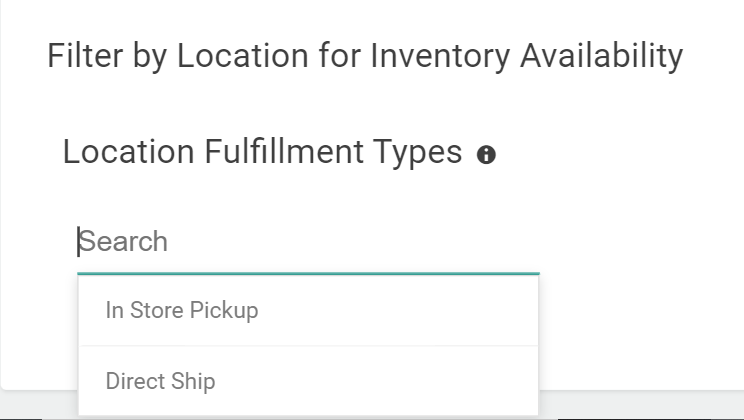
Visibility to inventory at the beginning of the customer journey is critical in driving customer engagement. Inventory availability can be reflected on search and category pages in real-time, in which in-stock or out-of-stock inventory status for products updates instantaneously. Inventory levels can be calculated as the total across the entire site or filtered to a location (or locations). In-stock inventory counts across the site provide a clear, single aggregate view of available inventory across all locations and segments. In-stock inventory counts localized to a store inform the customer about in-store pickup availability. For example:- If a customer searches for Charcoal Grill, RIS returns a count of available charcoal grills that have at least 1 SKU in stock site-wide.
- If a customer searches for Charcoal Grill at Timber Creek Store, RIS returns a count of available charcoal grills that have at least 1 SKU in stock at Timber Creek Store.
- If a customer searches for Charcoal Grill at multiple locations, RIS returns a count of available charcoal grills that have at least 1 SKU in stock at each of the selected locations.
RIS on Product Details Pages
A product becoming in-stock or out-of-stock is reflected instantly, providing inventory accuracy as the customer is making the critical decision to purchase the product. This prevents overselling or underselling of products. The updated quantity of a product in stock is reflected in near real-time (within about 15 minutes). Updated inventory quantity information is available at an aggregate level across the site. At a location level, the quantity available for pickup can be displayed if you set it up in your custom theme. This can be used for urgency messaging such as “Hurry! Only 4 items left in stock!” For example:- If a customer navigates to the product details page for a Shirt which is available in multiple colors and sizes, RIS returns an accurate in-stock picture for the product. The page displays only the Shirt’s sizes and colors that have at least one SKU in stock. This helps the customer quickly view what is available for purchase.
- If a customer navigates to the product details page for a Shirt which is available in multiple colors and sizes, and then selects Color = Red and Size = XS, RIS returns the SKU availability and quantity site-wide (such as 20 XS Red Shirts). The page enables the “Add to Cart” button based on this inventory information.
- If a customer has selected a store and navigates to the product details page for a Shirt which is available in multiple colors and sizes, and then selects Color = Red and Size = XS, RIS returns SKU availability and quantity at the location (such as 5 XS Red Shirts available at the Timber Creek Store). The customer may select Buy Online Pick-up In Store (BOPIS) or Curbside Delivery as a fulfillment option.
Query Inventory by Location Group
RIS supports querying real-time inventory availability across all locations that belong to a named Location Group. Instead of enumerating individual location codes in each API call, you provide the Location Group code, and RIS automatically resolves the group to its member locations and returns availability for each. This is particularly useful when your fulfillment network is organized into logical groups — such as regional distribution centers, retail store clusters, or third-party fulfillment nodes — and you want to query inventory across an entire group without maintaining a hardcoded list of location codes in your storefront integration.Sorting Results
When querying by Location Group (or by individual location codes), you can optionally sort the returned locations by available quantity in ascending or descending order. This lets you surface the locations with the highest stock first, which is useful for routing decisions or for displaying “best availability” to customers. For example:- If a customer searches for a product and your storefront queries the “EAST_COAST_HUBS” Location Group, RIS returns availability for every location in that group. With sorting enabled (
sortBy: AVAILABLE_QUANTITY,sortOrder: DESC), the locations with the most stock appear first in the response. - If you have a Location Group called “RETAIL_STORES” representing all brick-and-mortar locations, a single query returns BOPIS availability across all stores in the group — without listing each store code individually.
Inventory Data in the Theme
You can use fields from Kibo’s API responses to inject inventory data into your custom theme in a similar manner as to API variables in email templates. This allows you to display additional inventory information on the Search, Category, and Product Details pages. The Catalog API responses (such as Get Product) include the belowinventoryInfo object that indicates how much stock is available, as well as whether the product can be substituted and what the projected available date is for backordered products. However, the Catalog APIs use some caching so their data isn’t always exactly real-time.
inventoryInfo.availableDate on the details page of an out-of-stock product, such as in “This product will be available again on March 1.”