

Commerce Languages
Event notifications sent from Kibo during the fulfillment process are only available in English, but consumer email messaging can be sent in other languages depending on the site. This is determined by the locale that is set at site creation; the same site cannot send emails or translations for languages from other locales. For more information about customizing email templates in both English and other languages, see Email Template Customization. When creating a site (System > Structure > Sites), a country code is chosen that determines the locale. If localized data for that country code and associated language does not exist, then American English will be used instead.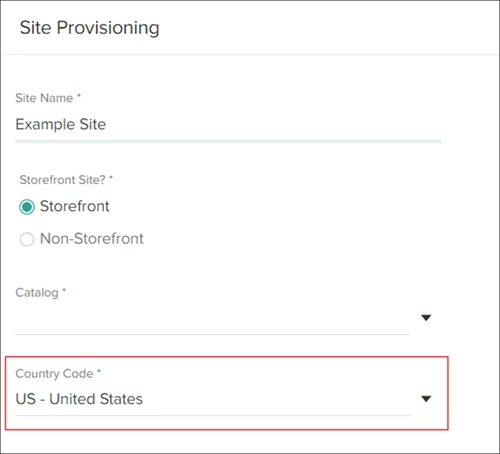
User Interface Languages
Fulfiller UI
Localization is provided as “language files” in your theme, which are prepopulated with text labels but can be customized as needed. For details about how to edit your Fulfiller UI to add any language, see the Fulfiller theme guide.Admin UI
The Admin UI language is automatically determined by the browser’s language setting. There is no in-app configuration option — the UI reads the browser’s preferred language and selects the matching locale. The following languages are natively supported:
If the browser language does not match a supported locale, the Admin UI falls back to English.
To display the Admin UI in a supported language, set your browser’s preferred language accordingly and reload the page:
- Chrome: Settings > Languages > Add the language > Move it to the top > Relaunch
- Firefox: Settings > Language > Add the language > Move it to the top > Restart
- Edge: Settings > Language > Add the language > Move it to the top
Non-ZIP Code Addresses
Some countries, such as the United Arab Emirates, do not use addresses with ZIP codes. Although the Order Routing service usually references ZIP codes to obtain latitude/longitude coordinates of location candidates during routing, the system does support addresses without ZIP codes. In these cases, Inventory and Order Routing will use the entire provided address to look up the latitude/longitude instead. See the Order Routing documentation for more information on how locations are selected for routing.Metric vs. Imperial Measurements
You can select whether a fulfillment location uses the metric or imperial system for entering package measurements in their location group configurations. However, the product catalog does not currently have an option to use metric units. When configuring a product’s shipping options, the Admin UI will only display inches. Even if you specify metric units via the Product API (using thepackageHeight, packageWidth, packageDepth, and packageWeight fields), those values will still be displayed as inches in the UI. Support for the metric system in the catalog will be added in the future.