

Note: There is no default Steal-From Rule. If no Steal-From Rules are configured or enabled, no stealing can occur. All short Call-Off Orders that cannot be refilled from free supply fall through to the regular Reservations Job.
Prerequisites
Before configuring Steal-From Rules, ensure the following:- The B2B Wholesale OMS feature is enabled for your tenant. Contact Kibo Support to enable this capability.
- The Reservation Rebalancer is enabled within the Inventory Balancing & Reservations B2B settings under general settings.
- You have Admin or Super Admin role permissions, or a role with the following behaviors assigned:
- Product Rule: Read, Create, Update, Delete
- Customer Rule: Read, Create, Update, Delete
- Steal-From Rule: Read, Create, Update, Delete
How Steal-From Rules Work
Rule Evaluation
All enabled Steal-From Rules run together when the Reservation Rebalancer enters the steal phase. The full set of non-short Call-Off Orders with active reservations is evaluated against each Steal-From Rule in ascending rank order — Rank 1 is evaluated first. When a Call-Off Order matches a rule’s criteria, that rule designates it as a Giver and assigns it a draw order. A Call-Off Order is only matched once — once it qualifies under a rule, it is not re-evaluated against subsequent rules. Call-Off Orders that do not match any enabled Steal-From Rule cannot be Givers and their reserved supply is protected.Seeker vs. Giver Partition
At the start of the steal phase, the engine determines a fixed partition of all relevant Call-Off Orders into potential Seekers and potential Givers. A Call-Off Order is either a Seeker or a Giver in a given run — never both. If a Call-Off Order matches both a Steal-For Rule and a Steal-From Rule, it is treated as a Seeker only and removed from the Giver pool.Giver Draw Order
The Rank on a Steal-From Rule determines the order in which Givers are drawn from. Givers matched by Rank 1 are drawn from first when Seekers need supply. Givers matched by Rank 2 are only drawn from after Rank 1 Givers are exhausted. The sort configured on each rule determines the order within a rank tier — for example, draw from the latest ship date first to protect near-term commitments for as long as possible.A Giver Remains in the Pool
A Giver is not removed from the pool after being partially used. Its remaining reserved supply stays available to later Seekers in the same steal pass. A Giver that goes entirely short after giving up supply to multiple Seekers is not re-promoted to a Seeker in the same run — it falls through to the regular Reservations Job.Criteria Matching
A Call-Off Order must satisfy all defined criteria types on a rule (AND logic across types) to match. Within a single criteria type, conditions can be combined using AND or OR logic in the expression editor. If a rule defines a simple criteria for a particular type which will match all the call off orders (e.g Total Amount ≥ 1$), all orders automatically pass that criterion. This makes it straightforward to configure a catch-all rule at the lowest rank to ensure every Call-Off Order receives an allocation pass.The Ship Date Buffer
Regardless of whether a Call-Off Order is matched by a Steal-From Rule, the Ship Date buffer still applies. The engine will only take supply from a Giver if its ship date is strictly later than the Seeker’s ship date by at least the configured Ship-Date Buffer days. No rule configuration can override or loosen the Date Gate.Important: A Call-Off Order can be designated as an eligible Giver by your Steal-From Rules, but still be protected from a specific steal attempt by the Ship Date buffer. Eligibility under Steal-From Rules is necessary but not sufficient — the Date Gate is always enforced by the engine.
Rule Criteria
A Steal-From Rule supports up to three criteria types:Note: Product Rules , Customer Rules and Call off order Rules created for Steal-For Rules are exclusive to Steal-For Rules and cannot be shared with other rule types.
Rule Attributes
Note: At least one Rule Criteria is needed for the rule to be saved
Configure Steal-From Rules
To create a new Steal-From Rule:- Go to Main > Supply > Rules > Steal-From Rules.
-
Select a Site from the site selector.
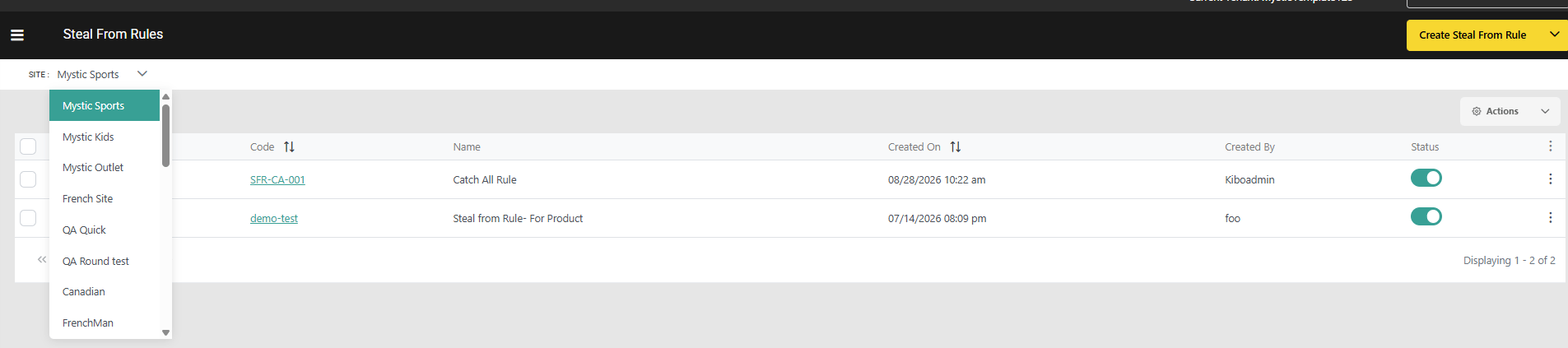
- Click Create Steal-From Rule.
- Enter a Code. If left blank, the system generates one automatically.
- Enter a Name and an optional Description.
-
Use the optional Start Date and End Date fields to schedule when the rule is eligible for evaluation.
- If both fields are blank, the rule is always eligible — the default behavior.
- The rule is only evaluated when it is Enabled and the current date and time falls within the window.
- Enter a Rank value. The lower the number, the higher the draw priority — Givers matched by this rule are drawn from before those matched by higher-ranked rules.
- Toggle the rule Enabled to activate it.
-
Configure Sort Criteria: Under Primary Sort Attribute, select a sort field and choose a Sort Direction of Ascending or Descending.
Optionally, under Secondary Sort Attribute, select a tie-breaker field and its own Sort Direction. The secondary sort is applied only when matched call off orders have the same primary sort value. -
Optionally, add Account / Customer Criteria:
- Click Add Customer Rule and use the expression editor to define account-level conditions.
-
Optionally, add Product Criteria:
- Click Add Product Rule and use the expression editor to define product-level conditions.
-
Optionally, add Call-Off Order Criteria:
- Click Add Call-Off Order Rule and use the expression editor to define order-level conditions.
-
Click Save.\
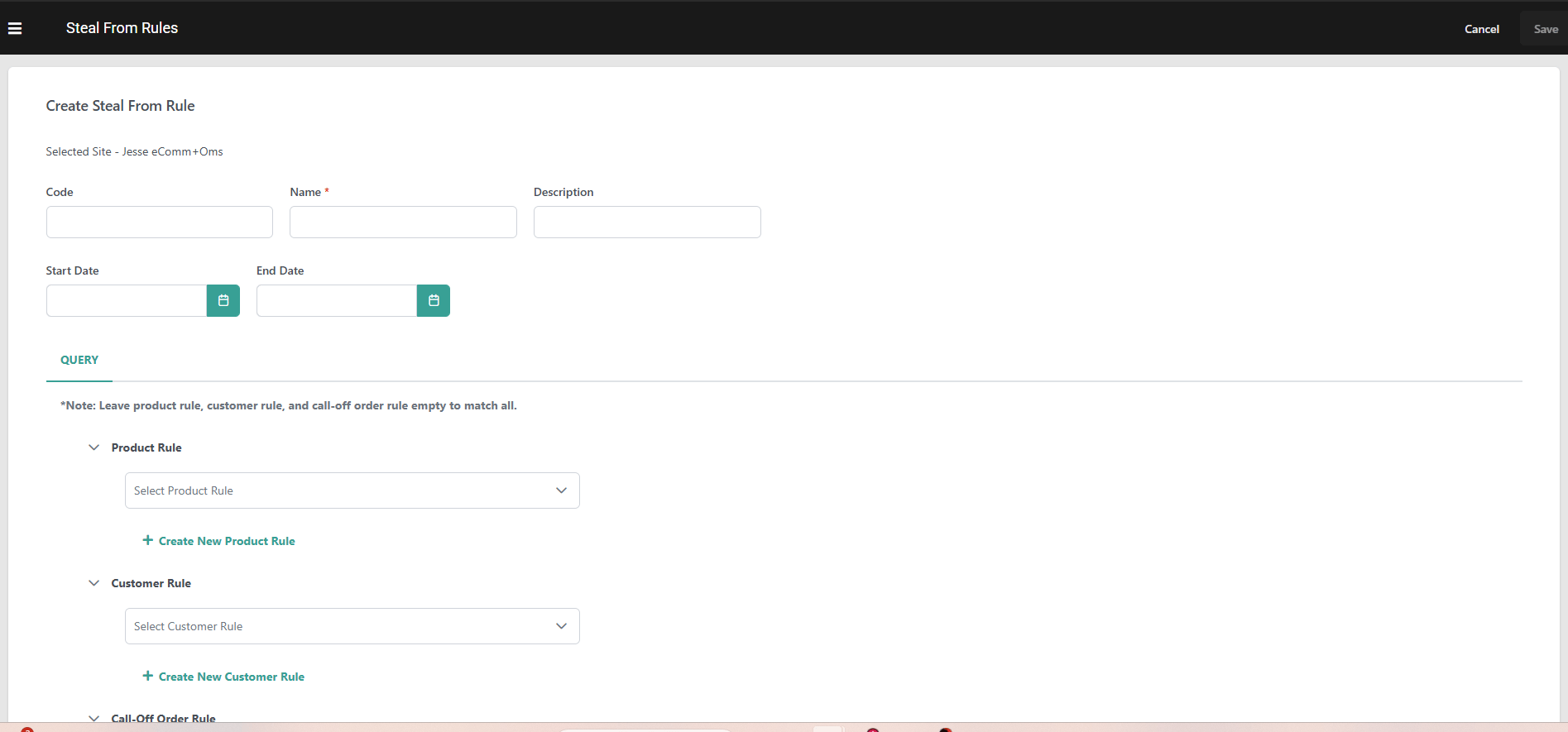
Note: At least one Rule Criteria is needed for the rule to be saved. Only Extensible/Custom attributes marked Available for Rules on their attribute definition appear in this rule’s criteria builders for Product Rules and Call off Order Rules(header as well as item level).
Manage Steal-From Rules
Access the Steal-From Rules dashboard at Main > Supply > Rules > Steal-From Rules to manage your configured rules:- Toggle the Status icon on a rule to activate or deactivate it without deleting it. Disabled rules are skipped during batch processing.
- Click on the Kebab icon on a rule to Edit or Delete it.
- Check multiple rules and then use the Actions menu in the top right to enable, disable, or delete them in bulk.
- Edit the Rank of a rule directly in the table, or click and drag to reorder. Rules are always evaluated from highest to lowest rank, with Rank 1 running first.
- The list displays Start Date and End Date columns. Click either column header to sort the list by that date.
- Use the Search & Filter section to narrow the list by Rule Code, Rule Name, Start Date, End Date, Status (Enabled/Disabled), and Created By.
