Call-Off Order Dashboard
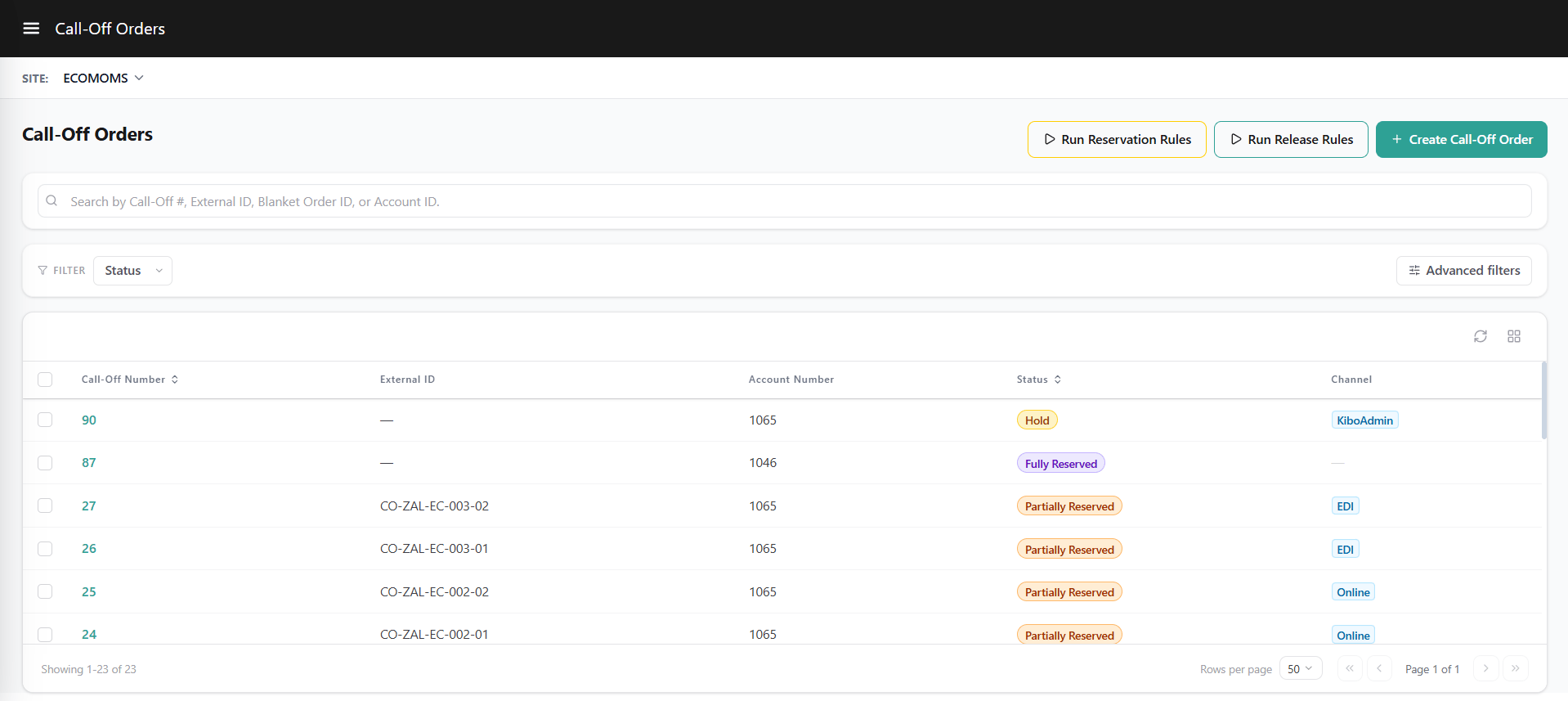
The Call-Off Orders list view provides access to call-off orders for the selected site.- Site Scope Selection: Select the target site from the site context dropdown to view call-off orders for that site.
- Centralized Search: Search for call-off orders using the Call-Off Order Number, External Call-Off Number, Blanket Order Reference, or Account ID.
- Lifecycle Filtering: Filter call-off orders by operational status.
Call Off Order Information
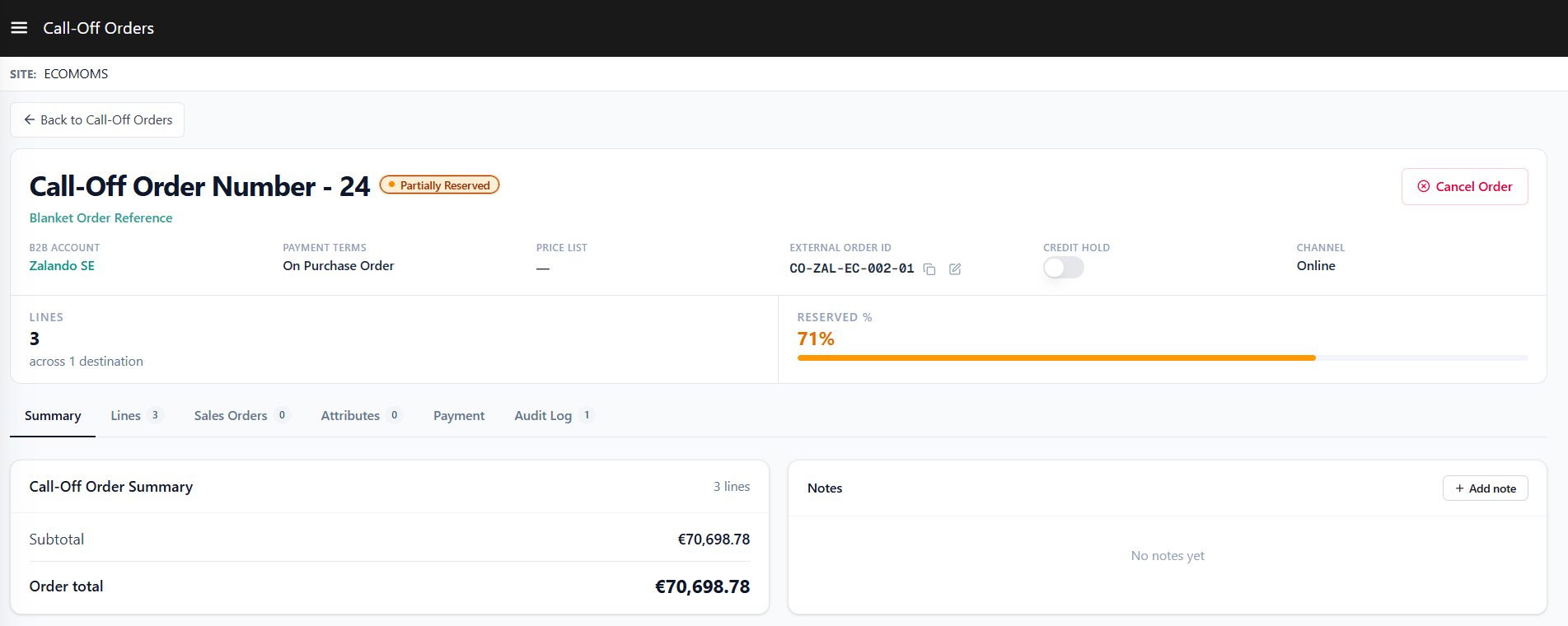
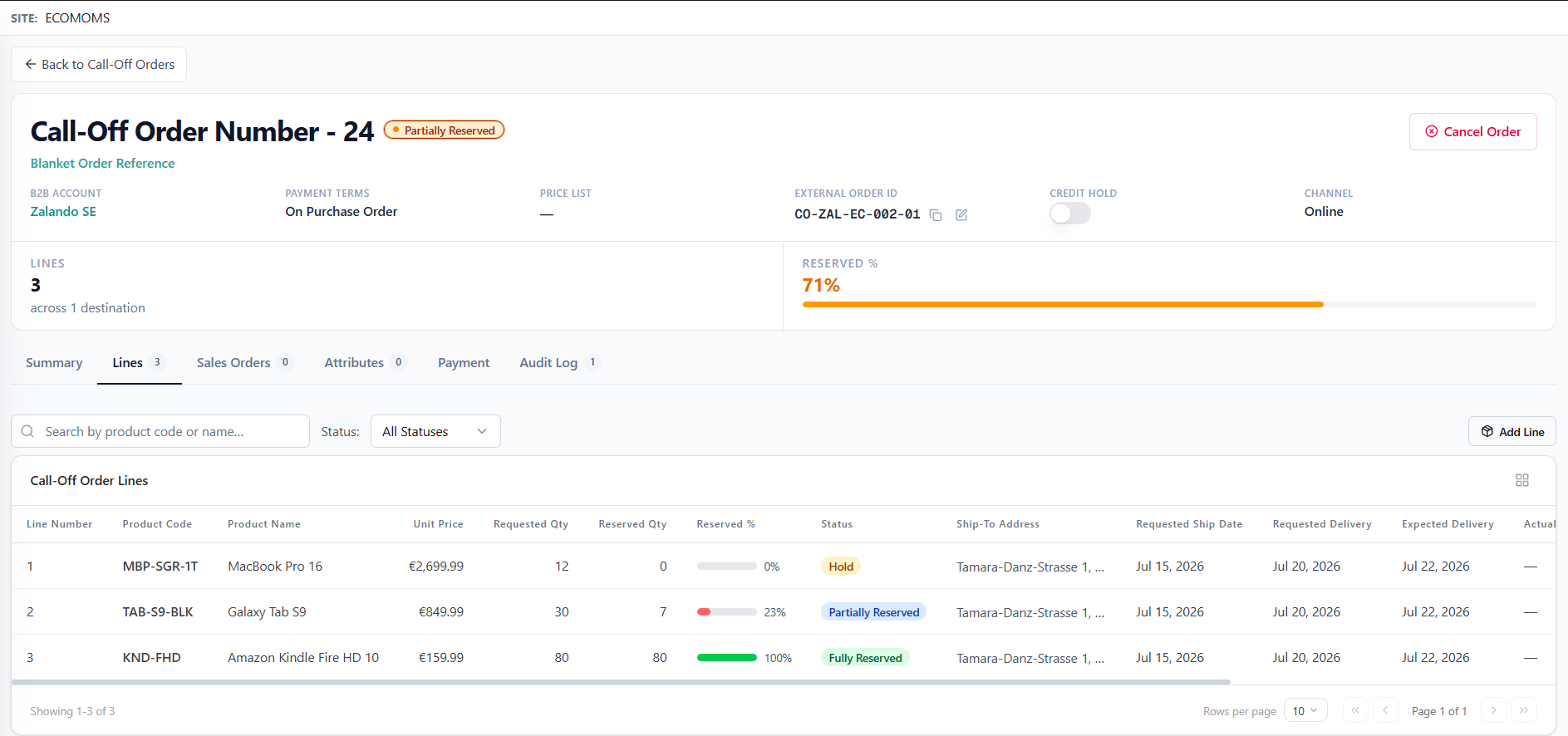
Call Off contract level details capture foundational terms for the order: :- Call Off Order Number: Unique system-generated identifier for the Call-Off Order.
- Blanket Order Reference: Reference identifier of the parent Blanket Order being drawn against (not applicable to standalone call off orders).
- B2B Account & Account Name: B2B Account and account name associated with the order request.
- External Call Off Number: Optional buyer-supplied purchase order or external reference number.
- Status: Operational lifecycle state of the Call-Off Order.
- Price List: Reference to the price list governing product pricing.
- Payment: Optional payment information, supporting Purchase Order details.
- Notes: Free-text field for internal comments or operational notes.
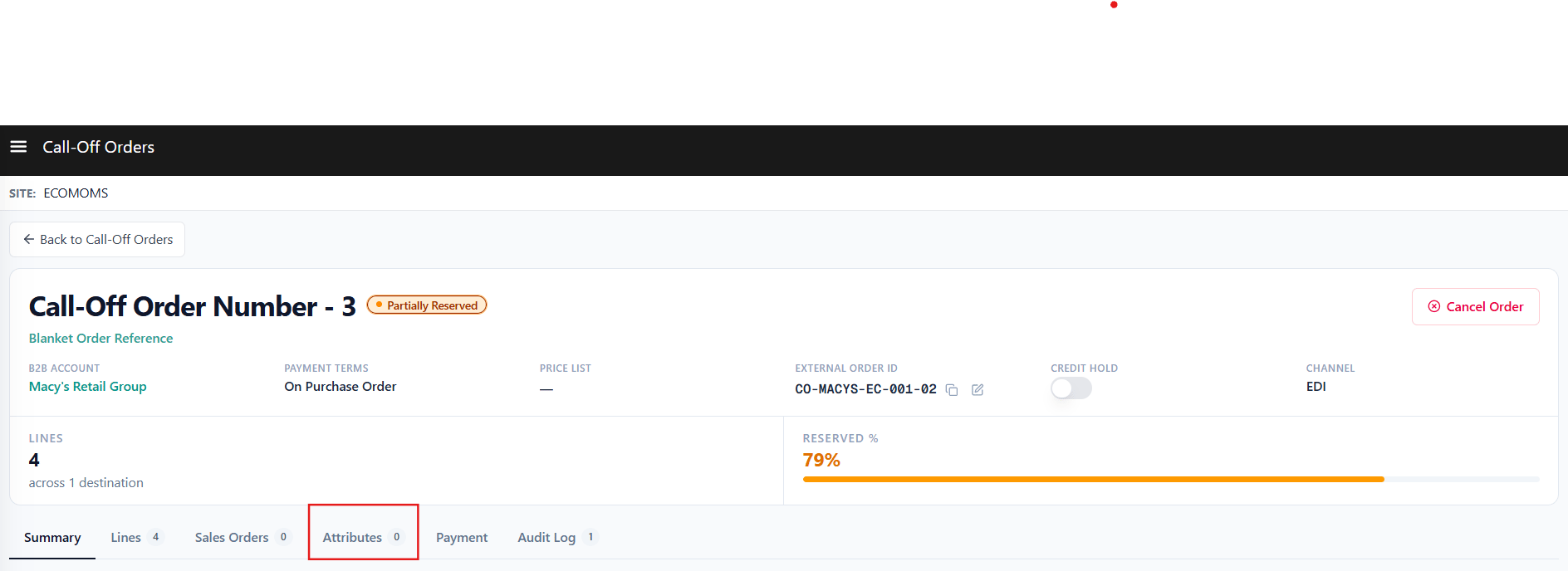
- Custom Attributes: Custom attributes configured for the Call Off Order entity.
- Channel: Submission channel through which the order originated.
- Note - Field editability is governed by the call off order status. As the Blanket Order moves through its lifecycle, certain fields become locked to preserve agreement terms.
Item Level Details on Call Off Order
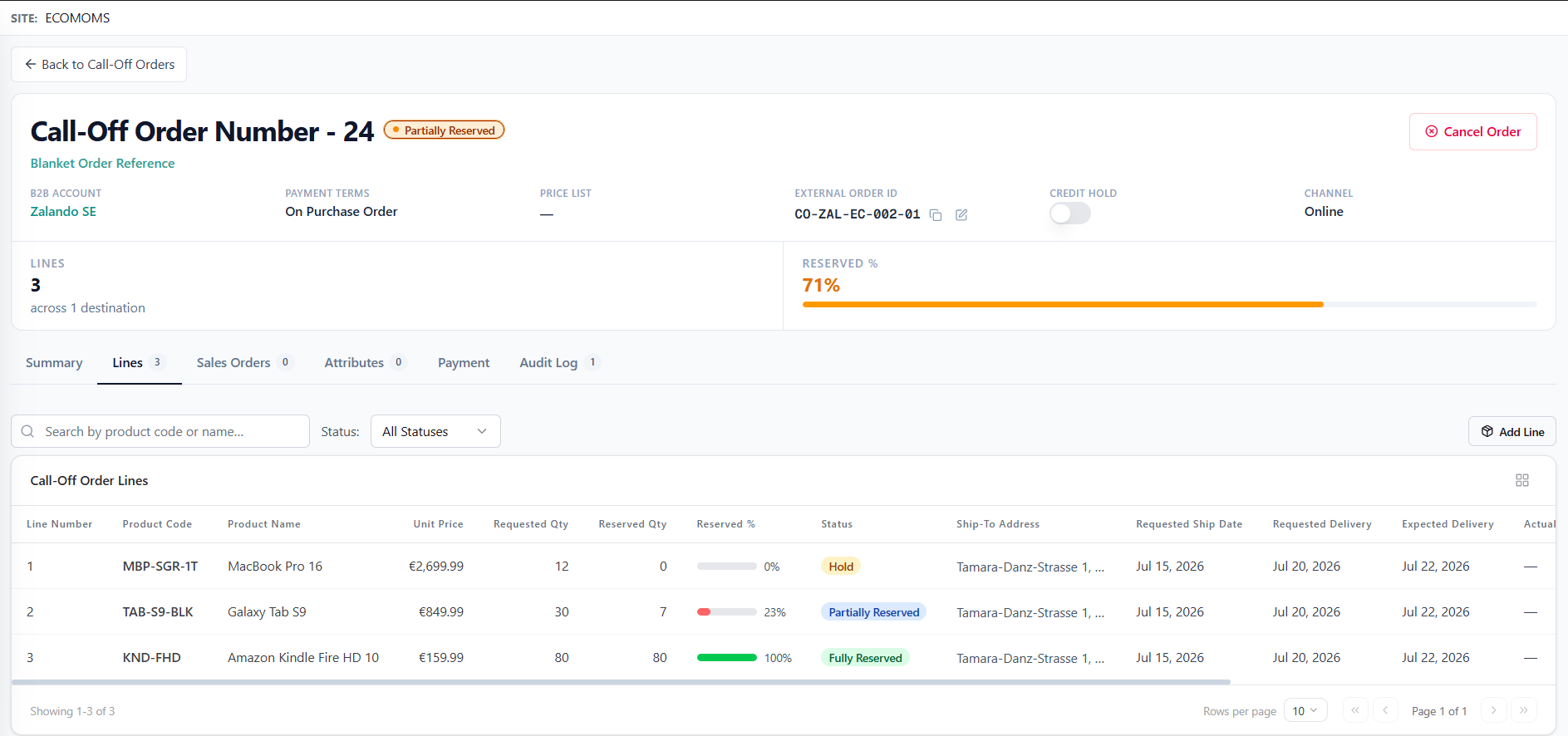
- Product Code & Product Name: Product Code being requested and associated product name.
- Requested Quantity: Quantity requested on the line item.
- Requested Ship Date: Target ship date specified per individual line item.
- Address: Delivery destination address or location specified for the line item.
- Fulfillment Type: Fulfillment Type assigned to the line item.
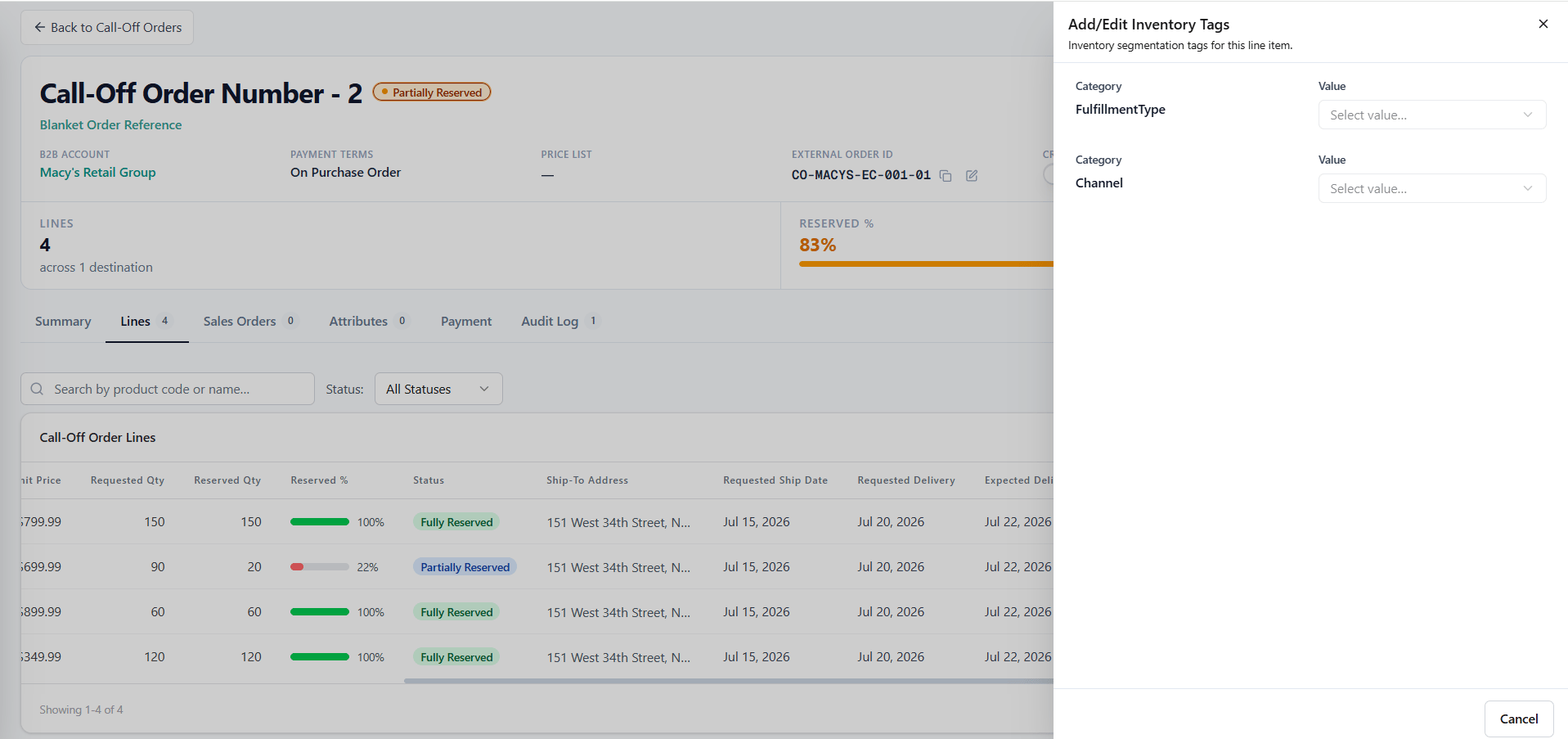
- Inventory Segment: Inventory segment tags that scope the soft reservation pool.
- Line Status: Operational lifecycle state of the individual line item.
- Unit Price: Unit price governing the product line item.
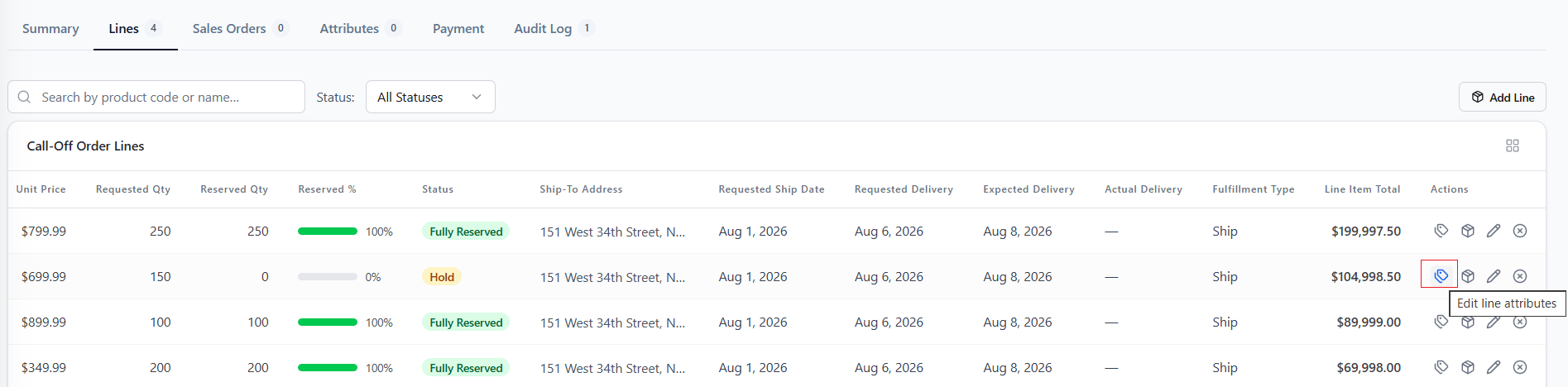
- Call Off Line Attributes: Custom attributes configured for the Call Off Order line items.
- Note - Field editability is governed by the line item status.
Fulfillment Details
Line items on a Call-Off Order capture necessary delivery, schedule, and fulfillment attributes prior to submission:- Dynamic Location Handling: The location selection field dynamically adapts based on the chosen fulfillment method. It serves as an Address selector for Ship To Home and Delivery lines, or as a Pickup Location selector for BOPIS (Store Pickup) lines.
- Requested Ship Date: Target ship date specified per line item.
- Requested Delivery Date: Buyer-supplied target date for goods arrival. Distinct from Requested Ship Date, RDD serves as the customer’s delivery expectation and remains editable while the line item is in an editable state.
- Estimated Delivery Date: Read-only, system-calculated date representing when soft-reserved line items are expected to reach the buyer. Dynamically computed using location processing times, carrier transit times, and the reservation time-fence window anchored by the Requested Ship Date.
- Actual Delivery Date: Factual record of when the line item was physically delivered.
- Bulk Line Application: Delivery address, requested ship date, and fulfillment method can be applied across multiple selected line items simultaneously.
- Inline Address Management: New shipping addresses can be added during line setup and saved permanently to the B2B account profile
- Multi-Ship-To Sales Order Split: Upon order release, lines are automatically grouped by unique delivery address, creating a separate downstream Sales Order for each destination while maintaining complete traceability back to the Call-Off Order.
- Fulfillment Validation: Fulfillment methods are validated against catalog capabilities. If an assigned method is unsupported for a product, submission is halted and affected lines are highlighted for correction.
Payment Information
Purchase Order is optional on a Call-Off Order. When Purchase Order (PO) payment is selected, captured payment details automatically cascade to downstream Sales Orders upon conversion:- Billing Address: Required; can be selected from saved B2B account addresses or added as a new address.
- PO Number: Required field when entering Purchase Order payment.
- Payment Terms
- Amount: Defaults to the total Call-Off Order amount and is non-editable.
Call Off Order Lifecycle & Statuses
Order Statuses
The contract status reflects the operational state of the overall call off Order- Pending: Standalone Call of is created but not submitted.
- Hold: The Call Off Order has passed validation and been accepted. Qty can be soft. reserved against the lines. The Call Off Order is not yet eligible for order release.
- Partially Reserved: At least one line has inventory reserved against it.
- Fully Reserved: All the line items are fully reserved.
- Partially Released: At least one line has converted into a Sales Order but other lines are still in Hold or have inventory reserved and are awaiting release.
- Fully Released: All lines have been converted into Sales Orders.
- Cancelled: The Call Off Order was cancelled. If a Blanket Order reference was present, any drawn balance is restored to the Blanket.
Line Item Statuses
Each product line within a Call Off Order maintains an independent status that tracks its consumption state under the agreement:- Hold: The line has been accepted and is awaiting inventory reservation.
- Partially Reserved: Inventory has been reserved for part of the requested quantity on this line. The line is eligible for order release on the reserved portion.
- Fully Reserved: Inventory has been reserved for ALL of the requested quantity on this line.
- Released: Line is converted into a sales order.
- Cancelled: Line item has been cancelled and any soft inventory reservations are released (terminal state).
Creating Call-Off Orders
Creating a Call-Off Order from a Blanket Order
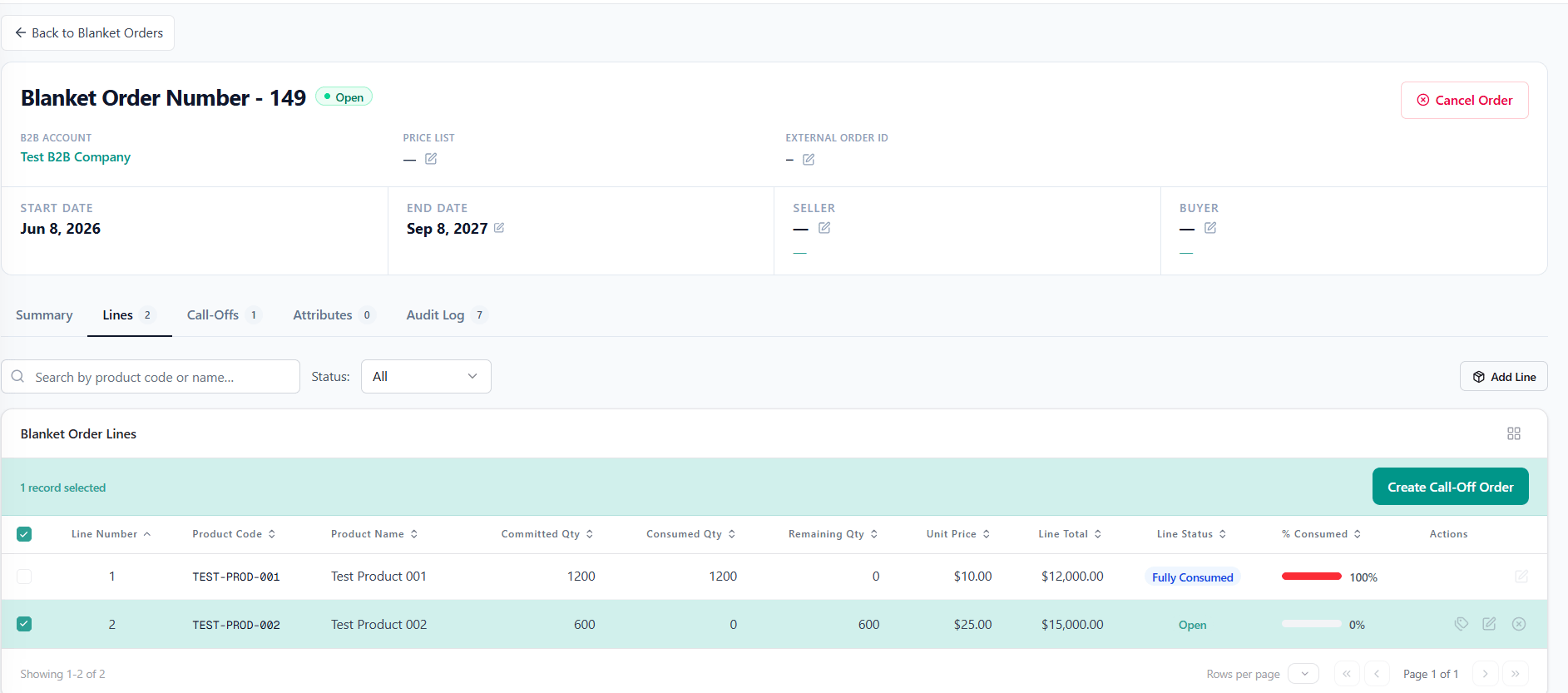
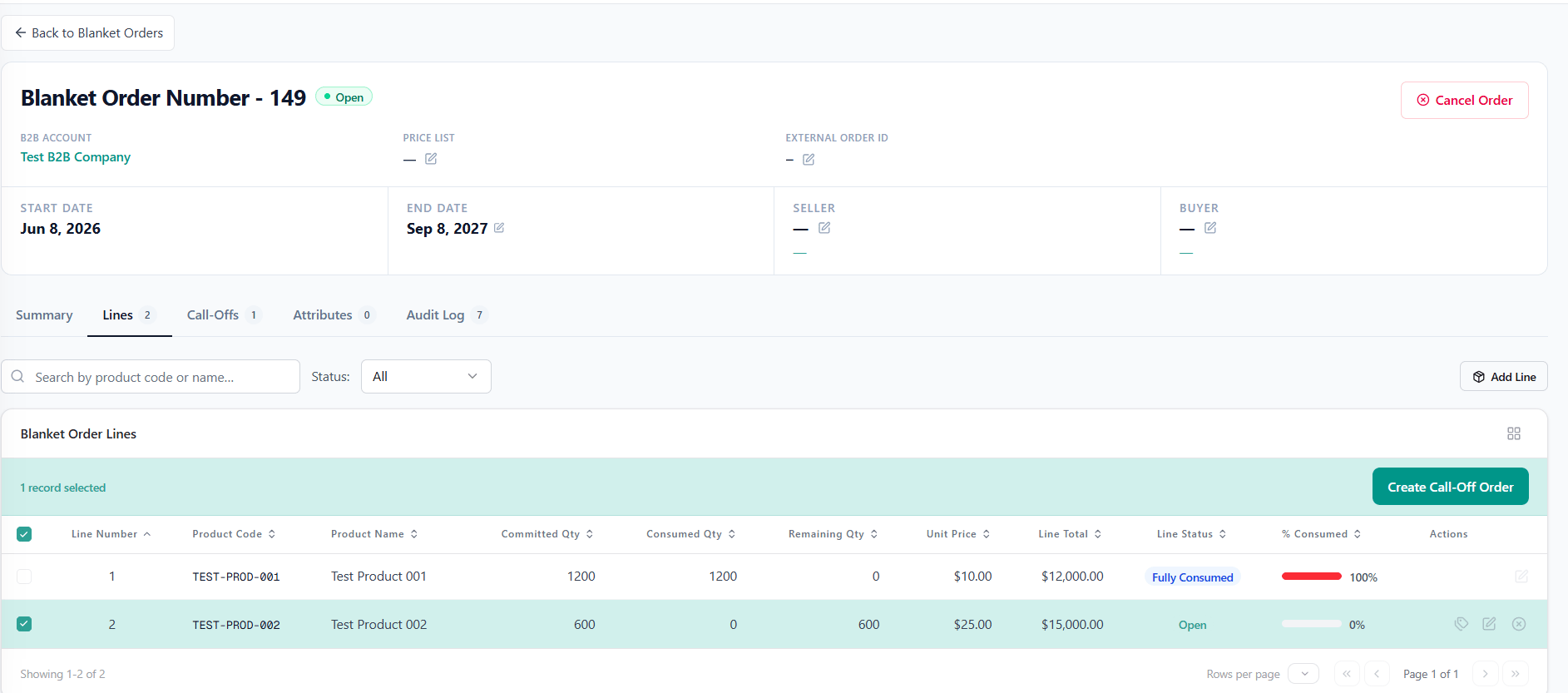
When created from a Blanket Order, the Call-Off Order references the original agreement. Users can select specific line items from the Blanket Order to create a Call-Off Order. To create a Call-Off Order from a Blanket Order, navigate to an eligible Blanket Order or the Call-Off Orders list and select lines from the parent contract.- Line Selection: Only contract lines in Open or Partially Consumed status are available for selection. Lines in Fully Consumed or Cancelled status are locked.
- Balance Validation & Drawdown: Requested line quantities are validated against the Blanket Order line’s available remaining balance. Upon successful creation, system automatically decrements the remaining balance on the referenced contract lines and records a consumption audit entry.
- The B2B Account is automatically inherited from the parent Blanket Order.
Standalone Call-Off Orders
To create a standalone Call-Off Order without referencing a Blanket Order, create a new Call-Off Order directly for the B2B Account. Standalone call-offs allow B2B delivery requests to be processed without drawing against a pre-existing commitment agreement. For standalone call-offs, the B2B Account must be manually selected during creation.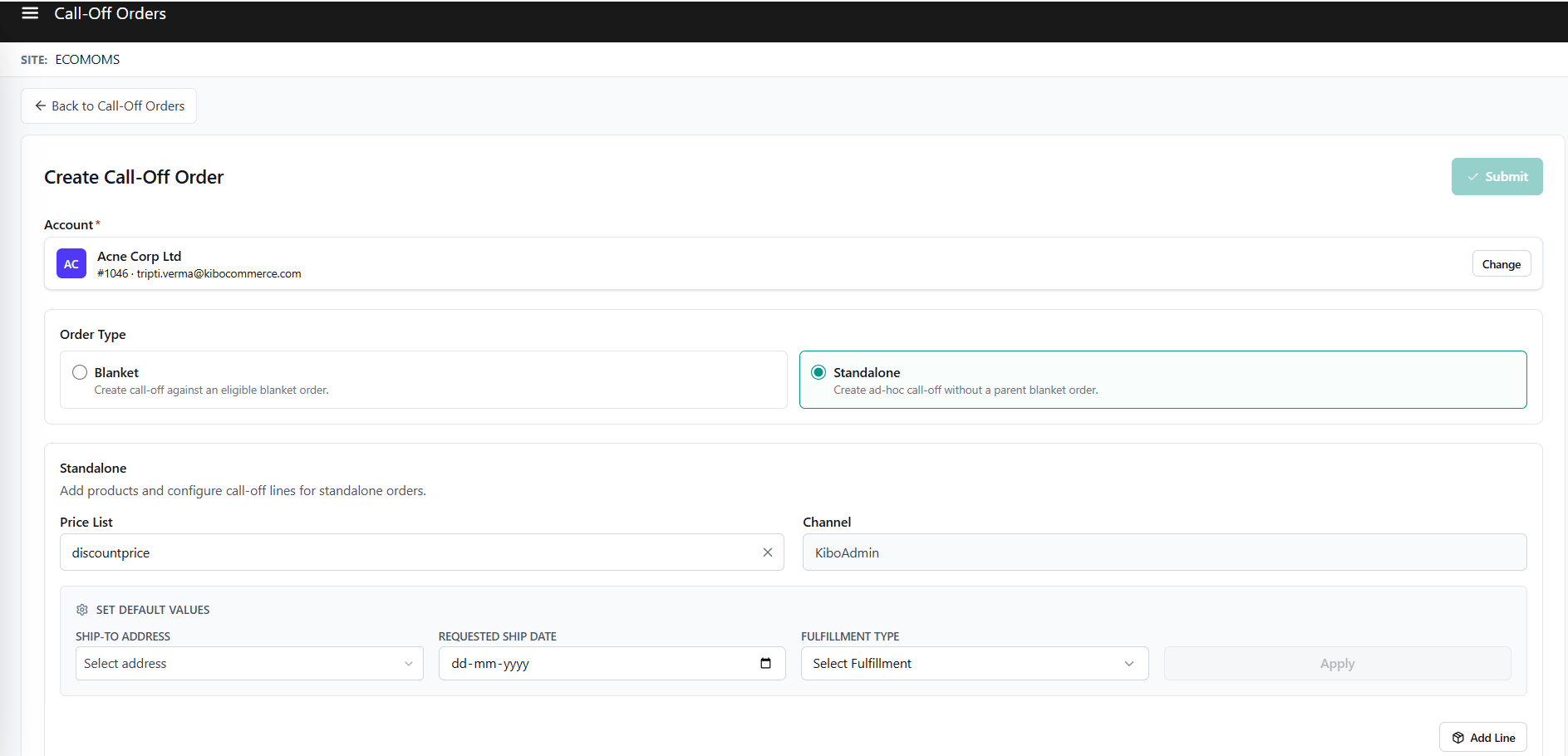
Inventory Reservation
Inventory soft reservations protect supply for confirmed orders without creating immediate fulfillment obligations:- Line-Level Trigger: At the line level, a line item starts in Hold status while awaiting inventory soft reservation. Reservation is not triggered at order creation time.
- Reservation Transition: Once inventory is allocated, that specific line item transitions from Hold to Partially Reserved or Fully Reserved.
- Multi-Location Allocation Records: A single line item may hold multiple reservation records across different fulfillment locations to satisfy the total requested quantity.
Inventory Segmentation
Inventory segments allow merchants to scope inventory reservations to specific, labeled inventory segments:- Line-Level Segment Tags: Inventory segment tags are configured at the line item level to target specific inventory segments.
- Segment Tag Updates: Inventory segment tags can only be updated while a line item is in Hold status. They become permanently locked once a line item transitions to Partially Reserved or Fully Reserved.
Manual Release
Administrators can execute manual release overrides to bypass background release schedules and immediately process lines currently in Partially Reserved or Fully Reserved status. Manual releases convert quantities backed by active inventory reservations directly into downstream Sales Orders.Call Off Order Level Manual Release
Header-level manual release allows administrators to process all reservation-backed lines within a Call-Off Order simultaneously:- Eligible Header Statuses: Available only when the order header status is Partially Reserved, Fully Reserved, or Partially Released. It is unavailable when the order is in Pending, Hold, Fully Released, or Cancelled status.
- Reservation-Backed Conversion: Executing a header release converts only line items (or partial quantities) currently in Partially Reserved or Fully Reserved status. Lines in Hold status are not converted.
- Selective Order Generation: Converted line items immediately generate downstream Sales Orders.
Line-Item Manual Release
Users can also release individual line items independently:- Eligible Line Statuses: Available strictly for individual line items in Partially Reserved or Fully Reserved status. Lines in Hold, Released, or Cancelled states do not expose manual release controls.
- Executing a line manual release converts only the targeted line item into a downstream Sales Order line.
A user can execute manual release actions only if assigned the required behavior permission.
Credit Hold Management
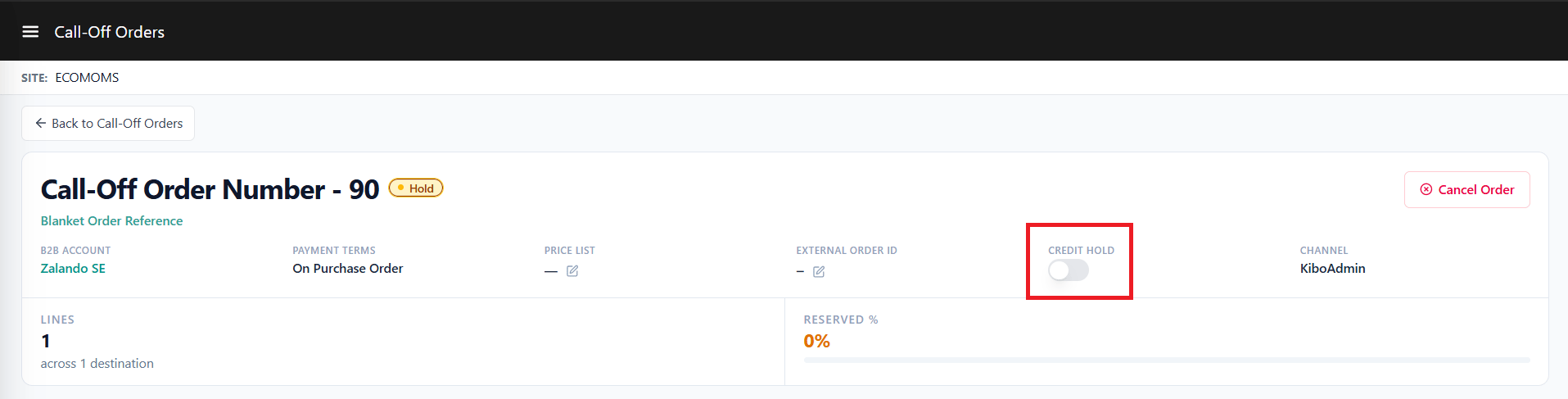
Call-Off Orders include credit hold controls to prevent unapproved order conversions:- Order Release Blocking: Call-Off Orders can be placed on Credit Hold manually by administrators or automatically via external credit engine integrations. While on Credit Hold, order lines cannot be released or converted into Sales Orders.
- Customizable Reasons: An explicit reason code can be specified when applying a credit hold, with reason lists customizable by administrators.
- Extensibility Hooks: System provides API extension points at creation and release to call external credit engines that dynamically place orders on or remove them from credit hold.
Cancellation
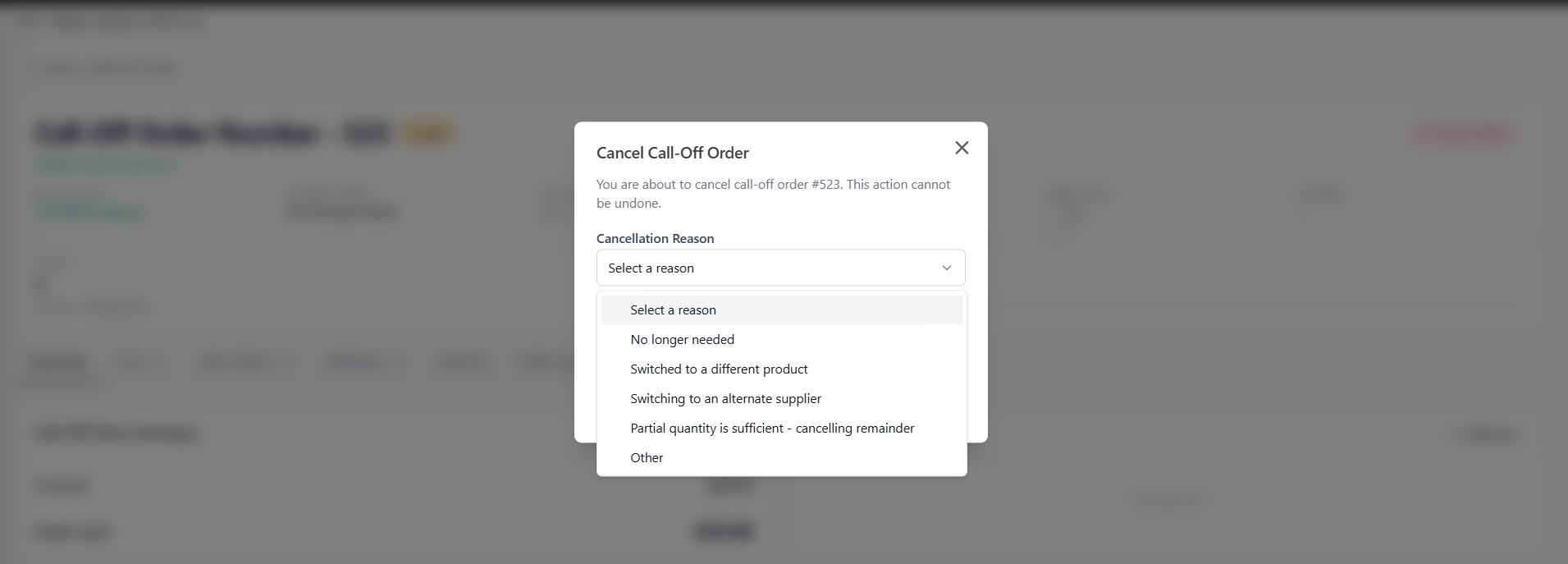
Order and line item cancellations handle balance restoration and inventory allocation release:- Mandatory Cancellation Reasons: An explicit cancellation reason code must be specified when cancelling an order or an individual line item. Cancellation reason options can be customized by administrators.
- Inventory Reservation Release: Cancelling a line item automatically releases any soft inventory reservations held for that line.
- Blanket Balance Restoration: For contract-linked Call-Off Orders, cancelling a line item automatically restores the requested line quantity back to the parent Blanket Order line’s available balance and recalculates the contract status.
Extensible Attributes
- Call Off Order Attributes: Call off order attributes capture custom order level data, such as such as special project codes, or buyer department references. For full configuration details on entity selection and attribute value sync settings, see Extensible Attributes.
- Call Off Order Item Attributes: Call off order item attributes capture custom line item level data, such as line-level priority flags or special fulfillment instructions. For full configuration details on entity selection and attribute value sync settings, see Extensible Item Attributes.