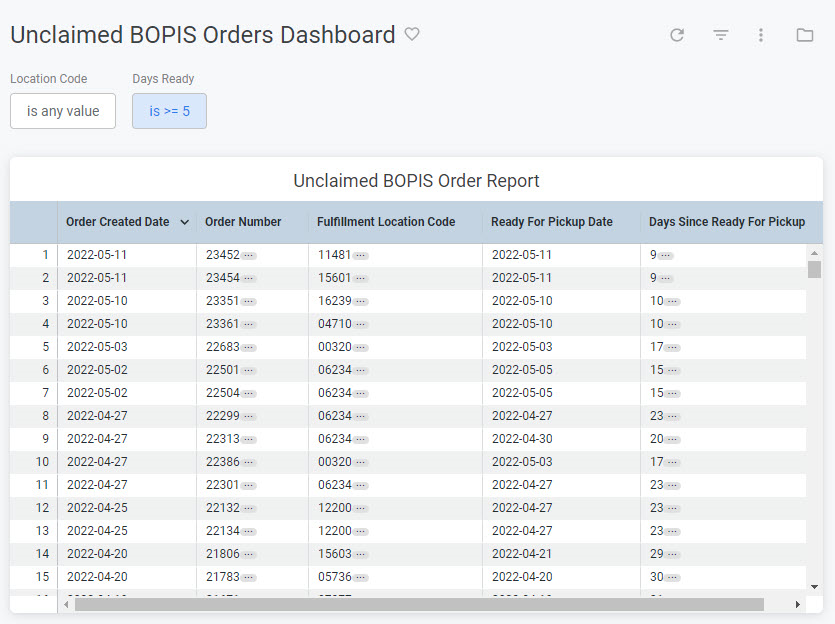
The Unclaimed BOPIS Orders dashboard provides detailed information about orders with a shipment type of In-Store Pickup that have not been picked up. This can be viewed under the order topic at Kibo Standard Reports > Order > Unclaimed BOPIS Orders Dashboard in the navigation menu.
BOPIS Concepts
Learn about Buy Online, Pick Up In Store workflows
The supported filters that can be applied to this dashboard are:
Name
Description
Default
Location Code
The location codes where the shipments were fulfilled.
All
Days Ready
The number of days passed since the shipment was marked as ready for pickup.
Greater than or equal to five days
There are no special measures that are calculated by this dashboard.The tiles that make up this dashboard are:
Name
Description
Unclaimed BOPIS Order Report
Table providing the following dimensions for each order: Order Created Date, Order Number, Location Code, Ready For Pickup Date, and Days Ready.