

A product type is a template of settings and attributes that you create for a specific set of products. Every product in your catalog has a single product type associated to it, and you must associate each product with a single product type.

Watch: Product Types

See how to create and manage product types
You can modify your product types to include additional attributes if you want to add options and extras for shoppers to select or configure on your site.

Available Product Types

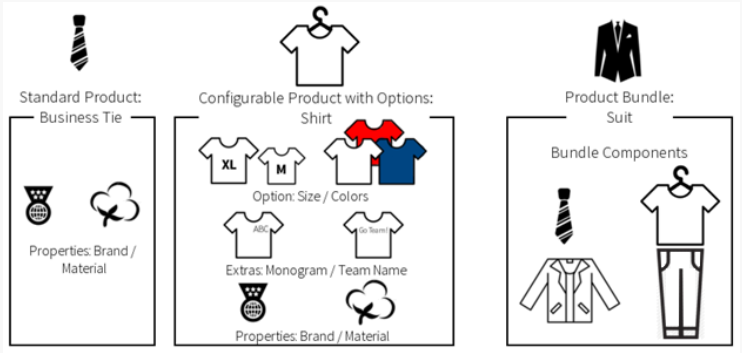
There are four different product types that you can use: For example, imagine that you sell ties, shirts, and suits. Given this, your product types might be the following: Diagram illustrating a standard product, a configurable product with options, and a product bundle
Base Product Type

By default, all product catalogs include a base product type with default attributes such as product availability, cross-sells, and up-sells. However, you should only use this base product type for your products if the product attributes within it are suitable for your products. If you need more product attributes to sufficiently describe your products, Kibo recommends creating unique product types for your products. Once more product types are created, you can change a product or multiple products’ product types at once using the Quick Edits tool.

OMS-Only Bundle Support

While product bundles are primarily an eCommerce feature, OMS-only implementations that include catalogs can also support them to some extent. When a product bundle is added to an order, the individual item components of the bundle will be retrieved. OMS will then calculate item pricing based on those components, in which the difference between the bundle price and the sum of the item’s catalog prices is subtracted from the prices of each item based on its percentage of the overall price. For example, if a $90 bundle has a $118 item and two $1 items, then the difference between the catalog total ($120) and the bundle price is $30. Since the most expensive item makes up 98% of the total price, $29.50 will be subtracted from its individual item price while the $1 items each have $0.25 subtracted from their prices. However, if an OMS-only implementation does not include a catalog then a validation error will be returned when an order is placed with a bundle.