Watch: Store Credits and Gift Cards
See how to manage store credits and store gift cards

To Credit or Not to Credit
You can also perform a “credit” as an appeasement directly on an order payment to return that money to the customer. The key distinction between credits and refunds on returns is that credits affect the order balance, whereas refunds do not:- Use credits to fix accounting issues by returning money to the customer and reducing the order balance.
- Use refunds to provide appeasements by giving money to the customer without changing the accounting and order balance.
Create a Credit or Gift Card
To create a new store credit or gift card for a customer:- Go to Main > Customers > Store Credit.
- Click Create New Store Credit.
- Specify a store credit or a gift card in the Credit Type drop-down menu.
- Enter a unique code to identify the store credit or gift card.
- Select an activation date and expiration date for the store credit or gift card. If you leave these fields blank, the activation date assumes the current date and the expiration date assumes a date one year from the current date minus a day.
- Enter an Amount for the value of the store credit or gift card.
- (Optional) Select a shopper to apply the store credit or gift card to using the Customer drop-down menu.
- Click Save.
Processing Store Credit and Gift Cards
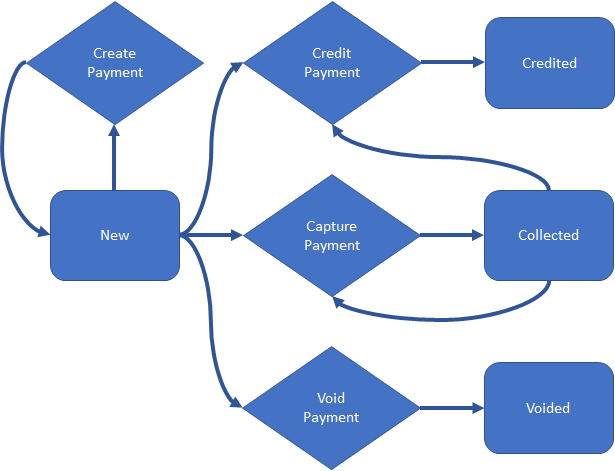
Gateway gift cards are processed in the same workflow as standard credit cards, while store credit and store gift cards follow the below process. They simply move through the New, Collected, and Credited steps as well as Voided if applicable.