Add an Analyzer
To apply an analyzer with an attribute to the schema:- Go to Main > Search > Schema.
- Click Add in the Field/Attribute table.
- Choose a Schema Type.
- Core fields include Product Name, Product Code, and Categories.
- Custom Attributes refer to any unique product attributes you’ve created.
- Select an attribute.
- Select an analyzer.
- Click Add.
- When you’re done adding attributes and analyzers, click Save and then Publish Now in the top right.
Analyzer Types
Kibo recommends using theexact_match, lenient, lenient_phrases, and the corresponding typeahead field type analyzers for the most common searched fields.
exact_match
Searches for exact matches to the query term without stemming or synonyms. This analyzer applies HTML stripping, lowercasing, and ASCII folding.
This analyzer is best used when you want to show matches that are exactly the same as what your customer types as a search term.
exact_match_type_ahead
Searches for matches based on the exact_match analyzer, but also includes an Edge NGram filter on the index side. This allows for search-as-you-type use cases where a partial query can return search results that match a term that completes it. For example, a partial query of “piz” can return a result of “pizza.”
lenient
Searches for exact matches to the query term, but also applies stopword filtering, stemming, and synonym expansion to allow for more matches. This analyzer applies HTML stripping, lowercasing, and ASCII folding.
This analyzer is a good general-purpose analyzer to use for most fields that contain English text.
lenient_type_ahead
Searches for matches based on the lenient analyzer, but also includes an Edge NGram filter on the index side. This allows for search-as-you-type use cases where a partial query can return search results that match a term that completes it. For example, a partial query of “piz” can return a result of “pizza.”
lenient_phrases
A supplemental filter to use with lenient that also applies shingle filtering. This filtering makes the analyzer prefer term order in the query. For example, the search term “chocolate milk” matches better to “chocolate milk” than to “milk chocolate.”
This analyzer does not use stopword filtering and synonym expansion to prevent undesirable interactions with the shingle filter.
lenient_phrases_type_ahead
Searches for matches based on the lenient_phrases analyzer, but also includes an Edge NGram filter on the index side. This allows for search-as-you-type use cases where a partial query can return search results that match a term that completes it. For example, a partial query of “piz” can return a result of “pizza.”
return_only
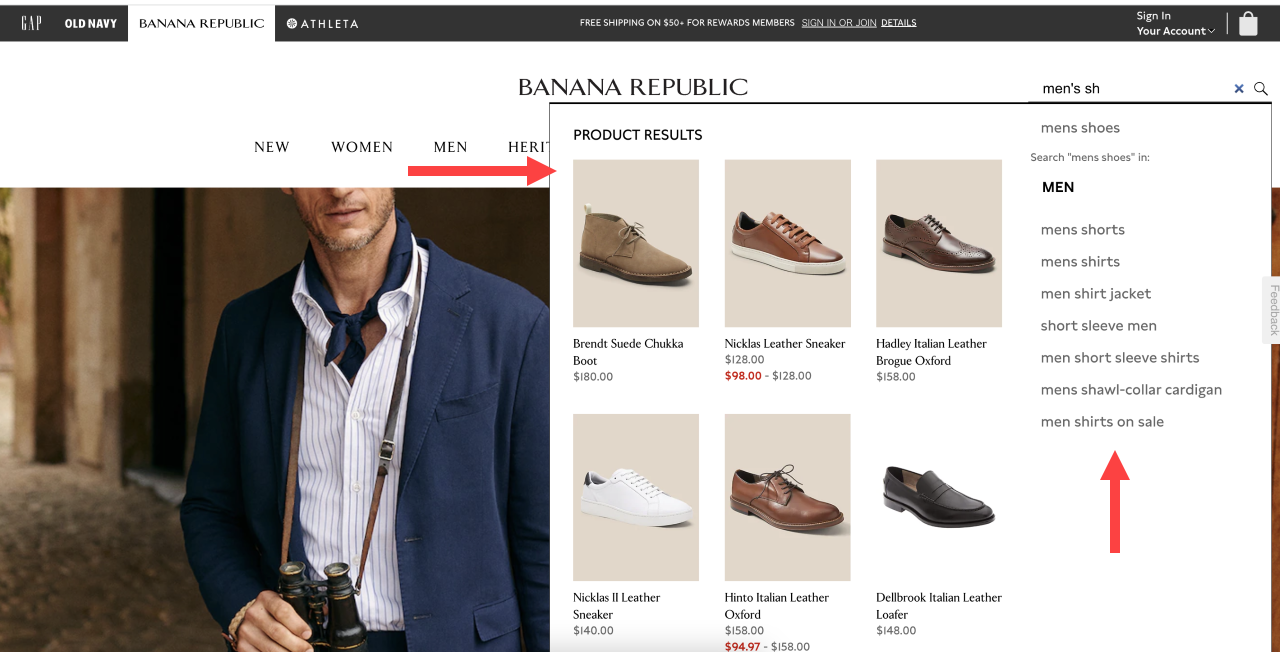
An analyzer you can use with type ahead analyzers to display which products and categories to display as suggestions within the search experience. The example below shows the productName and categoryName fields enabled and what information is displayed during a type ahead search.