

Preference Behavior
The substitution process will take the shopper’s preferences into account:- If the shopper is willing to accept substitutions, the list of potential substitutes for that product will be displayed. The shopper can select one as their preference, and the system will attempt to substitute with that item first when an automatic substitution is performed. If the shopper doesn’t indicate a preferred item, then the system will attempt substitution in order of priority as defined in the product settings.
- If the shopper indicates that they will only accept substitutions at fulfillment, then substitutions will not be performed automatically and fulfillers will be responsible for contacting the shopper and manually performing any substitutions.
- If the shopper is not willing to accept substitutions, then substitutions will not be performed automatically nor available during fulfillment.
Select Preferences in Offline Orders
Customer service representatives can also indicate whether substitutions are allowed when creating an offline order on behalf of the shopper. Use the dropdown menu shown below to select Yes, No, or Requires Shopper Consent (meaning that they will only accept substitutions at fulfillment).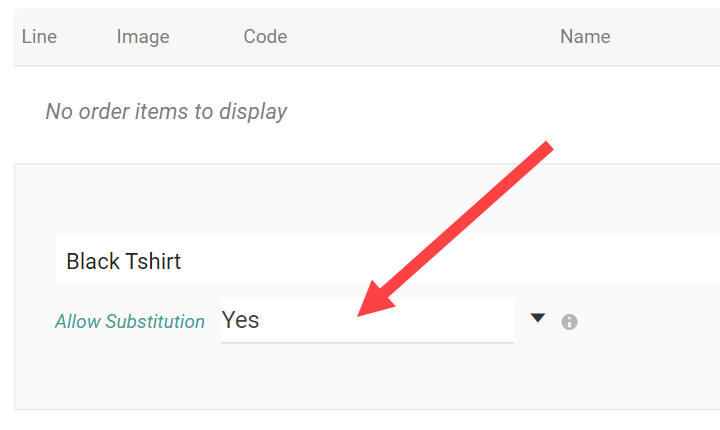
Headless Storefront Integration
When making calls to add cart, checkout, or order items, useoptIn and substituteProductCode (or substituteVariantCode if using a product variant as a substitute) in the item-level data to indicate the shopper’s selections. You can edit these preferences again with the Update Substitution Info endpoints for checkouts and orders, as long as the order is not yet Accepted.
optIn flag may be set to Yes, No, None, or OnlyAtFulfillment. If you want to perform substitutions regardless of the shopper’s preference, then set it to None.