

Explain with Kibo AI
Explain capabilities are read-only. They help you understand decisions or state the platform already has. Explain never changes data — to act on what you find, use the matching capability in Configure with Kibo AI.Configure with Kibo AI.Order Routing (Forward and Reverse)
Understand why an order routed the way it did, using the routing logs. This works for orders that have already been routed, across order types. You can ask Kibo AI to:- Retrieve and show the routing log for an order.
- Explain a routing decision and the criteria behind it.
- Show the location that was assigned and the alternatives that were considered.
- Identify routing errors and how they were resolved.
- Explain why an order was split or consolidated.
- Answer follow-up questions about the decision.
Note: This capability only explains routing; it does not change routing rules or re-route an order. It cannot explain an order that has not been routed yet.
- “Why was order
#100045, shipment #5 routed to location W-1?” - “Pull up the routing history for order 100045.”
- “What other locations were considered for order 98230, and why weren’t they picked?”
- “A customer is asking why her order 100880 arrived in two separate boxes. What happened?”
- “Order 99871 sat unfulfilled for two days. Were there any routing errors on it?”
- “When was the routing decision made for order 101245, and has it changed since the order was placed?”
Promotions
Review how your discounts and promotions are set up, and understand where they applied — all read-only. For discount performance numbers (redemptions, total discount given), Kibo AI uses Analytics; see Analyze with Kibo AI. You can ask Kibo AI to:- List discounts by status, such as which promotions are currently active or scheduled.
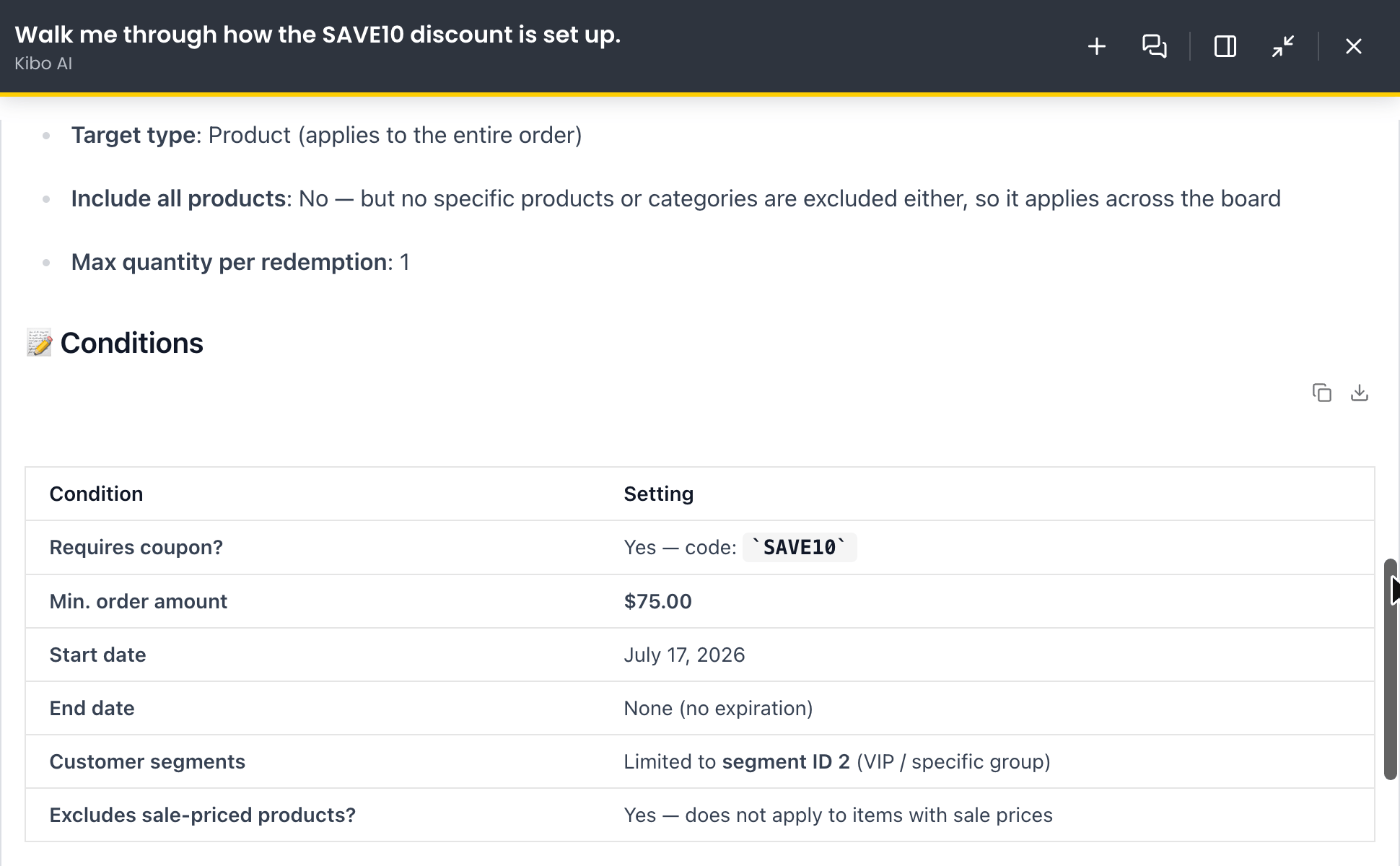
- Find a discount by name and summarize how it is configured — type, scope, targets, dates, and conditions.
- Check whether a discount requires a coupon code, and report the code and its conditions.
- List discounts that expire within a date range, or filter by amount type (percentage vs. fixed) or scope (order-level vs. line-item).
- Report which shipping methods a shipping promotion applies to.
- Explain why a specific product is discounted on a given order.
- Open the detail page for a named discount.
- “Which promotions are currently active on the site?”
- “Find the discount called ‘Summer Sale’ and walk me through how it’s set up.”
- “Look up the ‘Spring $10 off’ discount — does it require a coupon code?”
- “Show me all promotions that expire this month.”
- “List all percentage-off discounts that are scheduled but not live yet.”
- “Is the FREESHIP promo still live, and which shipping methods does it apply to?”
- “Why is the product ‘Cute Cat’ discounted on order #87?”
- “Take me to the detail page for the ‘Black Friday’ discount.”
Returns and Refunds
Look up returns information before you act on it — all read-only. You can ask Kibo AI to:- Summarize an order as a starting point for a return conversation.
- List which items on an order are still eligible to be returned.
- List the return reasons and appeasement reasons configured on your tenant.
- List the available return locations.
- Show an order’s shipment financial details, including prior refunds and credits.
- Confirm whether items on an order have already been returned or refunded.
- “Give me a summary of order 100234 — the customer wants to return something.”
- “Which items on order 100234 are still eligible to be returned?”
- “What return reasons can I choose from when I log a return?”
- “Before I decide the refund amount, show me the shipment financials for order 100587.”
- “Find order 100761 and tell me what has already been refunded on it so far.”
- “Has anything on order 100118 already been returned? I don’t want to double-process a return.”
Inventory
Understand current stock position and why an item is, or is not, available to sell — all read-only. You can ask Kibo AI to:- Explain on-hand, available, and allocated counts for a product at a location or across the network.
- Explain safety stock and floor buffers, and how they affect availability.
- Identify blocked assignment and explain why it is blocking availability.
- Show future and incoming inventory for a product.
- Explain the gap between Available-to-Sell (ATS) and Available-to-Promise (ATP).
- Explain why a specific item is or is not sellable at a specific location.
- “Why is the running shoe AirMax 270 showing as unavailable at our Denver store?”
- “What is the current Available to Sell (ATS) for the Aspen Backpack, the Trail Runner Jacket, and the Summit Tent at the Chicago Distribution Center? For each product, show On Hand, Allocated, and Safety Stock, and flag any that have zero or negative available.”
- “What is the current ATS for the Aspen Backpack across all locations in the West Coast Distribution Centers group? Break it down by location and give me the total ATS across the group.”
- “What is the Available to Promise (ATP) for the Aspen Backpack at the Chicago Distribution Center by the end of next month? Include current available plus any future inventory expected to arrive before that date.”
- “Show me the ATS for the Trail Runner Jacket across every location it’s stocked at. Which locations have sufficient stock, which are low, and which have zero available?”
- “For the Aspen Backpack at the Chicago Distribution Center, is the available quantity at or below the safety stock threshold? What’s the current safety stock value, and how close is actual available to hitting zero?”
Fulfillment
Understand shipment and fulfillment operations — all read-only. You can ask Kibo AI to:- Answer questions about shipments, grouped or filtered by location, location group, or fulfillment type.
- Explain fulfillment SLAs and whether they are being met.
- Identify late shipments and summarize why they are late.
- Resolve a location or location-group reference to its code as part of answering a question.
- “Which shipments from our West Coast location group are late this week?”
- “What’s our fulfillment SLA performance for Ship-to-Home orders this month?”
- “Show me all late shipments for the Chicago warehouse.”
- “How many shipments did location group East-DC-1 process yesterday?”