Inventory Concepts
Learn about inventory management fundamentals
Developer Reference
See the Reservation API documentation for programmatic access
Watch: Product Substitutions
See how to handle product substitutions during fulfillment
Watch: Managing Substitutions
Learn how to create and manage product substitution rules
Example
For example, you do not currently have a sufficient on-hand quantity to fulfill an item, but you know that the warehouse has received new stock but hasn’t had time to enter the amounts. By allowing fulfillment without sufficient on-hand quantities, you can still mark an item as fulfilled and Kibo will automatically adjust your on-hand quantity accordingly. The warehouse can then add the new on-hand quantities.Location Setting
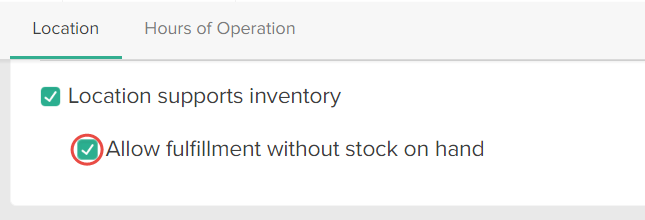
To override this default behavior for a specific location:- Go to Main > Supply > Locations.
- Select an applicable location.
- Under the Location section, enable Allow fulfillment without stock on hand: