

Catalog Concepts
Learn about product catalog architecture and management
Watch: Creating a Catalog
See how to create a new catalog in Kibo
Types of Catalogs
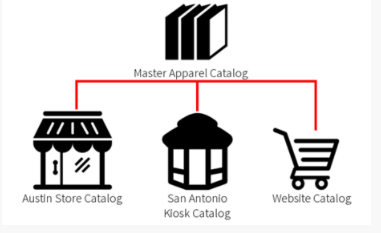
There are two types of catalogs:- Master Catalogs: Specific to your tenant and contain all the products in your child catalogs that belong to them, which enables you to share products across all child catalogs.
- Catalogs: Specific to each of your sites or storefronts and only contain the products in them that you wish to sell in their associated storefronts.
Catalog Example
Imagine that your business includes a brick and mortar store in Austin, a kiosk in San Antonio, and a website, and you sell the following products:
Given this situation, you would configure your catalogs in the following way:
Developer Reference
See the Admin Catalog API documentation for programmatic access