

How Order Validation Works
When an order is submitted, Kibo calls the Order Validator capability registered for the site and uses the returnedstatus to determine the order’s next state.
The OrderValidator capability type is scoped per-site and uses MultiplePerSite mode, meaning more than one Order Validator may be registered per site simultaneously. However, only the first validator resolved for the site is called for each order, so you should register a single Order Validator per site. Validators can be integrated via an external REST endpoint or a Kibo API Extension function. If no Order Validator capability is registered for a site, the platform automatically treats the order as Pass and proceeds to fulfillment without calling any external service. If Kibo cannot reach your validator endpoint (network error, timeout, etc.), the endpoint returns a non-2xx response, or the capability has no ValidateOrder operation URL configured, the platform defaults the result to Fail and the order goes to PendingReview.
Validator Types
ThevalidatorType field on an OrderValidationResult identifies the category of validation being performed.
"Fraud" is the only formally defined constant in the platform. The validatorType field is a free-form string, so custom implementations may use other values for internal tracking purposes, but the platform does not apply any special routing behavior based on custom type values.
Validator Statuses
Thestatus field on the OrderValidationResult determines what happens to the order after validation. Four statuses are recognized:
Order State Flow
The flow above applies to orders placed through checkout. In Order Management-only implementations, imported orders follow a different entry path: the import process creates the order directly in theValidated state, then evaluates the validation result supplied with the imported order. If that result is Review, Fail, or Error, the order transitions from Validated to PendingReview. As a result, an imported order that requires fraud review briefly appears as Validated before it reaches PendingReview. This is expected behavior.
For a description of each order state, see Order Statuses.
Add Order Validator
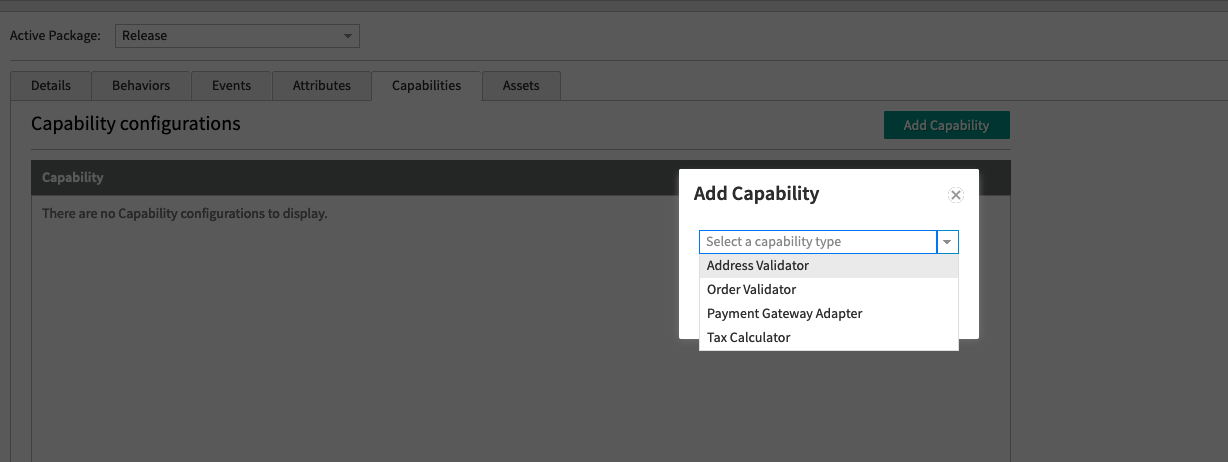
Follow the below steps to add an order validator:- In Dev Center, navigate to Develop > Applications > Packages > Capabilities.
- Click Add Capability.
- Search for Order Validator in the Add Capability modal and click Ok.
- Add a URL for a web service that you host externally, or an API Extension function if you want it hosted in Kibo.
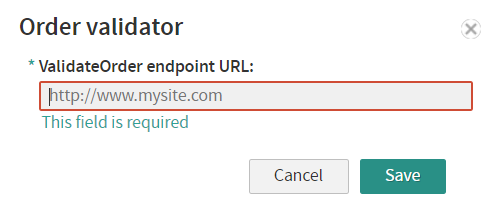
Order object via POST and returns an OrderValidationResult response.
OrderValidationResult Schema
Your validator endpoint must return anOrderValidationResult JSON object. The validationId and createdDate fields are required — requests missing either will be rejected by the platform.
API Endpoints
Add a validation result (for async validators that review orders after the fact):PUT /api/commerce/orders/{orderId}/validationresults — API reference
This endpoint records the result on the order for reporting and auditing. It does not change the order status. To move an order out of PendingReview, accept or cancel it.
Get validation results for an order:
GET /api/commerce/orders/{orderId}/validationresults — API reference
Building a Custom Validator
If you want to implement your own order validator rather than using a pre-built integration, follow this pattern.Step 1 — Create your endpoint
Your service must expose aPOST endpoint that:
- Accepts the full Kibo
Orderobject in the request body (JSON) - Returns an
OrderValidationResultJSON object - Responds with an HTTP
2xxstatus code on success
Step 2 — Register the capability in Dev Center
Register your endpoint URL as theValidateOrder operation URL on an Order Validator capability (see Add Order Validator above).
Step 3 — Return a valid result
Your response must always includevalidationId, createdDate, and status. The status value drives order routing (see Validator Statuses above).
Example — Pass:
Pre-Built Validator Integrations
Kount
Kount is a fraud detection service that:- Automatically sends submitted order data to Kount for screening (browser type, IP, device, billing info, etc.)
- Calculates a fraud score using your configured Kount rules
- Returns one of four Kount statuses:
Accept (A),Decline (D),Review (R),Escalate (E) - Maps results back to Kibo order status (
Accepted,PendingReview, orCancelled) - Supports a monetary threshold below which orders are not screened
- Supports the Kount Event Notification System (ENS) to sync status changes from Kount back to Kibo in near real-time
CyberSource Decision Manager
CyberSource Decision Manager is a fraud protection platform that:- Automatically sends submitted order data to Decision Manager for screening
- Applies your configured Decision Manager rules to produce a fraud score and validation result (
accept,review, orreject) - Maps results back to Kibo order status (
Accepted,PendingReview, orCancelled) - Supports scheduled order synchronization to pull status updates from Decision Manager back into Kibo
- Supports combined authorization and fraud validation in a single call
- Supports a monetary threshold below which orders are not screened
Platform Capability Type Reference
OrderValidator is one of four publicly available capability types the Kibo platform supports. For the full reference, see Application Capabilities.