This page is about Application Event Subscriptions, which allow your applications to receive notifications when events occur in Kibo. If you’re looking for information about commerce subscriptions (recurring orders), see Product Subscriptions Overview.
Configure Subscriptions
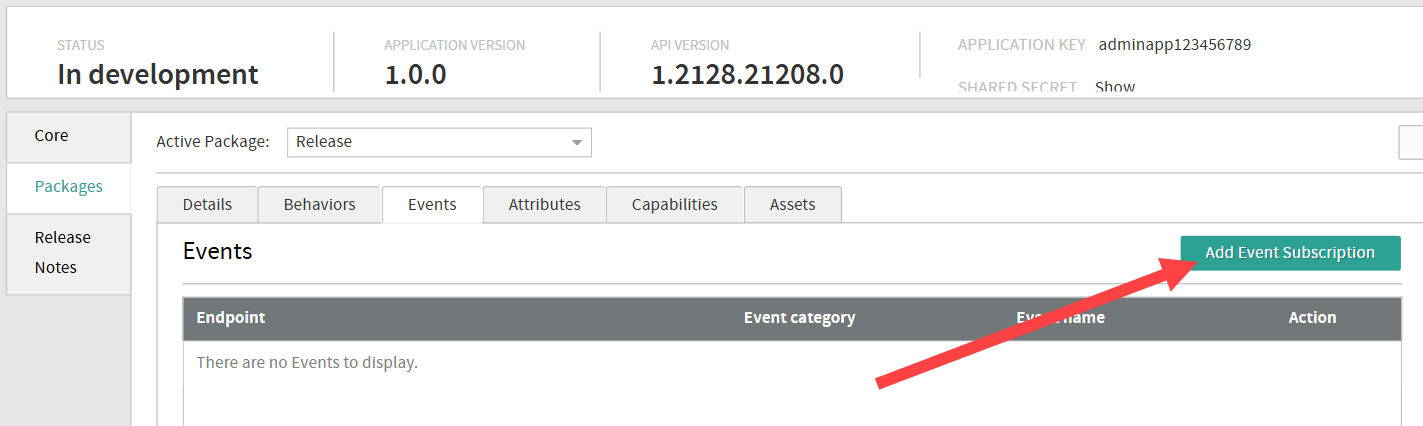
To configure an application to subscribe to events:- Go to Dev Center > Develop > Applications.
- Edit an app in the table using the actions menu on the right
- Go to Packages > Events.
- Click Add Event Subscription.
- Enter the HTTPS Endpoint that you want Kibo to send the notification to. This can be up to a maximum of 250 characters.
- Select an Event Category.
- Check the specific Event(s) you want to subscribe to. The list of selected events across all categories will be displayed in the far right.
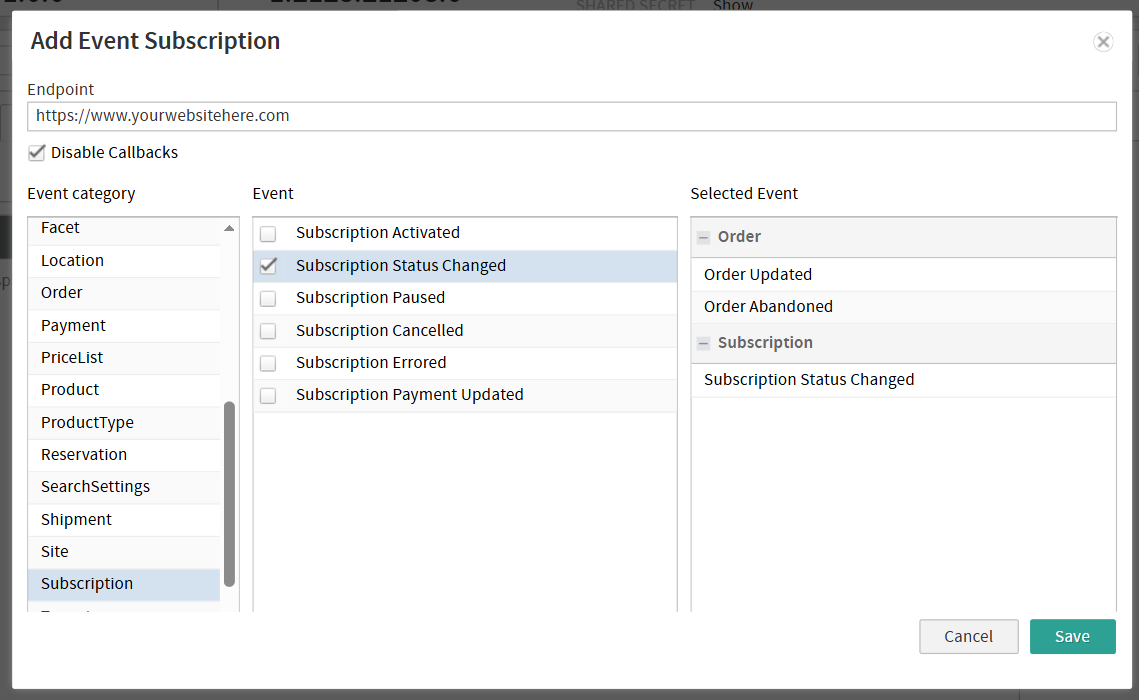
- Click Save.
Best Practices
There are several things to keep in mind regarding the endpoint you use to accept events, as well as knowing how Kibo handles notification failures.Duplicate Prevention
Kibo expects a 200 OK success response to be returned from within 20 seconds of sending the notification. If no success response is received during that time or if an HTTP status error message is received, the notification will be placed in a queue to be resent every minute or so (the actual timing will vary based on the size of the queue). The notification will continue to be resent until either the success response is received or the notification expires after 14 days. Due to this process, the endpoint may sometimes receive duplicates of notifications. To avoid saturation with a large number of duplicates, it is recommended to configure the endpoint with duplicate prevention.Out-Of-Order Events
It is sometimes possible for notifications of different topics to be received out of order. While Kibo should always send notifications of the same topic in the order of the process flow, notifications from different topic groups are not guaranteed to be sent in any particular order. For instance, if a shipment event triggers both a Shipment Status and a Shipment Workflow notification, it is not known which will be received first by the endpoint. Thus, it is also advised to configure the endpoint to be capable of receiving out-of-order notifications to avoid any problems that may be caused by expecting these different notifications in a strict order.Retry Behavior
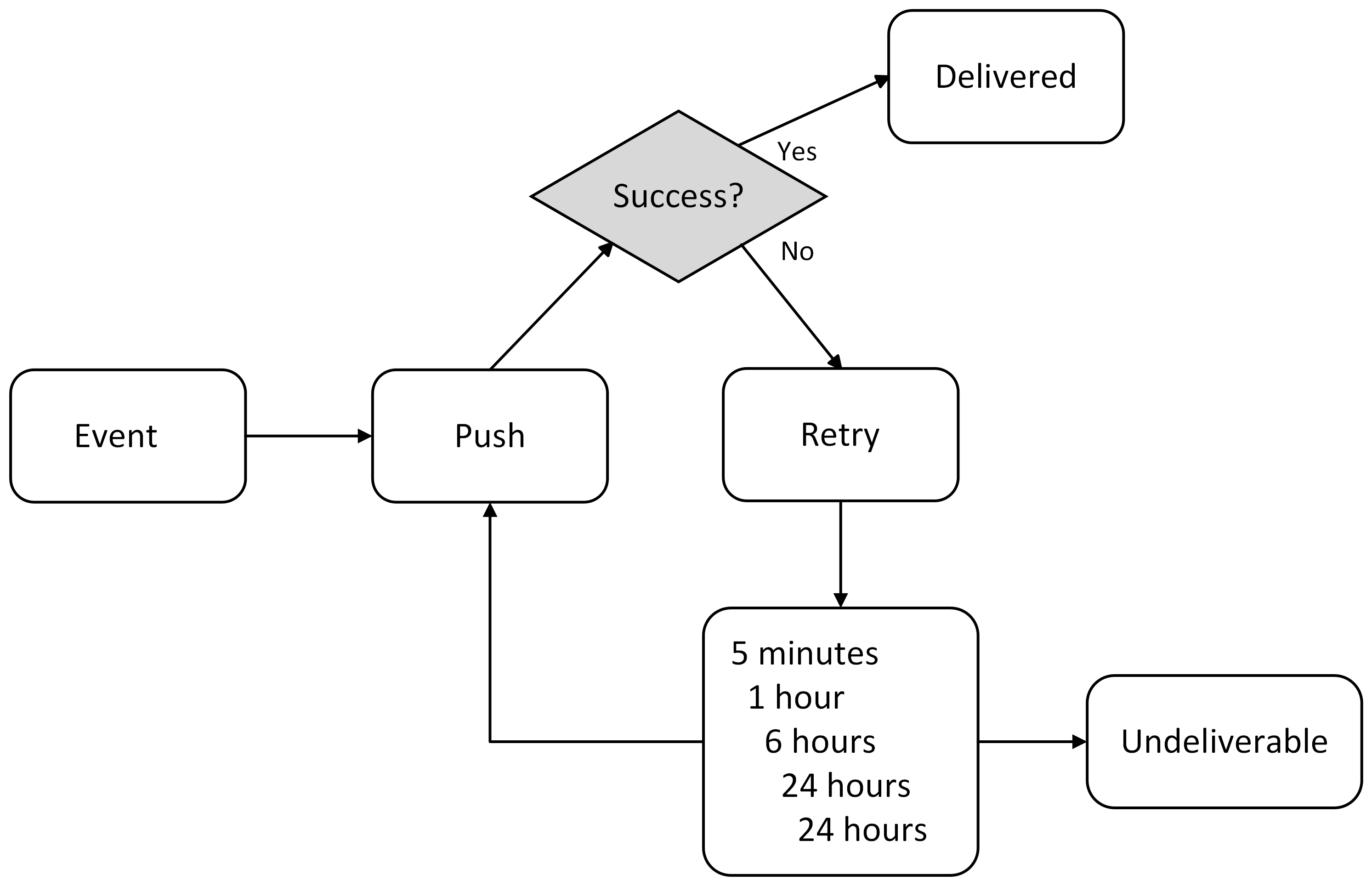
It is also important to know that Kibo uses backoff behavior when re-queueing failed notifications for production tenants. If there is a server outage or other issue preventing notifications from successfully sending, the system will retry multiple times. This means that if orders are placed during a short-term outage that lasts a few hours, the notifications for those orders will eventually come through once the outage is resolved. The first time the notification fails, there will be a 5 minute delay before attempting to send it again. If it continues to fail, the amount of time between attempts will increase to 1 hour, 6 hours, 24 hours, and then make a final attempt after another 24 hours. If it still cannot go through, the notification will not be tried again. Note that this behavior is not applicable for sandbox tenants. Retries do not occur for sandboxes, in order to reduce server activity and improve the event performance in production environments.Push Subscriptions
A subscription to an event triggers the push service that a tenant or external application uses to receive immediate notifications when actions associated with the events occur. Authorized applications can subscribe to receive notifications when the associated event occurs for the sites the application can access. When a subscribed event occurs in a tenant or site the subscribing application can access, the eventing system creates a notification and relays it to the endpoint configured for the external application. For example, if you subscribed to the product. created event for your application, the application triggers a push notification every time a new product is created in the associated tenant store. The push notification message body is sent as an HTTP POST, commonly referred to as a “webhook”. The webhook POST body content includes limited event payload information that the subscriber uses to call the API and retrieve additional information about the event. For example, if an application receives a notification that a new order was created, the application uses the data in the notification response to call the API and views the details of the newly created order. The entityId value returned in the response payload typically represents the ID of the object for the application to retrieve. To version events, maintain security, and limit payload size, the event payload does not return the object itself, such as an order or product definition. If the event notification delivery service fails for a specific subscriber for 24 hours, all notifications for the subscriber are disabled. To re-enable push notifications, the subscriber must log in to Dev Center and verify the event configuration.Notification Format
The response header includes the API context information. As documented in the Event Notifications guide, a standard notification sent by an HTTP POST webhook contains the following information:- The
eventIDis a unique identifier for the event. - The
extendedPropertiesare provided only by shipment topic notifications, this is detailed metadata such as the new and old statuses that a shipment moved between. This is a list of key-value, string pairs, and the key varies depending on the information provided. See the examples for more information. - The
topicis a type of event that occurred, such as product.created. - The
entityIDidentifies the object for which the action occurred, such as a product code or order ID or shipment number. - The
timestampis a date-time at which the event occurred. - The
correlationIDis an identifier used by Kibo to track API requests across different services in the data logs. - The
isTestis a boolean indicator that identifies whether the event was sent as part of a test.
- 50 unique eventId values for each update performed
- 1 topic value, which is product.updated
- 1 entityId value, which represents the product code of the product that was updated
- 50 timestamps that represent when the event occurred
- 50 correlationId values for each API request used to update the product
Push Notification Delivery
When an application subscribes to an event, Kibo services send push notifications to the configured API endpoint. When an event push notification delivery fails, the redelivery service attempts to deliver the notification for 24 consecutive hours according to the defined retry schedule.