

Google Feed Process
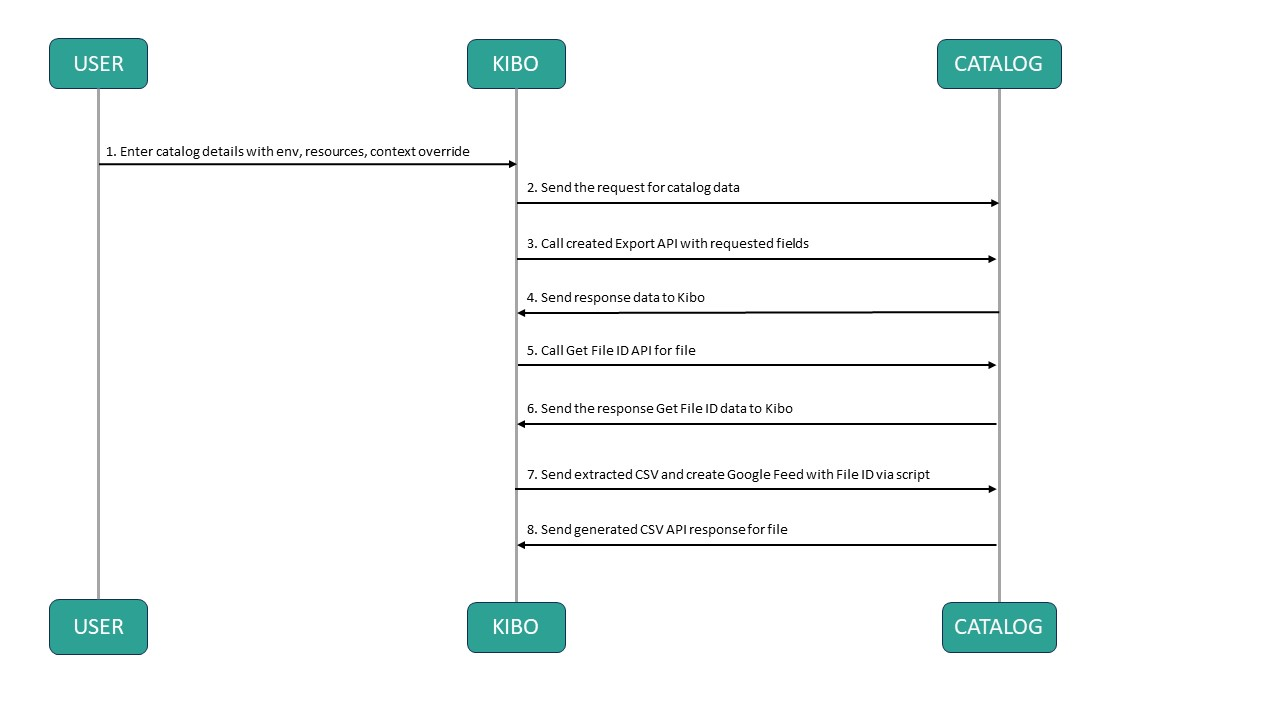
An automated system interacts with the catalog system to retrieve catalog data and perform various actions such as exporting and generating CSV files. The following steps outline the process:- User enters the catalog details, including environmental parameters, resource specifications, and context overrides, to initiate the process.
- Kibo sends a request to the catalog system, seeking catalog data.
- The Catalog system receives the request and processes it by invoking the Create Export API with the requested fields. This API is responsible for extracting the relevant data for the catalog.
- The Catalog system generates the catalog data and sends the response back to Kibo.
- Upon receiving the response from the Catalog system, Kibo proceeds by using the Get File ID API to retrieve the File ID associated with the generated catalog data.
- The Catalog system responds to Kibo, providing the necessary data related to the obtained File ID.
- Kibo utilizes this information and sends a request to the Catalog system instructing it to extract the CSV file and create a Google Feed using the obtained File ID. This step involves invoking a script.
- The Catalog system processes the request and generates the CSV file accordingly. It sends the response, containing the necessary details about the created file, back to Kibo.
Example Payload
Here is an example payload for exporting data through Google Feed.id which is useful to poll the status using the GET endpoint.