The Import/Export tool can be used to upload data through the API as well as through the user interface in the KCCP Admin. Any bulk data load into KCCP should use the Import/Export APIs if the data resource is supported. These APIs are used internally by the import/export application, so you can use the UI to export files which can then be modified and imported by the API. Similarly, you can create an export via API and then import it in the application.

Understanding Import/Export in Kibo

In Kibo, the Import/Export domain is the primary tool for asynchronous, bulk data management. Unlike standard REST API calls that create or update a single record in real-time, the Import/Export system is designed to handle thousands or even millions of records at once from a file (like a CSV). What makes Kibo’s approach different is its job-based, asynchronous workflow. You don’t just “upload data”; you follow a distinct, multi-step process:
  1. Upload a file to a secure, temporary storage location in Kibo.
  2. Create an Import Job, telling Kibo to process that file.
  3. Monitor the job’s status as it runs in the background.
This design is robust and scalable, preventing API timeouts and ensuring that large data operations don’t impact storefront performance. It’s the standard Kibo pattern for data migration, bulk updates, and integrating with external systems that work with flat files.

How This Domain Fits Into Kibo

The Import/Export domain is a utility that supports almost every other part of the Kibo platform. It’s the backbone for large-scale data operations.
  • Catalog: Used to import new products, update pricing for thousands of SKUs, or add inventory information from a supplier’s feed.
  • Customers: Used for migrating customer lists from a previous e-commerce platform.

How It Works

The import and export APIs use a series of API calls to coordinate the process of getting data in and out of Kibo. File upload and download is handled separately from the creation of the jobs themselves. The API calls for the jobs are asynchronous — none of the API calls will block for the jobs to complete, you must poll for the results. The system is built around a few core concepts:
  • File: A data file (usually CSV or ZIP containing CSVs) that you upload to Kibo’s temporary storage. The key piece of information you get back after an upload is the fileId.
  • ImportJob / ExportJob: A record that tracks the status of your bulk data operation. It has a unique id and a status field (e.g., Pending, Processing, Succeeded, Failed). This is the central object you’ll interact with to monitor your operation.
  • ImportSettings / ExportSettings: A JSON object you provide when creating a job. It tells Kibo what type of data you’re working with (e.g., Products, Orders), where to find the input file (for imports), and other configuration details.

API Workflow

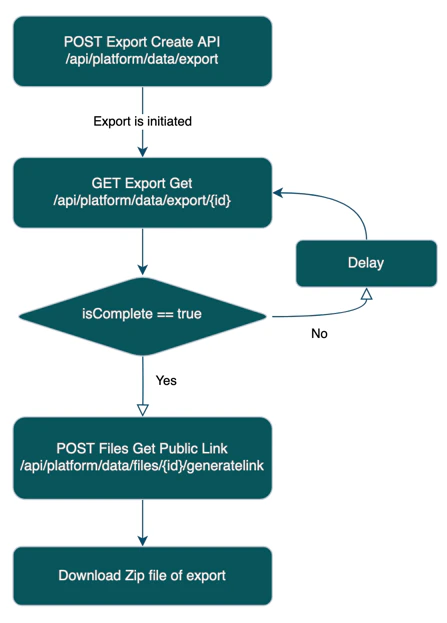
The following diagrams show the general process of the series of API calls needed for both export and import:

Export Process

The export process is as follows:
  1. Form a JSON payload describing the export that you want to perform, then POST it to the Export Create API.
  2. The Export Create API returns an ID which is used to track the export process.
  3. Poll the Export Get API until you see that the isComplete field is true. (typically every few seconds) When it is true, inside the files key in the JSON there will be an object where "fileType": "export", then take that ID.
  4. Use the POST Files Get Public Link API with that ID, which gives you the contents of the export.

Import Process
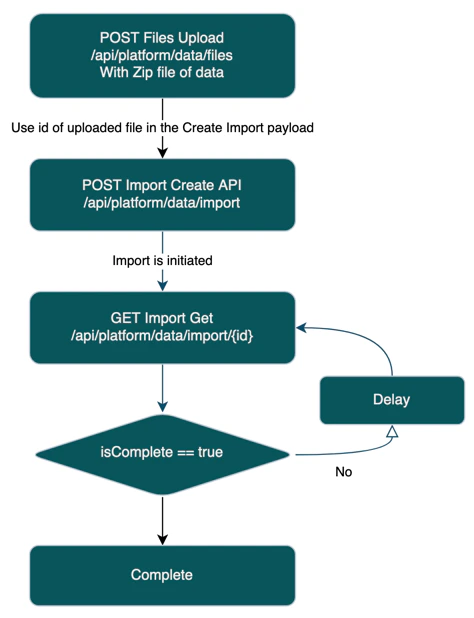
The import process is as follows:
  1. Create a ZIP file containing the CSV files you want to import. Then POST it to the Files Upload API. This returns an ID.
  2. Call the Import Create API, referencing the file that you uploaded in the previous step. You will then receive an ID that you can use to track the import.
  3. Poll the Import Get API until you see that the isComplete field is true. Once this field returns as true, then the import is complete.
Authentication Pattern: The Kibo SDK manages authentication for you. You create a single Configuration object containing your credentials (Client ID, Shared Secret, etc.). This object is then passed to the constructor of specific API clients (e.g., new ImportExportApi(configuration)). Request/Response Structure: When you request the status of a job, you get back the complete job object. When requesting a list of jobs, the response is paginated with the data in an items array.
// Actual response schema for GET /platform/data/import/:id
{
    "name": "Products Import",
    "id": "b16e3e69-b002-4274-a24e-5daf8eb4377d",
    "requester": "3264d539c46642b38f2abcbd515adcbf",
    "domain": "catalog",
    "resources": [
        {
            "format": "Legacy",
            "resource": "Products",
            "deleteOmitted": false,
            "status": "complete",
            "isComplete": true,
            "stateDetails": "Duration: 0.0498721 seconds",
            "allowSyscalcValueUpdates": false
        }
    ],
    "isComplete": true,
    "auditInfo": {
        "updateDate": "2025-10-03T18:15:37.734Z",
        "createDate": "2025-10-03T18:15:37.051Z"
    },
    "tenant": 31271,
    "status": "complete",
    "files": [
        {
            "id": "e5d7cc84-d0e7-455b-be8a-1a0276b19382",
            "locationType": "internal",
            "fileName": "Products.zip",
            "fileType": "import"
        },
        {
            "id": "a4a16338-c5a9-4c1a-a9f1-a980c7188a61",
            "locationType": "internal",
            "fileName": "products_import_log.csv",
            "fileType": "log"
        }
    ]
}
Error Handling: API call failures (like providing a bad job ID) will throw a standard structured error. However, a failed job is different. The API call to getImportJob will succeed (HTTP 200), but the status field in the response will be Failed. You must check this field to determine the outcome of the operation.

A First Example in Postman

First, make sure that you have the autogenerated Postman collection set up. See Getting Started with your API for details.
  1. POST this payload to the Export Create API:
    {
      "name": "Export",
      "domain": "catalog",
      "resources": [
        {
          "resource": "Products",
          "format": "legacy"
        }
      ],
      "format": "legacy"
    }
    
  2. Call the Export List API to see all of the recent exports. Refresh until isComplete is true. You will receive a result like this:
    [
        {
            "name": "Export",
            "id": "12f69402-e8ea-44d4-b2b5-b2d5fe5e9f27",
            "requester": "9154becb518b42ffb5d0a82519abd75a",
            "tenant": 39668,
            "domain": "catalog",
            "resources": [
                {
                    "resource": "Products",
                    "format": "legacy",
                    "status": "complete",
                    "isComplete": true,
                    "stateDetails": "Duration: 0.0390942 seconds"
                }
            ],
            "format": "legacy",
            "status": "complete",
            "isComplete": true,
            "files": [
                {
                    "id": "cbcfbbfb-bc4c-4132-ab0a-8a6fe1e2a9cb",
                    "locationType": "internal",
                    "fileName": "catalog_export.zip",
                    "fileType": "export"
                }
            ],
            "auditInfo": {
                "updateDate": "2023-09-20T14:26:13.887Z",
                "createDate": "2023-09-20T14:26:11.327Z"
            }
        }
    ]
    
  3. Then call Files Get Public Link on the ID of the export, in this case cbcfbbfb-bc4c-4132-ab0a-8a6fe1e2a9cb. This will return a pre-signed URL which you can paste in a web browser to retrieve the product data of the tenant that you just exported.

Catalog Import/Export

Supported Resources

The catalog domain supports importing and exporting the following resources:
  • Attributes
  • AttributeValues
  • ProductTypes
  • ProductTypeAttributes
  • ProductTypeAttributeValues
  • Categories
  • CategoryImages
  • SortDefinitions
  • ProductRankings
  • Products
  • ProductPropertyLocale
  • ProductCatalog
  • ProductBundles
  • ProductOptions
  • ProductExtras
  • ProductOptionsLocale
  • ProductImages
  • LocationTypes
  • Locations
  • LocationInventory
  • Images
  • LocationGroup
  • LocationGroupConfiguration
  • LocationGroupBoxTypeConfig
  • LocationGroupCarrierConfig
  • Pricelists
  • PricelistEntries
  • PricelistEntryPrices
  • PricelistEntryExtras

CSV File Format

The format of the CSV files follows the standard conventions for CSV file formats.
  • The file encoding should be UTF-8.
  • Use double quotes to wrap single quotes.
  • Quotes capture new lines.
  • To represent multiple values in a single field, separate by carriage returns (0xD in ASCII).
Be careful when opening up CSV files in Excel. Excel can corrupt data (such as large numbers being converted to scientific notation). Best practice would be to open CSV in raw text format or if opened in Excel, do not save the document. Please check:
  • Accidental removal of leading zeros
  • Numbers that can be represented by scientific notation

deleteOmitted Field

The resources field of the Create Import API contains a field deleteOmitted. By default, the import process will not delete any Kibo data if that data does not exist in the import. So, for example, if your import file contains only product 1001, and you already have products 1001 and 1002, 1002 will remain unchanged. The deleteOmitted flag lets you specify that you have a full data import, and to wipe any data that does not exist as part of the CSV file for that resource. This lets you specify full updates.

Removing Product Properties

By default, if you leave a product property blank, it will not clear the property in KCCP to prevent deletion of data. If you really need to clear a product property, use the ~delete~ sentinel as the value of the property to remove the property in the product in KCCP.

Exporting Optional Fields

Note that by default, all fields of resource are not exported. So for example, there is a Description field on the Attribute resource, but it is not exported by default, you must include it in the fields array. The full list of optional fields is specified in the Field List JSON below.

Using Context Override

You can use the contextOverride field in an import to specify which catalogs or sites the data should be uploaded to:
"contextOverride": {
      "locale": "en-US",
      "currency": "USD",
      "masterCatalog": 2,
      "catalog": 5,
      "site": 54321
}
Note that this field is required for ProductImages upload.

End of Central Directory Issues

If you ever receive errors about “End of Central directory”, this is most likely related to the file that was uploaded. It must be of zip file format, even if there is a single file. So for example, if you only want to update the Products resource, you need to take your file products.csv, zip it, and then upload the resulting zip file. Example file structure for a single resource:
catalog.zip
  - products.csv

Product Images

In order to generate a ProductImages import file, it is recommended that as part of the image import process, a mapping is generated between the cms-id generated from upload and the product code it should apply to. This association can be used to generate an import CSV. productimages.zip

Catalog Field List Specification

The following is a full JSON listing of the fields, which can be used for reference for what resources are available, and for those resources, what fields are required and optional.
{
  "Attributes": {
    "format": "Legacy",
    "resource": "Attributes",
    "deleteOmitted": false,
    "configuration": {},
    "fields": {
      "required": [
        "MasterCatalogName",
        "AttributeCode",
        "AttributeName",
        "DataType",
        "InputType",
        "IsExtra",
        "IsOption",
        "IsProperty",
        "Namespace",
        "SearchableInStorefront",
        "SearchableInAdmin",
        "SearchDisplayValue"
      ],
      "optional": [
        "Description"
      ]
    }
  },
  "AttributeValues": {
    "format": "Legacy",
    "resource": "AttributeValues",
    "deleteOmitted": false,
    "configuration": {},
    "fields": {
      "required": [
        "MasterCatalogName",
        "AttributeCode",
        "DataType",
        "Namespace",
        "Value",
        "Name",
        "DisplayOrder"
      ],
      "optional": []
    }
  },
  "ProductTypes": {
    "format": "Legacy",
    "resource": "ProductTypes",
    "deleteOmitted": false,
    "configuration": {},
    "fields": {
      "required": [
        "MasterCatalogName",
        "ProductType",
        "Standard",
        "Configurable",
        "Bundle",
        "Component"
      ],
      "optional": [
        "GoodsType"
      ]
    }
  },
  "ProductTypeAttributes": {
    "format": "Legacy",
    "resource": "ProductTypeAttributes",
    "deleteOmitted": false,
    "configuration": {},
    "fields": {
      "required": [
        "MasterCatalogName",
        "ProductType",
        "AttributeCode",
        "Type",
        "Order"
      ],
      "optional": [
        "IsRequiredByAdmin",
        "IsHiddenProperty",
        "IsMultiValueProperty"
      ]
    }
  },
  "ProductTypeAttributeValues": {
    "format": "Legacy",
    "resource": "ProductTypeAttributeValues",
    "deleteOmitted": false,
    "configuration": {},
    "fields": {
      "required": [
        "MasterCatalogName",
        "ProductType",
        "AttributeCode",
        "Type",
        "VocabularyValue"
      ],
      "optional": []
    }
  },
  "Categories": {
    "format": "Legacy",
    "resource": "Categories",
    "deleteOmitted": false,
    "configuration": {},
    "fields": {
      "required": [
        "CatalogName",
        "CategoryCode",
        "CategoryName",
        "CategoryType"
      ],
      "optional": [
        "CategoryId",
        "ParentCategoryCode",
        "Expression",
        "IsDisplayed",
        "IsActive",
        "Sequence",
        "MetaTagTitle",
        "MetaTagDescription",
        "PageTitle",
        "CategoryDescription",
        "MetaTagKeyWords",
        "SEOUrl"
      ]
    }
  },
  "CategoryImages": {
    "format": "Legacy",
    "resource": "CategoryImages",
    "deleteOmitted": false,
    "configuration": {},
    "fields": {
      "required": [
        "CatalogName",
        "CategoryCode",
        "ImageName"
      ],
      "optional": [
        "LocaleCode",
        "AltText",
        "ImageLabel",
        "Order"
      ]
    }
  },
  "SortDefinitions": {
    "format": "Legacy",
    "resource": "SortDefinitions",
    "deleteOmitted": false,
    "configuration": {},
    "fields": {
      "required": [
        "CatalogName",
        "CategoryCode",
        "ProductSortDefinitionId",
        "Name"
      ],
      "optional": [
        "StartDate",
        "EndDate",
        "PrimaryAttribute",
        "PrimaryDirection",
        "SecondaryAttribute",
        "SecondaryDirection"
      ]
    }
  },
  "ProductRankings": {
    "format": "Legacy",
    "resource": "ProductRankings",
    "deleteOmitted": false,
    "configuration": {},
    "fields": {
      "required": [
        "CatalogName",
        "CategoryCode",
        "SortDefinitionId",
        "ProductCode",
        "Position"
      ],
      "optional": [
        "Locked"
      ]
    }
  },
  "Products": {
    "format": "Legacy",
    "resource": "Products",
    "deleteOmitted": false,
    "configuration": {},
    "fields": {
      "required": [
        "MasterCatalogName",
        "ProductCode",
        "ProductType",
        "ProductUsage",
        "ProductName",
        "Price",
        "VariationPricingMethod",
        "PackageWeight",
        "PackageLength",
        "PackageWidth",
        "PackageHeight"
      ],
      "optional": [
        "SalePrice",
        "Cost",
        "MSRP",
        "MAP",
        "MAPEffectiveStartDate",
        "MAPEffectiveEndDate",
        "RestrictDiscount",
        "RestrictDiscountStartDate",
        "RestrictDiscountEndDate",
        "ManufacturerPartNumber",
        "UPC",
        "DistributorPartNumber",
        "IsTaxable",
        "ManageStock",
        "IsPackagedStandAlone",
        "OutOfStockBehavior",
        "FulfillmentTypes",
        "ProductShortDescription",
        "ContentFullProductDescription",
        "ContentFullProductDescription2",
        "ContentFullProductDescription3",
        "SEOMetaTagTitle",
        "SEOMetaTagDescription",
        "SEOMetaTagKeywords",
        "SEOFriendlyURL"
      ]
    }
  },
  "ProductPropertyLocale": {
    "format": "Legacy",
    "resource": "ProductPropertyLocale",
    "deleteOmitted": false,
    "configuration": {},
    "fields": {
      "required": [
        "MasterCatalogName",
        "ProductCode",
        "AttributeName"
      ],
      "optional": [
        "Value"
      ]
    }
  },
  "ProductCatalog": {
    "format": "Legacy",
    "resource": "ProductCatalog",
    "deleteOmitted": false,
    "configuration": {},
    "fields": {
      "required": [
        "MasterCatalogName",
        "CatalogName",
        "ProductCode",
        "IsActive"
      ],
      "optional": [
        "CategoryCodes",
        "ProductName",
        "Price",
        "SalePrice",
        "MSRP",
        "MAP",
        "MAPEffectiveStartDate",
        "MAPEffectiveEndDate",
        "ProductShortDescription",
        "ContentFullProductDescription",
        "SEOMetaTagTitle",
        "SEOMetaTagDescription",
        "SEOMetaTagKeywords",
        "SEOFriendlyURL"
      ]
    }
  },
  "ProductBundles": {
    "format": "Legacy",
    "resource": "ProductBundles",
    "deleteOmitted": false,
    "configuration": {},
    "fields": {
      "required": [
        "MasterCatalogName",
        "ProductCode",
        "Code",
        "Quantity"
      ],
      "optional": [
        "Name"
      ]
    }
  },
  "ProductOptions": {
    "format": "Legacy",
    "resource": "ProductOptions",
    "deleteOmitted": false,
    "configuration": {},
    "fields": {
      "required": [
        "MasterCatalogName",
        "ProductCode",
        "VariationCode",
        "Enabled"
      ],
      "optional": [
        "ExtraPrice",
        "FixedListPrice",
        "FixedSalePrice",
        "FixedMSRP",
        "DeltaMSRP",
        "FixedWeight",
        "ExtraWeight",
        "ExtraCost",
        "FulfillmentTypes",
        "MfgPartNo",
        "UPC",
        "DistPartNo"
      ]
    }
  },
  "ProductExtras": {
    "format": "Legacy",
    "resource": "ProductExtras",
    "deleteOmitted": false,
    "configuration": {},
    "fields": {
      "required": [
        "MasterCatalogName",
        "ProductCode",
        "AttributeCode",
        "Value"
      ],
      "optional": [
        "RequiredByShopper",
        "Defaulted",
        "MultiSelect",
        "Quantity"
      ]
    }
  },
  "ProductOptionsLocale": {
    "format": "Legacy",
    "resource": "ProductOptionsLocale",
    "deleteOmitted": false,
    "configuration": {},
    "fields": {
      "required": [
        "MasterCatalogName",
        "ProductCode",
        "VariationCode"
      ],
      "optional": [
        "Currency",
        "Extra Price",
        "Extra MSRP",
        "Extra Credit Value",
        "Fixed List Price",
        "Fixed Sale Price"
      ]
    }
  },
  "ProductImages": {
    "format": "Legacy",
    "resource": "ProductImages",
    "deleteOmitted": false,
    "configuration": {},
    "fields": {
      "required": [
        "MasterCatalogName",
        "ProductCode",
        "Name"
      ],
      "optional": [
        "Sequence",
        "AltText",
        "ImageLabel",
        "VideoUrl"
      ]
    }
  },
  "LocationTypes": {
    "format": "Legacy",
    "resource": "LocationTypes",
    "deleteOmitted": false,
    "configuration": {},
    "fields": {
      "required": [
        "LocationTypeCode",
        "LocationTypeName"
      ],
      "optional": []
    }
  },
  "Locations": {
    "format": "Legacy",
    "resource": "Locations",
    "deleteOmitted": false,
    "configuration": {},
    "fields": {
      "required": [
        "LocationTypeCodes",
        "LocationCode",
        "Name",
        "IsDisabled",
        "Address1",
        "AddressType",
        "CityOrTown",
        "CountryCode",
        "PostalOrZipCode",
        "StateOrProvince",
        "Shipping Contact CompanyOrOrganization",
        "Shipping Contact PhoneNumber",
        "SupportsInventory",
        "AllowFulfillmentWithNoStock",
        "Latitude",
        "Longitude",
        "Express",
        "TransferEnabled",
        "IncludeInLocationExport",
        "IncludeInInventoryAggregrate",
        "WarehouseEnabled"
      ],
      "optional": [
        "Description",
        "FulfillmentTypes",
        "Address2",
        "Address3",
        "Address4",
        "Shipping Contact Email",
        "Shipping Contact FirstName",
        "Shipping Contact LastNameOrSurname",
        "Shipping Contact MiddleNameOrInitial",
        "Fax",
        "Phone",
        "Notes",
        "Tags",
        "Hours of operation - Sunday",
        "Hours of operation - Monday",
        "Hours of operation - Tuesday",
        "Hours of operation - Wednesday",
        "Hours of operation - Thursday",
        "Hours of operation - Friday",
        "Hours of operation - Saturday",
        "LastModifiedDate"
      ]
    }
  },
  "LocationInventory": {
    "format": "Legacy",
    "resource": "LocationInventory",
    "deleteOmitted": false,
    "configuration": {},
    "fields": {
      "required": [
        "MasterCatalogName",
        "ProductCode",
        "LocationCode"
      ],
      "optional": [
        "ParentProductCode",
        "StockOnHand",
        "StockUpdateOption",
        "StockOnBackOrder",
        "StockAvailable"
      ]
    }
  },
  "Images": {
    "format": "Legacy",
    "resource": "Images",
    "deleteOmitted": false,
    "configuration": {},
    "fields": {
      "required": [
        "MasterCatalogName",
        "ImageUrl"
      ],
      "optional": [
        "Name",
        "Id",
        "Tags"
      ]
    }
  },
  "LocationGroup": {
    "format": "Legacy",
    "resource": "LocationGroup",
    "deleteOmitted": false,
    "configuration": {},
    "fields": {
      "required": [
        "LocationGroupCode",
        "Name",
        "LocationCodes",
        "SiteIds"
      ],
      "optional": [
        "LastModifiedDate"
      ]
    }
  },
  "LocationGroupConfiguration": {
    "format": "Legacy",
    "resource": "LocationGroupConfiguration",
    "deleteOmitted": false,
    "configuration": {},
    "fields": {
      "required": [
        "LocationGroupCode",
        "SiteId",
        "CustomerFailedToPickupAfterAction",
        "CustomerFailedToPickupDeadline",
        "SendCustomerPickupReminder",
        "DefaultCarrier",
        "PrintReturnLabel",
        "DefaultPrinterType"
      ],
      "optional": [
        "LastModifiedDate"
      ]
    }
  },
  "LocationGroupBoxTypeConfig": {
    "format": "Legacy",
    "resource": "LocationGroupBoxTypeConfig",
    "deleteOmitted": false,
    "configuration": {},
    "fields": {
      "required": [
        "LocationGroupCode",
        "SiteId",
        "Name",
        "Height",
        "Length",
        "Width"
      ],
      "optional": []
    }
  },
  "LocationGroupCarrierConfig": {
    "format": "Legacy",
    "resource": "LocationGroupCarrierConfig",
    "deleteOmitted": false,
    "configuration": {},
    "fields": {
      "required": [
        "LocationGroupCode",
        "SiteId",
        "CarrierType",
        "IsEnabled",
        "EnableSmartPost",
        "Express1DayDefault",
        "Express2DayDefault",
        "Express3DayDefault",
        "ReturnLabelShippingMethod",
        "ShippingMethods",
        "StandardDefault"
      ],
      "optional": []
    }
  },
  "Pricelists": {
    "format": "Legacy",
    "resource": "Pricelists",
    "deleteOmitted": false,
    "configuration": {},
    "fields": {
      "required": [
        "MasterCatalogName",
        "PriceListName",
        "PriceListCode",
        "Enabled",
        "ValidForAllSites",
        "ValidSites"
      ],
      "optional": [
        "ParentPriceListCode",
        "Description",
        "FilteredInStorefront",
        "IndexedSites",
        "DefaultForSites",
        "MappedCustomerSegments",
        "Resolvable",
        "ResolutionRank",
        "CreatedBy"
      ]
    }
  },
  "PricelistEntries": {
    "format": "Legacy",
    "resource": "PricelistEntries",
    "deleteOmitted": false,
    "configuration": {},
    "fields": {
      "required": [
        "MasterCatalogName",
        "PriceListCode",
        "ProductCode",
        "CurrencyCode",
        "StartDate",
        "IsVariation"
      ],
      "optional": [
        "ProductName",
        "OptionSummary",
        "EndDate",
        "PriceListEntryMode",
        "MsrpMode",
        "Msrp",
        "CostMode",
        "Cost",
        "MapMode",
        "Map",
        "MapStartDate",
        "MapEndDate",
        "DiscountsRestricted",
        "DiscountsRestrictedMode",
        "DiscountsRestrictedStartDate",
        "DiscountsRestrictedEndDate",
        "CreatedBy",
        "PriceListEntryTypeCode"
      ]
    }
  },
  "PricelistEntryPrices": {
    "format": "Legacy",
    "resource": "PricelistEntryPrices",
    "deleteOmitted": false,
    "configuration": {},
    "fields": {
      "required": [
        "MasterCatalogName",
        "PriceListCode",
        "ProductCode",
        "CurrencyCode",
        "StartDate",
        "MinimumQuantity"
      ],
      "optional": [
        "ListPriceMode",
        "SalePriceMode",
        "ListPrice",
        "SalePrice"
      ]
    }
  },
  "PricelistEntryExtras": {
    "format": "Legacy",
    "resource": "PricelistEntryExtras",
    "deleteOmitted": false,
    "configuration": {},
    "fields": {
      "required": [
        "MasterCatalogName",
        "PriceListCode",
        "ProductCode",
        "CurrencyCode",
        "StartDate",
        "AttributeFQN",
        "Value",
        "Price"
      ],
      "optional": [
        "DisplayValue",
        "AttributeCode"
      ]
    }
  }
}

Sample Data

sample.zip

Customer Import/Export

Customer data can be imported and exported using the Import/Export API with "domain": "customer". Important caveats:
  • Customer import/export is API-only — the Import/Export 3.0 UI does not support customer import.
  • It is recommended to import in batches of 100,000 records at a time.

Supported Resources

The customer domain supports importing and exporting the following resources:
ResourceImportExport
CustomerSegmentsYesYes
CustomerAccountsYesYes
CustomerContactsYesYes
PurchaseOrderAccountsYesYes
PurchaseOrderPaymentTermsYesYes
PurchaseOrderTransactionsYesYes
StoreCreditsYesYes
StoreCreditTransactionsYesYes
CustomerAttributesYesYes

Import Processing Order

When importing customer data, resources must be processed in the following order to satisfy foreign key dependencies:
  1. CustomerSegments
  2. CustomerAccounts
  3. CustomerContacts
  4. PurchaseOrderAccounts
  5. PurchaseOrderPaymentTerms
  6. PurchaseOrderTransactions
  7. StoreCredits
  8. StoreCreditTransactions
  9. CustomerAttributes (must come after CustomerAccounts, as it references existing accounts)

Example Customer Import Job Payload

{
  "name": "Customer Import",
  "domain": "customer",
  "resources": [
    { "resource": "CustomerAccounts", "deleteOmitted": false },
    { "resource": "CustomerContacts", "deleteOmitted": false }
  ],
  "files": [{ "id": "<uploaded-file-id>", "locationType": "internal" }]
}

ZIP File Structure

customers.zip
  - CustomerAccounts.csv
  - CustomerContacts.csv     (optional)
  - CustomerSegments.csv     (optional)

Customer Field List Specification

{
  "CustomerSegments": {
    "resource": "CustomerSegments",
    "deleteOmitted": false,
    "fields": {
      "required": [
        "Code",
        "Name"
      ],
      "optional": [
        "Customer Segment Id",
        "segmentId",
        "Description"
      ]
    }
  },
  "CustomerAccounts": {
    "resource": "CustomerAccounts",
    "deleteOmitted": false,
    "fields": {
      "required": [
        "Email"
      ],
      "optional": [
        "ExternalId",
        "AccountId",
        "CustomerAccountId",
        "UserName",
        "FirstName",
        "LastName",
        "CompanyOrOrganization",
        "CustomerSet",
        "CustomerSegments",
        "TaxExempt",
        "TaxId",
        "AcceptsMarketing",
        "IsAnonymous",
        "AccountTypeId",
        "LifetimeValue",
        "OrderCount",
        "PriceList",
        "LastOrderDate",
        "LastModifiedDate",
        "CustomerSinceDate",
        "UserId"
      ]
    }
  },
  "CustomerContacts": {
    "resource": "CustomerContacts",
    "deleteOmitted": false,
    "fields": {
      "required": [
        "AccountId"
      ],
      "optional": [
        "ExternalId",
        "CustomerAccountId",
        "ContactId",
        "Type",
        "IsPrimary",
        "CompanyOrOrganization",
        "FirstName",
        "MiddleName",
        "LastName",
        "Email",
        "FaxNumber",
        "HomePhone",
        "MobilePhone",
        "WorkPhone",
        "AddressType",
        "Address1",
        "Address2",
        "Address3",
        "Address4",
        "CityOrTown",
        "StateOrProvince",
        "PostalOrZipCode",
        "CountryCode",
        "Label",
        "LastModifiedDate"
      ]
    }
  },
  "PurchaseOrderAccounts": {
    "resource": "PurchaseOrderAccounts",
    "deleteOmitted": false,
    "fields": {
      "required": [
        "AccountId"
      ],
      "optional": [
        "ExternalId",
        "Enabled",
        "CreditLimit",
        "OverdraftAllowanceType",
        "OverdraftAllowance",
        "AvailableBalance"
      ]
    }
  },
  "PurchaseOrderPaymentTerms": {
    "resource": "PurchaseOrderPaymentTerms",
    "deleteOmitted": false,
    "fields": {
      "required": [
        "ExternalId",
        "SiteName",
        "Code"
      ],
      "optional": [
        "AccountId"
      ]
    }
  },
  "PurchaseOrderTransactions": {
    "resource": "PurchaseOrderTransactions",
    "deleteOmitted": false,
    "fields": {
      "required": [
        "AccountId",
        "SiteName",
        "TransactionAmount",
        "TransactionTypeId"
      ],
      "optional": [
        "OrderNumber",
        "OrderType",
        "PurchaseOrderNumber",
        "TransactionDescription",
        "Author",
        "TransactionDate",
        "AdditionalTransactionDetail",
        "CreditLimit"
      ]
    }
  },
  "StoreCredits": {
    "resource": "StoreCredits",
    "deleteOmitted": false,
    "fields": {
      "required": [
        "Code",
        "CreditType",
        "CurrencyCode",
        "InitialBalance"
      ],
      "optional": [
        "ActivationDate",
        "CurrentBalance",
        "CustomerId",
        "ExpirationDate"
      ]
    }
  },
  "StoreCreditTransactions": {
    "resource": "StoreCreditTransactions",
    "deleteOmitted": false,
    "fields": {
      "required": [
        "Code",
        "ImpactAmount",
        "TransactionType"
      ],
      "optional": [
        "Comments"
      ]
    }
  },
  "CustomerAttributes": {
    "resource": "CustomerAttributes",
    "deleteOmitted": false,
    "fields": {
      "required": [
        "AttributeFQN",
        "Value"
      ],
      "optional": [
        "AccountId",
        "ExternalId"
      ]
    }
  }
}
Notes on CustomerAccounts fields:
  • CustomerSegments values are pipe-separated or carriage-return-separated.
  • AccountTypeId defaults to 1 if not specified.
Notes on PurchaseOrderPaymentTerms fields:
  • ExternalId is used to look up the customer account. SiteName must match a site name known to Kibo.
Notes on CustomerAttributes fields:
  • The attribute identified by AttributeFQN must already exist as a defined customer attribute in Kibo.
  • Either AccountId or ExternalId must be provided to identify the account.
  • For vocabulary (list) attributes, Value must match an existing vocabulary value’s internal value exactly.

Developer Guide

Creating an Import Job

The import process is a two-part process: you first upload the file, then you create the job.

Part 1: Uploading the Data File

Endpoint: POST /platform/data/filesUpload Files Kibo intentionally separates the file upload from the job creation. You upload your file to a dedicated, temporary storage service. Once the upload is complete, Kibo gives you back a unique fileId. This ID links your file to the import job you’re about to create.
import { Configuration } from "@kibocommerce/rest-sdk";
import { FilesApi, ImportApi } from "@kibocommerce/rest-sdk/clients/ImportExport";
import { DropLocation, ImportJob } from "@kibocommerce/rest-sdk/clients/ImportExport/models";
import * as fs from "fs";

const configuration = new Configuration({
    tenantId: process.env.KIBO_TENANT_ID,
    siteId: process.env.KIBO_SITE_ID,
    clientId: process.env.KIBO_CLIENT_ID,
    sharedSecret: process.env.KIBO_SHARED_SECRET,
    authHost: process.env.KIBO_AUTH_HOST,
});

async function uploadFileToKibo(localFilePath: string): Promise<DropLocation> {
    const fileBasedClient = new FilesApi(configuration);

    const zipFileContent = await fs.promises.readFile(localFilePath);
    const uploadedFile = await fileBasedClient.upload({
        fileName: 'import.zip',
        body: zipFileContent
    });

    console.log("File uploaded successfully.");
    return uploadedFile;
}

Part 2: Creating and Monitoring the Import Job

Endpoint: POST /platform/data/importCreate Import Job Once the file is uploaded, you create the import job. This call is lightweight and returns almost instantly. Kibo returns a jobId. Poll the status of this job until it is complete.
async function createAndMonitorImportJob(importJobName: string, uploadedFile: DropLocation): Promise<ImportJob> {
    const importClient = new ImportApi(configuration);

    const importJobConfig: ImportJob = {
        "name": importJobName,
        "domain": "catalog",
        "resources": [
            {
                "format": "Legacy",
                "resource": "Products",
                "deleteOmitted": false
            }
        ],
        "files": [uploadedFile]
    };

    // Optional: use contextOverride to target a specific catalog or site
    // "contextOverride": {
    //     "locale": "en-CA",
    //     "currency": "CAD",
    //     "masterCatalog": 7,
    //     "catalog": 6,
    //     "site": 12345
    // }

    const job = await importClient.create({ importJob: importJobConfig });
    const jobId = job.id as string;
    console.log(`Created import job: ${jobId}`);

    // Poll until complete
    while (true) {
        const jobStatus = await importClient.get({ id: jobId });

        if (jobStatus.status === "complete" || jobStatus.status === "errored") {
            console.log(`Job finished with status: ${jobStatus.status}`);
            return jobStatus;
        }

        await new Promise(resolve => setTimeout(resolve, 15000));
    }
}

Downloading an Exported File

import * as fs from 'fs';
import { pipeline } from 'stream/promises';

async function downloadKiboFile(fileId: string, localDestination: string): Promise<void> {
    const fileBasedClient = new FilesApi(configuration);

    const fileStream = await fileBasedClient.download({ id: fileId });
    const writer = fs.createWriteStream(localDestination);

    await pipeline(fileStream as any, writer);
}

Getting a List of Recent Import Jobs

async function getRecentImportJobs() {
    const importExportClient = new ImportApi(configuration);
    const jobs = await importExportClient.list({ pageSize: 10 });
    console.log("Last 10 import jobs:", jobs.length);
    return jobs;
}

Troubleshooting

Reading Job Status

Remember, the API call to get a job’s status might succeed (HTTP 200), but the job itself could have failed. Always check the status property in the response body. If the status is Failed, you must log into the Kibo Admin UI, navigate to System > Import/Export, and view the job details to see the specific row-by-row errors. Common Error Codes for the API calls themselves:
  • JOB_NOT_FOUND: The importJobId or exportJobId you provided is incorrect.
  • VALIDATION_ERROR: The settings object you provided when creating the job was malformed or missing required fields.
  • UNAUTHORIZED: Your API credentials do not have permission to access the Import/Export system.

Common Development Issues

Issue: My import job failed, but the API call didn’t throw an error.
  • Why it happens: This is the expected behavior of an asynchronous system. The API call to create the job was successful, but the job failed later during processing.
  • How to fix it: Your monitoring logic must check for jobStatus.status === "errored". When this happens, the root cause is almost always a problem with the data file itself.
  • How to avoid it: Before attempting an API-based import, try uploading your CSV file manually in the Kibo Admin UI. The UI provides direct feedback on formatting errors. Ensure your file’s columns and data types perfectly match the templates provided by Kibo.
Issue: The file upload call is failing.
  • Why it happens: The uploaded file must be a compressed ZIP file. Another common reason is that the file content (body) is not being sent correctly as a stream or buffer.
  • How to fix it: Double-check the construction of your remote filePath. Ensure you are using a library like Node.js’s fs.createReadStream() to provide the file content to the SDK method.