> ## Documentation Index
> Fetch the complete documentation index at: https://docs.kibocommerce.com/llms.txt
> Use this file to discover all available pages before exploring further.
# Vendor Analytics
Monitor vendor performance across your active vendor network — assess performance categories, scores, and fulfillment metrics from a single grid in the Operator Portal.
## **Overview**
The Vendor Analytics page gives operator admins a consolidated view of how each vendor is performing across three key metrics: item acceptance rate, on-time shipment rate, and item return rate. These metrics combine into a single **Performance Score** (0–10 scale), which determines each vendor's **Performance Category** — High, Medium, or Low.
Use Vendor Analytics to identify underperforming vendors, compare across your network, and take action on vendors that fall below acceptable thresholds.
## **How to Access**
**Path:** Operator Portal → Main tab → Vendor → Vendor Analytics
 ## **Performance Category Summary Cards**
At the top of the Vendor Analytics page, three summary cards provide a snapshot of your vendor network health:
| **Card** | **What it shows** |
| :--------------------------- | :------------------------------------------------------------------------------------------ |
| Performance Category: High | Count of active vendors in the High category and their percentage of total active vendors |
| Performance Category: Medium | Count of active vendors in the Medium category and their percentage of total active vendors |
| Performance Category: Low | Count of active vendors in the Low category and their percentage of total active vendors |
## **Performance Category Summary Cards**
At the top of the Vendor Analytics page, three summary cards provide a snapshot of your vendor network health:
| **Card** | **What it shows** |
| :--------------------------- | :------------------------------------------------------------------------------------------ |
| Performance Category: High | Count of active vendors in the High category and their percentage of total active vendors |
| Performance Category: Medium | Count of active vendors in the Medium category and their percentage of total active vendors |
| Performance Category: Low | Count of active vendors in the Low category and their percentage of total active vendors |
 ## **Searching and Filtering**
### **Search**
Use the search bar in the page header to filter the vendor grid by name or other vendor attributes. The grid updates in place as you type.
### **Filter by Performance Category**
Click any of the three summary cards to filter the grid to that category. When a category filter is active:
* A **"Filtered by: \[category name]"** indicator appears above the grid.
* A **Clear filter** link appears next to the indicator — click it to remove the filter and show all vendors.
## **Vendor Analytics Grid**
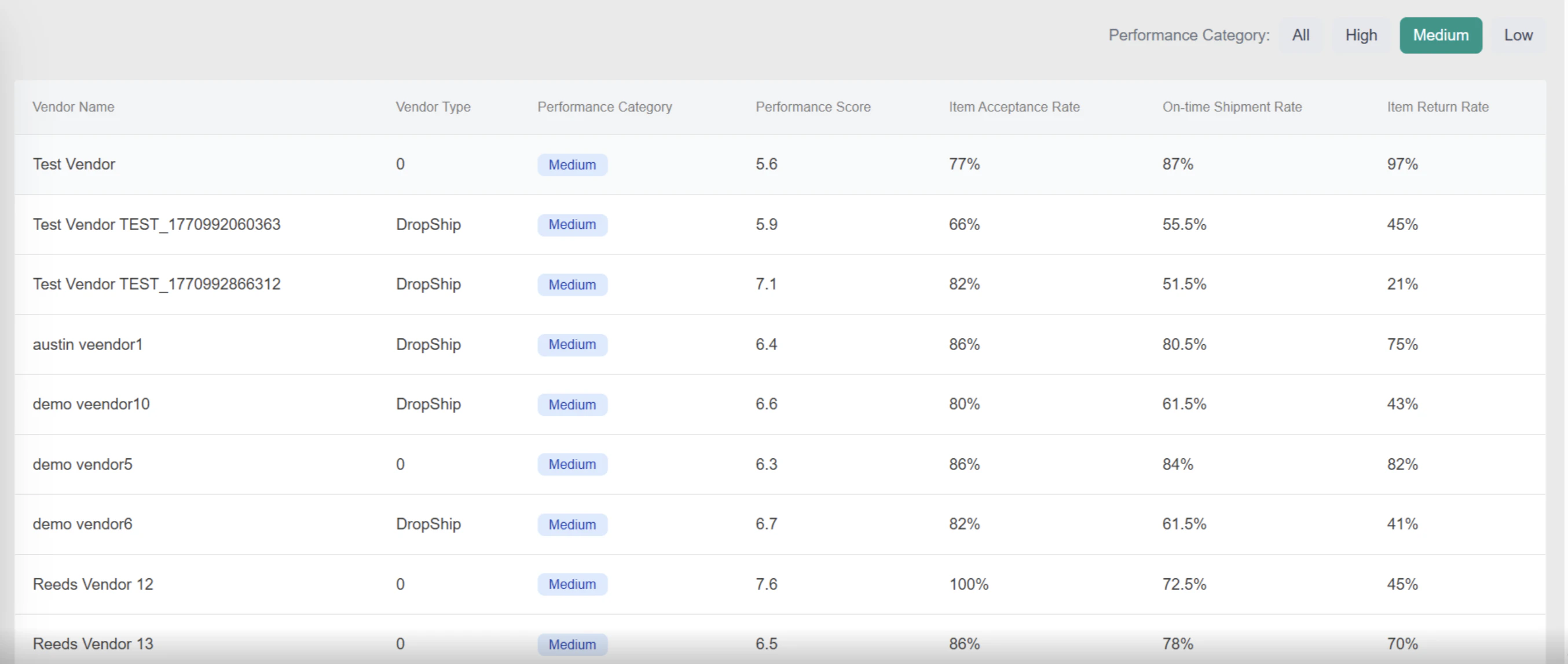
The grid lists all vendors with the following columns:
| **Column** | **Description** |
| :-------------------- | :------------------------------------------------------------------------------------------------------ |
| Vendor Name | The vendor's display name as configured in Vendor Management |
| Vendor Type | The vendor classification (e.g., Dropship, Marketplace, Dropship & Marketplace) |
| Performance Category | A badge indicating High, Medium, or Low based on the vendor's current Performance Score |
| Performance Score | Calculated score on a 0–10 scale, derived from the weighted combination of the three rate metrics below |
| Item Acceptance Rate | Percentage of purchase order line items the vendor accepted vs. total routed |
| On-time Shipment Rate | Percentage of shipments the vendor fulfilled within the configured SLA window |
| Item Return Rate | Percentage of fulfilled items that were subsequently returned |
## **Searching and Filtering**
### **Search**
Use the search bar in the page header to filter the vendor grid by name or other vendor attributes. The grid updates in place as you type.
### **Filter by Performance Category**
Click any of the three summary cards to filter the grid to that category. When a category filter is active:
* A **"Filtered by: \[category name]"** indicator appears above the grid.
* A **Clear filter** link appears next to the indicator — click it to remove the filter and show all vendors.
## **Vendor Analytics Grid**
The grid lists all vendors with the following columns:
| **Column** | **Description** |
| :-------------------- | :------------------------------------------------------------------------------------------------------ |
| Vendor Name | The vendor's display name as configured in Vendor Management |
| Vendor Type | The vendor classification (e.g., Dropship, Marketplace, Dropship & Marketplace) |
| Performance Category | A badge indicating High, Medium, or Low based on the vendor's current Performance Score |
| Performance Score | Calculated score on a 0–10 scale, derived from the weighted combination of the three rate metrics below |
| Item Acceptance Rate | Percentage of purchase order line items the vendor accepted vs. total routed |
| On-time Shipment Rate | Percentage of shipments the vendor fulfilled within the configured SLA window |
| Item Return Rate | Percentage of fulfilled items that were subsequently returned |
 ## **Performance Category Badges**
Each vendor's Performance Category is displayed as
| **Badge** | **Meaning** |
| :-------- | :---------------------------------------------------------------------------- |
| High | Vendor's Performance Score meets or exceeds the High threshold |
| Medium | Vendor's Performance Score meets or exceeds the Medium threshold but not High |
| Low | Vendor's Performance Score falls below the Medium threshol |
Thresholds are configurable by operators. See Vendor Settings — Configuration Scoring for how to adjust them.
## **Metric Reference**
All metrics are calculated **lifetime-to-date (LTD)** across all shipments assigned to the vendor's locations.
* **Item Acceptance Rate** Measures the percentage of ordered item quantities the vendor's locations validated and fulfilled. A rate of 80% means 80 out of every 100 ordered units were accepted. Higher is better.
* **On-time Shipment Rate** Measures the percentage of shipments fulfilled within the configured SLA window. A shipment counts as on-time only if it was fulfilled at or before the SLA deadline. Higher is better.
* **Item Return Rate** Measures the percentage of fulfilled item quantities that were subsequently returned. **Lower is better** — a high return rate signals fulfilment quality issues at the vendor's locations and negatively impacts their Performance Score.
* **Performance Score** A weighted composite of the three metrics above, scored on a 0–10 scale. The weight each metric contributes is configurable in Vendor Settings. Item Return Rate is inverted in the score calculation — a lower return rate contributes positively to the score, rewarding vendors who ship the right items correctly.
**Note:** Metric weights and category thresholds are operator-managed and apply across all vendors. See Vendor Settings to configure them.
## **Performance Score Calculation**
A vendor's Performance Score is a weighted combination of their three rate metrics, evaluated on a 0–10 scale. The weight assigned to each metric is configured in **Vendor Settings → Performance Score Formula Weights**. Thresholds that determine category boundaries are configured in **Vendor Settings → Performance Category Thresholds**.
Both weights and thresholds are operator-managed — see Vendor Settings — Configuration Scoring.
## Viewing Analytics on a Vendor Profile
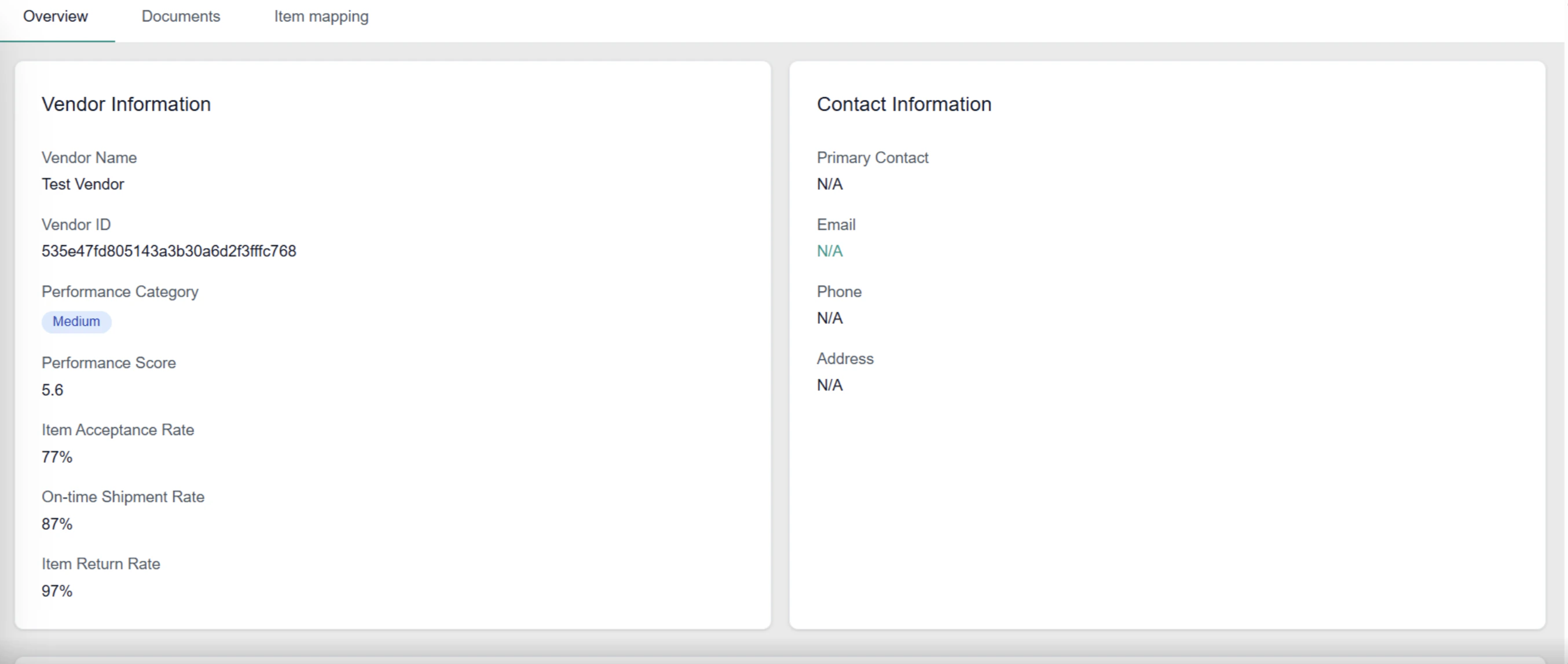
In addition to the Vendor Analytics grid, each vendor's performance metrics are surfaced directly on their individual profile page. This gives you a quick read on a single vendor without navigating to the analytics grid.
**Path:** Operator Portal → Vendor Management → \[Vendor Name] → Overview tab
The **Vendor Information** card on the Overview tab displays:
* **Performance Category** — color-coded badge showing High, Medium, or Low.
* **Performance Score** — the vendor's current score on a 0–10 scale.
* **Item Acceptance Rate** — lifetime-to-date acceptance rate as a percentage.
* **On-time Shipment Rate** — lifetime-to-date on-time fulfilment rate as a percentage.
* **Item Return Rate** — lifetime-to-date return rate as a percentage. Lower is better.
## **Performance Category Badges**
Each vendor's Performance Category is displayed as
| **Badge** | **Meaning** |
| :-------- | :---------------------------------------------------------------------------- |
| High | Vendor's Performance Score meets or exceeds the High threshold |
| Medium | Vendor's Performance Score meets or exceeds the Medium threshold but not High |
| Low | Vendor's Performance Score falls below the Medium threshol |
Thresholds are configurable by operators. See Vendor Settings — Configuration Scoring for how to adjust them.
## **Metric Reference**
All metrics are calculated **lifetime-to-date (LTD)** across all shipments assigned to the vendor's locations.
* **Item Acceptance Rate** Measures the percentage of ordered item quantities the vendor's locations validated and fulfilled. A rate of 80% means 80 out of every 100 ordered units were accepted. Higher is better.
* **On-time Shipment Rate** Measures the percentage of shipments fulfilled within the configured SLA window. A shipment counts as on-time only if it was fulfilled at or before the SLA deadline. Higher is better.
* **Item Return Rate** Measures the percentage of fulfilled item quantities that were subsequently returned. **Lower is better** — a high return rate signals fulfilment quality issues at the vendor's locations and negatively impacts their Performance Score.
* **Performance Score** A weighted composite of the three metrics above, scored on a 0–10 scale. The weight each metric contributes is configurable in Vendor Settings. Item Return Rate is inverted in the score calculation — a lower return rate contributes positively to the score, rewarding vendors who ship the right items correctly.
**Note:** Metric weights and category thresholds are operator-managed and apply across all vendors. See Vendor Settings to configure them.
## **Performance Score Calculation**
A vendor's Performance Score is a weighted combination of their three rate metrics, evaluated on a 0–10 scale. The weight assigned to each metric is configured in **Vendor Settings → Performance Score Formula Weights**. Thresholds that determine category boundaries are configured in **Vendor Settings → Performance Category Thresholds**.
Both weights and thresholds are operator-managed — see Vendor Settings — Configuration Scoring.
## Viewing Analytics on a Vendor Profile
In addition to the Vendor Analytics grid, each vendor's performance metrics are surfaced directly on their individual profile page. This gives you a quick read on a single vendor without navigating to the analytics grid.
**Path:** Operator Portal → Vendor Management → \[Vendor Name] → Overview tab
The **Vendor Information** card on the Overview tab displays:
* **Performance Category** — color-coded badge showing High, Medium, or Low.
* **Performance Score** — the vendor's current score on a 0–10 scale.
* **Item Acceptance Rate** — lifetime-to-date acceptance rate as a percentage.
* **On-time Shipment Rate** — lifetime-to-date on-time fulfilment rate as a percentage.
* **Item Return Rate** — lifetime-to-date return rate as a percentage. Lower is better.