> ## Documentation Index
> Fetch the complete documentation index at: https://docs.kibocommerce.com/llms.txt
> Use this file to discover all available pages before exploring further.
# Steal-From Rules
Steal-From Rules define which Call-Off Orders are eligible to have their reserved supply taken and the order in which they are drawn from. When the [Reservation Rebalancer](/pages/reservation-rebalancer) enters the steal phase, Call-Off Orders matched by a Steal-From Rule become **Givers** — their reserved supply is available to be transferred to higher-priority, earlier-shipping Call-Off Orders (Seekers), subject to the Ship Date Buffer.
Critically, Steal-From Rules define **who is protected as much as who can give**. Any Call-Off Order not matched by any enabled Steal-From Rule is fully protected — its reserved supply cannot be taken under any circumstances.
**Note:** There is no default Steal-From Rule. If no Steal-From Rules are configured or enabled, no stealing can occur. All short Call-Off Orders that cannot be refilled from free supply fall through to the regular Reservations Job.
Steal-From Rules follow the same composable rule structure used across Kibo for other rule types, using expression-based conditions across Account/Customer, Product, and Call-Off Order criteria dimensions.
In addition to the UI detailed here, you can create and manage Steal-For Rules using the Steal-For Rules API endpoints. The [Product Rules](https://docs.kibocommerce.com/api-reference/productrules/create-product-rule) , [Customer Rules](https://docs.kibocommerce.com/api-reference/accountrankingrule/create-customer-rule) and [Call Off Order Rule](https://docs.kibocommerce.com/api-reference/calloffreleaserules/create-call-off-release-rule) APIs can also be used to manage supporting product and customer rules.
## Prerequisites
Before configuring Steal-From Rules, ensure the following:
* The **B2B Wholesale OMS** feature is enabled for your tenant. Contact [Kibo Support](https://help.kibocommerce.com/) to enable this capability.
* The **Reservation Rebalancer** is enabled within the **Inventory Balancing & Reservations** B2B settings under general settings.
* You have **Admin** or **Super Admin** role permissions, or a role with the following behaviors assigned:
* Product Rule: Read, Create, Update, Delete
* Customer Rule: Read, Create, Update, Delete
* Steal-From Rule: Read, Create, Update, Delete
## How Steal-From Rules Work
### Rule Evaluation
All enabled Steal-From Rules run together when the Reservation Rebalancer enters the steal phase. The full set of non-short Call-Off Orders with active reservations is evaluated against each Steal-From Rule in ascending rank order — Rank 1 is evaluated first. When a Call-Off Order matches a rule's criteria, that rule designates it as a Giver and assigns it a draw order. **A Call-Off Order is only matched once** — once it qualifies under a rule, it is not re-evaluated against subsequent rules.
Call-Off Orders that do not match any enabled Steal-From Rule cannot be Givers and their reserved supply is protected.
### Seeker vs. Giver Partition
At the start of the steal phase, the engine determines a fixed partition of all relevant Call-Off Orders into potential Seekers and potential Givers. A Call-Off Order is either a Seeker or a Giver in a given run — never both. If a Call-Off Order matches both a Steal-For Rule and a Steal-From Rule, it is treated as a Seeker only and removed from the Giver pool.
### Giver Draw Order
The Rank on a Steal-From Rule determines the order in which Givers are drawn from. Givers matched by Rank 1 are drawn from first when Seekers need supply. Givers matched by Rank 2 are only drawn from after Rank 1 Givers are exhausted. The sort configured on each rule determines the order within a rank tier — for example, draw from the latest ship date first to protect near-term commitments for as long as possible.
### A Giver Remains in the Pool
A Giver is not removed from the pool after being partially used. Its remaining reserved supply stays available to later Seekers in the same steal pass. A Giver that goes entirely short after giving up supply to multiple Seekers is not re-promoted to a Seeker in the same run — it falls through to the regular Reservations Job.
### Criteria Matching
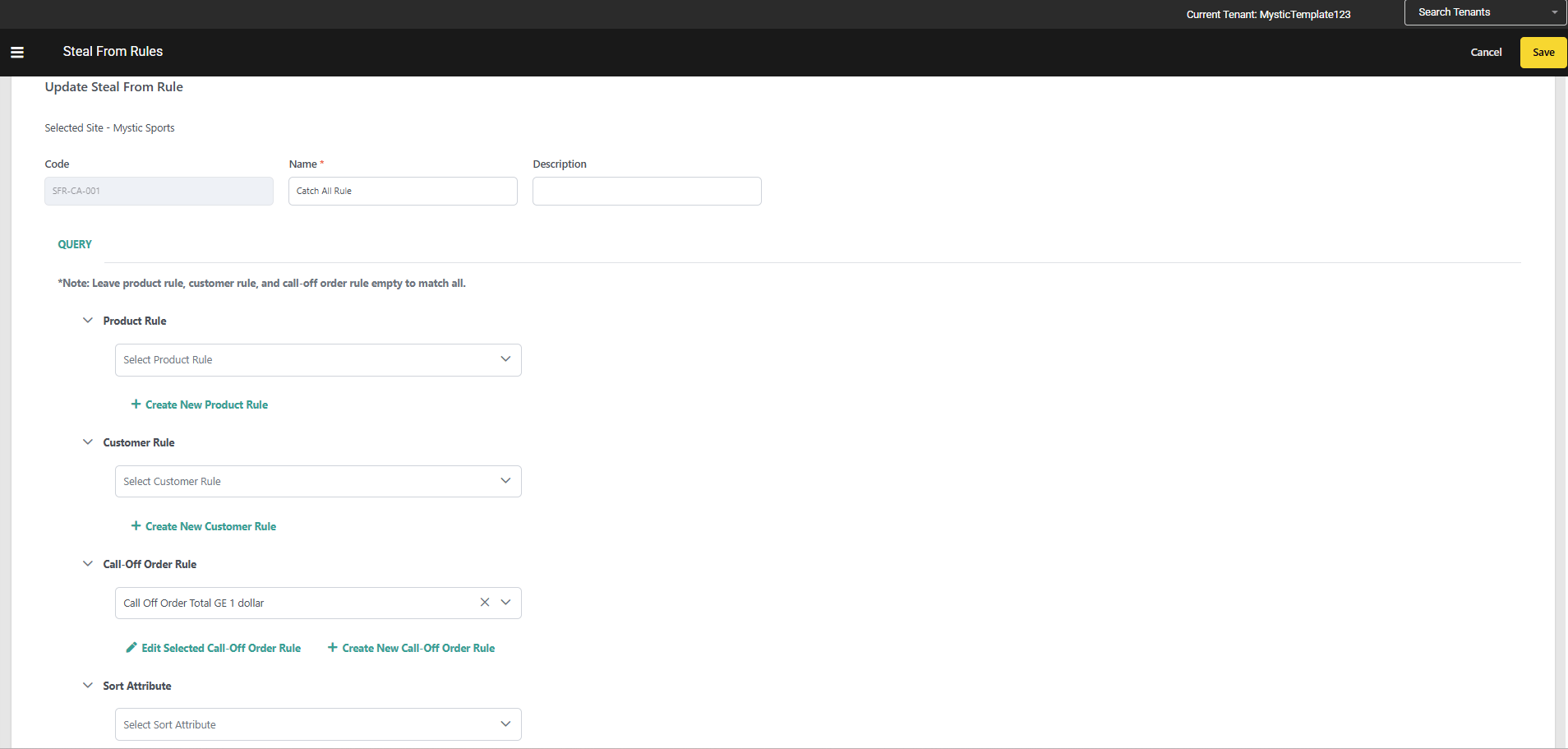
A Call-Off Order must satisfy **all** defined criteria types on a rule (AND logic across types) to match. Within a single criteria type, conditions can be combined using AND or OR logic in the expression editor. If a rule defines a simple criteria for a particular type which will match all the call off orders (e.g Total Amount ≥ 1\$), all orders automatically pass that criterion. This makes it straightforward to configure a **catch-all rule** at the lowest rank to ensure every Call-Off Order receives an allocation pass.
### The Ship Date Buffer
Regardless of whether a Call-Off Order is matched by a Steal-From Rule, the **Ship Date buffer** still applies. The engine will only take supply from a Giver if its ship date is strictly later than the Seeker's ship date by at least the configured **Ship-Date Buffer** days. No rule configuration can override or loosen the Date Gate.
**Important:** A Call-Off Order can be designated as an eligible Giver by your Steal-From Rules, but still be protected from a specific steal attempt by the Ship Date buffer. Eligibility under Steal-From Rules is necessary but not sufficient — the Date Gate is always enforced by the engine.
## Rule Criteria
A Steal-From Rule supports up to three criteria types:
| Criteria Type | What It Filters | Notes |
| :------------------------------ | :-------------------------------------------------------------------------------------------------- | :------------------------------------------------------------------------------------------------------------------------------------------------------------------------------------------------------------------------------------------------------------------------------ |
| **Account / Customer Criteria** | B2B buyer account attributes such as account ID, segment, tier, or custom extensible attributes | Uses the existing Customer Rule infrastructure. Supports Customer & Customer Segment. |
| **Product Criteria** | Product-level attributes such as type, code, category, or extensible attributes | Uses the existing Product Rule infrastructure . Supports first-class fields(like-Product Code, Variant Product Code, UPC, Mfg Part Number ,Product Type, Category Code, Category List Price, Fulfilment Types Supported, Height, Length, Weight, Width), attributes properties |
| **Call-Off Order Criteria** | Call-Off Order header and line-level attributes such as channel, total amount, or custom attributes | Expression-based criteria type specific to B2B Wholesale OMS. Like Call-Off Order Total Amount, Account ID, Channel Code, Item Product Code, and Item Requested Ship Date, as well as custom Order Attributes (header level) and Item Attributes (line level). |
**Note:** Product Rules , Customer Rules and Call off order Rules created for Steal-For Rules are exclusive to Steal-For Rules and cannot be shared with other rule types.
## Rule Attributes
| Attribute | Type | Required | Description |
| :-------------------------- | :---------------- | :------- | :-------------------------------------------------------------------------------------------------------------------------------------------------------- |
| **Code** | String | Yes | Unique identifier for the rule, scoped to the tenant. Auto-generated if left blank. |
| **Name** | String | Yes | Display name shown in the Admin UI. |
| **Description** | String | No | Optional free-text description of the rule's intent. |
| **Rank** | Integer | Yes | Priority order among Givers. Lower value = drawn from first. Values must be unique. |
| **Enabled** | Boolean | Yes | When disabled, the rule is skipped during rebalancing but remains saved for future use. |
| **Primary Sort** | Field + Direction | Yes | The field and direction (ascending/descending) used to order matched Givers within a rank tier. Supports any numeric or date field on the Call-Off Order. |
| **Account Criteria** | List | No | References to Customer Rule codes defining which accounts qualify as Givers. |
| **Product Criteria** | List | No | References to Product Rule codes defining which products this rule covers. |
| **Call-Off Order Criteria** | List | No | References to Call-Off Order Rule codes defining order-level filters. |
**Note:** At least one Rule Criteria is needed for the rule to be saved
## Configure Steal-From Rules
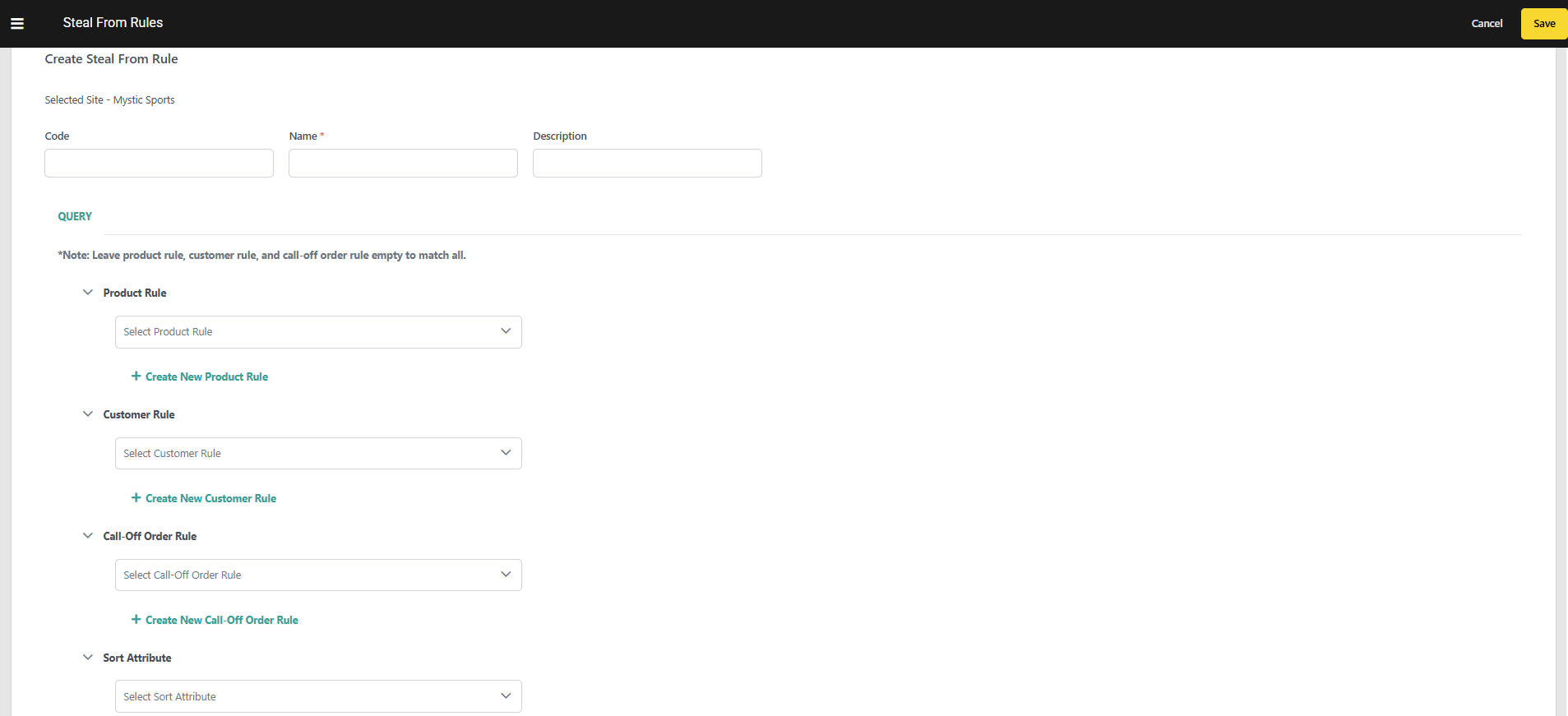
To create a new Steal-From Rule:
1. Go to **Main** > **Supply > Rules** > **Steal-From Rules**.
2. Select a **Site** from the site selector. 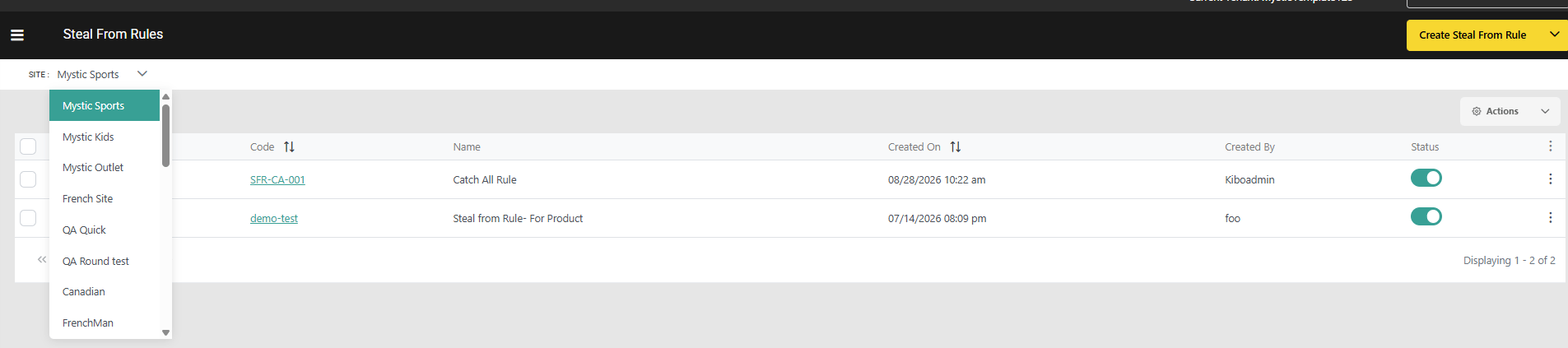 3. Click **Create Steal-From Rule**.
4. Enter a **Code**. If left blank, the system generates one automatically.
5. Enter a **Name** and an optional **Description**.
6. Enter a **Rank** value. The lower the number, the higher the draw priority — Givers matched by this rule are drawn from before those matched by higher-ranked rules.
7. Toggle the rule **Enabled** to activate it.
8. Configure **Sort Criteria**:
* Under **Primary Sort**, select a numeric or date field (for example, `requestedShipDate`) and choose **Ascending** or **Descending**.
9. Optionally, add **Account / Customer Criteria**:
* Click **Add Customer Rule** and use the expression editor to define account-level conditions.
10. Optionally, add **Product Criteria**:
* Click **Add Product Rule** and use the expression editor to define product-level conditions.
11. Optionally, add **Call-Off Order Criteria**:
* Click **Add Call-Off Order Rule** and use the expression editor to define order-level conditions.
12. Click **Save**.
3. Click **Create Steal-From Rule**.
4. Enter a **Code**. If left blank, the system generates one automatically.
5. Enter a **Name** and an optional **Description**.
6. Enter a **Rank** value. The lower the number, the higher the draw priority — Givers matched by this rule are drawn from before those matched by higher-ranked rules.
7. Toggle the rule **Enabled** to activate it.
8. Configure **Sort Criteria**:
* Under **Primary Sort**, select a numeric or date field (for example, `requestedShipDate`) and choose **Ascending** or **Descending**.
9. Optionally, add **Account / Customer Criteria**:
* Click **Add Customer Rule** and use the expression editor to define account-level conditions.
10. Optionally, add **Product Criteria**:
* Click **Add Product Rule** and use the expression editor to define product-level conditions.
11. Optionally, add **Call-Off Order Criteria**:
* Click **Add Call-Off Order Rule** and use the expression editor to define order-level conditions.
12. Click **Save**.
 ## Manage Steal-From Rules
Access the Steal-From Rules dashboard at **Main** > **Supply > Rules** > **Steal-From Rules** to manage your configured rules:
* Toggle the **Status** icon on a rule to activate or deactivate it without deleting it. Disabled rules are skipped during batch processing.
* Click on the Kebab icon on a rule to **Edit** or **Delete** it.
* Check multiple rules and then use the **Actions** menu in the top right to enable, disable, or delete them in bulk.
* Edit the **Rank** of a rule directly in the table, or click and drag to reorder. Rules are always evaluated from highest to lowest rank, with Rank 1 running first.
## Manage Steal-From Rules
Access the Steal-From Rules dashboard at **Main** > **Supply > Rules** > **Steal-From Rules** to manage your configured rules:
* Toggle the **Status** icon on a rule to activate or deactivate it without deleting it. Disabled rules are skipped during batch processing.
* Click on the Kebab icon on a rule to **Edit** or **Delete** it.
* Check multiple rules and then use the **Actions** menu in the top right to enable, disable, or delete them in bulk.
* Edit the **Rank** of a rule directly in the table, or click and drag to reorder. Rules are always evaluated from highest to lowest rank, with Rank 1 running first.
 ## Example Rule Configurations
### Draw from Standard Accounts Before Preferred Accounts
Allow standard-tier Call-Off Orders to give up supply before preferred-tier ones, protecting preferred commitments for as long as possible:
| Rule | Rank | Customer Criteria | Sort | Expected Behavior |
| :----- | :--- | :----------------------------------- | :----------------------------- | :---------------------------------------------------------------------------- |
| Rule 1 | 1 | `account.segment equals "standard"` | `requestedShipDate` Descending | Standard-tier orders with latest ship dates are drawn from first. |
| Rule 2 | 2 | `account.segment equals "preferred"` | `requestedShipDate` Descending | Preferred-tier orders only drawn from once standard-tier supply is exhausted. |
### Draw from Low-Value Orders First
Allow lower-value Call-Off Orders to give up supply before high-value ones:
| Rule | Rank | Call-Off Order Criteria | Sort | Expected Behavior |
| :----- | :--- | :------------------------------------ | :----------------------------- | :------------------------------------------------------------------------- |
| Rule 1 | 1 | `totalAmount lt 10000` | `requestedShipDate` Descending | Low-value Call-Off Orders with the latest ship dates give up supply first. |
| Rule 2 | 2 | `totalAmount between 10000 and 50000` | `requestedShipDate` Descending | Mid-value orders next. |
### Combined Account and Product Protection
Protect strategic accounts completely; allow standard accounts to give up supply for a specific product category:
| Rule | Rank | Account Criteria | Product Criteria | Sort | Expected Behavior |
| :----- | :--- | :----------------------------------- | :-------------------------------- | :----------------------------- | :--------------------------------------------------------------- |
| Rule 1 | 1 | `account.segment equals "standard"` | `product.category equals "Basic"` | `requestedShipDate` Descending | Standard-tier Basic-category orders give up supply first. |
| Rule 2 | 2 | `account.segment equals "preferred"` | `product.category equals "Basic"` | `requestedShipDate` Descending | Preferred-tier Basic-category orders drawn from next, if needed. |
## Example Rule Configurations
### Draw from Standard Accounts Before Preferred Accounts
Allow standard-tier Call-Off Orders to give up supply before preferred-tier ones, protecting preferred commitments for as long as possible:
| Rule | Rank | Customer Criteria | Sort | Expected Behavior |
| :----- | :--- | :----------------------------------- | :----------------------------- | :---------------------------------------------------------------------------- |
| Rule 1 | 1 | `account.segment equals "standard"` | `requestedShipDate` Descending | Standard-tier orders with latest ship dates are drawn from first. |
| Rule 2 | 2 | `account.segment equals "preferred"` | `requestedShipDate` Descending | Preferred-tier orders only drawn from once standard-tier supply is exhausted. |
### Draw from Low-Value Orders First
Allow lower-value Call-Off Orders to give up supply before high-value ones:
| Rule | Rank | Call-Off Order Criteria | Sort | Expected Behavior |
| :----- | :--- | :------------------------------------ | :----------------------------- | :------------------------------------------------------------------------- |
| Rule 1 | 1 | `totalAmount lt 10000` | `requestedShipDate` Descending | Low-value Call-Off Orders with the latest ship dates give up supply first. |
| Rule 2 | 2 | `totalAmount between 10000 and 50000` | `requestedShipDate` Descending | Mid-value orders next. |
### Combined Account and Product Protection
Protect strategic accounts completely; allow standard accounts to give up supply for a specific product category:
| Rule | Rank | Account Criteria | Product Criteria | Sort | Expected Behavior |
| :----- | :--- | :----------------------------------- | :-------------------------------- | :----------------------------- | :--------------------------------------------------------------- |
| Rule 1 | 1 | `account.segment equals "standard"` | `product.category equals "Basic"` | `requestedShipDate` Descending | Standard-tier Basic-category orders give up supply first. |
| Rule 2 | 2 | `account.segment equals "preferred"` | `product.category equals "Basic"` | `requestedShipDate` Descending | Preferred-tier Basic-category orders drawn from next, if needed. |