> ## Documentation Index
> Fetch the complete documentation index at: https://docs.kibocommerce.com/llms.txt
> Use this file to discover all available pages before exploring further.
# Shipment Release Rule
Shipment Release Rules are tenant-configurable, ranked rules that automate the timing of when shipments in **Hold** status should be released for fulfillment. Instead of requiring manual intervention to set or update a shipment's **Shipment Release Date**, a scheduled background job evaluates configured rules against all on-hold shipments, computes the optimal release date based on lead-time attributes sourced from location, product, and customer entities, and updates the shipment accordingly.
This feature works in conjunction with Kibo's [Hold Shipments](/pages/hold-shipments) capability, which allows shipments to be paused during the fulfillment process. While Hold Shipments provides the mechanism to place and release shipments on hold, Shipment Release Rules provide the automated, rule-driven logic for determining *when* each held shipment should become ready for fulfillment.
In addition to the UI detailed here, you can create and manage shipment release rules with the [Shipment Release Rule API endpoints](/api-reference/shipmentreleaserules/get-shipment-release-rules).
## How Shipment Release Rules Work
A scheduled background job runs every 2 minutes for each tenant. On each run, the job:
1. Loads all **enabled** Shipment Release Rules, ordered by **Rank** (ascending).
2. Fetches all shipments currently in **Hold** status.
3. For each held shipment, evaluates rules in rank order — the **first matching rule** wins.
4. For matched shipments, computes a new **Shipment Release Date** by subtracting lead-time business days from the shipment's Ship Date.
5. If the computed date differs from the existing value, updates the shipment's Shipment Release Date and sets the shipment as cross-dock eligible.
6. Records counts of scanned, skipped, updated, and failed shipments for each run.
The actual transition from **Hold** to **Ready** status is performed by the existing automatic release background job (configured in [General Settings](/pages/general-settings#fulfillment-settings)), which releases any held shipment whose Shipment Release Date is less than or equal to the current timestamp. Shipment Release Rules only compute and set the Shipment Release Date — they do not change shipment status directly.
## Prerequisites
* **Hold Shipments must be enabled** at the site level. See [Hold Shipments](/pages/hold-shipments) for setup instructions.
* **Lead-time attributes must be configured** on the relevant Location, Product, and/or Customer entities. These are custom attributes (typed as integers) that represent processing or lead-time values in business days.
* **Ship Date** must be set on the shipment. Ship Date is a first-class field that flows from the order to the shipment and is set via API.
The following behaviors allow [users](/pages/user-roles "User Roles") to view and manage Shipment Release Rules. The **Admin** and **Super Admin** roles have these behaviors by default.
* Shipment Release Rule
* Shipment Release Rule Read, Shipment Release Rule Create, Shipment Release Rule Update, Shipment Release Rule Delete
## Shipment Release Rule Criteria
Shipment Release Rules are based on filter criteria called product rules, customer rules, shipment rules, and location selections. These criteria determine which shipments qualify for the rule. At least one criterion is recommended, though a rule with all criteria empty will match any shipment.
* **Product Rules** are made up of a set of conditions that can be used with logical operators like OR or AND, such as "Color = Blue AND Brand = Adidas" that would restrict the rule to products that fit those conditions. These can be based on product type, code, variant, static category, attribute, and other first-class fields.
* **Customer Rules** apply conditions based on customer segments or account attributes.
* **Shipment Rules** apply conditions based on shipment attributes.
* **Location Codes** and **Location Groups** restrict the rule to specific fulfillment locations or location groups.
Within a single rule, conditions across all expression types (Product, Customer, Shipment, Location) are combined using **AND** logic — a shipment must match all defined expressions to be selected by that rule. Within a single expression type, conditions can be combined using **AND** or **OR** logic, as configured by the user.
**Note:** Product rules, customer rules, shipment rules, and location rules are exclusive to each rule type. For example, the same product rule cannot be used by both a Shipment Release Rule and a Safety Stock Rule.
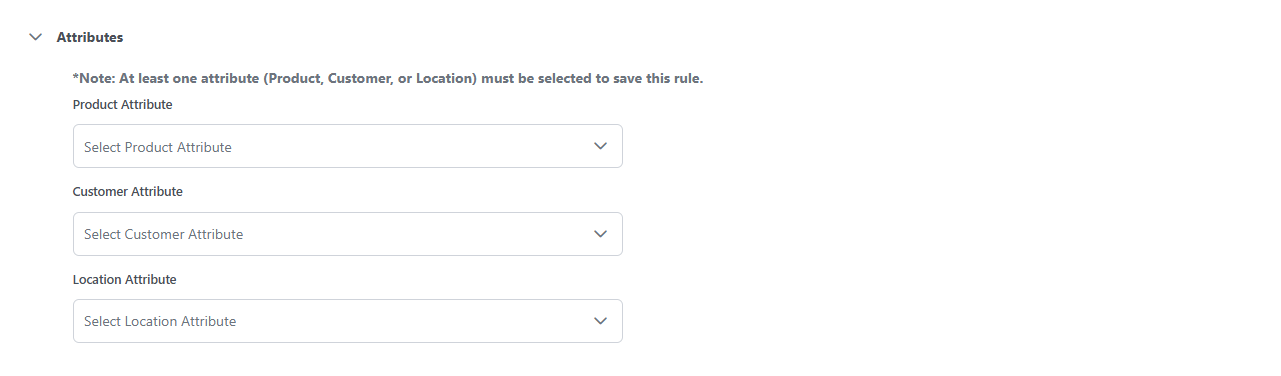
In addition to the filter criteria, each rule includes an **Attribute Selection** section where you specify which lead-time fields to use in the release date calculation. This is separate from the filter criteria — filters determine *which shipments qualify*, while the attribute selection determines *how the release date is calculated* for those qualifying shipments.
## Shipment Release Rule Properties
Each Shipment Release Rule has the following properties:
| Property | Type | Description |
| :---------------------- | :--------- | :---------------------------------------------------------------------------------------------------------------------------------------------------------------------------------------------------------------------------- |
| **Code** | string | Unique identifier (system-supplied if not provided) |
| **Name** | string | Display name for the rule |
| **Description** | string | Optional description |
| **Enabled** | boolean | Toggle for rule activation. Only enabled rules are evaluated by the job. |
| **Rank** | integer | Evaluation order. Rules are evaluated in ascending rank order (first match wins). Rank 1 is evaluated first. |
| **Location Codes** | string\[] | Specific location codes the rule applies to. Empty means "any location." |
| **Location Groups** | string\[] | Location groups the rule applies to. Empty means "any location group." |
| **Customer Rules** | string\[] | Account attributes such as account ID, segment |
| **Product Rules** | object\[] | Product-level attributes such as Product Code, Variant Product Code, UPC, Mfg Part Number ,Product Type, Category Code, Category List Price, Fulfilment Types Supported, Height, Length, Weight, Width, attributes properties |
| **Shipment Rules** | object\[] | Shipment-level attributes such as fulfillment type, carrier, shipping method, estimated delivery date, last cancellation date, SLA status, or extensible attributes at the shipment header or line level |
| **Attribute Selection** | JSON array | Lead-time attribute FQNs for location, product, and customer entities. See [Attribute Selection](#attribute-selection) above. |
| **Start Date** | datetime | Effective window start date. Rules are active on or after this date. Null means unbounded (active from the beginning). |
| **End Date** | datetime | Effective window end date. Rules are active on or before this date. Null means unbounded (active indefinitely). |
| **Audit Info** | object | System-managed audit tracking (created by, created date, updated by, updated date) |
## Attribute Selection
The **Attribute Selection** specifies which lead-time attributes to use when computing the Shipment Release Date. You can select one attribute from each of three sources: Location, Product, and Customer.
| Attribute Type | Description |
| -------------- | ---------------------------------------------------------------------------------------------------------------- |
| **Location** | A custom integer attribute on the fulfillment location that represents location-level lead time in business days |
| **Product** | A custom integer attribute on the product that represents product-level lead time in business days |
| **Customer** | A custom integer attribute on the customer account that represents customer-specific lead time in business days |
### Rules for Attribute Selection
* You are **not required** to select any attributes — an empty or partial selection is valid. If no lead-time attributes are selected, the release date defaults to the Ship Date (zero lead time subtracted).
* Only **one attribute of each type** (location, product, customer) may be selected per rule.
* **Any combination** of attribute types may be selected (e.g., location + product only, product only, all three).
### Example Attribute Selection JSON
```json theme={null}
"attributeSelection": [
{ "attributeType": "location", "value": "tenant~shipment-processing-time" },
{ "attributeType": "product", "value": "tenant~product-processing-time" },
{ "attributeType": "customer", "value": "tenant~customer-processing-time" }
]
```
 ## Lead-Time Formula
When a shipment matches a rule, the system computes the Shipment Release Date using the following formula:
**Shipment Release Date = Ship Date − Location Lead Time − Product Lead Time − Customer Lead Time**
Where:
| Term | Source | Description |
| ---------------------- | ------------------ | ----------------------------------------------------------------------------------------------------------------------------------------------------------------------------------- |
| **Ship Date** | Shipment | The shipment's Ship Date (a first-class field that flows from the order to the shipment, set via API) |
| **Location Lead Time** | Location attribute | The integer attribute value on the fulfillment location, using the FQN from the attribute selection where attribute type = location |
| **Product Lead Time** | Product attribute | The integer attribute value on the product (based on the first line item in the shipment), using the FQN from the attribute selection where attribute type = product |
| **Customer Lead Time** | Customer attribute | The integer attribute value on the customer account, using the FQN from the attribute selection where attribute type = customer. Only evaluated if a customer attribute is defined. |
### Business-Day Calculation
The system subtracts the total lead-time days from the Ship Date by decrementing one calendar day at a time, **skipping Saturdays and Sundays**. No holiday calendar is applied. All date arithmetic is performed in UTC.
**Note:** If the computed Shipment Release Date is in the past (less than or equal to the current UTC time), the system clamps it to **30 minutes from the current time** so the shipment is released promptly rather than scheduled retroactively.
### Example Calculation
| Input | Value |
| ------------------ | --------------------- |
| Ship Date | Friday, June 12, 2026 |
| Location Lead Time | 2 days |
| Product Lead Time | 3 days |
| Customer Lead Time | 1 day |
| **Total** | **6 business days** |
Subtracting 6 business days from June 12 (Friday):
**Result:** Wednesday, June 3, 2026
## Configure Shipment Release Rules
To configure a shipment release rule:
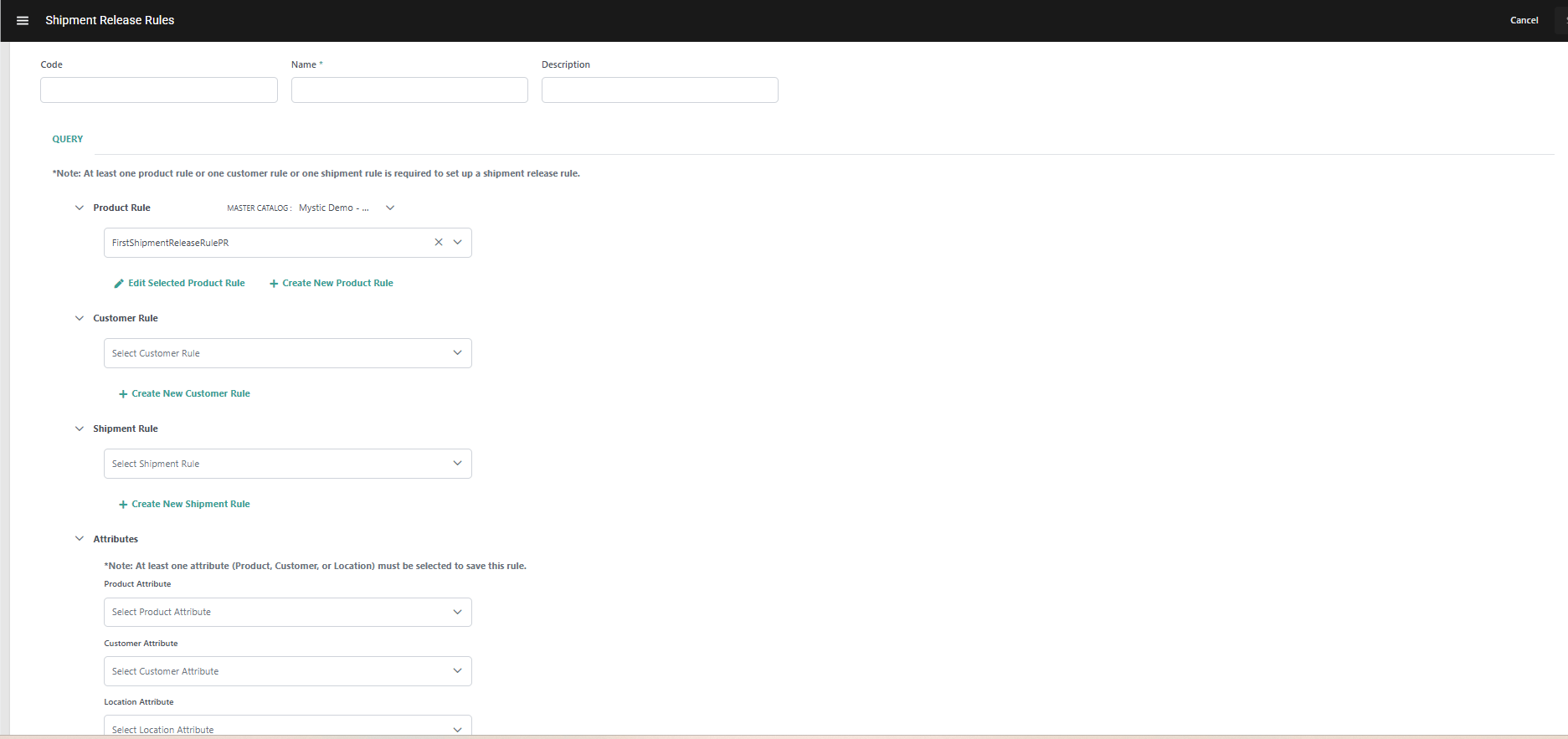
1. Go to **Main** > **Fulfillment** > **Rules** > **Shipment Release Rules**.
2. Click **Create Shipment Release Rule** or click an existing rule in the table. /
3. Enter a **Code**. If not provided, the system will generate one automatically.
4. Enter a **Name**.
5. Enter an optional **Description**.
6. Configure the **matching criteria** for the rule:
* **Location Codes**: Select specific locations from the dropdown, or leave empty to match any location.
* **Location Groups**: Select specific location groups, or leave empty to match any group.
* **Customer Rules**: Select customer/account ranking rule codes, or leave empty to match any customer.
* **Product Rules**: Select product rules (with master catalog), or leave empty to match any product.
* **Shipment Rules**: Select shipment rules, or leave empty to match any shipment.
7. Configure the **Attribute Selection** to specify lead-time attributes:
* Select a **Location Attribute** FQN (optional).
* Select a **Product Attribute** FQN (optional).
* Select a **Customer Attribute** FQN (optional).
* You may select any combination, but only one of each type.
8. Toggle **Enabled** to activate the rule.
9. Click **Save**.
## Lead-Time Formula
When a shipment matches a rule, the system computes the Shipment Release Date using the following formula:
**Shipment Release Date = Ship Date − Location Lead Time − Product Lead Time − Customer Lead Time**
Where:
| Term | Source | Description |
| ---------------------- | ------------------ | ----------------------------------------------------------------------------------------------------------------------------------------------------------------------------------- |
| **Ship Date** | Shipment | The shipment's Ship Date (a first-class field that flows from the order to the shipment, set via API) |
| **Location Lead Time** | Location attribute | The integer attribute value on the fulfillment location, using the FQN from the attribute selection where attribute type = location |
| **Product Lead Time** | Product attribute | The integer attribute value on the product (based on the first line item in the shipment), using the FQN from the attribute selection where attribute type = product |
| **Customer Lead Time** | Customer attribute | The integer attribute value on the customer account, using the FQN from the attribute selection where attribute type = customer. Only evaluated if a customer attribute is defined. |
### Business-Day Calculation
The system subtracts the total lead-time days from the Ship Date by decrementing one calendar day at a time, **skipping Saturdays and Sundays**. No holiday calendar is applied. All date arithmetic is performed in UTC.
**Note:** If the computed Shipment Release Date is in the past (less than or equal to the current UTC time), the system clamps it to **30 minutes from the current time** so the shipment is released promptly rather than scheduled retroactively.
### Example Calculation
| Input | Value |
| ------------------ | --------------------- |
| Ship Date | Friday, June 12, 2026 |
| Location Lead Time | 2 days |
| Product Lead Time | 3 days |
| Customer Lead Time | 1 day |
| **Total** | **6 business days** |
Subtracting 6 business days from June 12 (Friday):
**Result:** Wednesday, June 3, 2026
## Configure Shipment Release Rules
To configure a shipment release rule:
1. Go to **Main** > **Fulfillment** > **Rules** > **Shipment Release Rules**.
2. Click **Create Shipment Release Rule** or click an existing rule in the table. /
3. Enter a **Code**. If not provided, the system will generate one automatically.
4. Enter a **Name**.
5. Enter an optional **Description**.
6. Configure the **matching criteria** for the rule:
* **Location Codes**: Select specific locations from the dropdown, or leave empty to match any location.
* **Location Groups**: Select specific location groups, or leave empty to match any group.
* **Customer Rules**: Select customer/account ranking rule codes, or leave empty to match any customer.
* **Product Rules**: Select product rules (with master catalog), or leave empty to match any product.
* **Shipment Rules**: Select shipment rules, or leave empty to match any shipment.
7. Configure the **Attribute Selection** to specify lead-time attributes:
* Select a **Location Attribute** FQN (optional).
* Select a **Product Attribute** FQN (optional).
* Select a **Customer Attribute** FQN (optional).
* You may select any combination, but only one of each type.
8. Toggle **Enabled** to activate the rule.
9. Click **Save**.
 ## Manage Shipment Release Rules
This page at **Main** > **Orders** > **Inventory** > **Shipment Release Rules** displays all existing rules and allows you to manage them with the below actions:
* Toggle the **Status** icon on a specific rule to enable or disable it.
* Expand the actions menu on a specific rule to **Edit** or **Delete** it.
* Edit the **Rank** of a rule or click and drag it to reorder them. When the rules are run, they will always be applied in order of the highest to lowest rank (with 1 being the highest rank). The first matching rule wins.
## Manage Shipment Release Rules
This page at **Main** > **Orders** > **Inventory** > **Shipment Release Rules** displays all existing rules and allows you to manage them with the below actions:
* Toggle the **Status** icon on a specific rule to enable or disable it.
* Expand the actions menu on a specific rule to **Edit** or **Delete** it.
* Edit the **Rank** of a rule or click and drag it to reorder them. When the rules are run, they will always be applied in order of the highest to lowest rank (with 1 being the highest rank). The first matching rule wins.
 ## Rule Matching Logic
Rules are evaluated in ascending **Rank** order. The first rule whose criteria all match a given shipment is used — remaining rules are not considered (first-match-wins).
A rule matches a shipment when **all** of the following criteria are satisfied. Empty or null criteria on the rule mean "any":
| Criterion | Match Condition |
| ------------------- | ------------------------------------------------------------------------- |
| **Shipment Rules** | The shipment rule matches the shipment |
| **Product Rules** | The product rule matches the first line item in the shipment |
| **Location Codes** | The rule's location codes include the shipment's fulfillment location |
| **Location Groups** | The rule's location groups include the shipment's location group |
| **Customer Rules** | The customer rule matches the shipment's customer (segment or account ID) |
At least one Rule criteria must be selected to save the shipment rule
## Cross-Dock Eligibility
When a shipment's Shipment Release Date is updated by the Shipment Release Rules job, the system also marks the shipment as cross-dock eligible. No other shipment fields are modified.
## Rule Matching Logic
Rules are evaluated in ascending **Rank** order. The first rule whose criteria all match a given shipment is used — remaining rules are not considered (first-match-wins).
A rule matches a shipment when **all** of the following criteria are satisfied. Empty or null criteria on the rule mean "any":
| Criterion | Match Condition |
| ------------------- | ------------------------------------------------------------------------- |
| **Shipment Rules** | The shipment rule matches the shipment |
| **Product Rules** | The product rule matches the first line item in the shipment |
| **Location Codes** | The rule's location codes include the shipment's fulfillment location |
| **Location Groups** | The rule's location groups include the shipment's location group |
| **Customer Rules** | The customer rule matches the shipment's customer (segment or account ID) |
At least one Rule criteria must be selected to save the shipment rule
## Cross-Dock Eligibility
When a shipment's Shipment Release Date is updated by the Shipment Release Rules job, the system also marks the shipment as cross-dock eligible. No other shipment fields are modified.