> ## Documentation Index
> Fetch the complete documentation index at: https://docs.kibocommerce.com/llms.txt
> Use this file to discover all available pages before exploring further.
# Search Synonyms
You can use the Search Synonyms module in Admin to add search synonyms for specific sites.
Understand search configuration and merchandizing strategies
See a step-by-step walkthrough of creating and managing search synonyms
Search synonyms are synonyms to user search queries that expand the search results. For example, a user may search for *boots*, but you want the search results to also include results for *shoes*, *slippers*, and *pumps*. You can use search synonyms to accomplish this.
Multi-word search terms are only expanded if they are contained within quotes in the search query. If a multi-word search term is not contained within quotes in the search query, each word in the search will be used to find synonyms. For example, if a shopper searches for "blue shoes" without quotes, both "blue" and "shoes" will be expanded to any applicable synonyms.
## Expansion Types
There are two search synonym expansion types: [One Way](#one-way) and [Two Way](#two-way).
### One Way
The One Way expansion type includes a term and a set of synonyms that replace the search results. This is a one way expansion; the search results are not expanded to the term or any other listed synonyms.
For example, you create the following One Way search synonym:
 In the above example, searches for "blouse" will expand to include the results for "shirt," "top," and "T-shirt." However, if a user searches for "top," the search results will not include results for "blouse" or any of the other listed synonyms.
### Two Way
The Two Way expansion type does not include a term, but instead only contains a list of synonyms to which the search expands. This is a two way expansion; for any listed synonym, the search results are expanded to all other listed synonyms.
For example, you create the following Two Way search synonym:
In the above example, searches for "blouse" will expand to include the results for "shirt," "top," and "T-shirt." However, if a user searches for "top," the search results will not include results for "blouse" or any of the other listed synonyms.
### Two Way
The Two Way expansion type does not include a term, but instead only contains a list of synonyms to which the search expands. This is a two way expansion; for any listed synonym, the search results are expanded to all other listed synonyms.
For example, you create the following Two Way search synonym:
 In the above example, searches will be expanded for any of the listed synonyms, such as "top," to also include the results for all other listed synonyms.
## Create Search Synonyms
To create a search synonym:
1. Go to **Main** > **Search** > **Synonyms**.
2. Click **Create New Synonym**.
In the above example, searches will be expanded for any of the listed synonyms, such as "top," to also include the results for all other listed synonyms.
## Create Search Synonyms
To create a search synonym:
1. Go to **Main** > **Search** > **Synonyms**.
2. Click **Create New Synonym**.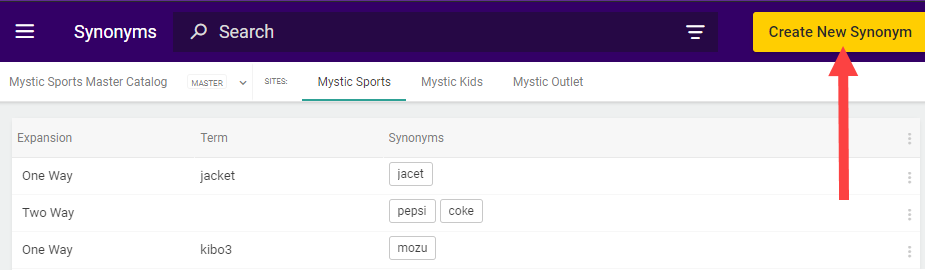 3. In the new search synonym, complete the following:
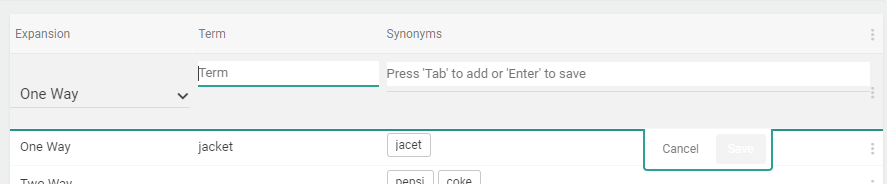
* (**One Way**) Select the **One Way** Expansion, specify a **Term** and a set of **Synonyms**. Press **Enter** to add each synonym to the list.\
The term is the search query on which you want to expand. Refer to [One Way](#one-way) for more information.
* (**Two Way**) Select the **Two Way** Expansion, leave the **Term** field blank, and only specify a set of **Synonyms**. Press **Enter** to add each synonym to the list.\
Searches will be expanded for any listed synonym to all other listed synonyms. Refer to [Two Way](#two-way) for more information.
4. Click **Save**.\\
3. In the new search synonym, complete the following:
* (**One Way**) Select the **One Way** Expansion, specify a **Term** and a set of **Synonyms**. Press **Enter** to add each synonym to the list.\
The term is the search query on which you want to expand. Refer to [One Way](#one-way) for more information.
* (**Two Way**) Select the **Two Way** Expansion, leave the **Term** field blank, and only specify a set of **Synonyms**. Press **Enter** to add each synonym to the list.\
Searches will be expanded for any listed synonym to all other listed synonyms. Refer to [Two Way](#two-way) for more information.
4. Click **Save**.\\