> ## Documentation Index
> Fetch the complete documentation index at: https://docs.kibocommerce.com/llms.txt
> Use this file to discover all available pages before exploring further.

# Return Fields

Use Return Fields to determine which fields are returned by the Product Suggestion API.

1. Click **Add Return Field** to include a new entry.\\
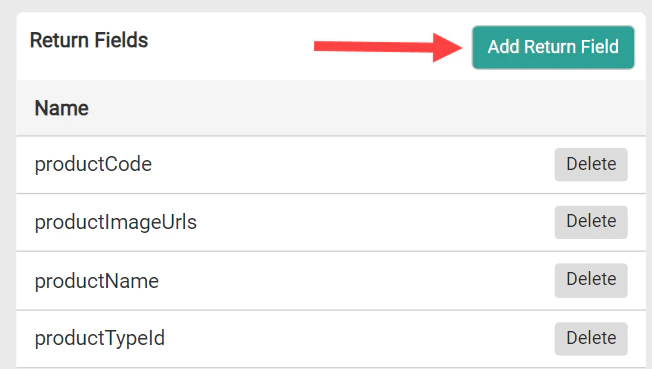
   <img src="https://mintcdn.com/kibocommerce-59e68a4a/H1YPkoqwgXOfZbZX/img/search-settings-return-fields-add.png?fit=max&auto=format&n=H1YPkoqwgXOfZbZX&q=85&s=f5b1f19ce72892a9d8ce3568caba8418" alt="Screenshot of the Return Fields settings with an arrow pointing to the Add Return Field button" width="652" height="369" data-path="img/search-settings-return-fields-add.png" />
2. A modal will appear. Make your selection from the drop-down menu and then click **Add**.\\
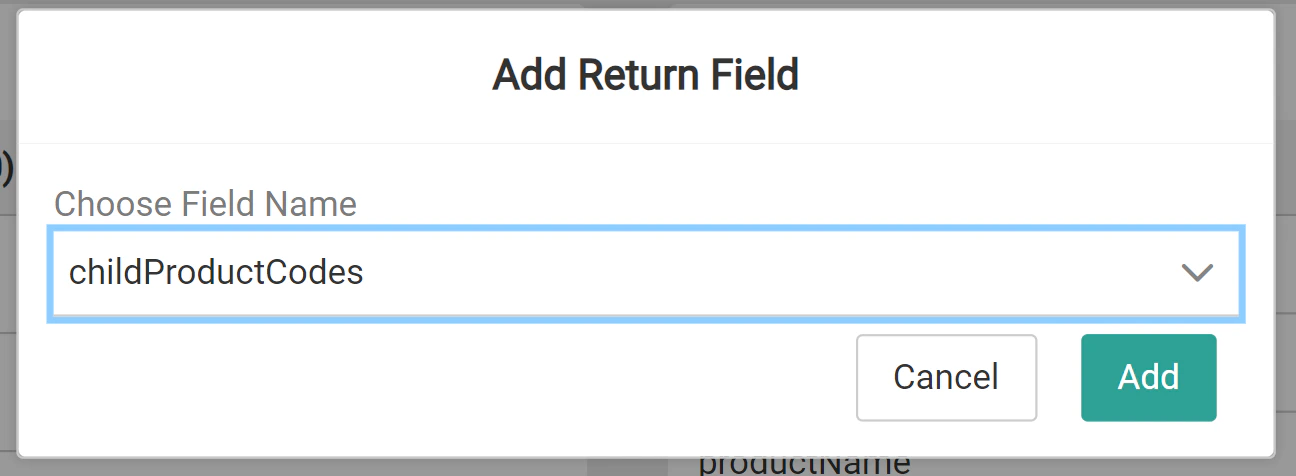
   <img src="https://mintcdn.com/kibocommerce-59e68a4a/H1YPkoqwgXOfZbZX/img/search-settings-return-fields-add-modal.png?fit=max&auto=format&n=H1YPkoqwgXOfZbZX&q=85&s=3f2678ed6f36b762d1ab4f926fb96eaf" alt="Screenshot of the Add Return Field modal with a drop-down menu to choose field name" width="1296" height="476" data-path="img/search-settings-return-fields-add-modal.png" />
