> ## Documentation Index
> Fetch the complete documentation index at: https://docs.kibocommerce.com/llms.txt
> Use this file to discover all available pages before exploring further.
# Reservation Rebalancer
The Reservation Rebalancer is an event-driven inventory rebalancing capability within the Kibo B2B Wholesale OMS that automatically re-secures soft inventory reservations on Call-Off Orders when a supply disruption affects already-promised inventory. In wholesale distribution, purchase orders are delayed or cut after commitments have already been made to buyers. Without automated rebalancing, these disruptions silently leave promised reservations short — discovered only at fulfillment time, far too late to take corrective action.
The Reservation Rebalancer closes this gap. When a supply change event leaves a Call-Off Order reservation unfillable at its current location, the rebalancer runs three recovery actions in sequence: it first draws from free available supply across the network; if still short, it may take supply from lower-priority, later-shipping Call-Off Orders under configurable rules and a hard engine-enforced date gate; and any Call-Off Orders it cannot fully re-secure fall through to the regular [Reservations Job](/pages/reservations) alongside new demand.
**Note:** The Reservation Rebalancer operates exclusively on **soft-allocated reservations** held against Call-Off Orders. It never touches pegged shipment allocations. Hard-allocated future and backorder shipments are handled by the [Allocation Rebalancer](/pages/allocation-rebalancer).
## Prerequisites
Before using the Reservation Rebalancer, ensure the following:
* The **B2B Wholesale OMS** feature is enabled for your tenant. Contact [Kibo Support](https://help.kibocommerce.com/) to enable this capability.
* At least one **Reservation Rule** is configured and enabled. See [Reservation Rules](/pages/reservation-rules).
* At least one **Steal-For Rule** is configured and enabled if you want the rebalancer to recover supply by taking from lower-priority Call-Off Orders. See [Steal-For Rules](/pages/steal-for-rules).
* At least one **Steal-From Rule** is configured and enabled to define which Call-Off Orders may give up supply. See [Steal-From Rules](/pages/steal-from-rules).
* The **Reservation Rebalancer** is enabled within the B2B tab under [General settings](/pages/general-settings).
* You have **Admin** or **Super Admin** role permissions.
## How the Reservation Rebalancer Works
### Where It Fits in the Run Sequence
The Reservation Rebalancer runs as the **second stage** in Kibo's B2B supply rebalancing pipeline. This fixed order ensures that pegged supply is secured before soft reservations are re-evaluated, and that new demand only receives what remains after promised commitments have been protected:
| Order | Stage | Scope |
| :---- | :------------------------------------------ | :---------------------------------------------------------------------------------------------------- |
| 1 | **Allocation Rebalancer** | Hard-allocated future and backorder shipments |
| 2 | **Reservation Rebalancer** *(this feature)* | Soft-allocated reservations on already-promised Call-Off Orders |
| 3 | **Reservations Job** | All open Call-Off Orders with no reservation (new demand + Call-Off Orders still short after Stage 2) |
The supply pool the Reservation Rebalancer works from is always **net of everything the Allocation Rebalancer has already pegged** — never the original supply total. This sequencing is enforced by the \[Inventory Balancing & Reservations]\(/pages/general-settings#inventory-balancing-& -reservations) under General Settings under B2B Tab and cannot be changed.
### Triggers
The Reservation Rebalancer is triggered by supply change events that leave an existing reservation unable to be fully covered:
| Event | When It Triggers Rebalancing |
| :------------------- | :--------------------------------------------------------------------------------------------------------------------------------------------------------------------------------------------------------------------------------------------------------------------------------------------- |
| **Supply Decreased** | A purchase order backing a reservation is cut or cancelled, reducing available supply below the reserved quantity at the affected location. |
| **Supply Delayed** | A purchase order's expected arrival date moves beyond the **time fence** window of an affected Call-Off Order — meaning the supply can no longer arrive in time to meet the reservation's timing requirement. A delay that still lands within the time fence does **not** trigger rebalancing. |
**Note:** Supply Up events (a PO arriving with more than expected) and Demand events (order cancellations, quantity reductions) do not trigger the Reservation Rebalancer. These events make supply more available — any new capacity is naturally consumed by the next [Reservations Job](/pages/reservations) run.
A single rebalancing run may bundle more than one supply change event. Each event is evaluated independently to identify its affected reservations. The full set of affected Call-Off Orders across all events in the run is then combined into one working set for processing.
### Rebalancing Flow
When the Reservation Rebalancer runs, it processes affected Call-Off Orders through the following sequential steps:
**Step 1 — Deallocate Stale Supply.** Before attempting to refill a short reservation, the stale or disrupted portion of the reservation at the affected location is first removed. This clears the gap so the system recognizes a genuine unfulfilled quantity to recover.
**Step 2a — Fill from Free Supply.** The rebalancer attempts to re-secure the needed quantity from free, available supply across the network using Order Routing. Affected Call-Off Orders are processed in priority order (determined by the existing [Reservation Rules](/pages/reservation-rules)), because filling one Call-Off Order reduces the free supply remaining for the next. A Call-Off Order filled successfully in this step does not proceed to Step 2b.
**Step 2b — Steal from Later-Shipping Call-Off Orders.** For Call-Off Orders still short after Step 2a, the rebalancer may take supply from other Call-Off Orders — governed by the [Steal-For Rules](/pages/steal-for-rules) and [Steal-From Rules](/pages/steal-from-rules), and a **hard engine-enforced Ship Date Buffer**. At this point, the still-short Call-Off Order becomes a **Seeker** and any Call-Off Order it takes supply from becomes a **Giver**.
**Step 3 — Fall Through to Regular Reservation Run.** Any Call-Off Order that could not be fully re-secured in Steps 2a and 2b is not left in an error state. It passes into the standard [Reservations Job](/pages/reservations) run, competing alongside new Call-Off Orders for whatever free supply remains. Its status remains **Partially Reserved** or **Hold** as appropriate.
### The Ship Date Buffer
The [Ship Date Buffer](/pages/general-settings#reservation-rebalancer) is a hard, engine-enforced guarantee that supply may only be stolen from a Call-Off Order whose ship date is **strictly later** than the Seeker's ship date, by at least the configured **Ship-Date Buffer** (in days). Formally:
**Giver Ship Date > Seeker Ship Date + Ship-Date Buffer Days**
This protects the supply-priority order: a more-urgent, earlier-shipping commitment can never have its supply taken by a less-urgent one.
**Example:**
| Setting | Value |
| :-------------------------- | :------------------ |
| Ship-Date Buffer | 10 days |
| Seeker Ship Date | 2026-08-10 |
| Giver eligibility threshold | 2026-08-21 or later |
| Giver | Ship Date | Eligible? |
| :------- | :--------- | :-------------------------------------------------------------- |
| Giver G1 | 2026-08-12 | ❌ No — ships too soon (only 2 days after Seeker) |
| Giver G2 | 2026-08-31 | ✅ Yes — ships 21 days after Seeker, exceeding the 10-day buffer |
**Important:** The Ship Date Buffer is enforced by the engine and **cannot be loosened, skipped, or overridden by any rule configuration**. If a Call-Off Order would be permitted as a Giver under your Steal-From Rules but fails the Ship Date buffer, the steal is blocked. The Seeker continues looking for another eligible Giver; if none exists, it falls through to the regular run.
### Stealing Logic
The steal phase follows a single, deterministic pass:
* **Seekers and Givers are determined once**, at the start of the steal phase, as a fixed partition. A Call-Off Order is either a potential Seeker or a potential Giver in a given run — never both. If a Call-Off Order matches both Steal-For and Steal-From Rules, it is treated as a Seeker only and removed from the Giver pool.
* **A Giver may supply multiple Seekers.** A Giver is not exhausted from the pool after being partially used — its remaining supply stays available to later Seekers in the same pass.
* **A Giver that goes short is not re-promoted.** If a Giver loses enough supply through stealing that it becomes short itself, it is not re-evaluated as a Seeker within the same run. It falls through to the regular Reservations Job alongside new demand.
* **Cross-product stealing is not permitted.** A steal only ever moves the same product between a Giver and Seeker.
### **EDD Recalculation After a Steal**
When a steal transfers supply from a Giver to a Seeker, both Call-Off Order reservations have their **Estimated Delivery Date (EDD) immediately recalculated** as a consequence of the supply change event. This recalculation happens at the time of the steal — not during the next scheduled reservation batch cycle.
* The **Seeker's** EDD is recalculated to reflect its newly secured supply source and delivery timeline.
* The **Giver's** EDD is recalculated to reflect its reduced or changed supply position after giving up units.
This ensures both reservations always carry an accurate, up-to-date delivery promise after rebalancing.
**Example:**
1. A PO is delayed — supply is reduced for an existing future inventory record.
2. Reservation R1 is impacted and steals supply from Reservation R2.
3. **Both R1 and R2 have their EDD immediately recalculated** — R1 reflects its newly secured supply source and delivery timeline; R2 reflects its reduced or changed supply position.
For full details on how EDD is calculated and maintained on Call-Off Order Lines, see [Estimated Delivery Date — Reservations](/pages/reservations#estimated-deliver-date).
### Blanket Order Ledger Integrity
When supply reserved against a Blanket Order's uncalled balance is taken from a Giver, that draw must be reversed — the quantity is returned to the Blanket Order's uncalled balance so the contract ledger stays correct. The identity **Called + Uncalled = Contracted** is maintained before and after every steal, for every affected Blanket Order.
### Fill Rate and Status Updates
After every rebalancing action, the fill rate and reservation status on each affected Call-Off Order Line are updated to reflect the true reserved quantity:
| Prior Status | Condition After Rebalancing | New Status |
| :--------------------- | :---------------------------- | :----------------- |
| **Fully Reserved** | Reserved qty \< Requested qty | Partially Reserved |
| **Fully Reserved** | Reserved qty = 0 | Hold |
| **Partially Reserved** | Reserved qty = 0 | Hold |
| **Fully Reserved** | Reserved qty = Requested qty | Fully Reserved |
The fill rate (`reservedQty ÷ requestedQty`) is also recalculated so the [Call-Off Release Rules Engine](/pages/call-off-release-rules) has an accurate basis for evaluating whether a line is eligible to be converted into a Sales Order.
### Segmentation
If a Call-Off Order specifies an inventory segment tag, the Reservation Rebalancer respects that segment during both free-supply fill and steal. Inventory is only drawn from within the designated segment.
## Steal-For Rules
[Steal-For Rules](/pages/steal-for-rules) define which still-short Call-Off Orders are eligible to attempt a steal and their priority order when competing for the same Giver supply. A Call-Off Order matched by a Steal-For Rule becomes a **Seeker** — it is permitted to take supply from eligible Givers under the Ship Date Buffer. Seekers with higher priority attempt to recover supply before lower-ranked Seekers, and the sort on each rule determines the order within a priority tier.
Configure Steal-For Rules to protect your highest-priority buyers during a supply disruption — ensuring their Call-Off Orders are the first to recover reserved supply before lower-priority accounts. See [Steal-For Rules](/pages/steal-from-rules) for the full configuration guide.
## Steal-From Rules
[Steal-From Rules](#) define which Call-Off Orders may have their reserved supply taken and the order in which they are drawn from. A Call-Off Order matched by a Steal-From Rule becomes a **Giver** — it is eligible to lose supply to a higher-priority Seeker, subject to the ship date buffer. Call-Off Orders not matched by any enabled Steal-From Rule are fully protected and cannot be Givers.
**Note:** There is no default Steal-From Rule. If no Steal-From Rules are configured or enabled, no stealing can occur. All short Call-Off Orders fall through to the regular Reservations Job.
Configure Steal-From Rules to explicitly define which Call-Off Orders can give up supply — and, by exclusion, which ones are always protected. See [Steal-From Rules](/pages/steal-from-rules) for the full configuration guide.
## Rebalancer Run Audit — Reservation Rebalancer Tab
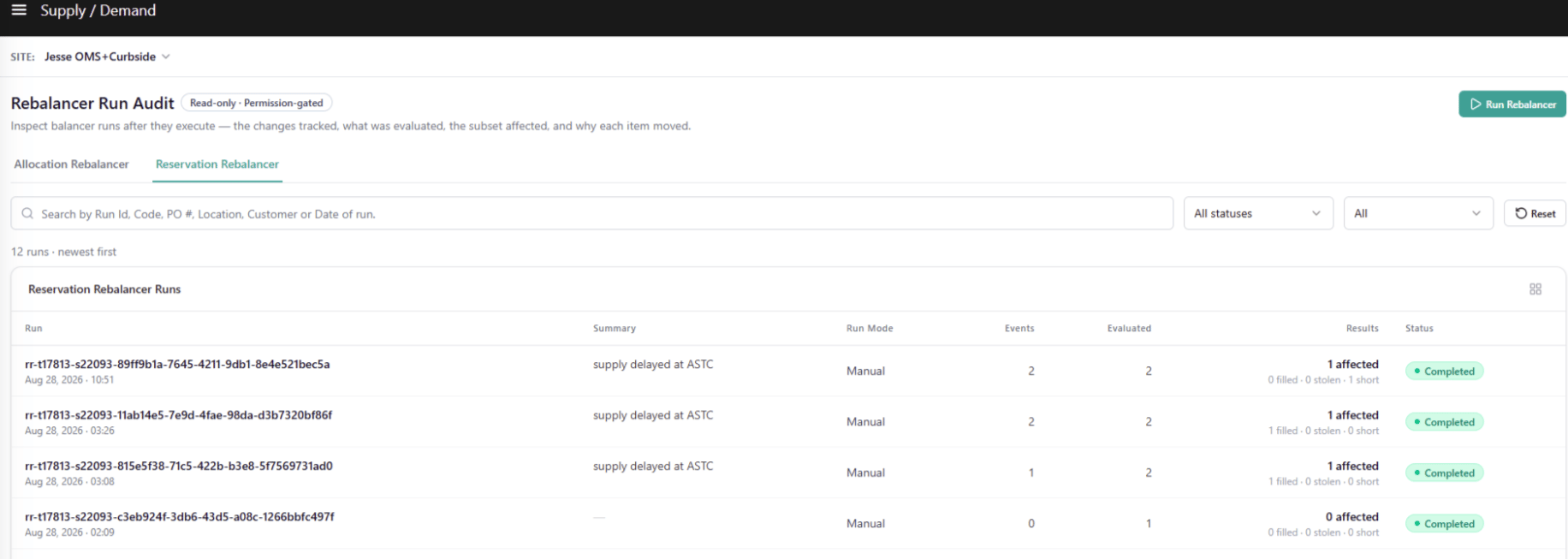
Every Reservation Rebalancer run produces a full audit trail accessible from the **Reservation Rebalancer** tab of the Rebalancer Run Audit page. Navigate to **Main** > **Supply** > **Reservation Rebalancer** .
**Note:** The Rebalancer Run Audit page contains two top-level tabs: **Allocation Rebalancer** and **Reservation Rebalancer**. The client can Run a single Rebalancer or Both as they wish for . The Run button is only visible if the Run Mode set for rebalancer is Manual
### Run List
The Run List displays all Reservation Rebalancer runs for the selected site, sorted newest first. A live count is shown above the table — for example, *"5 runs · newest first."*
#### Search & Filters
| Control | Values |
| :----------- | :------------------------------------------------------------- |
| **Search** | Free text by Run ID, code, PO #, location, or customer/account |
| **Status** | All statuses / Completed / Partial / Failed |
| **Run Mode** | All / Automated / Manual |
| **Reset** | Clears all filters |
#### Run List Table Columns
| Column | Description |
| :------------ | :--------------------------------------------------------------------------------------------------------------------------------------------------------------------------------------------------------------------------------------------------------------------------- |
| **Run** | Run code (for example, `RB-1187`) and run date/time. |
| **Summary** | Auto-generated plain-language description of the trigger, what the run did, and the outcome — for example, *"PO-8891 arrived too late for 21 promised call-offs — 7 refilled, 8 recovered from later-shipping orders, 3 partially reserved (mixed sources), 3 still short."* |
| **Run Mode** | **Manual** (with the triggering PO number) or **Automated**. |
| **Events** | Count of supply events (PO date slips, quantity drops) that fed this run. |
| **Evaluated** | Count of Call-Off reservations the run evaluated. |
| **Results** | Bold *"N affected"* with a breakdown: *"filled · stolen · short"* — for example, *"21 affected — 7 filled · 8 stolen · 3 short."* |
| **Status** | **Completed** (green), **Partial** (amber), or **Failed** (red). |
**Note:** Unlike the Allocation Rebalancer, the Reservation Rebalancer only tracks supply-side events — not demand events. The **Events** column therefore reflects supply changes only.
### Run Detail
Click any row in the Run List to open its detail view. The Run Detail page provides a full breakdown of what the rebalancer evaluated and what outcomes it produced for the selected run.
#### Header
| Element | Description |
| :----------------------- | :-------------------------------------------------------------------------------------------------------- |
| **Run code + Timestamp** | Unique identifier and date/time the run was initiated. |
| **Status badge** | Completed, Partial, or Failed. |
| **Trigger** | The supply change type and PO reference that triggered the run (for example, *"PO date slip / PO-4522"*). |
| **Summary** | Plain-language description of the run's trigger, actions, and outcome. No internal engine terminology. |
#### Summary Tiles
| Tile | Description |
| :-------------------------- | :--------------------------------------------------------------------------------------------------------------------------------------- |
| **Supply Events** | Count of supply changes that triggered this run. |
| **Reservations Evaluated** | Count of Call-Off reservations the run checked against those supply changes. |
| **Affected Reservations** | Count of reservations whose fill rate or status actually changed as a result of the run. |
| **Filled · Stolen · Short** | Three-part breakdown of affected reservations: filled from free supply / rebalanced via steal / still short and carried to the next run. |
| **Status** | Completed, Partial, or Failed. |
 #### Sub-Tabs
Three sub-tabs sit below the summary tiles, each with a count badge:
| Tab | Default | What It Shows |
| :----------------- | :-------------------- | :-------------------------------------------------------------------------------------------- |
| **Supply Changes** | ✅ Default landing tab | Every supply change event tracked in this run — PO date slips and PO quantity drops. |
| **Reservations** | | All Call-Off reservations evaluated during the run and their individual outcomes. |
| **Steal From** | | Every steal pairing produced by the run — one row per item transfer from a Giver to a Seeker. |
#### Supply Changes Tab
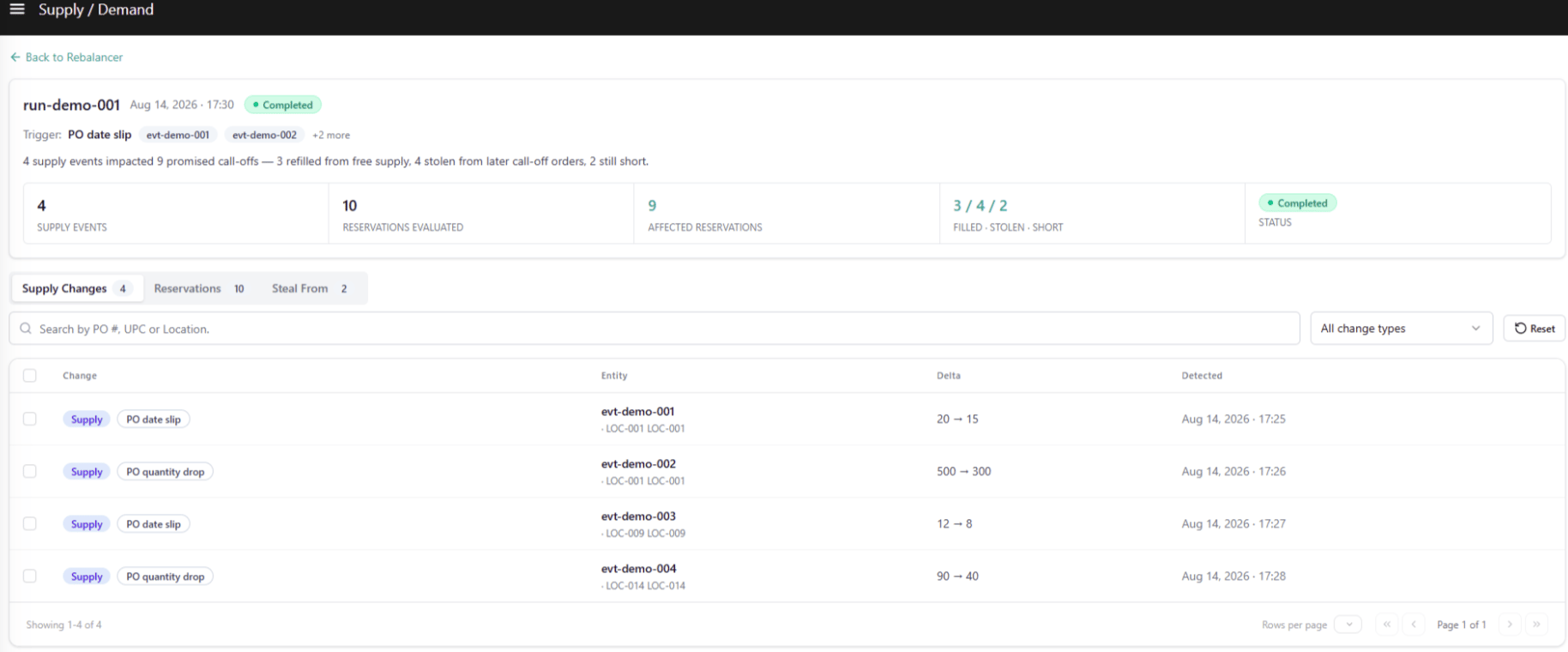
The Supply Changes tab lists every tracked supply change event that triggered this run. Use it to understand *why* the run was initiated before switching to the Reservations or Steal From tabs to see what happened as a result.
#### Sub-Tabs
Three sub-tabs sit below the summary tiles, each with a count badge:
| Tab | Default | What It Shows |
| :----------------- | :-------------------- | :-------------------------------------------------------------------------------------------- |
| **Supply Changes** | ✅ Default landing tab | Every supply change event tracked in this run — PO date slips and PO quantity drops. |
| **Reservations** | | All Call-Off reservations evaluated during the run and their individual outcomes. |
| **Steal From** | | Every steal pairing produced by the run — one row per item transfer from a Giver to a Seeker. |
#### Supply Changes Tab
The Supply Changes tab lists every tracked supply change event that triggered this run. Use it to understand *why* the run was initiated before switching to the Reservations or Steal From tabs to see what happened as a result.
 ##### Search & Filters
| Control | Values |
| :--------- | :--------------------------------------------------- |
| **Search** | Free text by code, PO #, or location |
| **Change** | All supply changes / PO date slip / PO quantity drop |
| **Reset** | Clears all filters |
##### Table Columns
| Column | Description |
| :----------- | :------------------------------------------------------------------------------------------------------------------------------------------------------------------------------ |
| **Change** | A **Supply** pill and the specific change sub-type — **PO date slip** or **PO quantity drop**. Row-level checkboxes for multi-selection. |
| **Entity** | The source PO number (bold) on the first line; UPC and location on the second line. |
| **Delta** | The before → after value: a date range for a PO date slip (for example, `2026-07-02 → 2026-07-08`) or a quantity range for a PO quantity drop (for example, `500 → 300 units`). |
| **Detected** | Timestamp the change was detected. |
##### Selection & Cross-Tab Pre-filter
Selecting one or more rows in the Supply Changes tab updates a banner above the table:
> *"N changes selected · open Reservations or Steal From tab to see impacted reservations."*
The selection pre-filters both the **Reservations** and **Steal From** tabs to display only the records tied to the selected change events. Unchecking rows or clicking Reset restores both tabs to their unfiltered view.
#### Reservations Tab
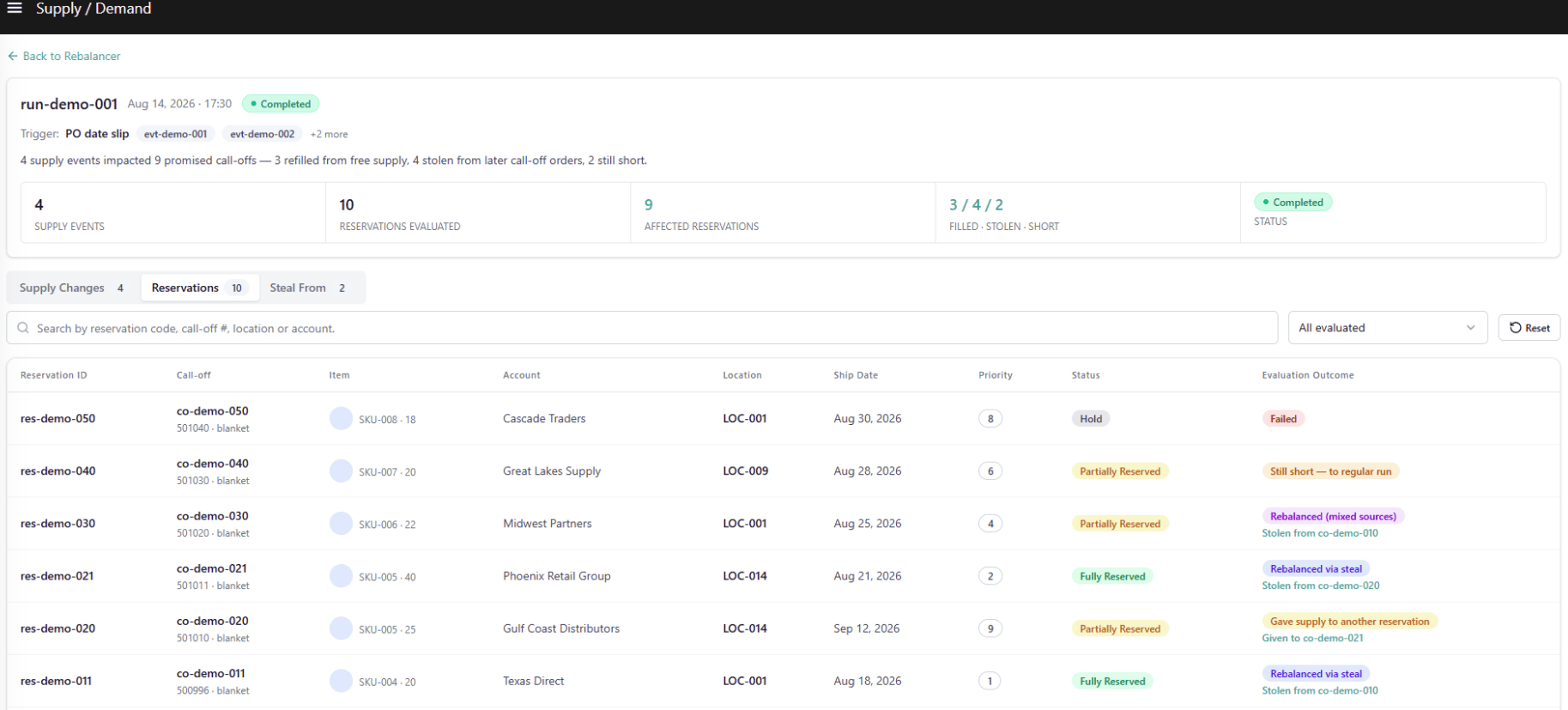
The Reservations tab shows every Call-Off reservation the rebalancer evaluated during this run and the outcome for each.
##### Search & Filters
| Control | Values |
| :--------- | :--------------------------------------------------- |
| **Search** | Free text by code, PO #, or location |
| **Change** | All supply changes / PO date slip / PO quantity drop |
| **Reset** | Clears all filters |
##### Table Columns
| Column | Description |
| :----------- | :------------------------------------------------------------------------------------------------------------------------------------------------------------------------------ |
| **Change** | A **Supply** pill and the specific change sub-type — **PO date slip** or **PO quantity drop**. Row-level checkboxes for multi-selection. |
| **Entity** | The source PO number (bold) on the first line; UPC and location on the second line. |
| **Delta** | The before → after value: a date range for a PO date slip (for example, `2026-07-02 → 2026-07-08`) or a quantity range for a PO quantity drop (for example, `500 → 300 units`). |
| **Detected** | Timestamp the change was detected. |
##### Selection & Cross-Tab Pre-filter
Selecting one or more rows in the Supply Changes tab updates a banner above the table:
> *"N changes selected · open Reservations or Steal From tab to see impacted reservations."*
The selection pre-filters both the **Reservations** and **Steal From** tabs to display only the records tied to the selected change events. Unchecking rows or clicking Reset restores both tabs to their unfiltered view.
#### Reservations Tab
The Reservations tab shows every Call-Off reservation the rebalancer evaluated during this run and the outcome for each.
 ##### View Filter
| Control | Values |
| :--------------------- | :------------------------------------------------------------------------------------------------------------------------------------- |
| **Evaluation Outcome** | All evaluated / No change / Filled from free supply / Rebalanced via steal / Rebalanced (mixed sources) / Still short — to regular run |
##### Search & Filters
| Control | Values |
| :--------- | :-------------------------------------------------------- |
| **Search** | Free text by code, call-off order #, location, or account |
| **Reset** | Clears the search field |
##### Table Columns
| Column | Description |
| :--------------------- | :------------------------------------------------------------------------------------------------------------------------------------------------------------------------------------------------------------------------------------------------------------------------------------------------------------------------------------------------------------------------------- |
| **Reservation ID** | System-generated reservation code (for example, `RSV-34000`). |
| **Call-Off** | Call-off order code (bold) with its Blanket Order code on the second line (for example, `BLK-7780 · blanket`). |
| **Item** | Product icon, item name, UPC/product code, and reserved unit quantity (for example, `IP16-100 · 500 units`). |
| **Account** | The buyer account the Call-Off belongs to. |
| **Location** | The fulfillment location. |
| **Ship Date** | Promised ship date for the Call-Off. |
| **Priority** | Numeric rank pill showing the order in which the engine resolved competing reservations for the same supply — Rank 1 is served first. |
| **Status** | Reservation status pill: **Fully Reserved**, **Partially Reserved**, or **Hold**. |
| **Evaluation Outcome** | What happened to this reservation in this run. *"Filled from free supply"* and *"No change"* appear as a single line. *"Rebalanced via steal"* and *"Rebalanced (mixed sources)"* show a second line naming the Giver call-off (for example, *"from CO-90231"*), linked to that call-off's row in the Steal From tab. *"Still short — to regular run"* appears as a single line. |
Clicking any row opens the **Call-Off Reservation Detail Drawer**. See [Call-Off Reservation Detail Drawer](#call-off-reservation-detail-drawer) below.
#### Steal From Tab
The Steal From tab lists every steal pairing produced by the run — one row per unit transfer from a later-shipping Call-Off Order (Giver) to an earlier, higher-priority Call-Off Order (Seeker) that was short.
##### View Filter
| Control | Values |
| :--------------------- | :------------------------------------------------------------------------------------------------------------------------------------- |
| **Evaluation Outcome** | All evaluated / No change / Filled from free supply / Rebalanced via steal / Rebalanced (mixed sources) / Still short — to regular run |
##### Search & Filters
| Control | Values |
| :--------- | :-------------------------------------------------------- |
| **Search** | Free text by code, call-off order #, location, or account |
| **Reset** | Clears the search field |
##### Table Columns
| Column | Description |
| :--------------------- | :------------------------------------------------------------------------------------------------------------------------------------------------------------------------------------------------------------------------------------------------------------------------------------------------------------------------------------------------------------------------------- |
| **Reservation ID** | System-generated reservation code (for example, `RSV-34000`). |
| **Call-Off** | Call-off order code (bold) with its Blanket Order code on the second line (for example, `BLK-7780 · blanket`). |
| **Item** | Product icon, item name, UPC/product code, and reserved unit quantity (for example, `IP16-100 · 500 units`). |
| **Account** | The buyer account the Call-Off belongs to. |
| **Location** | The fulfillment location. |
| **Ship Date** | Promised ship date for the Call-Off. |
| **Priority** | Numeric rank pill showing the order in which the engine resolved competing reservations for the same supply — Rank 1 is served first. |
| **Status** | Reservation status pill: **Fully Reserved**, **Partially Reserved**, or **Hold**. |
| **Evaluation Outcome** | What happened to this reservation in this run. *"Filled from free supply"* and *"No change"* appear as a single line. *"Rebalanced via steal"* and *"Rebalanced (mixed sources)"* show a second line naming the Giver call-off (for example, *"from CO-90231"*), linked to that call-off's row in the Steal From tab. *"Still short — to regular run"* appears as a single line. |
Clicking any row opens the **Call-Off Reservation Detail Drawer**. See [Call-Off Reservation Detail Drawer](#call-off-reservation-detail-drawer) below.
#### Steal From Tab
The Steal From tab lists every steal pairing produced by the run — one row per unit transfer from a later-shipping Call-Off Order (Giver) to an earlier, higher-priority Call-Off Order (Seeker) that was short.
 ##### Search & Filters
| Control | Values |
| :--------- | :-------------------------------------------- |
| **Search** | Free text by code, call-off order, or account |
| **Reset** | Clears the search field |
##### Table Columns
| Column | Description |
| :------------------- | :------------------------------------------------------------------------------------------------------------------------------------------------ |
| **Item** | Product icon, item name, UPC/product code, and quantity (for example, `IP16-100 · 500 units`). |
| **Giver Account** | The buyer account whose reservation gave up units. |
| **Giver Location** | The Giver call-off's fulfillment location. |
| **Giver** | The Giver call-off code (bold) with its Blanket Order code below (for example, `BLK-7801 · blanket`). |
| **Giver Ship Date** | The Giver call-off's ship date. Always later than the Seeker's ship date — the Date Gate enforces this. |
| **Units Moved** | Units moved from the Giver to the Seeker, shown as a negative number (for example, `-192`) representing the reduction to the Giver's reservation. |
| **Seeker** | The receiving call-off code, linked to its row in the Reservations tab. |
| **Seeker Ship Date** | The Seeker call-off's ship date. Always earlier than the Giver's. |
| **Seeker Location** | The Seeker call-off's fulfillment location. |
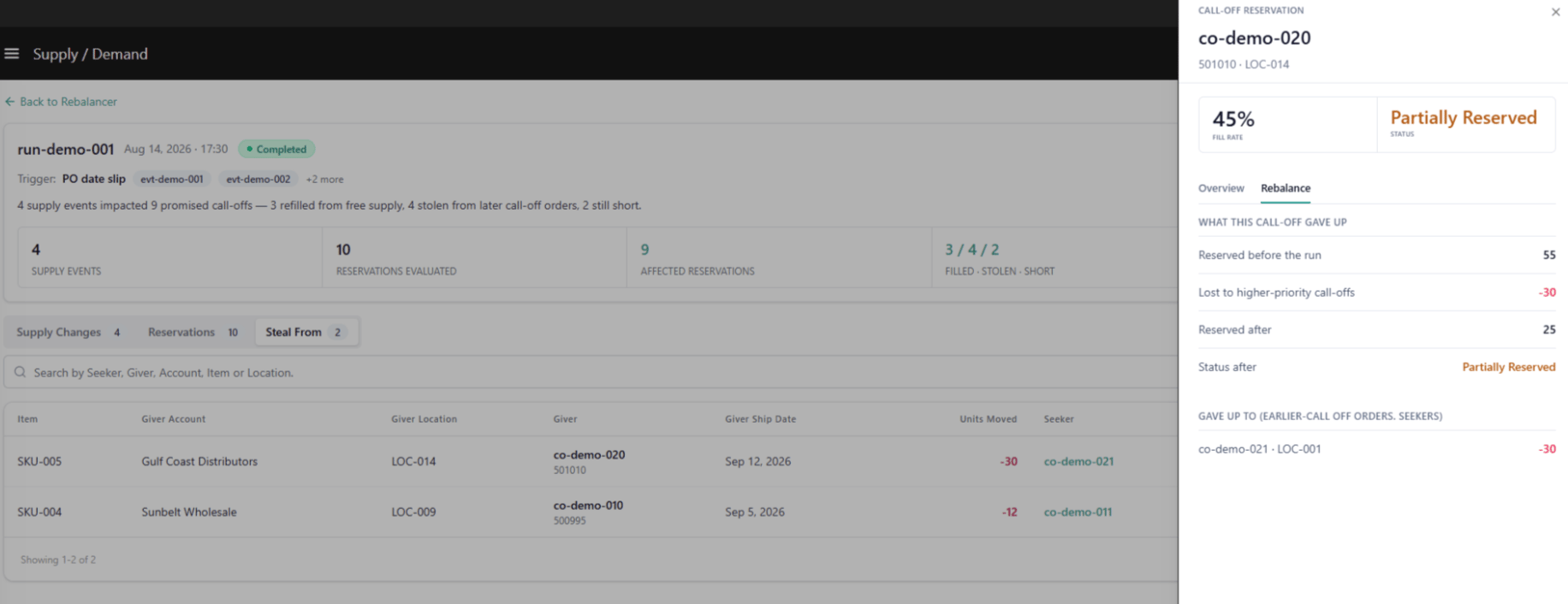
Each row in the Steal From tab corresponds to a *"Rebalanced via steal"* or *"Rebalanced (mixed sources)"* outcome in the Reservations tab. Clicking any row opens the **Call-Off Reservation Detail Drawer** scoped to the Giver's own record.
### Call-Off Reservation Detail Drawer
Clicking any row in either the **Reservations** tab or the **Steal From** tab opens the Call-Off Reservation Detail Drawer — a read-only side panel providing a full breakdown of a single reservation's evaluation context, outcome, and rebalancing detail.
The drawer structure is the same whether opened from a Seeker record or a Giver record. What differs is the call-off's role in this run.
##### Search & Filters
| Control | Values |
| :--------- | :-------------------------------------------- |
| **Search** | Free text by code, call-off order, or account |
| **Reset** | Clears the search field |
##### Table Columns
| Column | Description |
| :------------------- | :------------------------------------------------------------------------------------------------------------------------------------------------ |
| **Item** | Product icon, item name, UPC/product code, and quantity (for example, `IP16-100 · 500 units`). |
| **Giver Account** | The buyer account whose reservation gave up units. |
| **Giver Location** | The Giver call-off's fulfillment location. |
| **Giver** | The Giver call-off code (bold) with its Blanket Order code below (for example, `BLK-7801 · blanket`). |
| **Giver Ship Date** | The Giver call-off's ship date. Always later than the Seeker's ship date — the Date Gate enforces this. |
| **Units Moved** | Units moved from the Giver to the Seeker, shown as a negative number (for example, `-192`) representing the reduction to the Giver's reservation. |
| **Seeker** | The receiving call-off code, linked to its row in the Reservations tab. |
| **Seeker Ship Date** | The Seeker call-off's ship date. Always earlier than the Giver's. |
| **Seeker Location** | The Seeker call-off's fulfillment location. |
Each row in the Steal From tab corresponds to a *"Rebalanced via steal"* or *"Rebalanced (mixed sources)"* outcome in the Reservations tab. Clicking any row opens the **Call-Off Reservation Detail Drawer** scoped to the Giver's own record.
### Call-Off Reservation Detail Drawer
Clicking any row in either the **Reservations** tab or the **Steal From** tab opens the Call-Off Reservation Detail Drawer — a read-only side panel providing a full breakdown of a single reservation's evaluation context, outcome, and rebalancing detail.
The drawer structure is the same whether opened from a Seeker record or a Giver record. What differs is the call-off's role in this run.
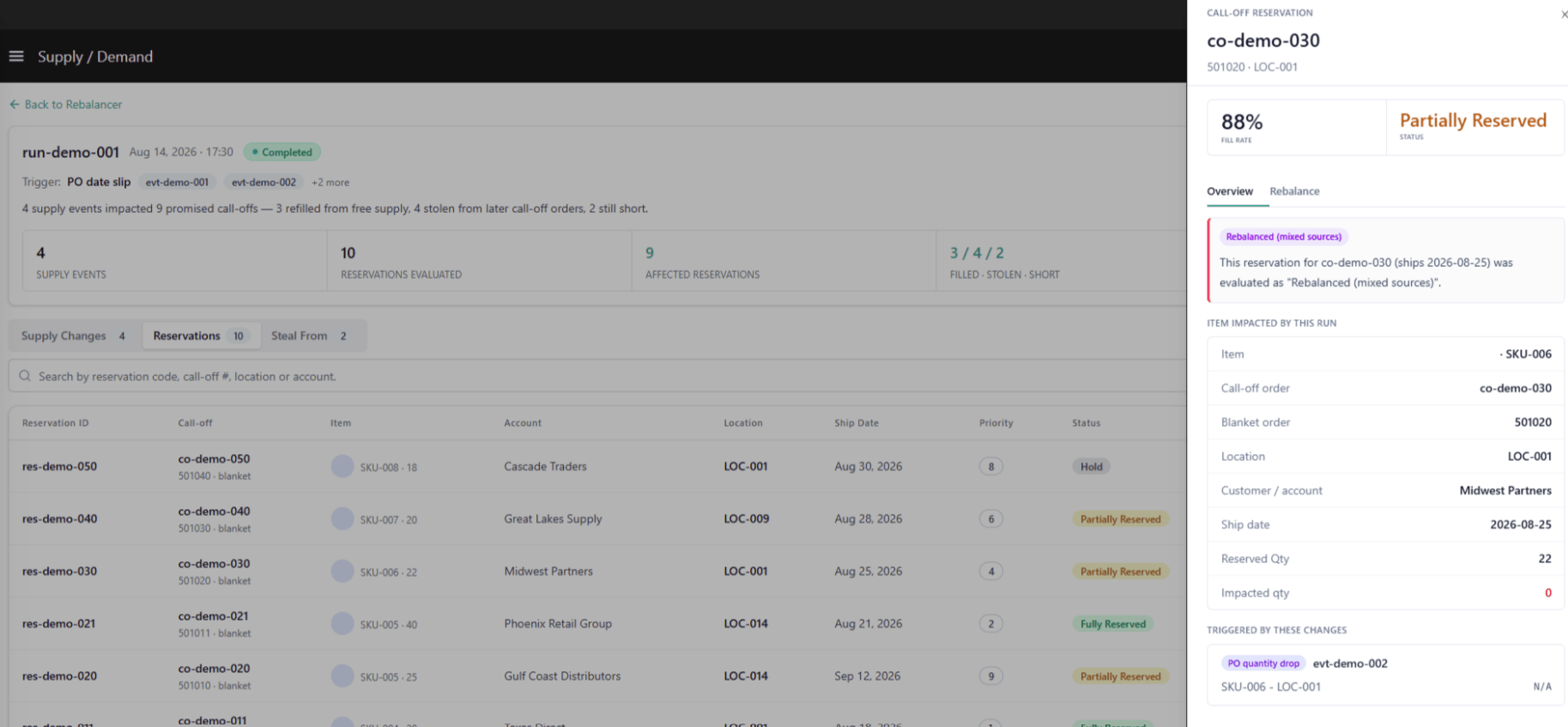 #### Drawer Header
| Element | Description |
| :---------------- | :----------------------------------------------------------------------------------------- |
| **Eyebrow** | Static label "Call-off Reservation" identifying the record type. |
| **Call-off Code** | The call-off order identifier (for example, `CO-90210`). |
| **Subtitle** | Blanket order and location (for example, `BLK-7780 · 001 Arizona`). |
| **Fill Rate** | Percentage of requested quantity currently reserved — reflects the post-run "after" state. |
| **Status Pill** | **Fully Reserved**, **Partially Reserved**, or **Hold**. |
| **Tabs** | **Overview** and **Rebalance**. |
#### Overview Tab
The Overview tab provides the narrative context for what happened to this reservation and why.
##### Outcome Callout
| Field | Description |
| :----------------------------- | :-------------------------------------------------------------------------------------------------------------------------------------- |
| **Role · Outcome pill** | States the call-off's role in this run and what happened — for example, *"Seeker · Filled from free supply"* or *"Giver · Lost units."* |
| **Rule reference tag** | The rule ID and rank that resolved this call-off — for example, *"RSV-RULE-1042 · rank 1"* or *"STEAL-FROM-01 · rank 2."* |
| **Plain-language explanation** | One or two sentences describing what happened and why, in plain business language. No internal engine terminology. |
##### Item Impacted by This Run
| Field | Description |
| :--------------------- | :-------------------------------------------------------------------------------------------------------- |
| **Item** | Item name and UPC/product code. |
| **Call-Off Order** | The call-off code. |
| **Blanket Order** | The Blanket Order this call-off draws against. |
| **Location** | The fulfillment location. |
| **Customer / Account** | The account the call-off belongs to. |
| **Fulfillment Type** | Fulfillment method (for example, Ship-to-Home). |
| **Ship Date** | Promised ship date. |
| **Reserved Qty** | Total units originally requested on this call-off. |
| **Impacted Qty** | Units affected by this run's rebalancing — the delta caused by this run, not the total reserved quantity. |
##### Triggered by These Changes
Lists every supply change event that caused this reservation to be re-evaluated in this run:
| Field | Description |
| :------------------------- | :----------------------------------------------------------------------------------------------------------------------- |
| **Change sub-type + PO #** | The supply change that triggered re-evaluation (for example, *"PO date slip PO-4522"*). One row per linked change event. |
| **UPC / Location** | The item and location tied to that supply change. |
| **Delta** | The before → after value — the same value shown on that change's row in the Supply Changes tab. |
#### Rebalance Tab — Seeker Record
The Rebalance tab on a Seeker record shows exactly how the system attempted to re-secure supply for this call-off.
#### Drawer Header
| Element | Description |
| :---------------- | :----------------------------------------------------------------------------------------- |
| **Eyebrow** | Static label "Call-off Reservation" identifying the record type. |
| **Call-off Code** | The call-off order identifier (for example, `CO-90210`). |
| **Subtitle** | Blanket order and location (for example, `BLK-7780 · 001 Arizona`). |
| **Fill Rate** | Percentage of requested quantity currently reserved — reflects the post-run "after" state. |
| **Status Pill** | **Fully Reserved**, **Partially Reserved**, or **Hold**. |
| **Tabs** | **Overview** and **Rebalance**. |
#### Overview Tab
The Overview tab provides the narrative context for what happened to this reservation and why.
##### Outcome Callout
| Field | Description |
| :----------------------------- | :-------------------------------------------------------------------------------------------------------------------------------------- |
| **Role · Outcome pill** | States the call-off's role in this run and what happened — for example, *"Seeker · Filled from free supply"* or *"Giver · Lost units."* |
| **Rule reference tag** | The rule ID and rank that resolved this call-off — for example, *"RSV-RULE-1042 · rank 1"* or *"STEAL-FROM-01 · rank 2."* |
| **Plain-language explanation** | One or two sentences describing what happened and why, in plain business language. No internal engine terminology. |
##### Item Impacted by This Run
| Field | Description |
| :--------------------- | :-------------------------------------------------------------------------------------------------------- |
| **Item** | Item name and UPC/product code. |
| **Call-Off Order** | The call-off code. |
| **Blanket Order** | The Blanket Order this call-off draws against. |
| **Location** | The fulfillment location. |
| **Customer / Account** | The account the call-off belongs to. |
| **Fulfillment Type** | Fulfillment method (for example, Ship-to-Home). |
| **Ship Date** | Promised ship date. |
| **Reserved Qty** | Total units originally requested on this call-off. |
| **Impacted Qty** | Units affected by this run's rebalancing — the delta caused by this run, not the total reserved quantity. |
##### Triggered by These Changes
Lists every supply change event that caused this reservation to be re-evaluated in this run:
| Field | Description |
| :------------------------- | :----------------------------------------------------------------------------------------------------------------------- |
| **Change sub-type + PO #** | The supply change that triggered re-evaluation (for example, *"PO date slip PO-4522"*). One row per linked change event. |
| **UPC / Location** | The item and location tied to that supply change. |
| **Delta** | The before → after value — the same value shown on that change's row in the Supply Changes tab. |
#### Rebalance Tab — Seeker Record
The Rebalance tab on a Seeker record shows exactly how the system attempted to re-secure supply for this call-off.
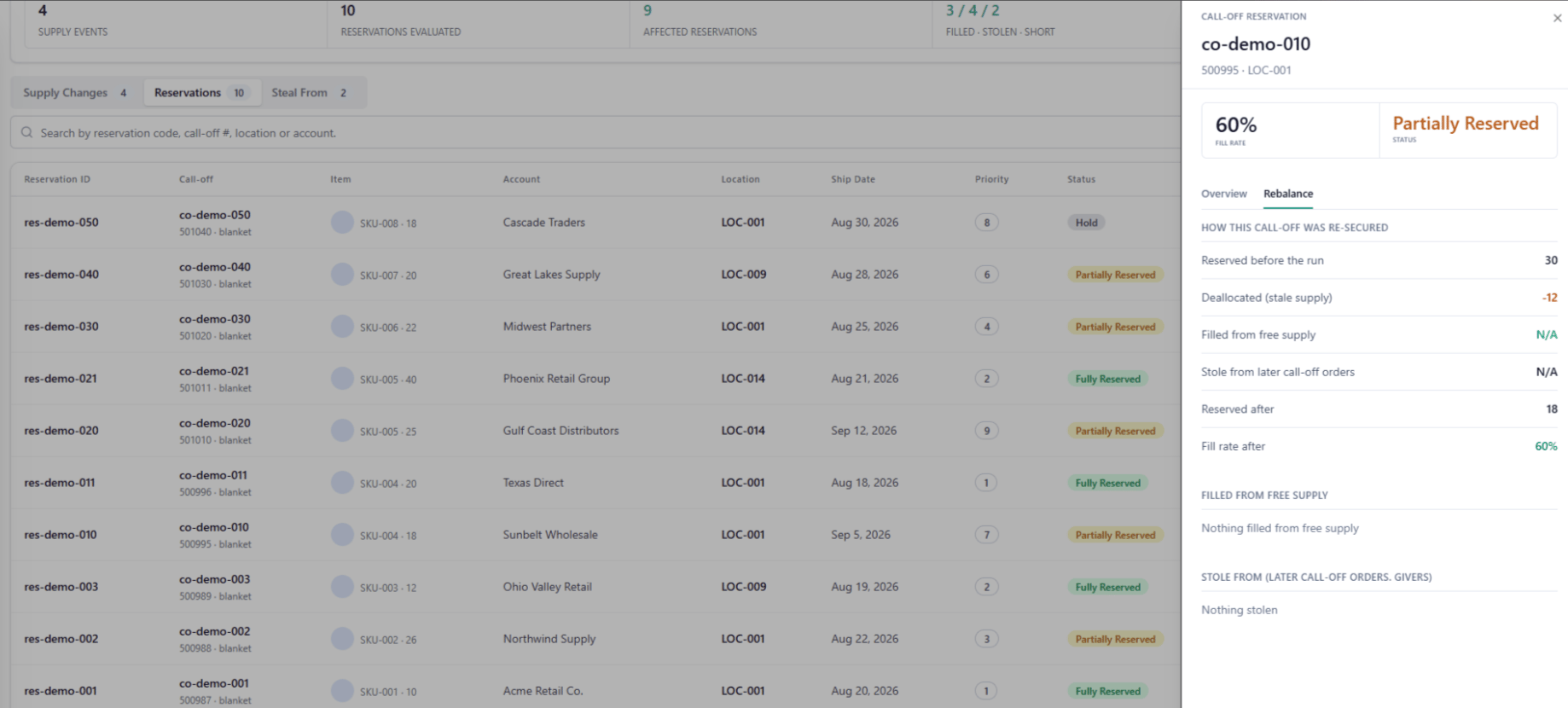 ##### How This Call-Off Was Re-Secured
| Field | Description |
| :----------------------------------- | :------------------------------------------------------------------------------------------------------------------------------------- |
| **Reserved before the run** | Units reserved for this call-off prior to this run. |
| **Deallocated (stale supply)** | Units removed because the supply backing them became invalid — shown as a negative value. |
| **Filled from free supply** | Units re-secured from available unreserved supply — shown as a positive value. |
| **Stole from later call-off orders** | Units re-secured by taking from lower-priority, later-shipping Call-Off Orders — shown as a positive value, or 0 if no steal occurred. |
| **Reserved after** | Units reserved for this call-off after this run. |
| **Fill rate after** | Reserved after ÷ Requested qty, as a percentage. Matches the Fill Rate shown in the drawer header. |
##### Filled from Free Supply — Breakdown
| Row | Description |
| :--------------------------------------- | :------------------------------------------------------------------------------------------------------------------------------------ |
| **Same location · \{Reservation ID}** | Units filled from free supply at the call-off's own location, added to its existing reservation — shown as `+N units`. |
| **New location · new reservation \{ID}** | Units filled from free supply at a different location, creating a new reservation record tied to this call-off — shown as `+N units`. |
##### Stole From (Later Call-Off Orders — Givers)
| Row | Description |
| :------------------------- | :---------------------------------------------------------------------------------------------------------------------------------------------------------- |
| **\{Giver Call-Off Code}** | A later-shipping, lower-priority call-off that gave up units to this Seeker — shown as `+N units`, linked to that call-off's own record. One row per Giver. |
| **Nothing stolen** | Shown when no steal occurred for this call-off. |
##### Still Short
| Field | Description |
| :-------------------- | :------------------------------------------------------------------------------------------------------------------------------------------------------------------------------------------ |
| **Units still short** | Remaining unfulfilled quantity after free-supply fill and steal are both applied — shown only when the Seeker could not be fully re-secured. Hidden when the call-off was fully re-secured. |
#### Rebalance Tab — Giver Record
The Rebalance tab on a Giver record shows what supply the system took from this call-off and who received it.
##### How This Call-Off Was Re-Secured
| Field | Description |
| :----------------------------------- | :------------------------------------------------------------------------------------------------------------------------------------- |
| **Reserved before the run** | Units reserved for this call-off prior to this run. |
| **Deallocated (stale supply)** | Units removed because the supply backing them became invalid — shown as a negative value. |
| **Filled from free supply** | Units re-secured from available unreserved supply — shown as a positive value. |
| **Stole from later call-off orders** | Units re-secured by taking from lower-priority, later-shipping Call-Off Orders — shown as a positive value, or 0 if no steal occurred. |
| **Reserved after** | Units reserved for this call-off after this run. |
| **Fill rate after** | Reserved after ÷ Requested qty, as a percentage. Matches the Fill Rate shown in the drawer header. |
##### Filled from Free Supply — Breakdown
| Row | Description |
| :--------------------------------------- | :------------------------------------------------------------------------------------------------------------------------------------ |
| **Same location · \{Reservation ID}** | Units filled from free supply at the call-off's own location, added to its existing reservation — shown as `+N units`. |
| **New location · new reservation \{ID}** | Units filled from free supply at a different location, creating a new reservation record tied to this call-off — shown as `+N units`. |
##### Stole From (Later Call-Off Orders — Givers)
| Row | Description |
| :------------------------- | :---------------------------------------------------------------------------------------------------------------------------------------------------------- |
| **\{Giver Call-Off Code}** | A later-shipping, lower-priority call-off that gave up units to this Seeker — shown as `+N units`, linked to that call-off's own record. One row per Giver. |
| **Nothing stolen** | Shown when no steal occurred for this call-off. |
##### Still Short
| Field | Description |
| :-------------------- | :------------------------------------------------------------------------------------------------------------------------------------------------------------------------------------------ |
| **Units still short** | Remaining unfulfilled quantity after free-supply fill and steal are both applied — shown only when the Seeker could not be fully re-secured. Hidden when the call-off was fully re-secured. |
#### Rebalance Tab — Giver Record
The Rebalance tab on a Giver record shows what supply the system took from this call-off and who received it.
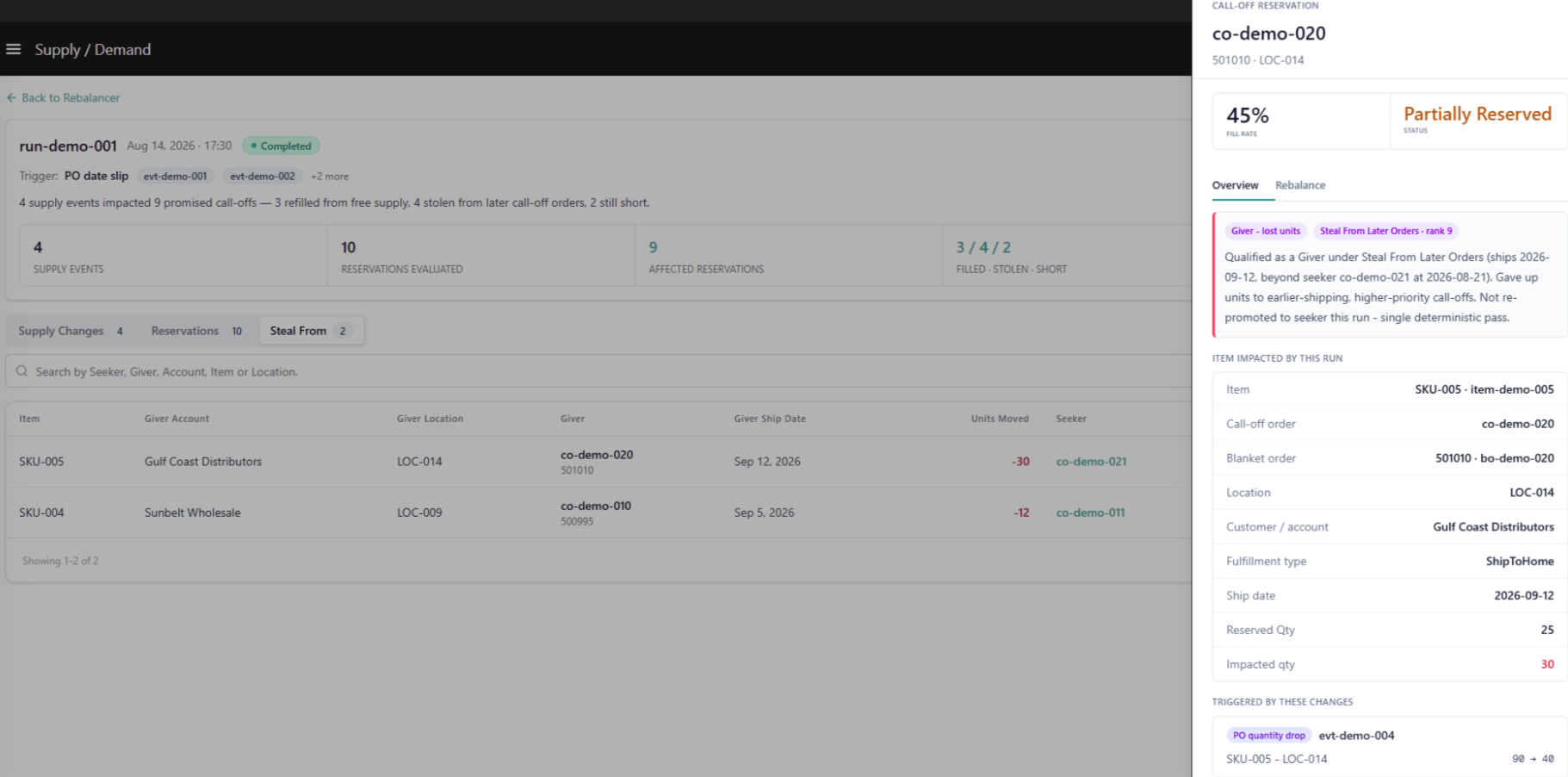 ##### What This Call-Off Gave Up
| Field | Description |
| :------------------------------------ | :----------------------------------------------------------------------------------------------------------------- |
| **Reserved before the run** | Units reserved for this call-off prior to this run. |
| **Lost to higher-priority call-offs** | Units taken from this call-off — shown as a negative value. |
| **Reserved after** | Units remaining reserved for this call-off after giving up units. |
| **Status after** | The call-off's reservation status after giving up units — **Fully Reserved**, **Partially Reserved**, or **Hold**. |
##### Gave Up To (Earlier Call-Off Orders — Seekers)
| Row | Description |
| :---------------------------------------- | :----------------------------------------------------------------------------------------------------------------------------------------------------------------- |
| **\{Seeker Call-Off Code} · \{Location}** | An earlier-shipping, higher-priority call-off that received units from this Giver — shown as `-N units`, linked to that call-off's own record. One row per Seeker. |
##### What This Call-Off Gave Up
| Field | Description |
| :------------------------------------ | :----------------------------------------------------------------------------------------------------------------- |
| **Reserved before the run** | Units reserved for this call-off prior to this run. |
| **Lost to higher-priority call-offs** | Units taken from this call-off — shown as a negative value. |
| **Reserved after** | Units remaining reserved for this call-off after giving up units. |
| **Status after** | The call-off's reservation status after giving up units — **Fully Reserved**, **Partially Reserved**, or **Hold**. |
##### Gave Up To (Earlier Call-Off Orders — Seekers)
| Row | Description |
| :---------------------------------------- | :----------------------------------------------------------------------------------------------------------------------------------------------------------------- |
| **\{Seeker Call-Off Code} · \{Location}** | An earlier-shipping, higher-priority call-off that received units from this Giver — shown as `-N units`, linked to that call-off's own record. One row per Seeker. |