> ## Documentation Index
> Fetch the complete documentation index at: https://docs.kibocommerce.com/llms.txt
> Use this file to discover all available pages before exploring further.
# Order Validators and Fraud Check Applications
An **Order Validator** is a Kibo platform capability that intercepts an order after submission and routes it to an external service for validation. The most common use case is fraud detection, but the capability contract is generic enough to support any order-level validation logic.
Kibo provides two supported, pre-built Order Validator applications — [Kount](/pages/kount-application) and [CyberSource Decision Manager](/pages/cybersource-decision-manager-application) — and also supports custom validator implementations via any externally hosted REST endpoint or Kibo API Extension function.
## How Order Validation Works
When an order is submitted, Kibo calls every registered Order Validator capability for the site, collects the result, and uses the returned `status` to determine the order's next state.
The `OrderValidator` capability type is scoped per-site and uses `MultiplePerSite` mode, meaning more than one Order Validator may be registered per site simultaneously. Validators can be integrated via an external REST endpoint or a Kibo API Extension function. If no Order Validator capability is registered for a site, the platform automatically treats the order as `Pass` and proceeds to fulfillment without calling any external service. If Kibo cannot reach your validator endpoint (network error, timeout, etc.), the platform defaults the result to `Fail` and the order goes to `PendingReview`.
## Validator Types
The `validatorType` field on an `OrderValidationResult` identifies the category of validation being performed.
| Value | Description |
| --------- | ----------------------------------------------------------- |
| `"Fraud"` | Indicates that the result is from a fraud-detection service |
`"Fraud"` is the only formally defined constant in the platform. The `validatorType` field is a free-form string, so custom implementations may use other values for internal tracking purposes, but the platform does not apply any special routing behavior based on custom type values.
## Validator Statuses
The `status` field on the `OrderValidationResult` determines what happens to the order after validation. Four statuses are recognized:
| Status | String Value | Order State Effect |
| ------ | ------------ | --------------------------------------------------------------------------------------------- |
| Pass | `"Pass"` | Order proceeds to `Validated`, then moves toward fulfillment (`Accepted` / `PendingShipment`) |
| Review | `"Review"` | Order is placed into `PendingReview` — a human agent must manually accept or cancel |
| Fail | `"Fail"` | Order is placed into `PendingReview` — requires manual intervention |
| Error | `"Error"` | Order is placed into `PendingReview` — validator encountered an error condition |
### Order State Flow
```mermaid theme={null}
flowchart TD
A[Order Submitted] --> B[Validator Called]
B -->|status = Pass| C[Validated]
C --> D[Accepted / PendingShipment]
B -->|status = Review| E[PendingReview\nmanual review required]
B -->|status = Fail| E
B -->|status = Error| E
```
## Add Order Validator
Follow the below steps to add an order validator:
1. In Dev Center, navigate to **Develop** > **Applications > Packages > Capabilities.**
2. Click **Add Capability**.
3. Search for **Order Validator** in the **Add Capability** modal and click **Ok.**
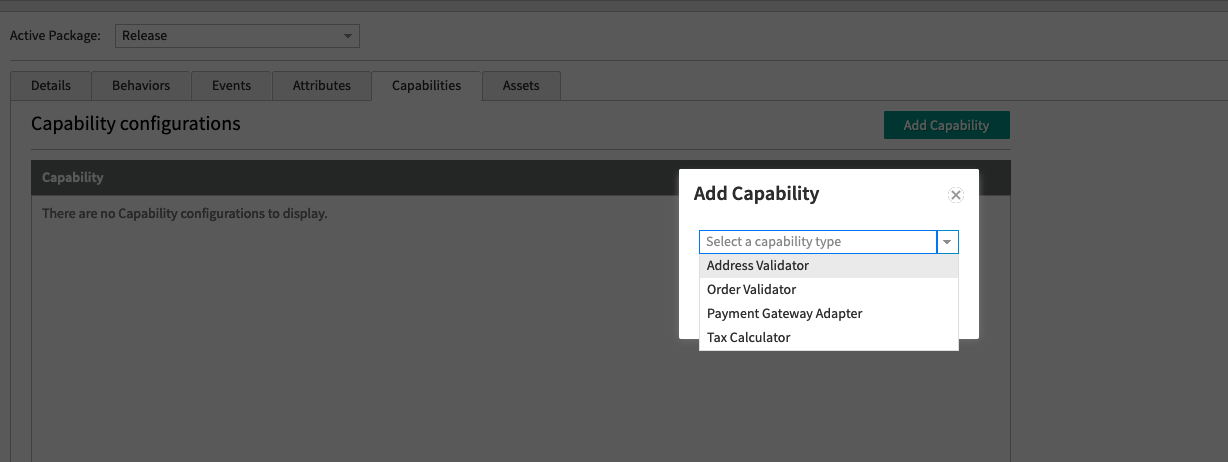 4. Add a URL for a web service that you host externally, or an API Extension function if you want it hosted in Kibo.
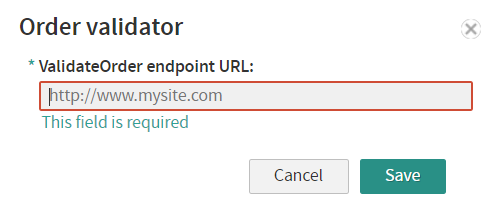 The URL is a REST endpoint that accepts the full `Order` object via `POST` and returns an `OrderValidationResult` response.
## OrderValidationResult Schema
Your validator endpoint must return an `OrderValidationResult` JSON object. The `validationId` and `createdDate` fields are required — requests missing either will be rejected by the platform.
```json theme={null}
{
"validationId": "string", // REQUIRED — unique ID for this validation attempt (set by your service)
"validatorName": "string", // Friendly name of your validator
"validatorType": "string", // The type of validation — "Fraud" is the only formally defined value
"status": "string", // "Pass", "Review", "Fail", or "Error"
"createdDate": "2024-01-01T00:00:00.000Z", // REQUIRED — ISO 8601 UTC timestamp
"messages": [
{
"orderItemId": "string", // Optional — links the message to a specific line item
"messageType": "string", // Classification of the message
"message": "string" // Human-readable message content
}
]
}
```
### API Endpoints
**Add a validation result** (for async validators that review orders after the fact):
`PUT /api/commerce/orders/{orderId}/validationresults` — [API reference](/api-reference/order/add-validation-result)
**Get validation results** for an order:
`GET /api/commerce/orders/{orderId}/validationresults` — [API reference](/api-reference/order/get-validation-results)
## Building a Custom Validator
If you want to implement your own order validator rather than using a pre-built integration, follow this pattern.
### Step 1 — Create your endpoint
Your service must expose a `POST` endpoint that:
* Accepts the full Kibo `Order` object in the request body (JSON)
* Returns an `OrderValidationResult` JSON object
* Responds with an HTTP `2xx` status code on success
### Step 2 — Register the capability in Dev Center
Register your endpoint URL as the `ValidateOrder` operation URL on an Order Validator capability (see [Add Order Validator](#add-order-validator) above).
### Step 3 — Return a valid result
Your response must always include `validationId`, `createdDate`, and `status`. The `status` value drives order routing (see [Validator Statuses](#validator-statuses) above).
**Example — Pass:**
```json theme={null}
{
"validationId": "txn-20240601-001",
"validatorName": "Acme Fraud Check",
"validatorType": "Fraud",
"status": "Pass",
"createdDate": "2024-06-01T12:00:00.000Z",
"messages": []
}
```
**Example — Review with messages:**
```json theme={null}
{
"validationId": "txn-20240601-002",
"validatorName": "Acme Fraud Check",
"validatorType": "Fraud",
"status": "Review",
"createdDate": "2024-06-01T12:00:01.000Z",
"messages": [
{
"messageType": "RiskFlag",
"message": "IP address does not match billing country"
},
{
"orderItemId": "item-abc",
"messageType": "HighValue",
"message": "Line item value exceeds threshold"
}
]
}
```
## Pre-Built Validator Integrations
### Kount
[Kount](/pages/kount-application) is a fraud detection service that:
* Automatically sends submitted order data to Kount for screening (browser type, IP, device, billing info, etc.)
* Calculates a fraud score using your configured Kount rules
* Returns one of four Kount statuses: `Accept (A)`, `Decline (D)`, `Review (R)`, `Escalate (E)`
* Maps results back to Kibo order status (`Accepted`, `PendingReview`, or `Cancelled`)
* Supports a monetary threshold below which orders are not screened
* Supports the Kount Event Notification System (ENS) to sync status changes from Kount back to Kibo in near real-time
### CyberSource Decision Manager
[CyberSource Decision Manager](/pages/cybersource-decision-manager-application) is a fraud protection platform that:
* Automatically sends submitted order data to Decision Manager for screening
* Applies your configured Decision Manager rules to produce a fraud score and validation result (`accept`, `review`, or `reject`)
* Maps results back to Kibo order status (`Accepted`, `PendingReview`, or `Cancelled`)
* Supports scheduled order synchronization to pull status updates from Decision Manager back into Kibo
* Supports combined authorization and fraud validation in a single call
* Supports a monetary threshold below which orders are not screened
## Platform Capability Type Reference
`OrderValidator` is one of four publicly available capability types the Kibo platform supports. For the full reference, see [Application Capabilities](/pages/applications-1a6c791-introduction#add-a-capability).
The URL is a REST endpoint that accepts the full `Order` object via `POST` and returns an `OrderValidationResult` response.
## OrderValidationResult Schema
Your validator endpoint must return an `OrderValidationResult` JSON object. The `validationId` and `createdDate` fields are required — requests missing either will be rejected by the platform.
```json theme={null}
{
"validationId": "string", // REQUIRED — unique ID for this validation attempt (set by your service)
"validatorName": "string", // Friendly name of your validator
"validatorType": "string", // The type of validation — "Fraud" is the only formally defined value
"status": "string", // "Pass", "Review", "Fail", or "Error"
"createdDate": "2024-01-01T00:00:00.000Z", // REQUIRED — ISO 8601 UTC timestamp
"messages": [
{
"orderItemId": "string", // Optional — links the message to a specific line item
"messageType": "string", // Classification of the message
"message": "string" // Human-readable message content
}
]
}
```
### API Endpoints
**Add a validation result** (for async validators that review orders after the fact):
`PUT /api/commerce/orders/{orderId}/validationresults` — [API reference](/api-reference/order/add-validation-result)
**Get validation results** for an order:
`GET /api/commerce/orders/{orderId}/validationresults` — [API reference](/api-reference/order/get-validation-results)
## Building a Custom Validator
If you want to implement your own order validator rather than using a pre-built integration, follow this pattern.
### Step 1 — Create your endpoint
Your service must expose a `POST` endpoint that:
* Accepts the full Kibo `Order` object in the request body (JSON)
* Returns an `OrderValidationResult` JSON object
* Responds with an HTTP `2xx` status code on success
### Step 2 — Register the capability in Dev Center
Register your endpoint URL as the `ValidateOrder` operation URL on an Order Validator capability (see [Add Order Validator](#add-order-validator) above).
### Step 3 — Return a valid result
Your response must always include `validationId`, `createdDate`, and `status`. The `status` value drives order routing (see [Validator Statuses](#validator-statuses) above).
**Example — Pass:**
```json theme={null}
{
"validationId": "txn-20240601-001",
"validatorName": "Acme Fraud Check",
"validatorType": "Fraud",
"status": "Pass",
"createdDate": "2024-06-01T12:00:00.000Z",
"messages": []
}
```
**Example — Review with messages:**
```json theme={null}
{
"validationId": "txn-20240601-002",
"validatorName": "Acme Fraud Check",
"validatorType": "Fraud",
"status": "Review",
"createdDate": "2024-06-01T12:00:01.000Z",
"messages": [
{
"messageType": "RiskFlag",
"message": "IP address does not match billing country"
},
{
"orderItemId": "item-abc",
"messageType": "HighValue",
"message": "Line item value exceeds threshold"
}
]
}
```
## Pre-Built Validator Integrations
### Kount
[Kount](/pages/kount-application) is a fraud detection service that:
* Automatically sends submitted order data to Kount for screening (browser type, IP, device, billing info, etc.)
* Calculates a fraud score using your configured Kount rules
* Returns one of four Kount statuses: `Accept (A)`, `Decline (D)`, `Review (R)`, `Escalate (E)`
* Maps results back to Kibo order status (`Accepted`, `PendingReview`, or `Cancelled`)
* Supports a monetary threshold below which orders are not screened
* Supports the Kount Event Notification System (ENS) to sync status changes from Kount back to Kibo in near real-time
### CyberSource Decision Manager
[CyberSource Decision Manager](/pages/cybersource-decision-manager-application) is a fraud protection platform that:
* Automatically sends submitted order data to Decision Manager for screening
* Applies your configured Decision Manager rules to produce a fraud score and validation result (`accept`, `review`, or `reject`)
* Maps results back to Kibo order status (`Accepted`, `PendingReview`, or `Cancelled`)
* Supports scheduled order synchronization to pull status updates from Decision Manager back into Kibo
* Supports combined authorization and fraud validation in a single call
* Supports a monetary threshold below which orders are not screened
## Platform Capability Type Reference
`OrderValidator` is one of four publicly available capability types the Kibo platform supports. For the full reference, see [Application Capabilities](/pages/applications-1a6c791-introduction#add-a-capability).