> ## Documentation Index
> Fetch the complete documentation index at: https://docs.kibocommerce.com/llms.txt
> Use this file to discover all available pages before exploring further.
# Merchandizing Agent User Guide
The Merchandizing Agent is an AI-powered assistant that helps merchandisers efficiently manage product content, generate descriptions, and optimize SEO across your Kibo Commerce catalog.
## Table of Contents
1. [Overview](#overview)
2. [Accessing the Merchandizing Agent](#accessing-the-merchandizing-agent)
3. [Getting Started](#getting-started)
4. [Types of Requests](#types-of-requests)
5. [Content Generation](#content-generation)
6. [How Changes Are Applied](#how-changes-are-applied)
7. [Best Practices](#best-practices)
8. [Example Conversations](#example-conversations)
9. [Troubleshooting](#troubleshooting)
***
## Overview
### What is the Merchandizing Agent?
The Merchandizing Agent is a conversational AI assistant designed specifically for merchandizing tasks. Instead of navigating through multiple screens and forms, you can simply describe what you want to do in plain English, and the agent will:
* Retrieve product information
* Generate or update product descriptions
* Create SEO-optimized content
* Update product metadata across locales
* Search your catalog using natural language
### Key Benefits
| Benefit | Description |
| -------------------- | ----------------------------------------------------------------- |
| **Speed** | Update product content in seconds instead of minutes |
| **Consistency** | Generate descriptions that follow your brand voice |
| **Multi-locale** | Manage content across different languages and regions |
| **SEO Optimization** | Create search-engine-friendly titles, descriptions, and keywords |
| **Natural Language** | No need to learn complex interfaces - just describe what you need |
***
## Accessing the Merchandizing Agent
### Where to Find It
The Merchandizing Agent is accessed through the **Kibo Agent Admin** interface:
1. Navigate to your Kibo Agent Admin URL (provided by your administrator)
2. Log in with your credentials
3. From the Dashboard, click **Manage Agents**
4. Select the **Catalog Agent** (or agent configured for merchandizing)
5. Click **Agent Testing** in the sidebar to start a conversation
### Navigation Path
```
Dashboard > Agents > [Catalog Agent] > Agent Testing
```
### Required Permissions
To use the Merchandizing Agent, you need:
* Access to the Kibo Agent Admin application
* Product catalog management permissions in your Kibo tenant
* Appropriate site/locale permissions for the content you want to manage
***
## Getting Started
### Starting a New Session
1. Navigate to **Agent Testing** for your Catalog Agent
2. Configure your session settings:
* **Site**: Select the brand/site context for your products
* **Language**: Choose your preferred language (default: English)
* **Session Timeout**: How long before the session expires (default: 30 minutes)
3. Type your request in the message box
4. Press **Enter** or click **Send**
### Session Configuration
| Setting | Description | Default |
| ---------------------- | ---------------------------------------- | ------------ |
| **Site Context** | Which brand/site's products to work with | Primary site |
| **Language Code** | Language for the conversation | en (English) |
| **Max Message Length** | Character limit per message | 2000 |
| **Session Timeout** | Minutes before session expires | 30 |
### Your First Request
When you open a product in the Kibo Admin and click the **Agentic** button, you'll see the Merchandizing Agent panel with quick action buttons:
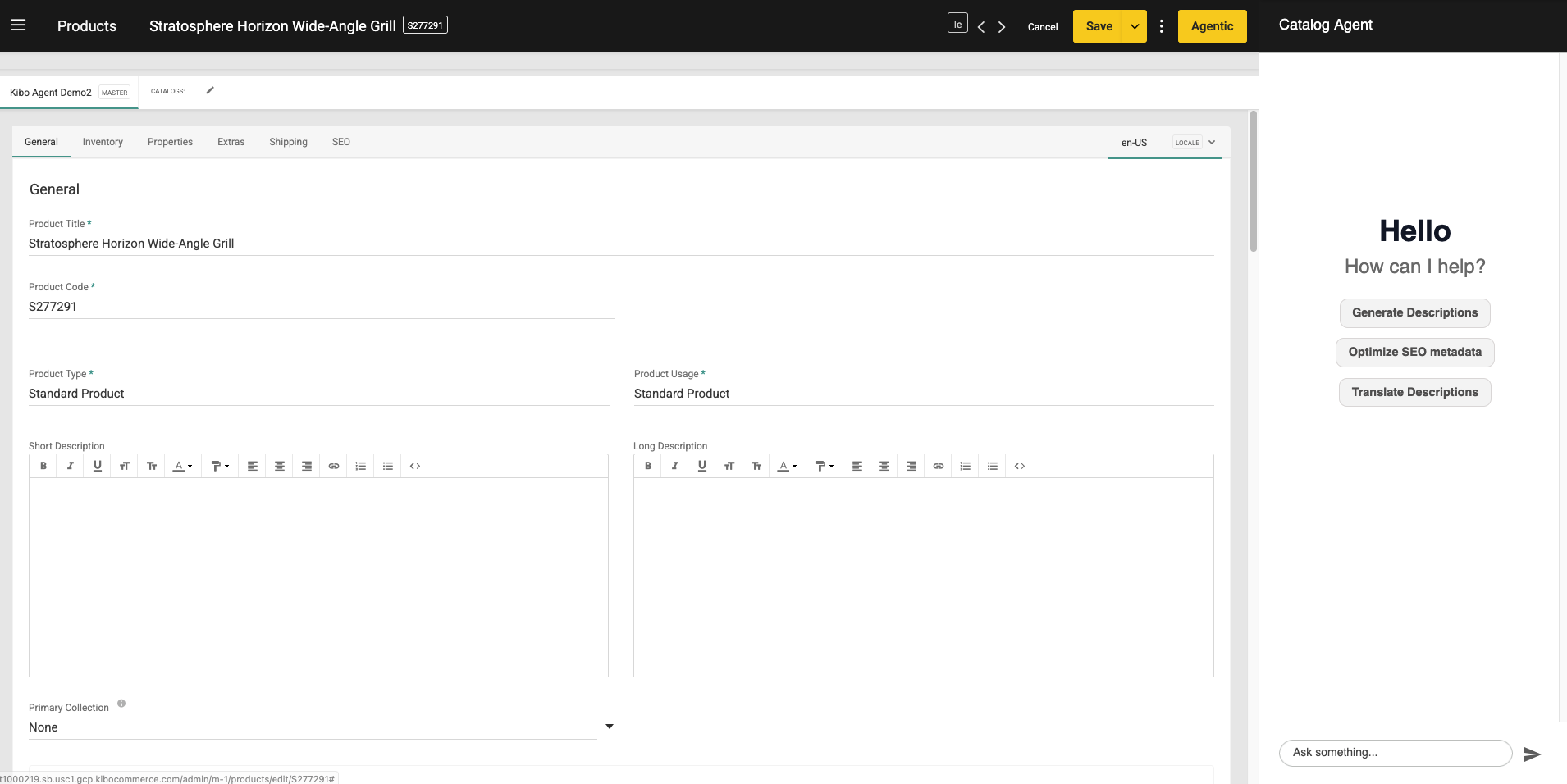 You can click one of the quick action buttons or type a custom request. Try a simple request to get started:
```
Show me the product details for product code ABC123
```
The agent will retrieve the product information and display it, allowing you to then request updates.
***
## Types of Requests
The Merchandizing Agent understands various types of requests. Here are the main categories:
### 1. Product Information Retrieval
Get details about products in your catalog.
**Example requests:**
* "Show me the details for product SKU-12345"
* "What is the current description for the Blue Running Shoes?"
* "Get the SEO metadata for product ABC123 in English"
* "List the content for product XYZ in Spanish locale"
### 2. Product Search
Find products using natural language queries.
**Example requests:**
* "Find all red dresses under \$100"
* "Search for running shoes in size 10"
* "Show me products with 'organic' in the name"
* "Find winter jackets on sale"
### 3. Content Updates
Update product descriptions and names.
**Example requests:**
* "Update the short description for product ABC123 to highlight its waterproof feature"
* "Change the product name for SKU-456 to 'Premium Leather Wallet'"
* "Set the full description for product XYZ to describe its eco-friendly materials"
* "Update the Spanish description for product ABC123"
### 4. SEO Optimization
Manage SEO-related content for products. Navigate to the SEO tab to see current metadata:
You can click one of the quick action buttons or type a custom request. Try a simple request to get started:
```
Show me the product details for product code ABC123
```
The agent will retrieve the product information and display it, allowing you to then request updates.
***
## Types of Requests
The Merchandizing Agent understands various types of requests. Here are the main categories:
### 1. Product Information Retrieval
Get details about products in your catalog.
**Example requests:**
* "Show me the details for product SKU-12345"
* "What is the current description for the Blue Running Shoes?"
* "Get the SEO metadata for product ABC123 in English"
* "List the content for product XYZ in Spanish locale"
### 2. Product Search
Find products using natural language queries.
**Example requests:**
* "Find all red dresses under \$100"
* "Search for running shoes in size 10"
* "Show me products with 'organic' in the name"
* "Find winter jackets on sale"
### 3. Content Updates
Update product descriptions and names.
**Example requests:**
* "Update the short description for product ABC123 to highlight its waterproof feature"
* "Change the product name for SKU-456 to 'Premium Leather Wallet'"
* "Set the full description for product XYZ to describe its eco-friendly materials"
* "Update the Spanish description for product ABC123"
### 4. SEO Optimization
Manage SEO-related content for products. Navigate to the SEO tab to see current metadata:
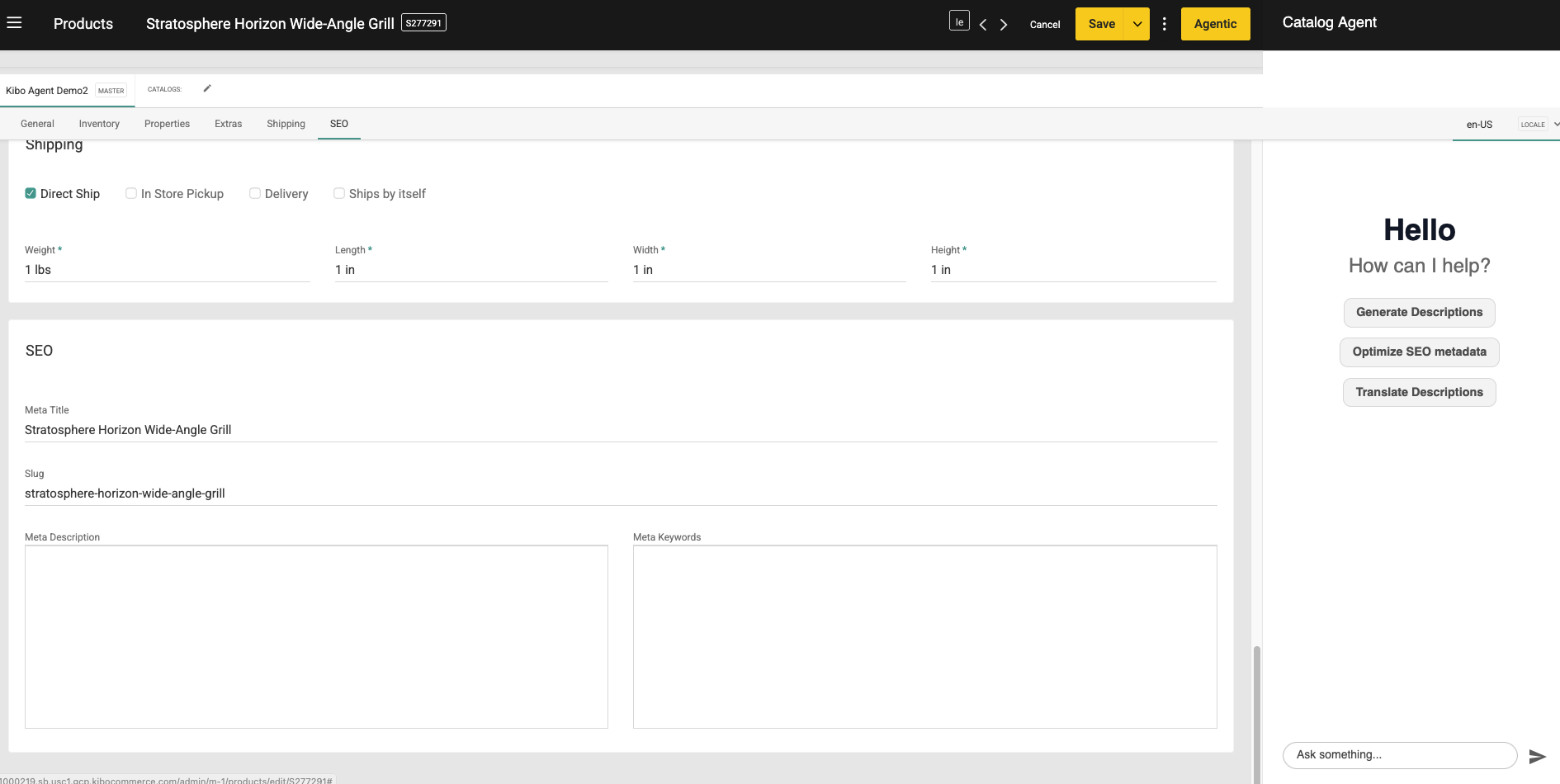 Click **Optimize SEO metadata** to have the agent generate meta titles, descriptions, and keywords:
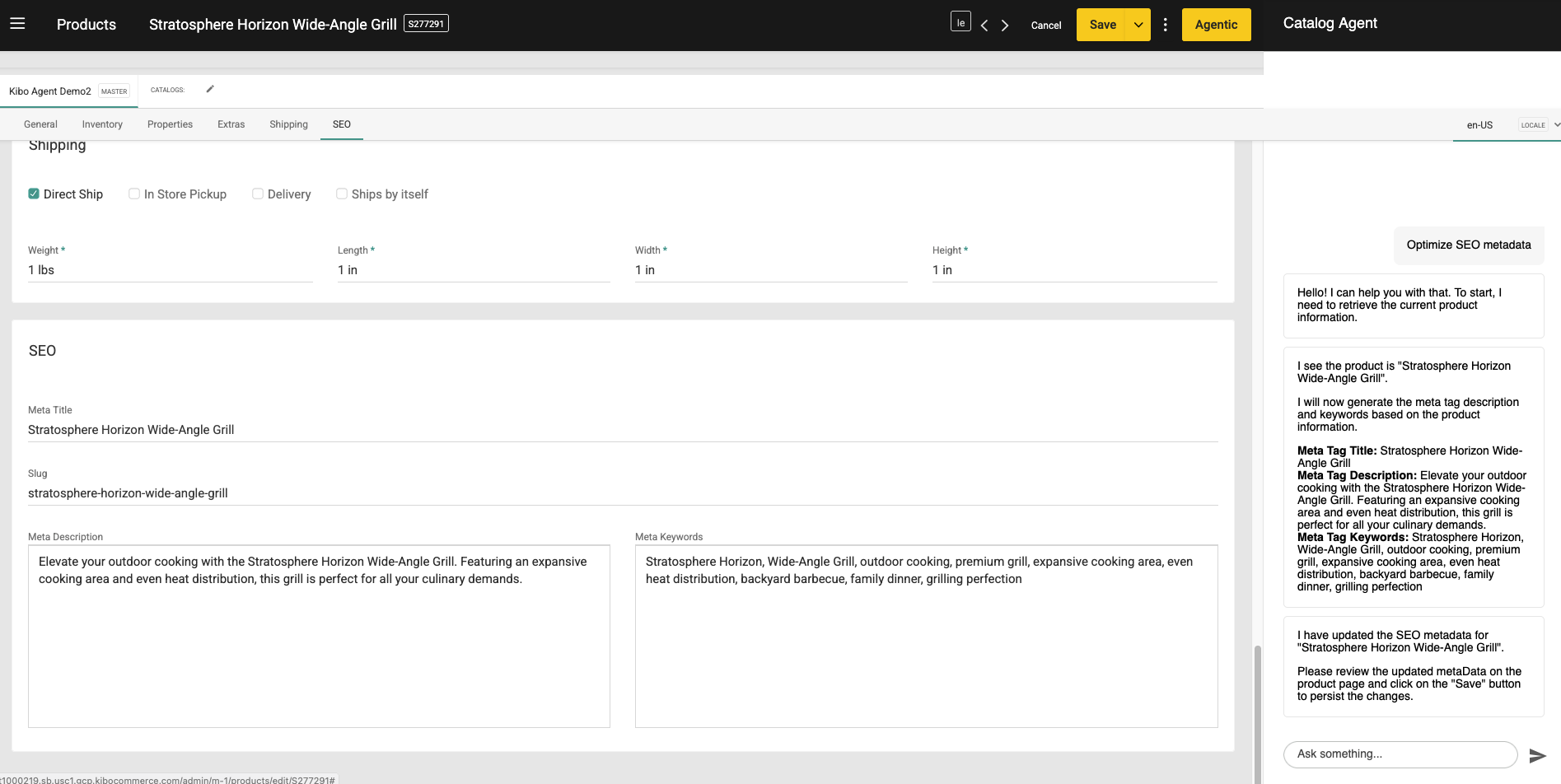 **Example requests:**
* "Update the meta title for product ABC123 to 'Best Running Shoes 2025'"
* "Set the meta description to highlight free shipping"
* "Add keywords 'sustainable, eco-friendly, organic' to product XYZ"
* "Update the URL slug for this product to 'premium-leather-wallet'"
### 5. Multi-Locale Management
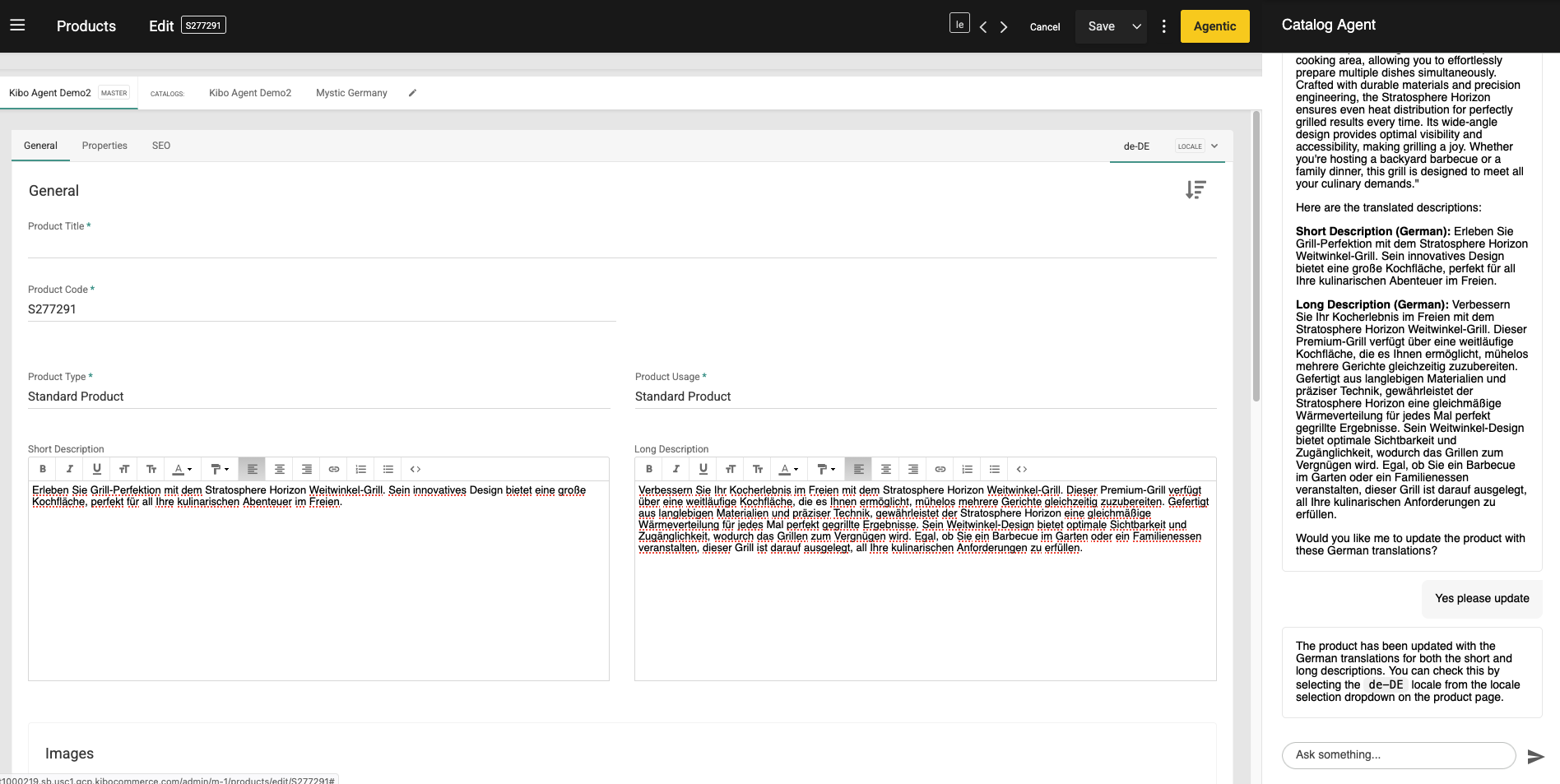
Manage content across different locales. Click **Translate Descriptions** to translate product content into other languages supported by your catalog:
**Example requests:**
* "Update the meta title for product ABC123 to 'Best Running Shoes 2025'"
* "Set the meta description to highlight free shipping"
* "Add keywords 'sustainable, eco-friendly, organic' to product XYZ"
* "Update the URL slug for this product to 'premium-leather-wallet'"
### 5. Multi-Locale Management
Manage content across different locales. Click **Translate Descriptions** to translate product content into other languages supported by your catalog:
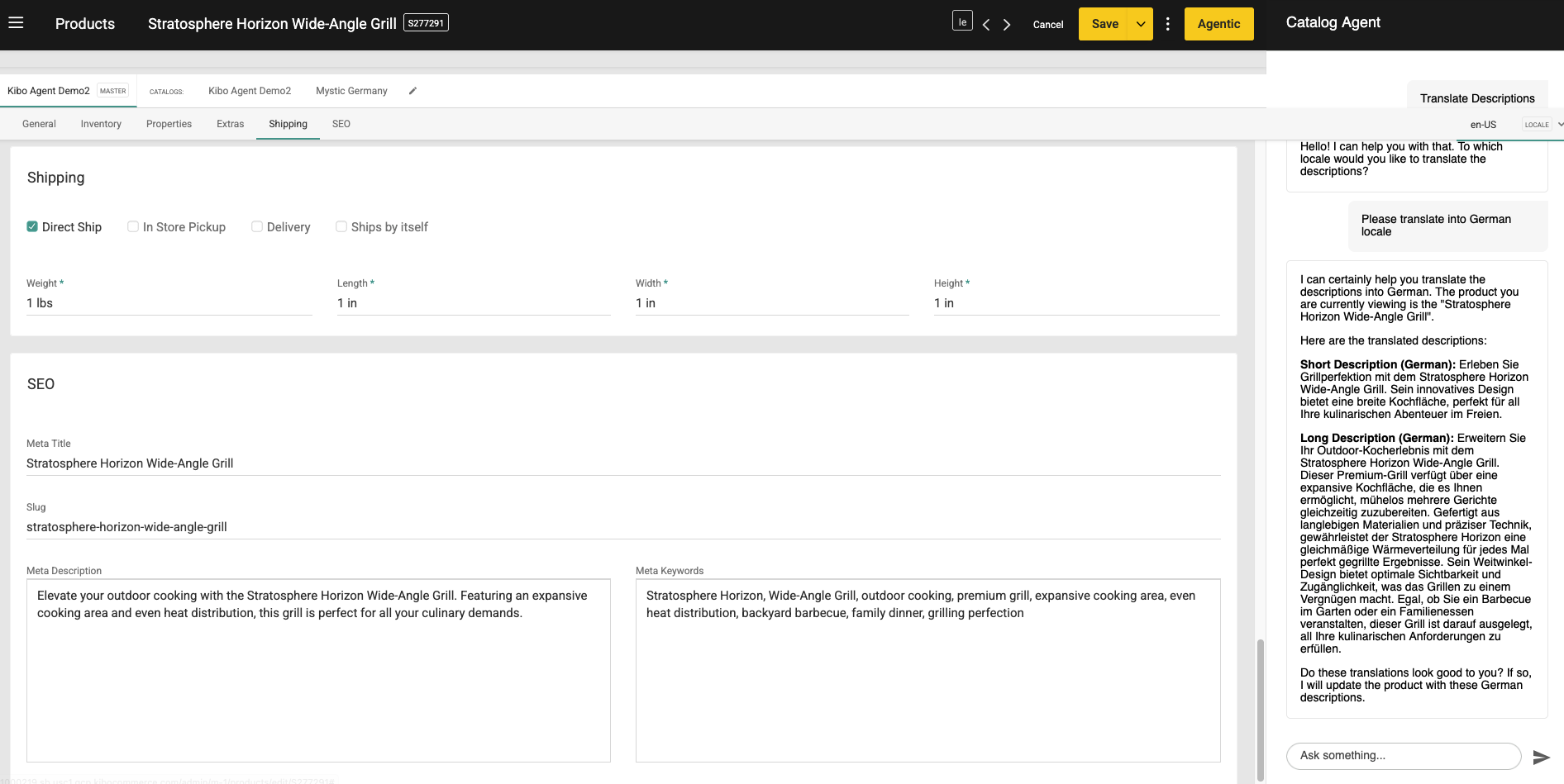 After confirming, the translations are applied to the product in the selected locale:
 **Example requests:**
* "Show me the French content for product ABC123"
* "Update the German product description for SKU-456"
* "Set the Spanish meta description for this product"
* "Copy the English description to Spanish for product XYZ"
***
## Content Generation
### What Content Can Be Generated?
The Merchandizing Agent can help you create and update:
| Content Type | Description | Character Limits |
| --------------------- | ---------------------------------- | ------------------------- |
| **Product Name** | The display name of the product | Typically 100-200 chars |
| **Short Description** | Brief product summary for listings | Typically 150-300 chars |
| **Full Description** | Detailed product description | Typically 1000-5000 chars |
| **Meta Title** | SEO page title | Recommended 50-60 chars |
| **Meta Description** | SEO page description | Recommended 150-160 chars |
| **Meta Keywords** | SEO keywords | Comma-separated list |
| **URL Slug** | SEO-friendly URL path | Lowercase, hyphenated |
### Generating New Descriptions
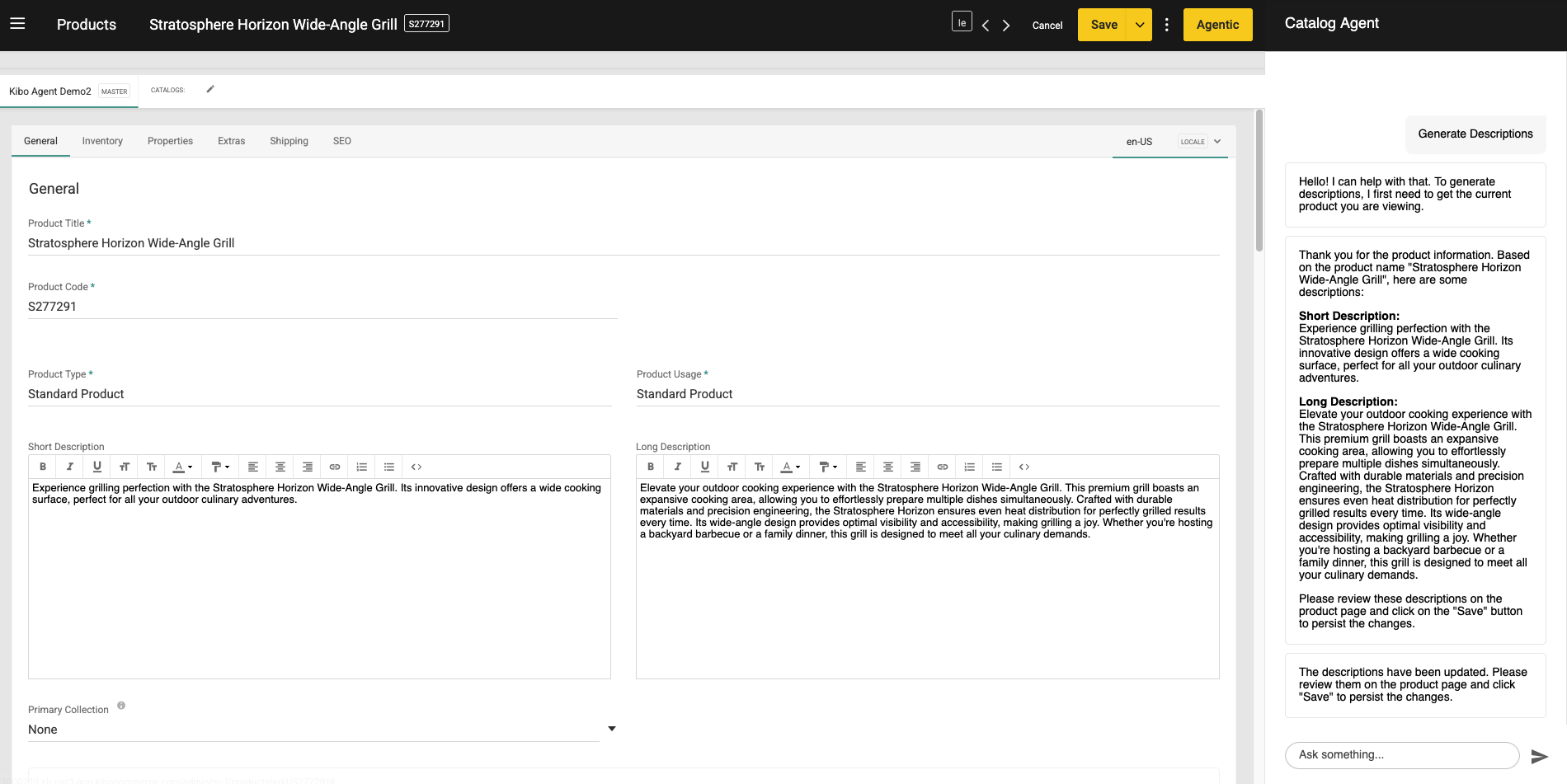
Click **Generate Descriptions** or ask the agent to create content based on product attributes. The agent will analyze the product and generate both short and long descriptions:
**Example requests:**
* "Show me the French content for product ABC123"
* "Update the German product description for SKU-456"
* "Set the Spanish meta description for this product"
* "Copy the English description to Spanish for product XYZ"
***
## Content Generation
### What Content Can Be Generated?
The Merchandizing Agent can help you create and update:
| Content Type | Description | Character Limits |
| --------------------- | ---------------------------------- | ------------------------- |
| **Product Name** | The display name of the product | Typically 100-200 chars |
| **Short Description** | Brief product summary for listings | Typically 150-300 chars |
| **Full Description** | Detailed product description | Typically 1000-5000 chars |
| **Meta Title** | SEO page title | Recommended 50-60 chars |
| **Meta Description** | SEO page description | Recommended 150-160 chars |
| **Meta Keywords** | SEO keywords | Comma-separated list |
| **URL Slug** | SEO-friendly URL path | Lowercase, hyphenated |
### Generating New Descriptions
Click **Generate Descriptions** or ask the agent to create content based on product attributes. The agent will analyze the product and generate both short and long descriptions:
 **Example:**
```
Generate a compelling product description for ABC123 that highlights
its premium materials and lifetime warranty
```
**Example with specific tone:**
```
Write a fun, casual short description for the Summer Beach Towel
product that appeals to young adults
```
### Improving Existing Content
Request improvements to current descriptions:
**Example:**
```
Improve the SEO for product ABC123 by updating the meta title
and description to include relevant keywords
```
### Locale-Specific Content
Generate content for specific locales:
**Example:**
```
Create a French product description for ABC123 based on the
English version but adapted for the French market
```
***
## How Changes Are Applied
### Immediate Application
When you confirm a content update, changes are applied **immediately** to your Kibo Commerce catalog. The agent uses the Kibo Product Admin API to update product records directly.
### Update Flow
```
1. You request a change
|
2. Agent retrieves current product data
|
3. Agent shows you the proposed change
|
4. You confirm the update
|
5. Agent applies the change via API
|
6. Product is updated in Kibo Commerce
|
7. Agent confirms success
```
### What Gets Updated
When you update product content, the following fields may be modified:
| Field | API Field | Notes |
| ----------------- | ------------------------- | ------------------ |
| Product Name | `productName` | Per-locale content |
| Short Description | `productShortDescription` | Per-locale content |
| Full Description | `productFullDescription` | Per-locale content |
| Meta Title | `metaTagTitle` | Per-locale SEO |
| Meta Description | `metaTagDescription` | Per-locale SEO |
| Meta Keywords | `metaTagKeywords` | Per-locale SEO |
| URL Slug | `seoFriendlyUrl` | Per-locale SEO |
### Verification
After an update, you can verify the change by:
1. Asking the agent to show the updated product details
2. Checking the product in Kibo Admin
3. Viewing the product on your storefront (may require cache refresh)
## Example Conversations
### Example 1: Updating a Product Description
```
You: Show me the current description for product SHOE-001
Agent: Here's the current content for product SHOE-001:
Product Name: Running Shoe
Short Description: A comfortable running shoe
Full Description: Our running shoe is designed for comfort...
Locale: en-US
You: Update the short description to "Lightweight running shoe with
advanced cushioning technology for maximum comfort on long runs"
Agent: I'll update the short description for product SHOE-001.
Current: "A comfortable running shoe"
New: "Lightweight running shoe with advanced cushioning
technology for maximum comfort on long runs"
[Updating product...]
Success! The short description has been updated for product
SHOE-001 in the en-US locale.
```
### Example 2: SEO Optimization
```
You: I need to improve the SEO for product JACKET-002
Agent: Let me get the current SEO content for product JACKET-002.
Current SEO Content:
- Meta Title: Winter Jacket
- Meta Description: (empty)
- Meta Keywords: (empty)
Would you like me to suggest improvements?
You: Yes, please suggest better SEO content for this winter jacket
Agent: Based on the product details, here are my suggestions:
Meta Title: "Premium Waterproof Winter Jacket | Stay Warm & Dry"
Meta Description: "Shop our insulated winter jacket with
waterproof shell and thermal lining. Perfect for cold
weather. Free shipping on orders over $50."
Meta Keywords: "winter jacket, waterproof jacket, insulated
jacket, cold weather gear, thermal jacket"
Would you like me to apply these updates?
You: Yes, apply all of those
Agent: [Updating SEO content...]
Success! SEO content has been updated for product JACKET-002:
- Meta Title: Updated
- Meta Description: Updated
- Meta Keywords: Updated
```
### Example 3: Multi-Locale Content
```
You: Get the product content for DRESS-003 in Spanish
Agent: Here's the Spanish (es) content for product DRESS-003:
Product Name: Vestido de Verano
Short Description: (empty)
Full Description: (empty)
The Spanish content appears incomplete. Would you like me
to help create descriptions?
You: Yes, create a short description based on the English version
Agent: The English short description is: "Elegant summer dress with
floral print, perfect for beach weddings and garden parties"
Suggested Spanish translation:
"Elegante vestido de verano con estampado floral, perfecto
para bodas en la playa y fiestas en el jardin"
Would you like me to apply this?
You: Yes, apply it
Agent: [Updating Spanish content...]
Success! Spanish short description has been updated for
product DRESS-003.
```
### Example 4: Product Search and Bulk Review
```
You: Find all products in the "Running Shoes" category under $100
Agent: Found 8 products matching your criteria:
1. SHOE-001 - Lightweight Runner ($79.99)
2. SHOE-002 - Trail Blazer ($89.99)
3. SHOE-003 - Speed Elite ($99.99)
4. SHOE-004 - Daily Jogger ($59.99)
5. SHOE-005 - Marathon Pro ($94.99)
...
Would you like to see details for any of these products?
You: Show me SHOE-004
Agent: Product Details for SHOE-004:
Name: Daily Jogger
Price: $59.99
Short Description: "Basic running shoe"
Full Description: "A simple running shoe for everyday use..."
The descriptions seem basic. Would you like me to suggest
improvements?
```
## Quick Reference
### Supported Content Fields
| Field | Can Read | Can Update |
| ----------------- | -------- | ---------- |
| Product Name | Yes | Yes |
| Short Description | Yes | Yes |
| Full Description | Yes | Yes |
| Meta Title | Yes | Yes |
| Meta Description | Yes | Yes |
| Meta Keywords | Yes | Yes |
| URL Slug | Yes | Yes |
| Product Code | Yes | No |
| Price | Yes | No |
| Images | Yes | No |
### Common Commands Cheat Sheet
```
# Get product info
"Show me product [CODE]"
"Get details for [CODE]"
"What is the description for [CODE]?"
# Search products
"Find products with [QUERY]"
"Search for [QUERY] under $[PRICE]"
"Show me [CATEGORY] products"
# Update descriptions
"Update the short description for [CODE] to [NEW TEXT]"
"Change the product name for [CODE] to [NEW NAME]"
"Set the full description for [CODE]"
# SEO updates
"Update the meta title for [CODE] to [NEW TITLE]"
"Set the meta description for [CODE]"
"Add keywords [KEYWORDS] to [CODE]"
"Change the URL slug for [CODE] to [NEW SLUG]"
# Multi-locale
"Show me [CODE] in [LANGUAGE]"
"Update the [LANGUAGE] description for [CODE]"
"Get the SEO content for [CODE] in [LOCALE]"
```
**Example:**
```
Generate a compelling product description for ABC123 that highlights
its premium materials and lifetime warranty
```
**Example with specific tone:**
```
Write a fun, casual short description for the Summer Beach Towel
product that appeals to young adults
```
### Improving Existing Content
Request improvements to current descriptions:
**Example:**
```
Improve the SEO for product ABC123 by updating the meta title
and description to include relevant keywords
```
### Locale-Specific Content
Generate content for specific locales:
**Example:**
```
Create a French product description for ABC123 based on the
English version but adapted for the French market
```
***
## How Changes Are Applied
### Immediate Application
When you confirm a content update, changes are applied **immediately** to your Kibo Commerce catalog. The agent uses the Kibo Product Admin API to update product records directly.
### Update Flow
```
1. You request a change
|
2. Agent retrieves current product data
|
3. Agent shows you the proposed change
|
4. You confirm the update
|
5. Agent applies the change via API
|
6. Product is updated in Kibo Commerce
|
7. Agent confirms success
```
### What Gets Updated
When you update product content, the following fields may be modified:
| Field | API Field | Notes |
| ----------------- | ------------------------- | ------------------ |
| Product Name | `productName` | Per-locale content |
| Short Description | `productShortDescription` | Per-locale content |
| Full Description | `productFullDescription` | Per-locale content |
| Meta Title | `metaTagTitle` | Per-locale SEO |
| Meta Description | `metaTagDescription` | Per-locale SEO |
| Meta Keywords | `metaTagKeywords` | Per-locale SEO |
| URL Slug | `seoFriendlyUrl` | Per-locale SEO |
### Verification
After an update, you can verify the change by:
1. Asking the agent to show the updated product details
2. Checking the product in Kibo Admin
3. Viewing the product on your storefront (may require cache refresh)
## Example Conversations
### Example 1: Updating a Product Description
```
You: Show me the current description for product SHOE-001
Agent: Here's the current content for product SHOE-001:
Product Name: Running Shoe
Short Description: A comfortable running shoe
Full Description: Our running shoe is designed for comfort...
Locale: en-US
You: Update the short description to "Lightweight running shoe with
advanced cushioning technology for maximum comfort on long runs"
Agent: I'll update the short description for product SHOE-001.
Current: "A comfortable running shoe"
New: "Lightweight running shoe with advanced cushioning
technology for maximum comfort on long runs"
[Updating product...]
Success! The short description has been updated for product
SHOE-001 in the en-US locale.
```
### Example 2: SEO Optimization
```
You: I need to improve the SEO for product JACKET-002
Agent: Let me get the current SEO content for product JACKET-002.
Current SEO Content:
- Meta Title: Winter Jacket
- Meta Description: (empty)
- Meta Keywords: (empty)
Would you like me to suggest improvements?
You: Yes, please suggest better SEO content for this winter jacket
Agent: Based on the product details, here are my suggestions:
Meta Title: "Premium Waterproof Winter Jacket | Stay Warm & Dry"
Meta Description: "Shop our insulated winter jacket with
waterproof shell and thermal lining. Perfect for cold
weather. Free shipping on orders over $50."
Meta Keywords: "winter jacket, waterproof jacket, insulated
jacket, cold weather gear, thermal jacket"
Would you like me to apply these updates?
You: Yes, apply all of those
Agent: [Updating SEO content...]
Success! SEO content has been updated for product JACKET-002:
- Meta Title: Updated
- Meta Description: Updated
- Meta Keywords: Updated
```
### Example 3: Multi-Locale Content
```
You: Get the product content for DRESS-003 in Spanish
Agent: Here's the Spanish (es) content for product DRESS-003:
Product Name: Vestido de Verano
Short Description: (empty)
Full Description: (empty)
The Spanish content appears incomplete. Would you like me
to help create descriptions?
You: Yes, create a short description based on the English version
Agent: The English short description is: "Elegant summer dress with
floral print, perfect for beach weddings and garden parties"
Suggested Spanish translation:
"Elegante vestido de verano con estampado floral, perfecto
para bodas en la playa y fiestas en el jardin"
Would you like me to apply this?
You: Yes, apply it
Agent: [Updating Spanish content...]
Success! Spanish short description has been updated for
product DRESS-003.
```
### Example 4: Product Search and Bulk Review
```
You: Find all products in the "Running Shoes" category under $100
Agent: Found 8 products matching your criteria:
1. SHOE-001 - Lightweight Runner ($79.99)
2. SHOE-002 - Trail Blazer ($89.99)
3. SHOE-003 - Speed Elite ($99.99)
4. SHOE-004 - Daily Jogger ($59.99)
5. SHOE-005 - Marathon Pro ($94.99)
...
Would you like to see details for any of these products?
You: Show me SHOE-004
Agent: Product Details for SHOE-004:
Name: Daily Jogger
Price: $59.99
Short Description: "Basic running shoe"
Full Description: "A simple running shoe for everyday use..."
The descriptions seem basic. Would you like me to suggest
improvements?
```
## Quick Reference
### Supported Content Fields
| Field | Can Read | Can Update |
| ----------------- | -------- | ---------- |
| Product Name | Yes | Yes |
| Short Description | Yes | Yes |
| Full Description | Yes | Yes |
| Meta Title | Yes | Yes |
| Meta Description | Yes | Yes |
| Meta Keywords | Yes | Yes |
| URL Slug | Yes | Yes |
| Product Code | Yes | No |
| Price | Yes | No |
| Images | Yes | No |
### Common Commands Cheat Sheet
```
# Get product info
"Show me product [CODE]"
"Get details for [CODE]"
"What is the description for [CODE]?"
# Search products
"Find products with [QUERY]"
"Search for [QUERY] under $[PRICE]"
"Show me [CATEGORY] products"
# Update descriptions
"Update the short description for [CODE] to [NEW TEXT]"
"Change the product name for [CODE] to [NEW NAME]"
"Set the full description for [CODE]"
# SEO updates
"Update the meta title for [CODE] to [NEW TITLE]"
"Set the meta description for [CODE]"
"Add keywords [KEYWORDS] to [CODE]"
"Change the URL slug for [CODE] to [NEW SLUG]"
# Multi-locale
"Show me [CODE] in [LANGUAGE]"
"Update the [LANGUAGE] description for [CODE]"
"Get the SEO content for [CODE] in [LOCALE]"
```