> ## Documentation Index
> Fetch the complete documentation index at: https://docs.kibocommerce.com/llms.txt
> Use this file to discover all available pages before exploring further.
# Inventory Workflow Examples
Refer to the following examples for some common inventory workflow scenarios.
Learn about inventory management fundamentals
See the Inventory API documentation for programmatic access
## Back Ordering
The following example shows a situation in which you want to track negative inventory quantities in order to keep your inventory totals accurate at the end of each day after counting and entering incoming stock. Because you know that you're going to receive new stock, you also want to allow shoppers to backorder items, and you also want to mark items as fulfilled as necessary.
In the following example, you've already enabled **Allow fulfillment without stock on hand** for the location, and you've enabled **Allow backordering** for a specific product.
1. You start with the following product inventory quantities:
 * **Available**: 0
* **On Reserve**: 0
* **On Hand**: 0
* **On Backorder**: 0
2. A shopper places an order for three of the product, which creates the following inventory quantities:
* **Available**: 0
* **On Reserve**: 0
* **On Hand**: 0
* **On Backorder**: 0
2. A shopper places an order for three of the product, which creates the following inventory quantities:
 * **Available**: 0
* **On Reserve**: 3
* **On Hand**: 0
* **On Backorder**: 3
3. You then mark two out of the three items as fulfilled in Kibo eCommerce:
* **Available**: 0
* **On Reserve**: 3
* **On Hand**: 0
* **On Backorder**: 3
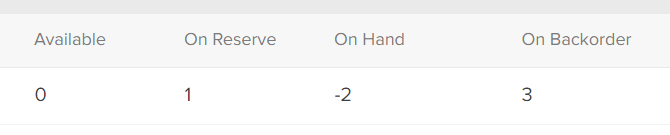
3. You then mark two out of the three items as fulfilled in Kibo eCommerce:
 * **Available**: 0
* **On Reserve**: 1
* **On Hand**: -2
* **On Backorder**: 3\
The -2 *on-hand* quantity is essentially your *fulfillment debt*.
4. You then receive five quantities of the product, and add this to your on-hand quantity:
* **Available**: 0
* **On Reserve**: 1
* **On Hand**: -2
* **On Backorder**: 3\
The -2 *on-hand* quantity is essentially your *fulfillment debt*.
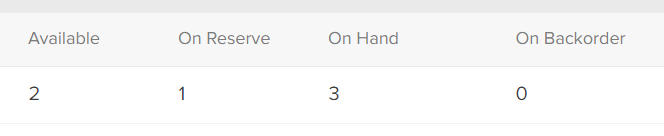
4. You then receive five quantities of the product, and add this to your on-hand quantity:
 * **Available**: 2
* **On Reserve**: 1
* **On Hand**: 3
* **On Backorder**: 0\
Your fulfillment debt is subtracted from the on-hand quantity, and Kibo eCommerce calculates the available quantity. The on backorder quantity also returns to zero, because you now have enough on-hand quantity to fulfill the remaining on reserve quantity.
5. You fulfill the remaining item:
* **Available**: 2
* **On Reserve**: 1
* **On Hand**: 3
* **On Backorder**: 0\
Your fulfillment debt is subtracted from the on-hand quantity, and Kibo eCommerce calculates the available quantity. The on backorder quantity also returns to zero, because you now have enough on-hand quantity to fulfill the remaining on reserve quantity.
5. You fulfill the remaining item:
 * **Available**: 2
* **On Reserve**: 0
* **On Hand**: 2
* **On Backorder**: 0
## Manual Inventory Adjustment
In the following example, you manually adjust your on-hand quantity after performing an inventory audit, even after shoppers have placed orders for the product:
1. You start with the following product inventory quantities:
* **Available**: 2
* **On Reserve**: 0
* **On Hand**: 2
* **On Backorder**: 0
## Manual Inventory Adjustment
In the following example, you manually adjust your on-hand quantity after performing an inventory audit, even after shoppers have placed orders for the product:
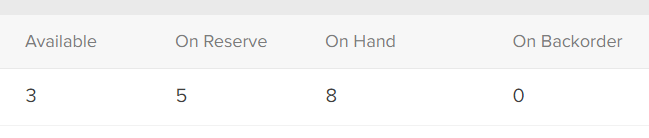
1. You start with the following product inventory quantities:
 * **Available**: 3
* **On Reserve**: 5
* **On Hand**: 8
* **On Backorder**: 0
2. You then perform an inventory audit and manually set your on-hand quantity appropriately:
* **Available**: 3
* **On Reserve**: 5
* **On Hand**: 8
* **On Backorder**: 0
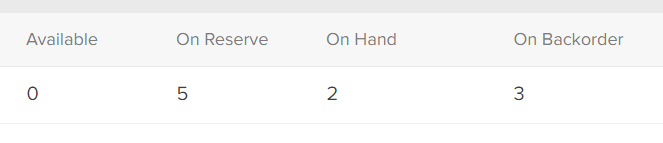
2. You then perform an inventory audit and manually set your on-hand quantity appropriately:
 * **Available**: 0
* **On Reserve**: 5
* **On Hand**: 2
* **On Backorder**: 3
3. You mark one item as fulfilled:
* **Available**: 0
* **On Reserve**: 5
* **On Hand**: 2
* **On Backorder**: 3
3. You mark one item as fulfilled:
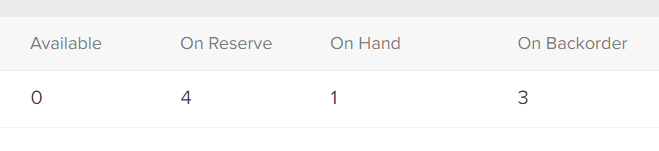 * **Available**: 0
* **On Reserve**: 4
* **On Hand**: 1
* **On Backorder**: 3
4. You mark three items as fulfilled:
* **Available**: 0
* **On Reserve**: 4
* **On Hand**: 1
* **On Backorder**: 3
4. You mark three items as fulfilled:
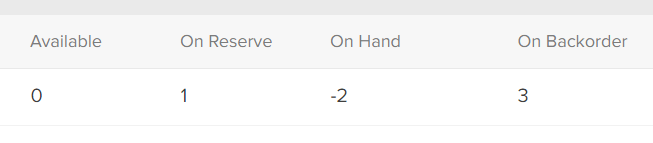 * **Available**: 0
* **On Reserve**: 1
* **On Hand**: -2
* **On Backorder**: 3
5. You then receive five quantities of the product, and add this to your on-hand quantity:
* **Available**: 0
* **On Reserve**: 1
* **On Hand**: -2
* **On Backorder**: 3
5. You then receive five quantities of the product, and add this to your on-hand quantity:
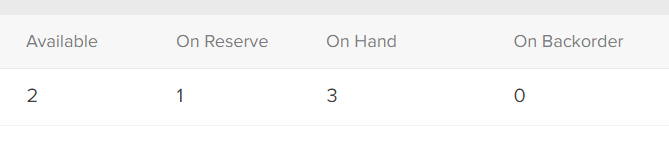 * **Available**: 2
* **On Reserve**: 1
* **On Hand**: 3
* **On Backorder**: 0
6. You fulfill the remaining item:
* **Available**: 2
* **On Reserve**: 1
* **On Hand**: 3
* **On Backorder**: 0
6. You fulfill the remaining item:
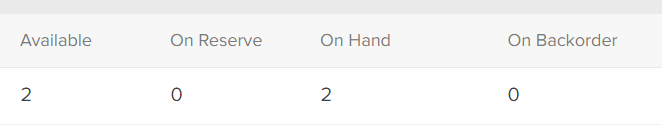 * **Available**: 2
* **On Reserve**: 0
* **On Hand**: 2
* **On Backorder**: 0
* **Available**: 2
* **On Reserve**: 0
* **On Hand**: 2
* **On Backorder**: 0