> ## Documentation Index
> Fetch the complete documentation index at: https://docs.kibocommerce.com/llms.txt
> Use this file to discover all available pages before exploring further.
# Inventory Audit Logs
Inventory Audit Logs provide an immutable, timestamped record of every inventory change across your Kibo implementation — including changes made by users in the Admin UI, by API integrations, by import jobs, and by internal Kibo processes. The audit log also records inventory updates that Kibo suppressed because they would have driven on-hand inventory below zero, so you can reconcile Kibo against your upstream systems (POS, WMS, ERP).
With audit logging enabled, you can answer — **who or what changed inventory**, **when the change occurred**, **what the quantities were before and after.**
## Prerequisites
Inventory Audit Logs must be enabled for your tenant. Audit logging is **not generated** **automatically** — it is an opt-in capability. Contact [Kibo Support](https://help.kibocommerce.com/) to enable it.
**Important:** Audit log data is retained for a **maximum of 30 days**; older entries are automatically purged. If you require audit records beyond 30 days — for example, for compliance archives — export the data (via the UI export or the Inventory Audit Log API) and store it in your own systems before the 30-day window expires.
## How Audit Logging Works
### What the Audit Log Records
When enabled, the audit log records every inventory event for your tenant, for the following operation types:
* **Refresh** — inventory updates submitted by an Admin UI , integration or import job.
* **Adjust** — manual or API-driven quantity adjustments, including Admin UI edits.
* **Delete** — inventory record deletions.
* **Import** — changes applied by an inventory import job.
* **Allocate** / **Deallocate** — order/shipment-driven allocation and release of inventory.
* **Fulfill** — fulfillment events.
* **Safety Stock Adjustment** — changes to safety stock levels.
* **Future Inventory** — future inventory record creation, delivery date changes,
allocation, release, deallocation, and deletion.
* **Pending Item** — pending item release events.
### Attribution
Each audit entry records who or what initiated the change:
| Change initiated by | Recorded as |
| :- | :- |
| An authenticated user (Admin UI or API call with a user token) | **User ID/Email ID** |
| An external system or integration (API key) | **Source System** (the integration identifier) |
| An internal Kibo process (for example, pending item release) | **Source System** (a standardized internal identifier) |
| An import job | **Source Action** = `Import`, with the import job identifier as the **Source System** |
## View the Inventory Audit Log
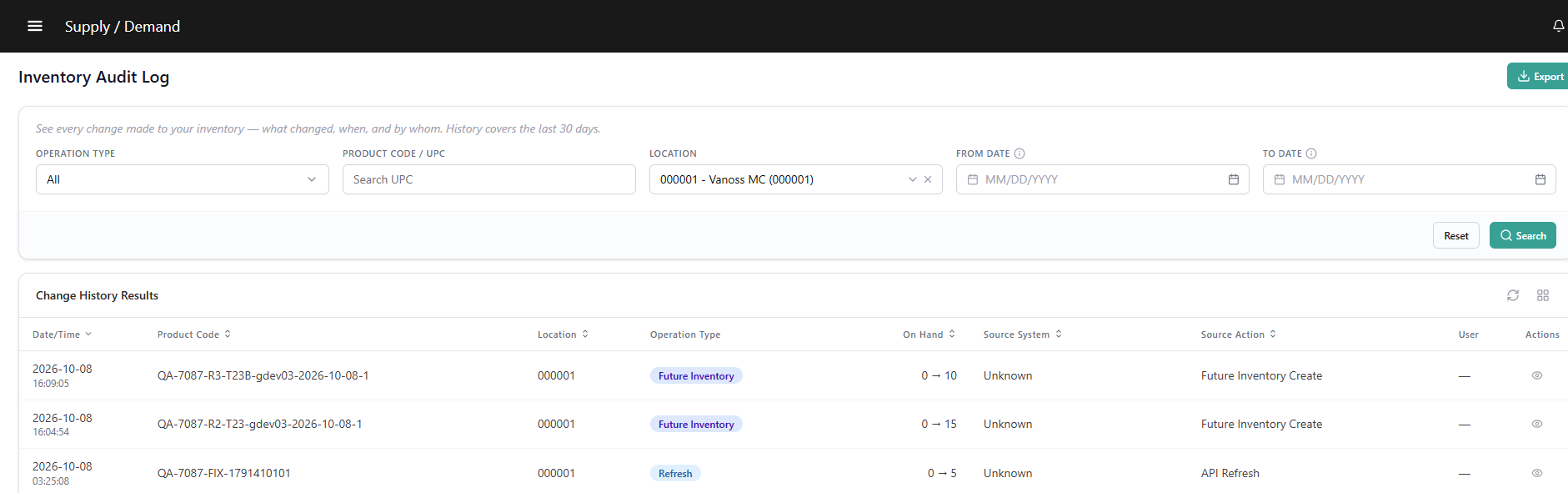
1. Go to **Main** > **Supply** > **Inventory** > **Audit Logs**.
2. Enter a **Product Code / UPC / Variant Product Code** or select a **Location**. A product or location value is **required** before a search can run.
3. Apply optional filters:
* **Date range** — maximum selectable range: 30 days.
* **Operation Type** — Refresh, Adjust, Delete, Import, Allocate, Deallocate, Fulfill, Safety Stock Adjustment, Future Inventory, or Pending Item.
* **Source System**, **Source Action**, or **User ID** — filter by attribution.
4. Click **Search**. Results display sorted by timestamp, most recent first.
**Note:** Results are paginated. Use the pagination controls to display 25, 50, 100, or 200 rows per page.
### Grid Columns
| Column | Description |
| :- | :- |
| **Timestamp** | When the change occurred. |
| **Product Code** | Product/item identifier. |
| **Location Code** | Store or warehouse location. |
| **Operation Type** | Refresh, Adjust, Delete, Import, Allocate, Deallocate, Fulfill, Safety Stock Adjustment, Future Inventory, or Pending Item. |
| **On Hand** | Previous on-hand → new on-hand quantity, with the change amount. For future inventory events, previous future on-hand → new future on-hand. |
| **Source System** | External system or integration identifier. |
| **Source Action** | Import, API Refresh, API Adjust, API Delete, Shipment Allocation, Shipment Deallocation, Safety Stock Adjustment, Admin UI, or a Future Inventory action (Date Change, Allocation, Release, Deallocation, Deletion). |
| **User ID** | User name for human-initiated changes. |
| **Reason** | Reason text where applicable — for example, `Negative On-Hand Inventory` for suppressed updates. |
 ### Audit Entry Details
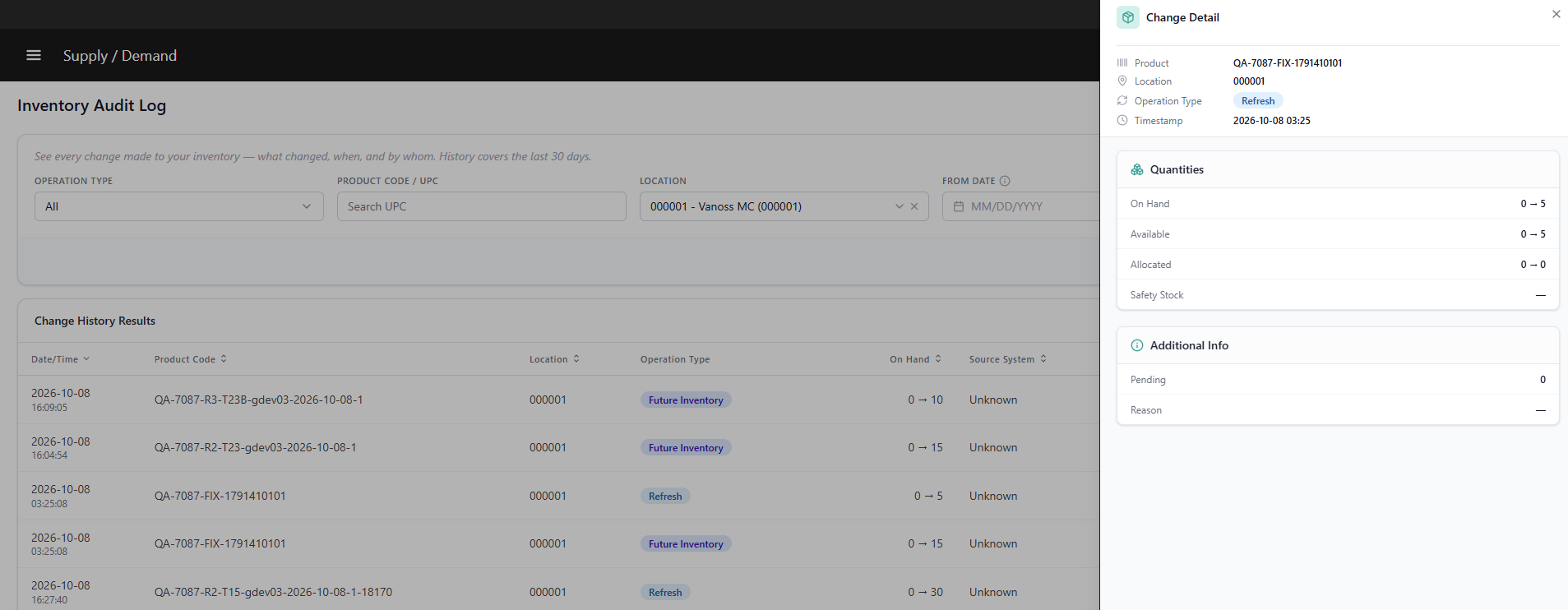
Click any row to open the detail drawer. The drawer contains three sections; the sections shown depend on the type of event:
**Quantities** — for current inventory events:
| Field | Description |
| :- | :- |
| On Hand | Previous on-hand → new on-hand (delta). |
| Available | Previous available → new available (delta). |
| Allocated | Previous allocated → new allocated (delta). |
| Safety Stock | Previous safety stock → new safety stock (delta). |
| Suppress Quantity | For suppressed updates: the discarded (below-zero) portion of the submitted change. |
### Audit Entry Details
Click any row to open the detail drawer. The drawer contains three sections; the sections shown depend on the type of event:
**Quantities** — for current inventory events:
| Field | Description |
| :- | :- |
| On Hand | Previous on-hand → new on-hand (delta). |
| Available | Previous available → new available (delta). |
| Allocated | Previous allocated → new allocated (delta). |
| Safety Stock | Previous safety stock → new safety stock (delta). |
| Suppress Quantity | For suppressed updates: the discarded (below-zero) portion of the submitted change. |
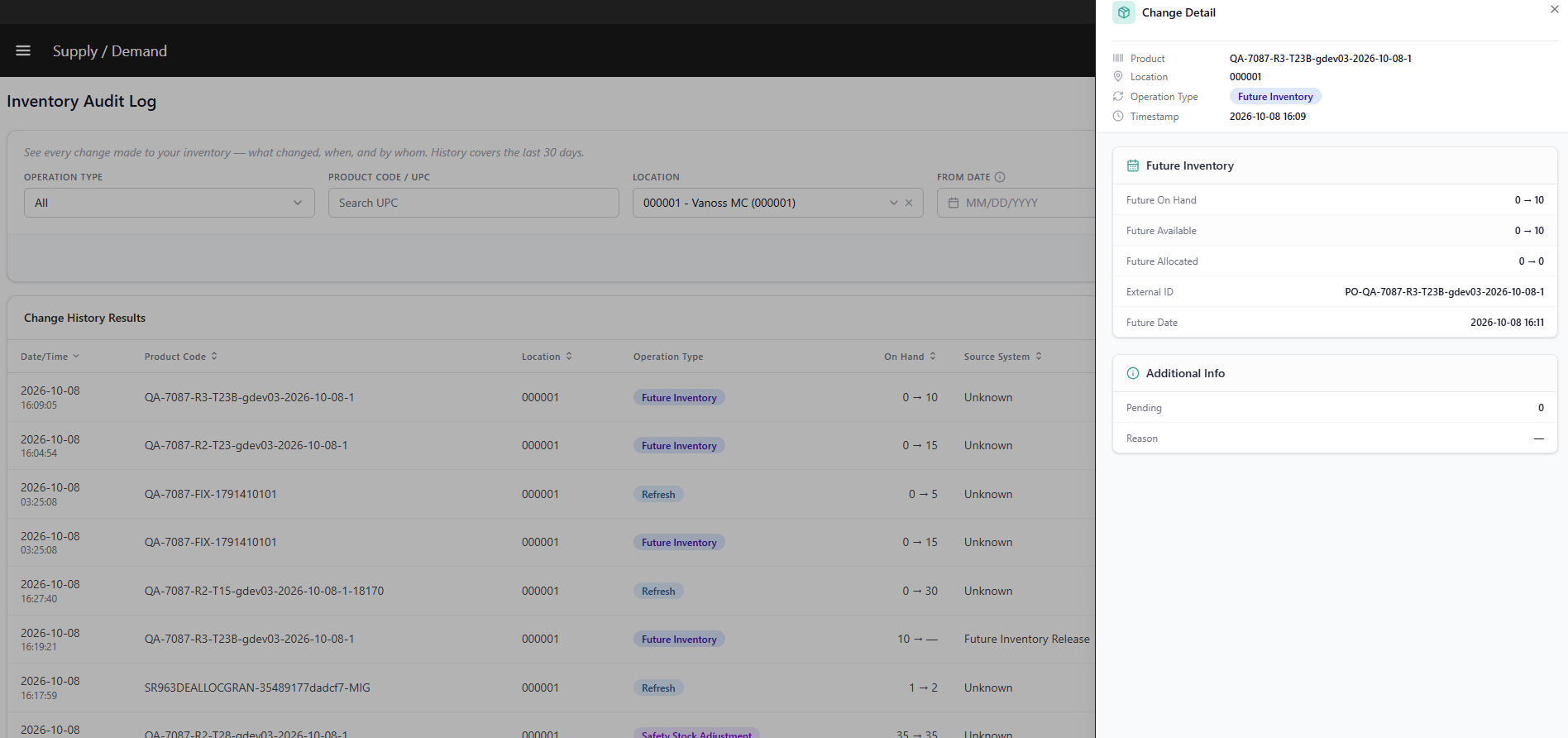
 **Future Inventory** — for future inventory events:
| Field | Description |
| :- | :- |
| Future On Hand | Previous future on-hand → new future on-hand (delta). |
| Future Available | Previous future available → new future available (delta). |
| Future Allocated | Previous future allocated → new future allocated (delta). |
| External ID | External identifier for the future inventory record, such as a purchase order number. |
| Delivery Date | Previous delivery date → new delivery date. |
**Future Inventory** — for future inventory events:
| Field | Description |
| :- | :- |
| Future On Hand | Previous future on-hand → new future on-hand (delta). |
| Future Available | Previous future available → new future available (delta). |
| Future Allocated | Previous future allocated → new future allocated (delta). |
| External ID | External identifier for the future inventory record, such as a purchase order number. |
| Delivery Date | Previous delivery date → new delivery date. |
 **Additional Info**:
| Field | Description |
| :- | :- |
| Pending | Shown only for pending item events. |
| Tags | Tag name and value. |
| Granular Data | SKU, Date, Lot Code, Serial Number, Condition. |
| Reason | Reason text where applicable. |
### Export the Audit Log
1. Apply the filters you want to export (the export respects active filters).
2. Click **Export** to download the filtered result set as CSV/Excel.
**Additional Info**:
| Field | Description |
| :- | :- |
| Pending | Shown only for pending item events. |
| Tags | Tag name and value. |
| Granular Data | SKU, Date, Lot Code, Serial Number, Condition. |
| Reason | Reason text where applicable. |
### Export the Audit Log
1. Apply the filters you want to export (the export respects active filters).
2. Click **Export** to download the filtered result set as CSV/Excel.
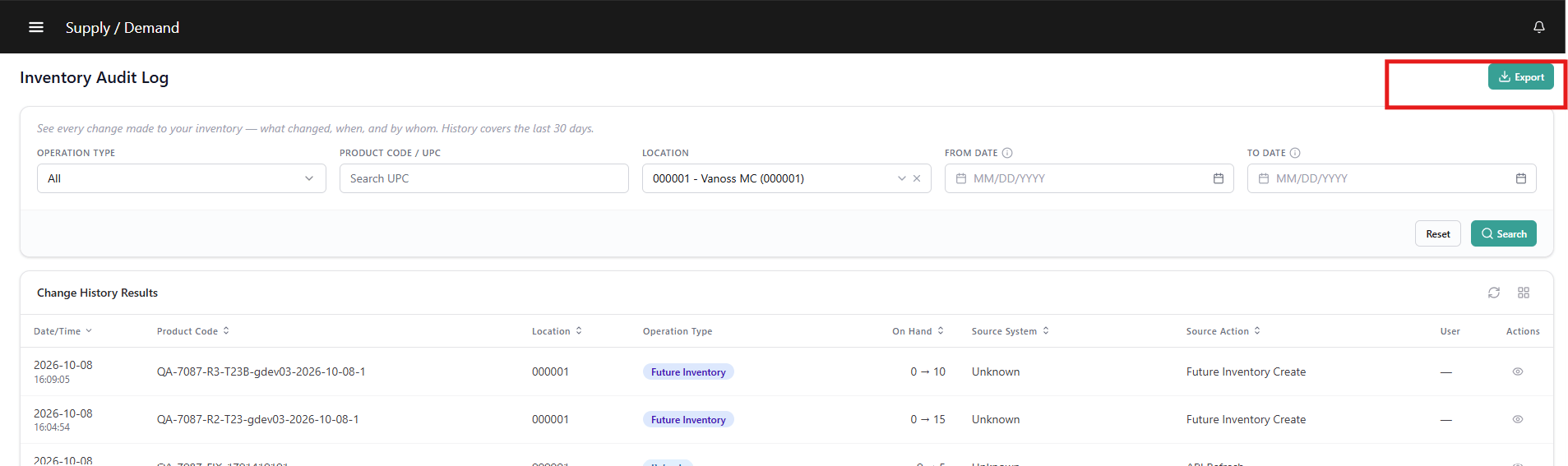 **Note:** Exports are limited to a maximum 30-day date range, aligned with the retention period. Exports of very large result sets are generated asynchronously; you will receive a download link via notification when the file is ready.
This documentation is built and hosted on [Mintlify](https://mintlify.com), a developer documentation platform.
**Note:** Exports are limited to a maximum 30-day date range, aligned with the retention period. Exports of very large result sets are generated asynchronously; you will receive a download link via notification when the file is ready.
This documentation is built and hosted on [Mintlify](https://mintlify.com), a developer documentation platform.