> ## Documentation Index
> Fetch the complete documentation index at: https://docs.kibocommerce.com/llms.txt
> Use this file to discover all available pages before exploring further.
# Future Shipment Rules
Future Shipment Rules determine the priority order in which impacted future shipments are evaluated when the [Allocation Rebalancer](/pages/allocation-rebalancer) detects a supply decrease event. When a purchase order backing future inventory is delayed, short-shipped, or cancelled, the Allocation Rebalancer identifies all future shipments allocated against that inventory record and runs the Future Shipment Rules to rank them. Shipments that match higher-priority rules receive inventory first during reallocation; lower-priority shipments are de-allocated first if inventory cannot be preserved for all.
Future Shipment Rules follow the same composable rule structure used across Kibo for other rule types, using expression-based conditions across Account, Product, and Shipment dimensions.
In addition to the UI detailed here, you can create and manage Future Shipment Rules using the Future Shipment Rules API endpoints. The [Product Rules](https://docs.kibocommerce.com/api-reference/productrules/create-product-rule) , [Customer Rules](https://docs.kibocommerce.com/api-reference/accountrankingrule/create-customer-rule) and [Shipment Rules](https://docs.kibocommerce.com/api-reference/shipmentrules/get-shipment-rule-by-code) APIs can also be used to manage supporting product, customer and Shipment rules.
## **Prerequisites**
Before configuring Future Shipment Rules, ensure the following:
* The **B2B Wholesale OMS** feature is enabled for your tenant. Contact [Kibo Support](https://help.kibocommerce.com/) to enable this capability.
* You have **Admin** or **SuperAdmin** role permissions, or a role with the following behaviors assigned:
* Product Rule: Read, Create, Update, Delete
* Customer Rule: Read, Create, Update, Delete
* Future Shipment Rule: Read, Create, Update, Delete
## **How Future Shipment Rules Work**
### **Rule Evaluation**
When the Allocation Rebalancer's rebalancing flow reaches the future shipment prioritization step, all enabled Future Shipment Rules run together against the impacted shipments. Each shipment is evaluated in ascending rank order — Rule 1 runs first, followed by Rule 2, and so on.
When a shipment matches a rule's criteria, that rule assigns a priority rank to the shipment. **A shipment is only evaluated once** — once it matches a rule, it is not re-evaluated against subsequent rules. Shipments that do not match any enabled rule will be considered by Catch All Rule, which is treated as the lowest possible priority during reallocation.
Its up to the Admin to create a Catch All Rule Criteria such that all the shipments get eligible in that rule
### **Criteria Matching**
A shipment must satisfy **all** defined criteria types on a rule (AND logic across types) to match. Within a single criteria type, conditions can be combined using AND or OR logic as configured in the expression editor.
### **Sort**
Each Future Shipment Rule includes a primary and optional secondary sort criterion. For shipments that match the same rule, the sort determines their relative order within that priority tier. You can sort on any numeric or date field available on the shipment — for example, sort by earliest `requestedShipDate` to protect shipments with the most imminent delivery commitments, or sort by earliest `lastCancellationDate` to protect shipments approaching their cancellation deadline.
### **De-Allocation Order**
When supply decreases and not all future shipments can retain their allocation, de-allocation follows reverse priority order — shipments with the **lowest priority** (highest rank number ) lose their allocation first. This protects higher-priority commitments from losing inventory to lower-priority ones.
## **Rule Criteria**
A Future Shipment Rule supports up to three criteria types:
| **Criteria Type** | **What It Filters** |
| :------------------------------ | :---------------------------------------------------------------------------------------------------------------------------------------------------------------------------------------------------------------------------- |
| **Account / Customer Criteria** | Account attributes such as account ID, segment |
| **Product Criteria** | Product-level attributes such as Product Code, Variant Product Code, UPC, Mfg Part Number ,Product Type, Category Code, Category List Price, Fulfilment Types Supported, Height, Length, Weight, Width, attributes properties |
| **Shipment Criteria** | Shipment-level attributes such as fulfillment type, carrier, shipping method, estimated delivery date, last cancellation date, SLA status, or extensible attributes at the shipment header or line level |
**Note:** Product Rules, Customer Rules and Shipment Rules created for Future Shipment Rules are exclusive to Future Shipment Rules and cannot be shared with other rule types.
### **Rule Attributes**
| **Attribute** | **Type** | **Required** | **Description** |
| :-------------------- | :---------------- | :----------- | :--------------------------------------------------------------------------------------------------------------------------------------------------------- |
| **Code** | String | Yes | Unique identifier for the rule, scoped to the tenant. Auto-generated if left blank. |
| **Name** | String | Yes | Display name shown in the Admin UI. |
| **Description** | String | No | Optional free-text description of the rule's intent. |
| **Rank** | Integer | Yes | Priority order. Lower value = higher priority. Rank 1 runs before Rank 2. Values must be unique. |
| **Enabled** | Boolean | Yes | When disabled, the rule is skipped during rebalancing but remains saved for future use. |
| **Time Fence Days** | Integer | Yes | Symmetric window (±N days) around `requestedShipDate` for inventory search during reallocation. |
| **Primary Sort** | Field + Direction | Yes | The field and direction (ascending/descending) used to order matched shipments within a priority tier. Supports any numeric or date field on the shipment. |
| **Account Criteria** | List | No | References to Customer Rule codes defining which accounts qualify. |
| **Product Criteria** | List | No | References to Product Rule codes defining which products this rule covers. |
| **Shipment Criteria** | List | No | References to Shipment Rule codes defining shipment-level filters. |
## **Configure Future Shipment Rules**
To create a new Future Shipment Rule:
1. Go to **Main** > **Fulfillment** > **Rules** > **Future Shipment Rules**.
 2. Click **Create Future Shipment Rule**.
3. Enter a **Code**. If left blank, the system generates one automatically.
4. Enter a **Name** and an optional **Description**.
5. Enter a **Rank** value. The lower the number, the higher the priority. Default takes the last rank.
6. Enter a **Time Fence Days** value. The rebalancer searches for alternate inventory within this symmetric window around the shipment's requested ship date.
7. Toggle the rule **Enabled** to activate it.
2. Click **Create Future Shipment Rule**.
3. Enter a **Code**. If left blank, the system generates one automatically.
4. Enter a **Name** and an optional **Description**.
5. Enter a **Rank** value. The lower the number, the higher the priority. Default takes the last rank.
6. Enter a **Time Fence Days** value. The rebalancer searches for alternate inventory within this symmetric window around the shipment's requested ship date.
7. Toggle the rule **Enabled** to activate it.
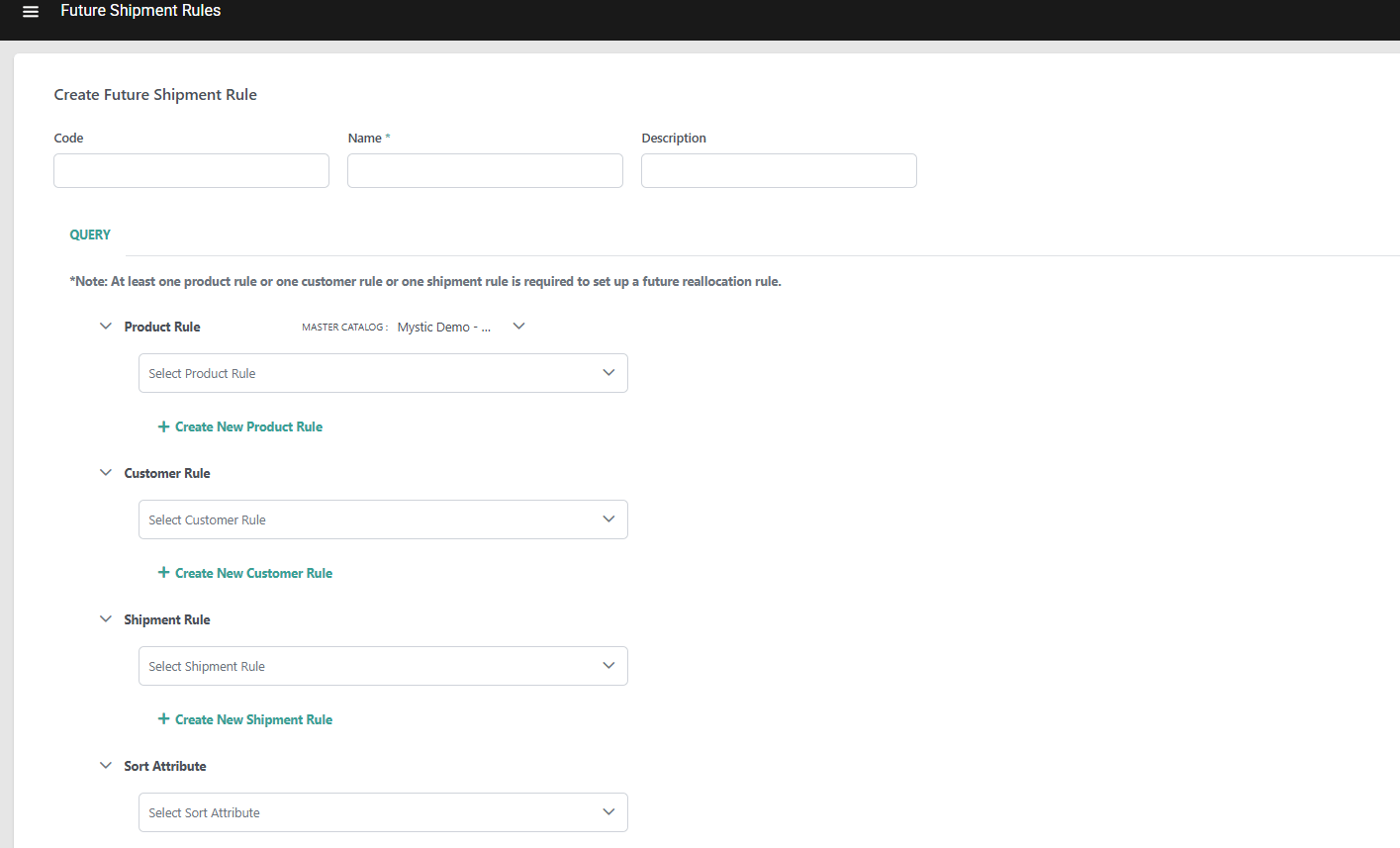 8. Configure **Sort Criteria**:
* Under **Primary Sort**, select a numeric or date field (for example, `estimatedDeliveryDate` or `lastCancellationDate`) and choose **Ascending** or **Descending**.
9. Optionally, add **Account / Customer Criteria**:
* Click **Add Customer Rule** and use the expression editor to define account-level conditions.
10. Optionally, add **Product Criteria**:
* Click **Add Product Rule** and use the expression editor to define product-level conditions.
11. Optionally, add **Shipment Criteria**:
* Click **Add Shipment Rule** and use the expression editor to define shipment-level conditions.
12. Click **Save**.
**Note:** At least one Rule Criteria is needed for the rule to be saved.
## **Manage Future Shipment Rules**
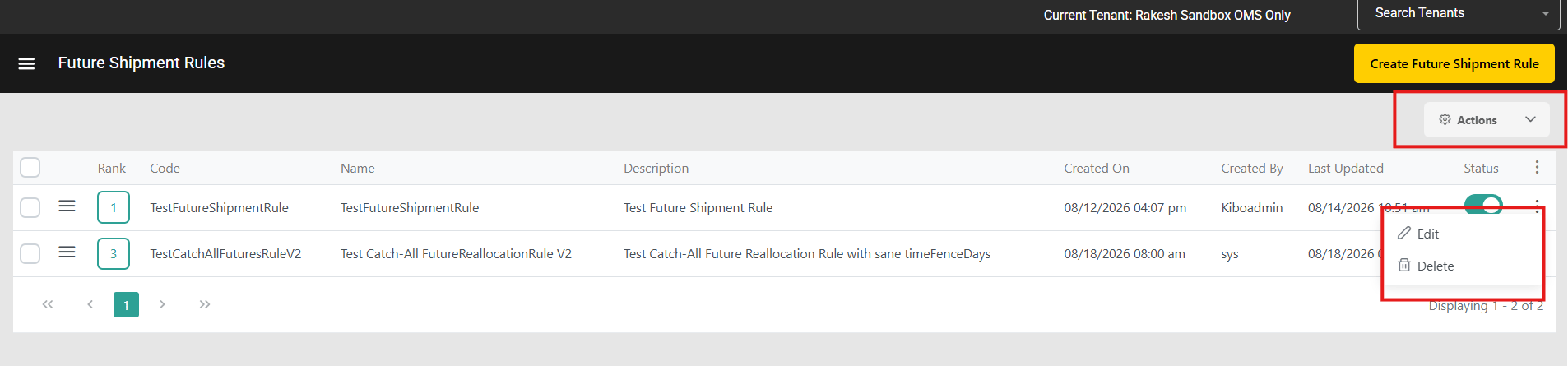
Access the Future Shipment Rules dashboard at **Main** > **Fulfillment** > **Rules** >**Future Shipment Rules** to manage your configured rules:
* Toggle the **Status** icon on a rule to activate or deactivate it without deleting it.
* Expand the actions menu on a rule to **Edit** or **Delete** it.
* Check multiple rules and use the **Actions** menu to enable, disable, or delete in bulk.
* Edit the **Rank** of a rule directly in the table, or click and drag to reorder.
8. Configure **Sort Criteria**:
* Under **Primary Sort**, select a numeric or date field (for example, `estimatedDeliveryDate` or `lastCancellationDate`) and choose **Ascending** or **Descending**.
9. Optionally, add **Account / Customer Criteria**:
* Click **Add Customer Rule** and use the expression editor to define account-level conditions.
10. Optionally, add **Product Criteria**:
* Click **Add Product Rule** and use the expression editor to define product-level conditions.
11. Optionally, add **Shipment Criteria**:
* Click **Add Shipment Rule** and use the expression editor to define shipment-level conditions.
12. Click **Save**.
**Note:** At least one Rule Criteria is needed for the rule to be saved.
## **Manage Future Shipment Rules**
Access the Future Shipment Rules dashboard at **Main** > **Fulfillment** > **Rules** >**Future Shipment Rules** to manage your configured rules:
* Toggle the **Status** icon on a rule to activate or deactivate it without deleting it.
* Expand the actions menu on a rule to **Edit** or **Delete** it.
* Check multiple rules and use the **Actions** menu to enable, disable, or delete in bulk.
* Edit the **Rank** of a rule directly in the table, or click and drag to reorder.
 ## **Example Rule Configurations**
### **Protect Strategic Account Shipments**
Ensure shipments for strategic accounts are last to lose allocation when supply decreases:
| **Rule** | **Rank** | **Account Criteria** | **Sort** | **Expected Behavior** |
| :------- | :------- | :----------------------------------- | :-------------------------------- | :---------------------------------------------------------------------------- |
| Rule 1 | 1 | `account.segment equals "strategic"` | `estimatedDeliveryDate` Ascending | Strategic account shipments with earliest delivery dates are protected first. |
### **Protect Shipments by Product Category and Urgency**
| **Rule** | **Rank** | **Product Criteria** | **Shipment Criteria** | **Sort** | **Expected Behavior** |
| :------- | :------- | :---------------------------------- | :---------------------------------------- | :-------------------------------- | :----------------------------------------------------- |
| Rule 1 | 1 | `product.category equals "Premium"` | `shipment.attributes.sla equals "urgent"` | `estimatedDeliveryDate` Ascending | Urgent premium-category shipments are protected first. |
| Rule 2 | 2 | `product.category equals "Premium"` | *(none)* | `lastCancellationDate` Ascending | All other premium-category shipments next. |
## **Example Rule Configurations**
### **Protect Strategic Account Shipments**
Ensure shipments for strategic accounts are last to lose allocation when supply decreases:
| **Rule** | **Rank** | **Account Criteria** | **Sort** | **Expected Behavior** |
| :------- | :------- | :----------------------------------- | :-------------------------------- | :---------------------------------------------------------------------------- |
| Rule 1 | 1 | `account.segment equals "strategic"` | `estimatedDeliveryDate` Ascending | Strategic account shipments with earliest delivery dates are protected first. |
### **Protect Shipments by Product Category and Urgency**
| **Rule** | **Rank** | **Product Criteria** | **Shipment Criteria** | **Sort** | **Expected Behavior** |
| :------- | :------- | :---------------------------------- | :---------------------------------------- | :-------------------------------- | :----------------------------------------------------- |
| Rule 1 | 1 | `product.category equals "Premium"` | `shipment.attributes.sla equals "urgent"` | `estimatedDeliveryDate` Ascending | Urgent premium-category shipments are protected first. |
| Rule 2 | 2 | `product.category equals "Premium"` | *(none)* | `lastCancellationDate` Ascending | All other premium-category shipments next. |