> ## Documentation Index
> Fetch the complete documentation index at: https://docs.kibocommerce.com/llms.txt
> Use this file to discover all available pages before exploring further.
# Fulfill Items Without Sufficient Stock
By default, items will not be fulfilled without sufficient on-hand quantities. However, you can override this default behavior for a specific location, which allows you to fulfill items even without sufficient on-hand quantities.
Learn about inventory management fundamentals
See the Reservation API documentation for programmatic access
See how to handle product substitutions during fulfillment
Learn how to create and manage product substitution rules
Note that changes to these settings may not immediately take effect when processing orders. It may take up to 15 minutes for updates to be reflected in the system while the cache refreshes.
## Example
For example, you do not currently have a sufficient on-hand quantity to fulfill an item, but you know that the warehouse has received new stock but hasn't had time to enter the amounts.
By allowing fulfillment without sufficient on-hand quantities, you can still mark an item as fulfilled and Kibo will automatically adjust your on-hand quantity accordingly. The warehouse can then add the new on-hand quantities.
## Location Setting
To override this default behavior for a specific location:
1. Go to **Main** > **Orders** > **Locations**.
2. Select an applicable location.
3. Under the **Location** section, enable **Allow fulfillment without stock on hand**:
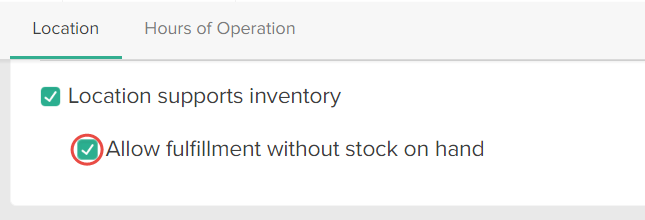 In order to enable **Allow fulfillment without stock on hand**, you must first enable **Location supports inventory**.