> ## Documentation Index
> Fetch the complete documentation index at: https://docs.kibocommerce.com/llms.txt
> Use this file to discover all available pages before exploring further.
# Kibo AI Overview
> Learn how Kibo AI, the in-platform assistant, helps operators complete tasks across Kibo Admin by describing them in plain language
## **1. Strategic Overview**
See Kibo AI in action — connect a model, configure it, and watch it create a promotion end-to-end
**Concept Definition**
Kibo AI is the in-platform assistant that lets operators complete work across Kibo Admin by describing it in plain language. It interprets a request, works through the task on the platform, and either fills in the relevant Kibo Admin screen for the operator to review and save, or returns a read-only answer — without the operator needing to know where every setting lives.
**Business Context**
Kibo AI is delivered as a native capability inside the existing Operator Portal (Kibo Admin). It appears as a floating assistant available from anywhere in the platform, and spans the modules operators already use — promotions, catalog and categories, search and merchandizing, order routing, order and returns operations, and analytics. It runs on a bring-your-own-model basis: the operator connects their own model provider credentials, and Kibo AI uses them to reason about requests and generate content. It is enabled per tenant, so each customer turns it on where they want it.
**Value Drivers**
1. **Platform work in plain language:** Operators, merchandisers, and customer service representatives complete multi-step Admin tasks — creating a promotion, building a routing scenario, enriching a product, processing a return, answering a business question — by describing the outcome, rather than navigating and filling every screen by hand. This lowers the expertise required to operate the platform and speeds up routine work.
2. **Human-in-the-loop by design:** For any task that changes data, Kibo AI prepares and fills in the Kibo Admin screen and stops; the operator reviews and clicks Save. Explain and Analyze tasks are read-only. Control of every change stays with the operator, which keeps the assistant safe to adopt on a live production tenant.
3. **Bring Your Own Model — your key, your data, your spend:** Kibo AI runs on model credentials the operator supplies. API keys are stored securely, requests run against the operator's own provider account, and per-model monthly limits cap usage. Operators choose their providers and control cost and data flow.
4. **One assistant across the platform:** Because Kibo AI reaches every major module through a single conversational surface, operators get consistent behavior — the same request pattern, the same review-and-save step, the same transparency — whether they are merchandizing, routing orders, or reporting on revenue.
**Scope Statement**
* **In Scope:** The Kibo AI assistant surface (floating panel, conversation threads, browse-by-capability); the three capability modes (Configure, Explain, Analyze); bring-your-own-model configuration (Agent Models, model slots, credentials, spend limits); brand voices; the capability areas across promotions, catalog and categories, search and merchandizing, order routing, order and returns operations, and analytics; conversation management; and the assistant's step-by-step transparency.
* **Explicitly Excluded:** Step-by-step UI walkthroughs (covered in the Kibo AI how-to guides); API, developer, and model-provider account setup details; the canvas and workflow functionality (not part of the current release); and specific model performance, quality, or pricing, which depend on the provider and model the operator connects.
## **2. Core Concepts Explained**
### **What is Kibo AI?**
Kibo AI is a conversational assistant embedded in Kibo Admin. An operator opens it from a floating icon, then either types a request in plain language or picks a capability area to see what the assistant can do. Kibo AI interprets the request, determines which capability applies, and works through the task on the platform.
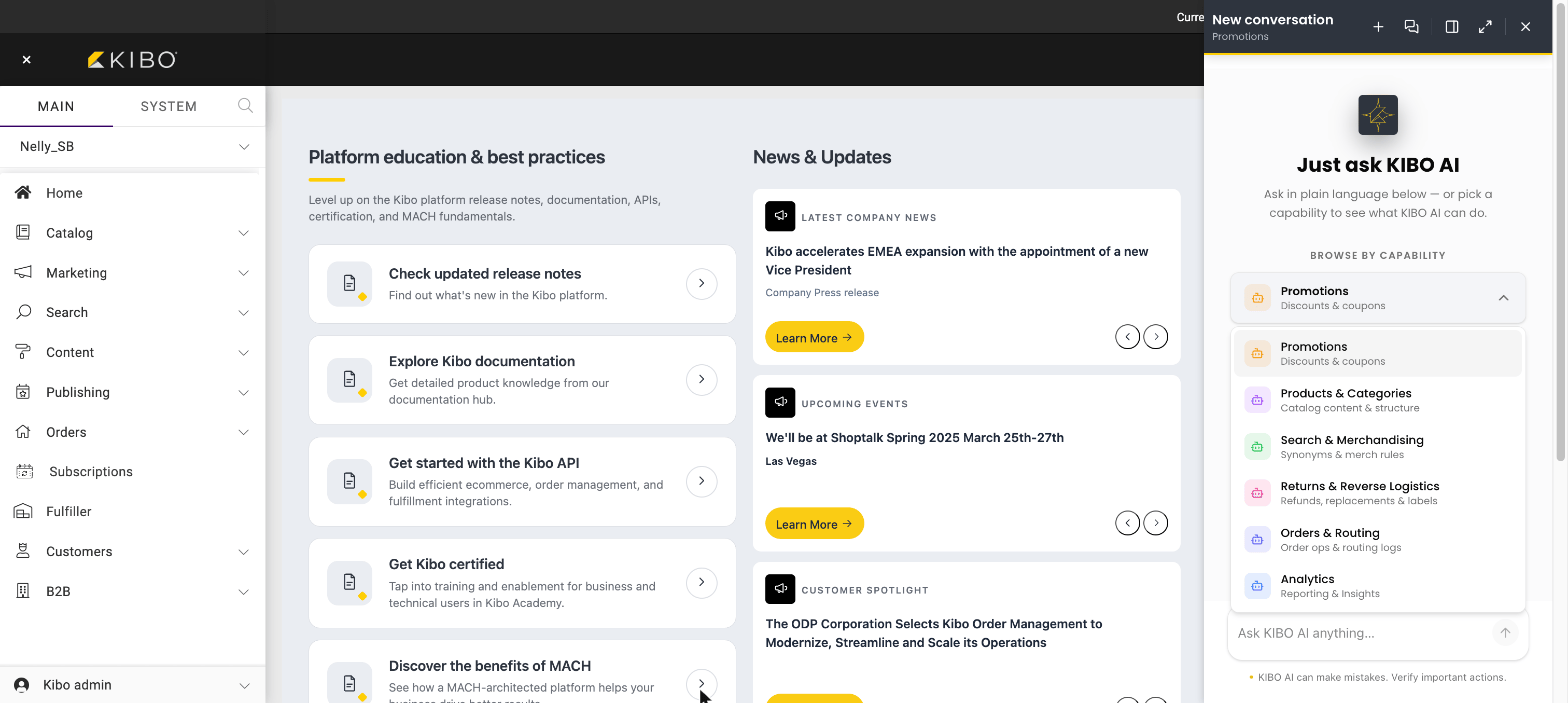
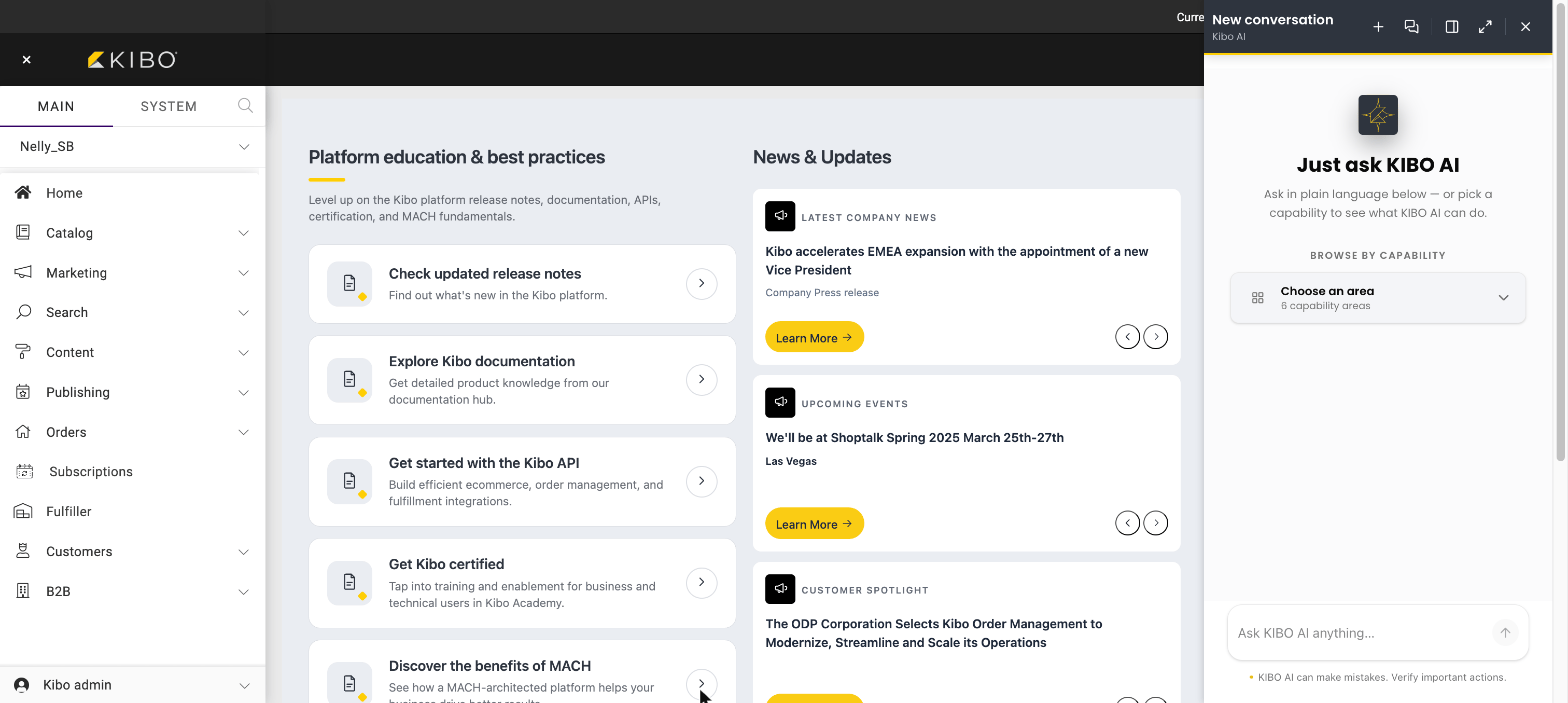 Opening the **Choose an area** menu lists the capability areas Kibo AI covers, each with a short description. Selecting one shows example prompts for that area, so an operator new to the assistant can see what it can do without knowing what to ask for.
 The interaction follows a consistent pattern. The operator describes an outcome. Kibo AI works through the steps — navigating to the relevant Kibo Admin screen, gathering the details it needs, and asking the operator for any missing decision. For a task that changes data, it fills in the screen and hands control back to the operator, who reviews and clicks Save. For a task that explains a decision or reports on the business, it returns a read-only answer. Throughout, Kibo AI shows its reasoning and the actions it is taking, so the operator can follow along and verify the result.
### **The three modes**
Kibo AI's capabilities fall into three modes, and the mode determines what the assistant does with the result.
1. **Configure** — makes changes. Kibo AI fills in the matching Kibo Admin screen; the operator reviews and clicks Save. Covers promotions, categories, search and merchandizing, order routing, order operations, returns, and product enrichment.
2. **Explain** — read-only. Kibo AI helps the operator understand a decision the platform has already made, such as why an order routed to a particular location or how a promotion is configured.
3. **Analyze** — read-only. Kibo AI answers business questions with charts and numbers directly in the conversation.
Only Configure changes data, and even then only after the operator saves. Explain and Analyze never change anything.
### **Why does Kibo AI matter?**
1. **Operational:** Complex Admin tasks that previously required knowing exact screens, fields, and sequences become a plain-language request. The assistant reaches across modules, so an operator does not switch mental models between merchandizing, routing, and order care.
2. **Governance:** The review-and-save step, read-only Explain and Analyze modes, per-tenant enablement, and secure credential handling make the assistant adoptable on a live tenant without ceding control of production changes.
3. **Cost and data control:** Bring-your-own-model means the operator selects the provider, holds the key, runs requests on their own account, and caps monthly usage per model.
### **When to use Kibo AI**
1. **Configuration at speed:** Setting up promotions, building or editing routing strategies and scenarios, creating categories, and creating merchandizing rules by describing the intended result.
2. **Content enrichment:** Generating and translating product descriptions, titles, SEO metadata, and images in the brand's voice.
3. **Frontline order care:** Looking up orders, applying appeasements and adjustments, and processing returns, refunds, and replacements.
4. **Investigation and reporting:** Understanding why an order routed the way it did, reviewing how a promotion is set up, and answering ad-hoc analytics questions without building a report.
## **3. Functional Components & Configuration Deep Dive**
### **Prerequisites**
Before Kibo AI can be used, three things must be in place: the assistant is enabled on the tenant by Kibo Customer Support; the operator has administrator access to configure models; and at least one model provider credential is connected through Bring Your Own Model. Brand voices are an optional prerequisite for content-generation tasks. Until a model is connected, Kibo AI shows a setup screen that links back to model configuration.
### **Component Architecture**
1. **Assistant surface** — a floating panel available throughout Kibo Admin. It provides a plain-language chat box, a browse-by-capability menu that groups tasks into areas with example prompts, conversation threads with history and search, and a step-by-step view that shows the assistant's reasoning and the actions it takes.
2. **Agent Models (Bring Your Own Model)** — where the operator connects provider credentials and assigns them to model slots. There are three slots: **Thinking** (the reasoning model), **Flash** (a faster model for lighter steps), and **Image** (for image generation). Each slot has spend controls.
3. **Brand Voices** — named, reusable tone-and-style definitions. When Kibo AI generates product or category content, it applies an active brand voice so the wording matches how the brand speaks.
4. **Capability set** — the tasks Kibo AI can perform across modules, organized into the three modes. Configure tasks fill Admin screens for the operator to save; Explain and Analyze tasks are read-only.
### **Configuration-Level Deep Dive**
#### **Model Slots (Bring Your Own Model)**
Each slot uses the credential the operator assigns to it, and spend is capped per slot.
| Slot | Business Purpose | Impact and Trade-offs | Concrete Example |
| :------- | :------------------------------------------------------ | :--------------------------------------------------------------------------------------------------------- | :------------------------------------------------------------------------- |
| Thinking | The reasoning model that plans and works through tasks. | Drives most of the assistant's behavior; a stronger model improves complex tasks but consumes more tokens. | A capable general model is assigned and capped with a monthly token limit. |
| Flash | A faster model for lighter, quicker steps. | Reduces latency and cost on simple steps. | A lower-cost model handles quick lookups. |
| Image | The model used for image-generation tasks. | Only needed if the operator uses product or category image generation; capped by a monthly image limit. | An image-capable model is connected for catalog imagery. |
Credentials store the connection to one model from one provider. Supported providers are OpenAI, Anthropic, Google, and Other (a custom, compatible endpoint). API keys are stored securely and are not shown again after saving. Because requests run on the operator's provider account, usage is billed by the provider, and monthly token and image limits cap consumption per slot.
#### **Brand Voices**
A brand voice pairs a name with a prompt that describes the desired tone and style. Operators can maintain multiple active voices and tell Kibo AI which voice to apply when generating content. Brand voices shape wording only; they do not change what content is created or where it is saved.
| Attribute | Business Purpose | Impact and Trade-offs | Concrete Example |
| :-------- | :------------------------------------------------- | :----------------------------------------------------------------------------- | :------------------------------------------------------- |
| Name | Identifies the voice when the operator selects it. | Makes voices easy to choose in a request. | "Whimsical", "Sporty", "Professional". |
| Active | Makes the voice available to Kibo AI. | Only active voices can be applied. | A voice is marked Active so it appears to the assistant. |
| Prompt | Defines the tone and style the assistant follows. | Directly shapes generated copy; a clear prompt produces more on-brand content. | A prompt instructing a lighthearted, playful tone. |
## **4. Key Capabilities and Business Applications**
### **Natural-Language Merchandizing and Catalog Enrichment**
Kibo AI enriches existing products — descriptions, titles, SEO metadata, translations, and images — in the brand's voice, and controls storefront search through merchandizing rules, redirects, facets, and synonyms. It edits existing products rather than creating new ones.
*Example — Merchandiser:* facing hundreds of products with thin copy, a merchandiser asks Kibo AI to find products missing a short description and to write punchier descriptions in the "Sporty" brand voice; the assistant fills each product screen, and the merchandiser reviews and saves.
### **Promotions Across Their Full Lifecycle**
Kibo AI creates and edits order-level, product, shipping, and Buy X Get Y discounts, sets coupon codes and redemption limits, targets by segment or price list, and controls stacking and state — and, on the Explain side, reviews how existing promotions are configured.
*Example — Marketing Manager:* to launch a summer campaign, a marketing manager asks for a 20% sitewide promotion running specific dates and a coupon limited to the VIP segment; Kibo AI fills the discount screen for review and save, and later answers "which promotions are active this month?" as a read-only review.
### **Order Routing Configuration and Explanation**
Kibo AI configures routing strategies and scenarios — locations, sort order, filter conditions, and split-shipment behavior — for both forward and reverse order types, and separately explains, read-only, why a placed order routed the way it did.
*Example — Fulfillment Manager:* a fulfillment manager builds a Direct Ship strategy that sorts by distance then inventory; Kibo AI fills the strategy and scenario, confirms before any activation because live orders are affected, and later explains why a specific order split across two locations.
### **Frontline Order and Returns Operations**
Handled by the Order (Customer Service) agent and the Returns capability, Kibo AI looks up and modifies orders, applies appeasements and adjustments, and processes returns, refunds, and replacements — with read-only lookups for order summaries, returnable items, reasons, and financials before an operator acts.
*Example — Customer Service Representative:* a representative resolves a damaged-item claim by asking Kibo AI to summarize the order, confirm the item is returnable, and process a refund return with a reason — reviewing each step before saving.
### **Self-Service Analytics in the Conversation**
Kibo AI answers business questions about orders, revenue, fulfillment, products, discounts, and customers, rendering charts and tables inline and interpreting relative time periods.
*Example — Ecommerce Manager:* instead of building a report, an ecommerce manager asks for revenue over the last six months and top products by revenue, and reads the charts directly in the conversation.
## **5. Supported Capabilities & Current Behavior**
**How to read this section.** This guide describes the capabilities Kibo AI exposes in the current release. Any capability not described here is not part of the current release. Where the assistant's behavior has intentional boundaries, they are called out under *Current Behavior Notes*.
**What Kibo AI supports today**
* **Plain-language requests** in chat, or a guided start from browse-by-capability areas.
* **Configure** tasks that fill Kibo Admin screens for the operator to review and save, across promotions, categories, search and merchandizing, order routing (forward and reverse), order operations, returns, and product enrichment.
* **Explain** tasks (read-only) for order routing, promotions, and returns information.
* **Analyze** tasks (read-only) that answer business questions with charts and numbers.
* **Bring Your Own Model** with Thinking, Flash, and Image slots, provider credentials, and per-slot spend limits.
* **Brand voices** applied to content generation.
* **Conversation management** — multiple threads with history, search, rename, delete, and a copyable thread ID.
* **Step-by-step transparency** — the assistant shows its reasoning and the actions it takes.
**Current Behavior Notes** — intentional boundaries of the current release:
| Behavior | How Kibo AI works today | What this means for operators |
| :------------------------------------------- | :----------------------------------------------------------------------------------------------------------------------------------------------------------------- | :------------------------------------------------------------------------------ |
| **Operator saves every change** | For Configure tasks, Kibo AI fills the Kibo Admin screen and stops; it does not save. Search synonyms are the exception and save immediately. | Nothing goes live until the operator reviews and clicks Save. |
| **Explain and Analyze are read-only** | These modes describe decisions or report on the business. | They never change data and can be used freely to investigate. |
| **Products are enriched, not created** | The product capability edits and enriches existing products. | Create the product in Kibo Admin first, then use Kibo AI to enrich it. |
| **Some actions are manual** | Kibo AI does not delete synonyms, clone or delete merchandizing rules, name or save a new search-configuration profile, or delete routing strategies or scenarios. | Complete these directly in Kibo Admin. |
| **Routing changes are not instant** | Saved routing changes rely on a cache refresh. | Allow up to about 15 minutes for a saved routing change to take effect. |
| **Routing explanations need a routed order** | Explanations read from the routing logs. | An order that has not been routed yet cannot be explained. |
| **Enabled per tenant** | The assistant is turned on for a tenant by Kibo Customer Support. | If the assistant is not visible, request enablement from Kibo Customer Support. |
| **A connected model is required** | Agentic capabilities need a model connected through Bring Your Own Model. | Without a model, Kibo AI shows a setup screen linking to model configuration. |
## **6. Platform Integration Map**
**Upstream Dependencies**
1. **Tenant enablement** — the agentic capability is turned on for the tenant by Kibo Customer Support. Without it, the Kibo AI assistant does not appear in Kibo Admin.
2. **A connected model (Bring Your Own Model)** — the assistant reasons and generates content using the models assigned to the Thinking, Flash, and Image slots. Without a connected model, no capability runs and Kibo AI shows the setup screen instead.
3. **Model provider account and API key** — requests run on the operator's own provider account. Without a valid key and available spend headroom, requests to that model fail until the credential or limit is corrected.
4. **Administrator access to Agent Models and Brand Voices** — required to connect credentials, assign slots, and configure voices. Without it, the assistant cannot be set up and stays inactive.
5. **Existing module records** — the assistant acts on data that already exists: products, discounts, categories, search configuration, routing strategies, orders, and reporting data. It edits rather than bootstraps an empty module — for example, it enriches existing products rather than creating them.
6. **Active brand voice** — required only for content generation. Without one, generated product and category copy uses a default tone rather than the brand's.
**Downstream Impacts**
1. **Module records change on Save** — when the operator saves a Configure result, the change is written to the underlying module (Discounts, Categories, Search & Merchandizing, Order Routing, Orders, or product content) exactly as if it were entered by hand, and it inherits that module's normal effects. Disabling a category, for example, cascades to its subcategories, and activating a routing strategy changes how live orders route once the routing cache refreshes, in about 15 minutes.
2. **Provider consumption and spend** — every request consumes the operator's model provider account and counts against the per-slot monthly token and image limits, giving one lever to cap agentic spend.
3. **No change from read-only modes** — Explain reads the routing logs and Analyze reads reporting data; neither writes anything back to the platform.
**Synergistic Features**
* **Kibo AI + Bring Your Own Model** — assigning different models to the Thinking, Flash, and Image slots lets operators tune capability, latency, and cost independently for reasoning, quick steps, and imagery.
* **Kibo AI + Brand Voices** — content generation inherits a consistent, reusable tone, so catalog enrichment scales across many products without diluting the brand's voice.
* **Kibo AI + Order Routing (Configure and Explain)** — the same assistant that builds a routing strategy can later explain how a specific order routed under it, closing the loop between how routing is configured and what actually happened.
* **Kibo AI + Analytics** — read-only reporting lets an operator check the effect of a change, such as a promotion's redemptions, in the same conversation right after making it.
* **Kibo AI + native Kibo screens and controls** — because Configure results save through the standard Admin screens, they respect the platform's existing validation, publishing, permissions, and audit behavior rather than bypassing them.
## **7. Related Guides**
* [**Set Up and Use Kibo AI**](/pages/kibo-ai-setup) — connect a model, configure brand voices, and use the assistant.
* [**Kibo AI Agent Capabilities**](/pages/kibo-ai-configure) — the full list of Configure, Explain, and Analyze tasks.
* [**Configure with Kibo AI**](/pages/kibo-ai-configure) · [**Explain with Kibo AI**](/pages/kibo-ai-explain) · [**Analyze with Kibo AI**](/pages/kibo-ai-analyze) — capabilities by mode.
* The module conceptual guides for the areas Kibo AI works across: [Promotions](/concept-guides/promotions), [Catalog](/concept-guides/catalog), [Search & Merchandizing](/concept-guides/search-and-merchandizing), [Order Routing](/concept-guides/order-routing), [Fulfillment](/concept-guides/fulfillment), and [Returns & Reverse Logistics](/concept-guides/returns-and-reverse-logistics).
The interaction follows a consistent pattern. The operator describes an outcome. Kibo AI works through the steps — navigating to the relevant Kibo Admin screen, gathering the details it needs, and asking the operator for any missing decision. For a task that changes data, it fills in the screen and hands control back to the operator, who reviews and clicks Save. For a task that explains a decision or reports on the business, it returns a read-only answer. Throughout, Kibo AI shows its reasoning and the actions it is taking, so the operator can follow along and verify the result.
### **The three modes**
Kibo AI's capabilities fall into three modes, and the mode determines what the assistant does with the result.
1. **Configure** — makes changes. Kibo AI fills in the matching Kibo Admin screen; the operator reviews and clicks Save. Covers promotions, categories, search and merchandizing, order routing, order operations, returns, and product enrichment.
2. **Explain** — read-only. Kibo AI helps the operator understand a decision the platform has already made, such as why an order routed to a particular location or how a promotion is configured.
3. **Analyze** — read-only. Kibo AI answers business questions with charts and numbers directly in the conversation.
Only Configure changes data, and even then only after the operator saves. Explain and Analyze never change anything.
### **Why does Kibo AI matter?**
1. **Operational:** Complex Admin tasks that previously required knowing exact screens, fields, and sequences become a plain-language request. The assistant reaches across modules, so an operator does not switch mental models between merchandizing, routing, and order care.
2. **Governance:** The review-and-save step, read-only Explain and Analyze modes, per-tenant enablement, and secure credential handling make the assistant adoptable on a live tenant without ceding control of production changes.
3. **Cost and data control:** Bring-your-own-model means the operator selects the provider, holds the key, runs requests on their own account, and caps monthly usage per model.
### **When to use Kibo AI**
1. **Configuration at speed:** Setting up promotions, building or editing routing strategies and scenarios, creating categories, and creating merchandizing rules by describing the intended result.
2. **Content enrichment:** Generating and translating product descriptions, titles, SEO metadata, and images in the brand's voice.
3. **Frontline order care:** Looking up orders, applying appeasements and adjustments, and processing returns, refunds, and replacements.
4. **Investigation and reporting:** Understanding why an order routed the way it did, reviewing how a promotion is set up, and answering ad-hoc analytics questions without building a report.
## **3. Functional Components & Configuration Deep Dive**
### **Prerequisites**
Before Kibo AI can be used, three things must be in place: the assistant is enabled on the tenant by Kibo Customer Support; the operator has administrator access to configure models; and at least one model provider credential is connected through Bring Your Own Model. Brand voices are an optional prerequisite for content-generation tasks. Until a model is connected, Kibo AI shows a setup screen that links back to model configuration.
### **Component Architecture**
1. **Assistant surface** — a floating panel available throughout Kibo Admin. It provides a plain-language chat box, a browse-by-capability menu that groups tasks into areas with example prompts, conversation threads with history and search, and a step-by-step view that shows the assistant's reasoning and the actions it takes.
2. **Agent Models (Bring Your Own Model)** — where the operator connects provider credentials and assigns them to model slots. There are three slots: **Thinking** (the reasoning model), **Flash** (a faster model for lighter steps), and **Image** (for image generation). Each slot has spend controls.
3. **Brand Voices** — named, reusable tone-and-style definitions. When Kibo AI generates product or category content, it applies an active brand voice so the wording matches how the brand speaks.
4. **Capability set** — the tasks Kibo AI can perform across modules, organized into the three modes. Configure tasks fill Admin screens for the operator to save; Explain and Analyze tasks are read-only.
### **Configuration-Level Deep Dive**
#### **Model Slots (Bring Your Own Model)**
Each slot uses the credential the operator assigns to it, and spend is capped per slot.
| Slot | Business Purpose | Impact and Trade-offs | Concrete Example |
| :------- | :------------------------------------------------------ | :--------------------------------------------------------------------------------------------------------- | :------------------------------------------------------------------------- |
| Thinking | The reasoning model that plans and works through tasks. | Drives most of the assistant's behavior; a stronger model improves complex tasks but consumes more tokens. | A capable general model is assigned and capped with a monthly token limit. |
| Flash | A faster model for lighter, quicker steps. | Reduces latency and cost on simple steps. | A lower-cost model handles quick lookups. |
| Image | The model used for image-generation tasks. | Only needed if the operator uses product or category image generation; capped by a monthly image limit. | An image-capable model is connected for catalog imagery. |
Credentials store the connection to one model from one provider. Supported providers are OpenAI, Anthropic, Google, and Other (a custom, compatible endpoint). API keys are stored securely and are not shown again after saving. Because requests run on the operator's provider account, usage is billed by the provider, and monthly token and image limits cap consumption per slot.
#### **Brand Voices**
A brand voice pairs a name with a prompt that describes the desired tone and style. Operators can maintain multiple active voices and tell Kibo AI which voice to apply when generating content. Brand voices shape wording only; they do not change what content is created or where it is saved.
| Attribute | Business Purpose | Impact and Trade-offs | Concrete Example |
| :-------- | :------------------------------------------------- | :----------------------------------------------------------------------------- | :------------------------------------------------------- |
| Name | Identifies the voice when the operator selects it. | Makes voices easy to choose in a request. | "Whimsical", "Sporty", "Professional". |
| Active | Makes the voice available to Kibo AI. | Only active voices can be applied. | A voice is marked Active so it appears to the assistant. |
| Prompt | Defines the tone and style the assistant follows. | Directly shapes generated copy; a clear prompt produces more on-brand content. | A prompt instructing a lighthearted, playful tone. |
## **4. Key Capabilities and Business Applications**
### **Natural-Language Merchandizing and Catalog Enrichment**
Kibo AI enriches existing products — descriptions, titles, SEO metadata, translations, and images — in the brand's voice, and controls storefront search through merchandizing rules, redirects, facets, and synonyms. It edits existing products rather than creating new ones.
*Example — Merchandiser:* facing hundreds of products with thin copy, a merchandiser asks Kibo AI to find products missing a short description and to write punchier descriptions in the "Sporty" brand voice; the assistant fills each product screen, and the merchandiser reviews and saves.
### **Promotions Across Their Full Lifecycle**
Kibo AI creates and edits order-level, product, shipping, and Buy X Get Y discounts, sets coupon codes and redemption limits, targets by segment or price list, and controls stacking and state — and, on the Explain side, reviews how existing promotions are configured.
*Example — Marketing Manager:* to launch a summer campaign, a marketing manager asks for a 20% sitewide promotion running specific dates and a coupon limited to the VIP segment; Kibo AI fills the discount screen for review and save, and later answers "which promotions are active this month?" as a read-only review.
### **Order Routing Configuration and Explanation**
Kibo AI configures routing strategies and scenarios — locations, sort order, filter conditions, and split-shipment behavior — for both forward and reverse order types, and separately explains, read-only, why a placed order routed the way it did.
*Example — Fulfillment Manager:* a fulfillment manager builds a Direct Ship strategy that sorts by distance then inventory; Kibo AI fills the strategy and scenario, confirms before any activation because live orders are affected, and later explains why a specific order split across two locations.
### **Frontline Order and Returns Operations**
Handled by the Order (Customer Service) agent and the Returns capability, Kibo AI looks up and modifies orders, applies appeasements and adjustments, and processes returns, refunds, and replacements — with read-only lookups for order summaries, returnable items, reasons, and financials before an operator acts.
*Example — Customer Service Representative:* a representative resolves a damaged-item claim by asking Kibo AI to summarize the order, confirm the item is returnable, and process a refund return with a reason — reviewing each step before saving.
### **Self-Service Analytics in the Conversation**
Kibo AI answers business questions about orders, revenue, fulfillment, products, discounts, and customers, rendering charts and tables inline and interpreting relative time periods.
*Example — Ecommerce Manager:* instead of building a report, an ecommerce manager asks for revenue over the last six months and top products by revenue, and reads the charts directly in the conversation.
## **5. Supported Capabilities & Current Behavior**
**How to read this section.** This guide describes the capabilities Kibo AI exposes in the current release. Any capability not described here is not part of the current release. Where the assistant's behavior has intentional boundaries, they are called out under *Current Behavior Notes*.
**What Kibo AI supports today**
* **Plain-language requests** in chat, or a guided start from browse-by-capability areas.
* **Configure** tasks that fill Kibo Admin screens for the operator to review and save, across promotions, categories, search and merchandizing, order routing (forward and reverse), order operations, returns, and product enrichment.
* **Explain** tasks (read-only) for order routing, promotions, and returns information.
* **Analyze** tasks (read-only) that answer business questions with charts and numbers.
* **Bring Your Own Model** with Thinking, Flash, and Image slots, provider credentials, and per-slot spend limits.
* **Brand voices** applied to content generation.
* **Conversation management** — multiple threads with history, search, rename, delete, and a copyable thread ID.
* **Step-by-step transparency** — the assistant shows its reasoning and the actions it takes.
**Current Behavior Notes** — intentional boundaries of the current release:
| Behavior | How Kibo AI works today | What this means for operators |
| :------------------------------------------- | :----------------------------------------------------------------------------------------------------------------------------------------------------------------- | :------------------------------------------------------------------------------ |
| **Operator saves every change** | For Configure tasks, Kibo AI fills the Kibo Admin screen and stops; it does not save. Search synonyms are the exception and save immediately. | Nothing goes live until the operator reviews and clicks Save. |
| **Explain and Analyze are read-only** | These modes describe decisions or report on the business. | They never change data and can be used freely to investigate. |
| **Products are enriched, not created** | The product capability edits and enriches existing products. | Create the product in Kibo Admin first, then use Kibo AI to enrich it. |
| **Some actions are manual** | Kibo AI does not delete synonyms, clone or delete merchandizing rules, name or save a new search-configuration profile, or delete routing strategies or scenarios. | Complete these directly in Kibo Admin. |
| **Routing changes are not instant** | Saved routing changes rely on a cache refresh. | Allow up to about 15 minutes for a saved routing change to take effect. |
| **Routing explanations need a routed order** | Explanations read from the routing logs. | An order that has not been routed yet cannot be explained. |
| **Enabled per tenant** | The assistant is turned on for a tenant by Kibo Customer Support. | If the assistant is not visible, request enablement from Kibo Customer Support. |
| **A connected model is required** | Agentic capabilities need a model connected through Bring Your Own Model. | Without a model, Kibo AI shows a setup screen linking to model configuration. |
## **6. Platform Integration Map**
**Upstream Dependencies**
1. **Tenant enablement** — the agentic capability is turned on for the tenant by Kibo Customer Support. Without it, the Kibo AI assistant does not appear in Kibo Admin.
2. **A connected model (Bring Your Own Model)** — the assistant reasons and generates content using the models assigned to the Thinking, Flash, and Image slots. Without a connected model, no capability runs and Kibo AI shows the setup screen instead.
3. **Model provider account and API key** — requests run on the operator's own provider account. Without a valid key and available spend headroom, requests to that model fail until the credential or limit is corrected.
4. **Administrator access to Agent Models and Brand Voices** — required to connect credentials, assign slots, and configure voices. Without it, the assistant cannot be set up and stays inactive.
5. **Existing module records** — the assistant acts on data that already exists: products, discounts, categories, search configuration, routing strategies, orders, and reporting data. It edits rather than bootstraps an empty module — for example, it enriches existing products rather than creating them.
6. **Active brand voice** — required only for content generation. Without one, generated product and category copy uses a default tone rather than the brand's.
**Downstream Impacts**
1. **Module records change on Save** — when the operator saves a Configure result, the change is written to the underlying module (Discounts, Categories, Search & Merchandizing, Order Routing, Orders, or product content) exactly as if it were entered by hand, and it inherits that module's normal effects. Disabling a category, for example, cascades to its subcategories, and activating a routing strategy changes how live orders route once the routing cache refreshes, in about 15 minutes.
2. **Provider consumption and spend** — every request consumes the operator's model provider account and counts against the per-slot monthly token and image limits, giving one lever to cap agentic spend.
3. **No change from read-only modes** — Explain reads the routing logs and Analyze reads reporting data; neither writes anything back to the platform.
**Synergistic Features**
* **Kibo AI + Bring Your Own Model** — assigning different models to the Thinking, Flash, and Image slots lets operators tune capability, latency, and cost independently for reasoning, quick steps, and imagery.
* **Kibo AI + Brand Voices** — content generation inherits a consistent, reusable tone, so catalog enrichment scales across many products without diluting the brand's voice.
* **Kibo AI + Order Routing (Configure and Explain)** — the same assistant that builds a routing strategy can later explain how a specific order routed under it, closing the loop between how routing is configured and what actually happened.
* **Kibo AI + Analytics** — read-only reporting lets an operator check the effect of a change, such as a promotion's redemptions, in the same conversation right after making it.
* **Kibo AI + native Kibo screens and controls** — because Configure results save through the standard Admin screens, they respect the platform's existing validation, publishing, permissions, and audit behavior rather than bypassing them.
## **7. Related Guides**
* [**Set Up and Use Kibo AI**](/pages/kibo-ai-setup) — connect a model, configure brand voices, and use the assistant.
* [**Kibo AI Agent Capabilities**](/pages/kibo-ai-configure) — the full list of Configure, Explain, and Analyze tasks.
* [**Configure with Kibo AI**](/pages/kibo-ai-configure) · [**Explain with Kibo AI**](/pages/kibo-ai-explain) · [**Analyze with Kibo AI**](/pages/kibo-ai-analyze) — capabilities by mode.
* The module conceptual guides for the areas Kibo AI works across: [Promotions](/concept-guides/promotions), [Catalog](/concept-guides/catalog), [Search & Merchandizing](/concept-guides/search-and-merchandizing), [Order Routing](/concept-guides/order-routing), [Fulfillment](/concept-guides/fulfillment), and [Returns & Reverse Logistics](/concept-guides/returns-and-reverse-logistics).